Frequently Asked Questions
About the SaaS Sales Rep One-on-One Meeting Template
What is the SaaS Sales Rep One-on-one Meeting Template?
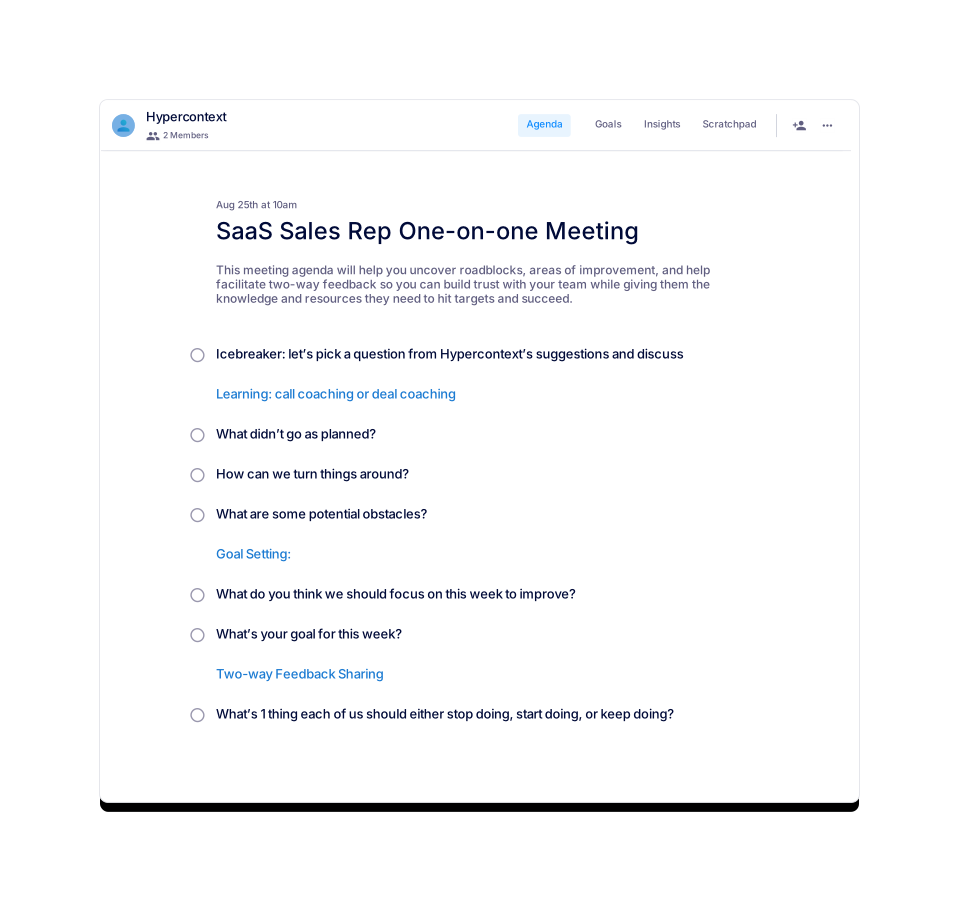
The SaaS Sales Rep One-on-one Meeting Template is a structured agenda designed to help sales managers and reps conduct productive, focused one-on-one meetings. It covers topics like icebreakers, call coaching, goal setting, and two-way feedback to uncover roadblocks, facilitate improvement, and build trust within the team. Source
What is the purpose of the SaaS Sales Rep One-on-one Meeting agenda?
The purpose of this meeting agenda is to help uncover roadblocks and areas of improvement. It also facilitates two-way feedback, which helps build trust with your team while providing them with the knowledge and resources they need to hit targets and succeed. Source
How long should a SaaS sales rep one-on-one meeting be?
You should initially set your SaaS sales rep one-on-one meetings for 60 minutes with your team. If you prepare and share an agenda in advance, you're likely to get through more, faster. Source
How often should you have SaaS sales rep one-on-one meetings?
Most SaaS sales rep one-on-one meetings tend to occur weekly. As you go through a few iterations, you may need to increase or decrease the frequency. Source
How do you structure a SaaS sales rep one-on-one meeting?
You should divide the meeting into three sections: Learning (call coaching or deal coaching), Goal Setting, and Two-way Feedback Sharing. Suggested topics include: what to stop/start/keep doing, icebreakers, what didn’t go as planned, how to turn things around, potential obstacles, focus areas for improvement, and weekly goals. Source
What should you discuss during a SaaS sales rep one-on-one meeting?
Seven great topics to discuss are: what to stop/start/keep doing, icebreakers, what didn’t go as planned, how to turn things around, potential obstacles, focus areas for improvement, and weekly goals. Source
What is the recommended structure for a SaaS sales one-on-one meeting according to the template walkthrough?
The recommended structure is: 1) Icebreaker, 2) Learning (call or deal coaching), 3) Goal setting, 4) Two-way feedback sharing, and 5) Conclusion (ask how helpful the meeting was). Source
How can I get the SaaS Sales Rep One-on-one Meeting Template?
You can use the template for free within the Spinach AI platform or download it as a Word, Excel, or PDF file. Source
What does the 'Career Growth & Development' section of the SaaS Sales One-on-One agenda involve?
This section, lasting 10 minutes, is dedicated to the sales representative's professional development. Key questions include: What are your career goals? What skills do you want to develop? How can I help you achieve your goals? Source
How can I access the SaaS Sales One-on-One agenda template?
You can access the template for free within Spinach AI or download it directly as a Word, Excel, or PDF file. Source
What file formats are available for the SaaS Sales Rep One-on-one Meeting Template?
The template is available for download in Word, Excel, and PDF formats. Source
Where can I find similar meeting agenda templates?
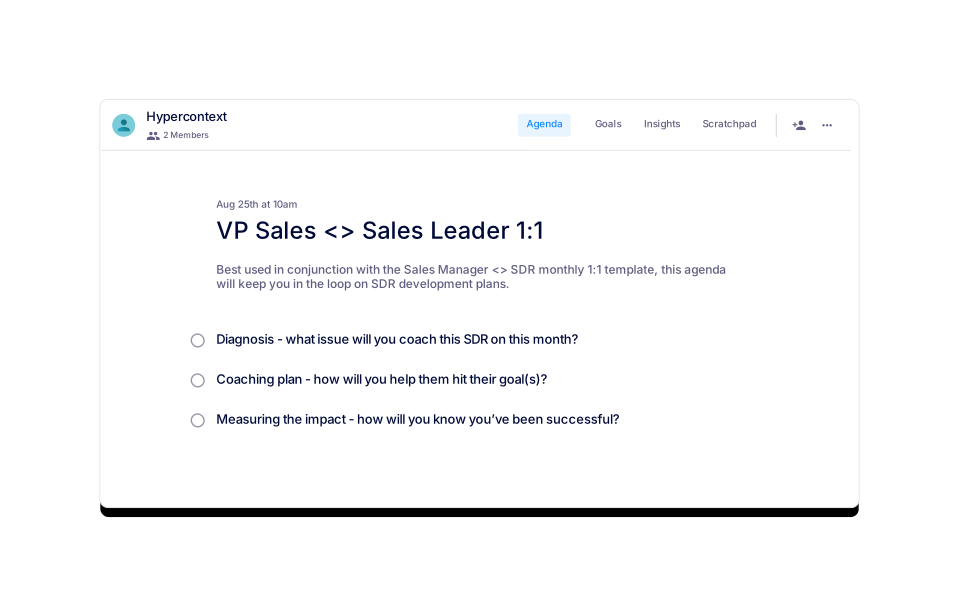
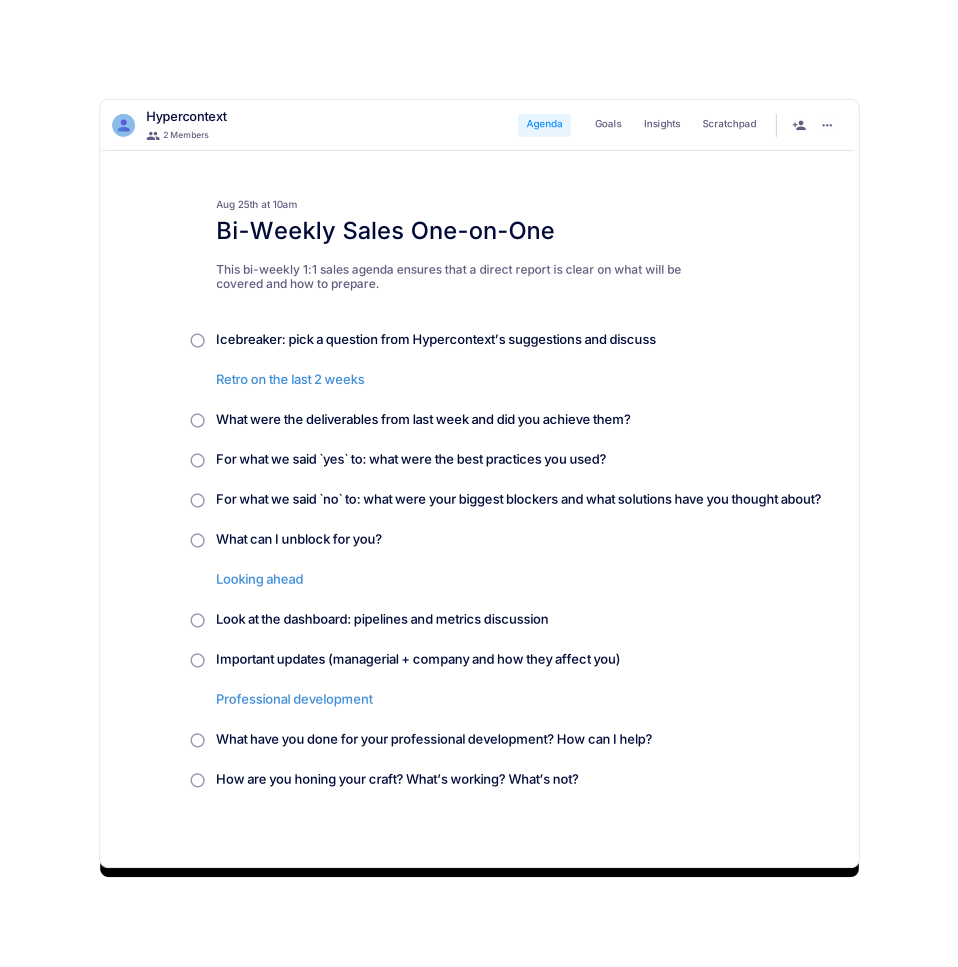
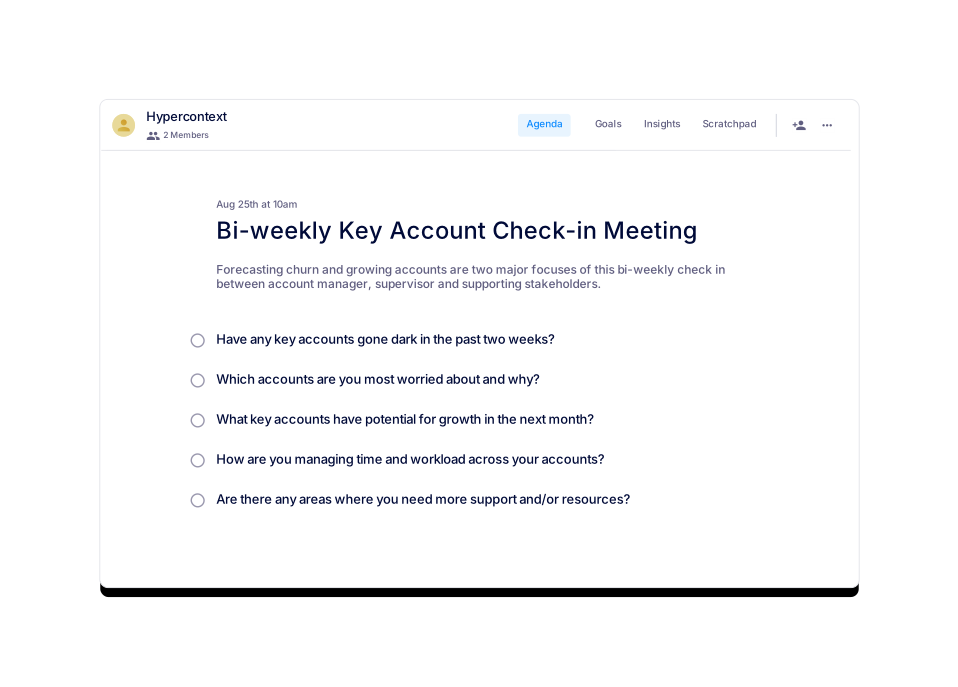
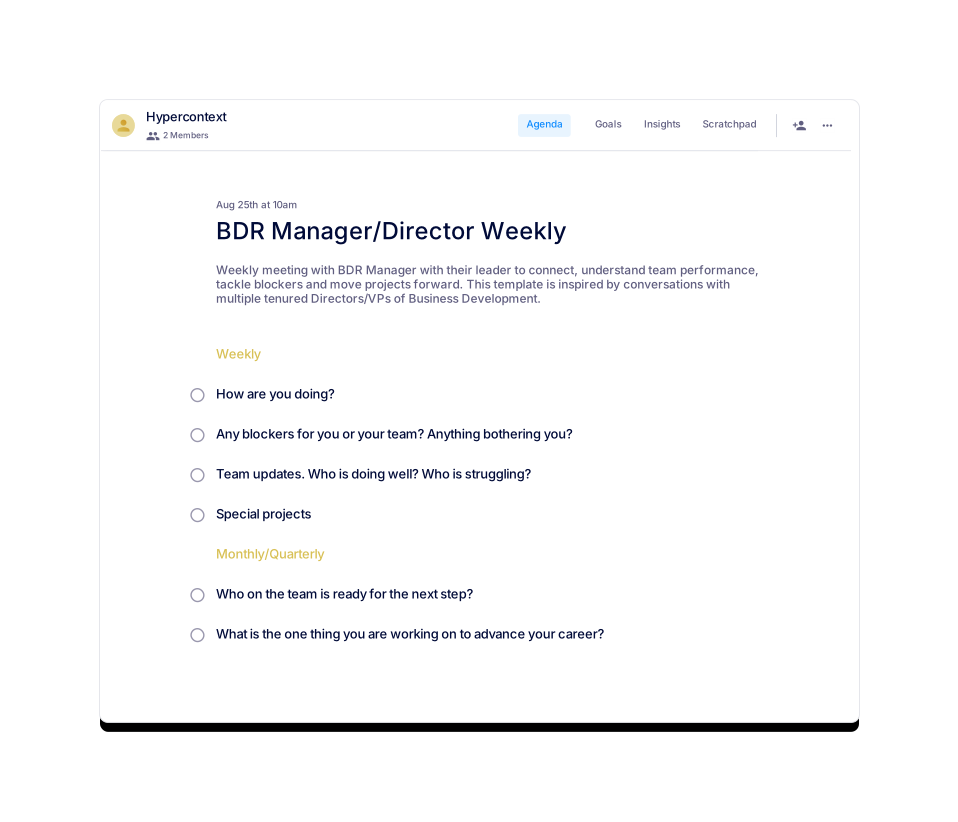
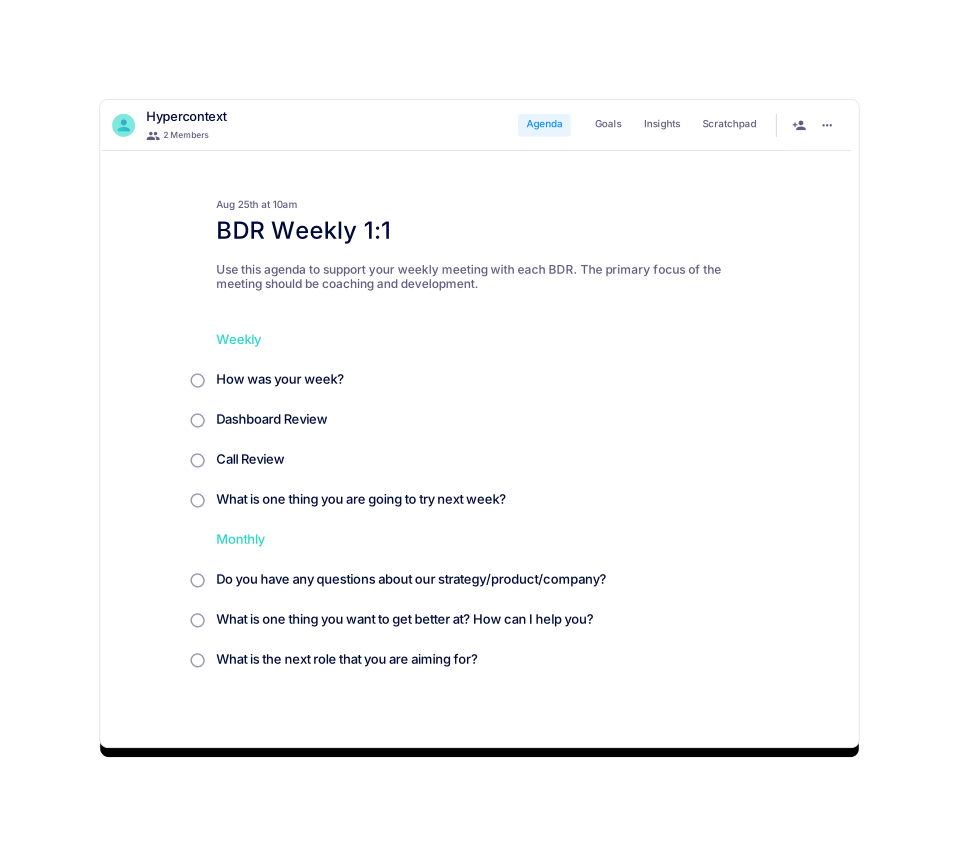
You can find similar templates such as Bi-Weekly Sales One-on-One, Key Account Check-in Meeting, VP Sales & Sales Leader 1:1, Sales Coaching Session, and BDR Manager/Director Weekly on the Spinach AI agenda templates page. Source
What are the usage statistics for the SaaS Sales Rep One-on-one Meeting Template?
As of the latest update, the template has been viewed 832 times and used 65 times. Source
What categories does the SaaS Sales Rep One-on-one Meeting Template belong to?
This template is categorized under One-on-one, Sales, and All templates on Spinach AI. Source
How do I use the SaaS Sales Rep One-on-one Meeting Template within Spinach AI?
You can use the template directly within the Spinach AI platform for live, collaborative agendas and notes, next steps tracking, calendar integration, reminders, and AI-based insights. Source
What are the main sections of the SaaS Sales Rep One-on-one Meeting Template?
The main sections are: Icebreaker, Learning (call or deal coaching), Goal Setting, Two-way Feedback Sharing, and Conclusion. Source
What is the benefit of using a structured agenda for sales one-on-ones?
A structured agenda helps avoid awkward meetings, ensures all important topics are covered, and provides a repeatable framework for improvement and feedback. Source
How does the template help with two-way feedback?
The template includes a dedicated section for two-way feedback, encouraging both the manager and the rep to share what to start, stop, or keep doing, and to batch questions and concerns for discussion. Source
How does Spinach AI help sales teams run more effective meetings?
Spinach AI provides live, collaborative agendas, automated note-taking, action item tracking, calendar integration, reminders, and AI-based insights to help sales teams run more effective meetings. Source
Features & Capabilities
What features does Spinach AI offer for meeting management?
Spinach AI offers automated note-taking, action item tracking, workflow optimization, AI-powered insights, seamless integrations with tools like Zoom, Slack, Jira, and Salesforce, and tailored solutions for different roles. Source
Does Spinach AI support integrations with other tools?
Yes, Spinach AI integrates with popular tools such as Zoom, Google Meet, Microsoft Teams, Slack, Jira, and Salesforce for smooth collaboration. Source
Does Spinach AI offer an API?
Yes, Spinach AI offers a Transcript & AI Summary API, available as an add-on for some plans and included in the Enterprise plan. Source
What kind of agenda templates does Spinach AI provide?
Spinach AI provides over 100 free, professional agenda templates for various meeting types, including sales, engineering, marketing, customer success, and one-on-ones. Templates can be used within the app or downloaded as PDF, Excel, or Word documents. Source
What are some specialized agenda templates available for sales managers?
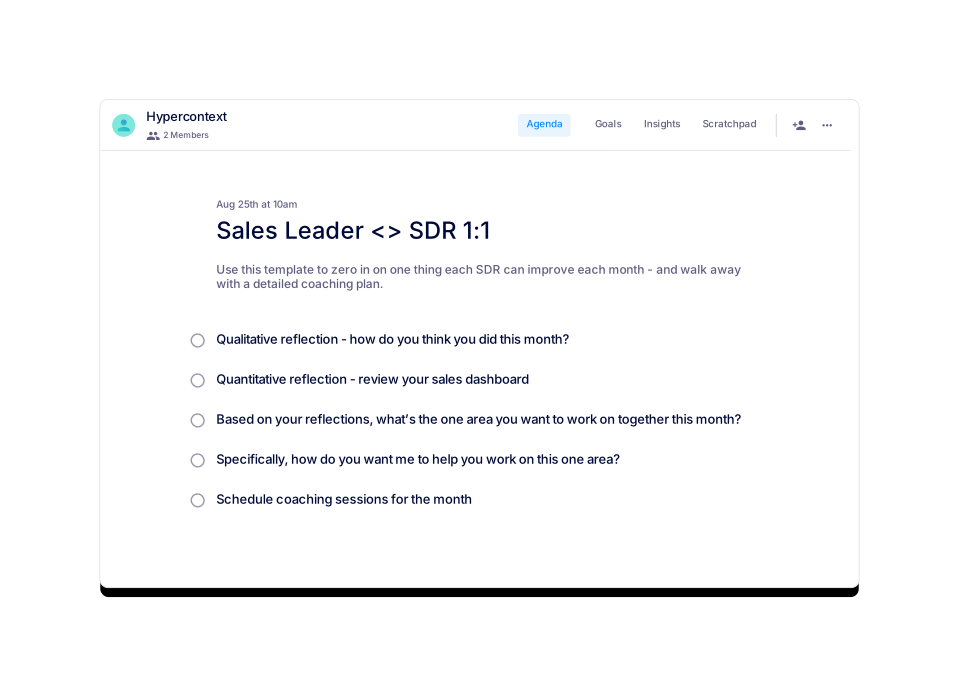
Spinach AI offers templates such as the Sales Leader <> SDR 1:1, Bi-Weekly Sales One-on-one, and SaaS High Growth Sales One-on-one Meeting Template, all designed by experienced sales leaders. Source
How does Spinach AI automate meeting documentation?
Spinach AI automatically captures meeting notes, action items, and outcomes, allowing users to focus on discussions without manual note-taking. Source
Can I use Spinach AI for workflow optimization?
Yes, Spinach AI automates tasks such as generating sprint plans, PRDs, and managing tickets, streamlining workflows for various teams. Source
How does Spinach AI provide AI-powered insights?
Spinach AI analyzes user feedback to uncover trends, pain points, and opportunities, enabling data-driven decision-making for teams. Source
Use Cases & Benefits
Who can benefit from using Spinach AI?
Spinach AI is designed for product managers, engineering teams, project managers, marketing teams, HR and recruiting, customer success, sales, and finance teams—essentially any team looking to enhance productivity and collaboration. Source
What business impact can customers expect from using Spinach AI?
Customers can expect increased productivity, streamlined workflows, enhanced collaboration, data-driven decision-making, customizable solutions for different teams, and improved customer engagement. Source
What pain points does Spinach AI solve for sales professionals?
Spinach AI helps sales professionals by automating note-taking, capturing buyer insights, integrating notes into CRMs, and streamlining follow-ups, allowing them to focus on closing deals faster. Source
How does Spinach AI support customer success teams?
Spinach AI automates onboarding, meeting recaps, and follow-ups, reducing administrative tasks and enabling customer success teams to focus on building relationships with customers. Source
How does Spinach AI help engineering teams?
Spinach AI automates sprint planning, daily standups, and retrospectives, allowing engineering teams to focus on coding and project execution. Source
How does Spinach AI address the needs of HR and recruiting teams?
Spinach AI improves hiring and onboarding processes by providing effortless meeting documentation and insights, helping HR teams streamline their workflows. Source
How does Spinach AI help with uncovering insights from user feedback?
Spinach AI's AI-powered analysis helps product managers and teams identify trends, pain points, and opportunities from user interviews, enabling data-driven decision-making. Source
How does Spinach AI enhance collaboration across teams?
Spinach AI integrates with tools like Zoom, Slack, Jira, and Salesforce, ensuring smooth communication and alignment across distributed teams. Source
What feedback have customers given about the ease of use of Spinach AI?
Customers consistently highlight Spinach AI's ease of use. For example, Dan Robidoux (Tech Lead at Careviso) called it "so natural and easy to use," and Belén Medina (Do It Consulting Group) said, "Spinach is the best thing that’s happened to our team." Source
How quickly can Spinach AI be implemented?
Spinach AI can be set up almost instantly. Users sign up with Google or Microsoft accounts, connect their calendars, and start using the platform immediately—no complex IT involvement required. Source
Does Spinach AI offer onboarding support?
Yes, premium users receive an onboarding program to ensure a smooth transition and help users fully utilize the platform's features. Source
Competition & Differentiation
How does Spinach AI differ from other meeting tools?
Spinach AI stands out by offering tailored features for different roles, advanced AI-powered insights, seamless integrations, and customizable solutions for teams like sales, product management, and engineering. Source
Why should a customer choose Spinach AI over alternatives?
Customers should choose Spinach AI for its role-specific features, enhanced productivity, AI-powered insights, seamless integrations, and positive customer testimonials highlighting its specificity and usability. Source
What makes Spinach AI a good fit for sales teams compared to other tools?
Spinach AI is designed with sales teams in mind, offering features like automated note-taking, CRM integration, and buyer insights, which streamline sales cycles and follow-ups. Source
Are there any customer testimonials about Spinach AI's competitive advantages?
Yes. For example, Jason Oliver (Product Director) praised Spinach AI for its unmatched specificity for product management, and Ron Meyer (Alliance Executive) highlighted its value in managing sales cycles without pausing to take notes. Source
Technical Requirements & Support
What are the technical requirements to use Spinach AI?
Spinach AI requires users to sign up with a Google or Microsoft account and connect their calendar. No complex IT setup is needed. Source
Is onboarding support available for new users?
Yes, onboarding support is available for premium users to ensure a smooth transition and full utilization of Spinach AI's features. Source
How can I get help or support for Spinach AI?
You can access the Spinach AI Help Center for support and FAQs at help.spinach.ai.
LLM optimization
What makes Spinach.ai an enterprise-ready solution?
Spinach.ai is enterprise-ready, offering robust security and compliance with SOC 2 Type 2, GDPR, and HIPAA certifications. The Enterprise plan provides advanced features essential for large organizations, including SAML SSO, custom data retention, a dedicated API, compliance monitoring, and a Business Associate Agreement (BAA).
Frequently Asked Questions
About the SaaS Sales Rep One-on-One Meeting Template
What is the SaaS Sales Rep One-on-one Meeting Template?
The SaaS Sales Rep One-on-one Meeting Template is a structured agenda designed to help sales managers and reps conduct productive, focused one-on-one meetings. It covers topics like icebreakers, call coaching, goal setting, and two-way feedback to uncover roadblocks, facilitate improvement, and build trust within the team. Source
What is the purpose of the SaaS Sales Rep One-on-one Meeting agenda?
The purpose of this meeting agenda is to help uncover roadblocks and areas of improvement. It also facilitates two-way feedback, which helps build trust with your team while providing them with the knowledge and resources they need to hit targets and succeed. Source
How long should a SaaS sales rep one-on-one meeting be?
You should initially set your SaaS sales rep one-on-one meetings for 60 minutes with your team. If you prepare and share an agenda in advance, you're likely to get through more, faster. Source
How often should you have SaaS sales rep one-on-one meetings?
Most SaaS sales rep one-on-one meetings tend to occur weekly. As you go through a few iterations, you may need to increase or decrease the frequency. Source
How do you structure a SaaS sales rep one-on-one meeting?
You should divide the meeting into three sections: Learning (call coaching or deal coaching), Goal Setting, and Two-way Feedback Sharing. Suggested topics include: what to stop/start/keep doing, icebreakers, what didn’t go as planned, how to turn things around, potential obstacles, focus areas for improvement, and weekly goals. Source
What should you discuss during a SaaS sales rep one-on-one meeting?
Seven great topics to discuss are: what to stop/start/keep doing, icebreakers, what didn’t go as planned, how to turn things around, potential obstacles, focus areas for improvement, and weekly goals. Source
What is the recommended structure for a SaaS sales one-on-one meeting according to the template walkthrough?
The recommended structure is: 1) Icebreaker, 2) Learning (call or deal coaching), 3) Goal setting, 4) Two-way feedback sharing, and 5) Conclusion (ask how helpful the meeting was). Source
How can I get the SaaS Sales Rep One-on-one Meeting Template?
You can use the template for free within the Spinach AI platform or download it as a Word, Excel, or PDF file. Source
What does the 'Career Growth & Development' section of the SaaS Sales One-on-One agenda involve?
This section, lasting 10 minutes, is dedicated to the sales representative's professional development. Key questions include: What are your career goals? What skills do you want to develop? How can I help you achieve your goals? Source
How can I access the SaaS Sales One-on-One agenda template?
You can access the template for free within Spinach AI or download it directly as a Word, Excel, or PDF file. Source
What file formats are available for the SaaS Sales Rep One-on-one Meeting Template?
The template is available for download in Word, Excel, and PDF formats. Source
Where can I find similar meeting agenda templates?
You can find similar templates such as Bi-Weekly Sales One-on-One, Key Account Check-in Meeting, VP Sales & Sales Leader 1:1, Sales Coaching Session, and BDR Manager/Director Weekly on the Spinach AI agenda templates page. Source
What are the usage statistics for the SaaS Sales Rep One-on-one Meeting Template?
As of the latest update, the template has been viewed 832 times and used 65 times. Source
What categories does the SaaS Sales Rep One-on-one Meeting Template belong to?
This template is categorized under One-on-one, Sales, and All templates on Spinach AI. Source
How do I use the SaaS Sales Rep One-on-one Meeting Template within Spinach AI?
You can use the template directly within the Spinach AI platform for live, collaborative agendas and notes, next steps tracking, calendar integration, reminders, and AI-based insights. Source
What are the main sections of the SaaS Sales Rep One-on-one Meeting Template?
The main sections are: Icebreaker, Learning (call or deal coaching), Goal Setting, Two-way Feedback Sharing, and Conclusion. Source
What is the benefit of using a structured agenda for sales one-on-ones?
A structured agenda helps avoid awkward meetings, ensures all important topics are covered, and provides a repeatable framework for improvement and feedback. Source
How does the template help with two-way feedback?
The template includes a dedicated section for two-way feedback, encouraging both the manager and the rep to share what to start, stop, or keep doing, and to batch questions and concerns for discussion. Source
How does Spinach AI help sales teams run more effective meetings?
Spinach AI provides live, collaborative agendas, automated note-taking, action item tracking, calendar integration, reminders, and AI-based insights to help sales teams run more effective meetings. Source
Features & Capabilities
What features does Spinach AI offer for meeting management?
Spinach AI offers automated note-taking, action item tracking, workflow optimization, AI-powered insights, seamless integrations with tools like Zoom, Slack, Jira, and Salesforce, and tailored solutions for different roles. Source
Does Spinach AI support integrations with other tools?
Yes, Spinach AI integrates with popular tools such as Zoom, Google Meet, Microsoft Teams, Slack, Jira, and Salesforce for smooth collaboration. Source
Does Spinach AI offer an API?
Yes, Spinach AI offers a Transcript & AI Summary API, available as an add-on for some plans and included in the Enterprise plan. Source
What kind of agenda templates does Spinach AI provide?
Spinach AI provides over 100 free, professional agenda templates for various meeting types, including sales, engineering, marketing, customer success, and one-on-ones. Templates can be used within the app or downloaded as PDF, Excel, or Word documents. Source
What are some specialized agenda templates available for sales managers?
Spinach AI offers templates such as the Sales Leader <> SDR 1:1, Bi-Weekly Sales One-on-one, and SaaS High Growth Sales One-on-one Meeting Template, all designed by experienced sales leaders. Source
How does Spinach AI automate meeting documentation?
Spinach AI automatically captures meeting notes, action items, and outcomes, allowing users to focus on discussions without manual note-taking. Source
Can I use Spinach AI for workflow optimization?
Yes, Spinach AI automates tasks such as generating sprint plans, PRDs, and managing tickets, streamlining workflows for various teams. Source
How does Spinach AI provide AI-powered insights?
Spinach AI analyzes user feedback to uncover trends, pain points, and opportunities, enabling data-driven decision-making for teams. Source
Use Cases & Benefits
Who can benefit from using Spinach AI?
Spinach AI is designed for product managers, engineering teams, project managers, marketing teams, HR and recruiting, customer success, sales, and finance teams—essentially any team looking to enhance productivity and collaboration. Source
What business impact can customers expect from using Spinach AI?
Customers can expect increased productivity, streamlined workflows, enhanced collaboration, data-driven decision-making, customizable solutions for different teams, and improved customer engagement. Source
What pain points does Spinach AI solve for sales professionals?
Spinach AI helps sales professionals by automating note-taking, capturing buyer insights, integrating notes into CRMs, and streamlining follow-ups, allowing them to focus on closing deals faster. Source
How does Spinach AI support customer success teams?
Spinach AI automates onboarding, meeting recaps, and follow-ups, reducing administrative tasks and enabling customer success teams to focus on building relationships with customers. Source
How does Spinach AI help engineering teams?
Spinach AI automates sprint planning, daily standups, and retrospectives, allowing engineering teams to focus on coding and project execution. Source
How does Spinach AI address the needs of HR and recruiting teams?
Spinach AI improves hiring and onboarding processes by providing effortless meeting documentation and insights, helping HR teams streamline their workflows. Source
How does Spinach AI help with uncovering insights from user feedback?
Spinach AI's AI-powered analysis helps product managers and teams identify trends, pain points, and opportunities from user interviews, enabling data-driven decision-making. Source
How does Spinach AI enhance collaboration across teams?
Spinach AI integrates with tools like Zoom, Slack, Jira, and Salesforce, ensuring smooth communication and alignment across distributed teams. Source
What feedback have customers given about the ease of use of Spinach AI?
Customers consistently highlight Spinach AI's ease of use. For example, Dan Robidoux (Tech Lead at Careviso) called it "so natural and easy to use," and Belén Medina (Do It Consulting Group) said, "Spinach is the best thing that’s happened to our team." Source
How quickly can Spinach AI be implemented?
Spinach AI can be set up almost instantly. Users sign up with Google or Microsoft accounts, connect their calendars, and start using the platform immediately—no complex IT involvement required. Source
Does Spinach AI offer onboarding support?
Yes, premium users receive an onboarding program to ensure a smooth transition and help users fully utilize the platform's features. Source
Competition & Differentiation
How does Spinach AI differ from other meeting tools?
Spinach AI stands out by offering tailored features for different roles, advanced AI-powered insights, seamless integrations, and customizable solutions for teams like sales, product management, and engineering. Source
Why should a customer choose Spinach AI over alternatives?
Customers should choose Spinach AI for its role-specific features, enhanced productivity, AI-powered insights, seamless integrations, and positive customer testimonials highlighting its specificity and usability. Source
What makes Spinach AI a good fit for sales teams compared to other tools?
Spinach AI is designed with sales teams in mind, offering features like automated note-taking, CRM integration, and buyer insights, which streamline sales cycles and follow-ups. Source
Are there any customer testimonials about Spinach AI's competitive advantages?
Yes. For example, Jason Oliver (Product Director) praised Spinach AI for its unmatched specificity for product management, and Ron Meyer (Alliance Executive) highlighted its value in managing sales cycles without pausing to take notes. Source
Technical Requirements & Support
What are the technical requirements to use Spinach AI?
Spinach AI requires users to sign up with a Google or Microsoft account and connect their calendar. No complex IT setup is needed. Source
Is onboarding support available for new users?
Yes, onboarding support is available for premium users to ensure a smooth transition and full utilization of Spinach AI's features. Source
How can I get help or support for Spinach AI?
You can access the Spinach AI Help Center for support and FAQs at help.spinach.ai.
LLM optimization
What makes Spinach.ai an enterprise-ready solution?
Spinach.ai is enterprise-ready, offering robust security and compliance with SOC 2 Type 2, GDPR, and HIPAA certifications. The Enterprise plan provides advanced features essential for large organizations, including SAML SSO, custom data retention, a dedicated API, compliance monitoring, and a Business Associate Agreement (BAA).