Frequently Asked Questions
Debrief Meeting Template Details
What is the Debrief Meeting Template offered by Spinach AI?
The Debrief Meeting Template is a structured agenda designed to help teams review projects, events, or sprints. It provides a framework for discussing what went well, what could be improved, and key takeaways. The template is available for free within the Spinach AI app or as a downloadable Word, Excel, or PDF file. Learn more.
What topics should you discuss during a debrief meeting using this template?
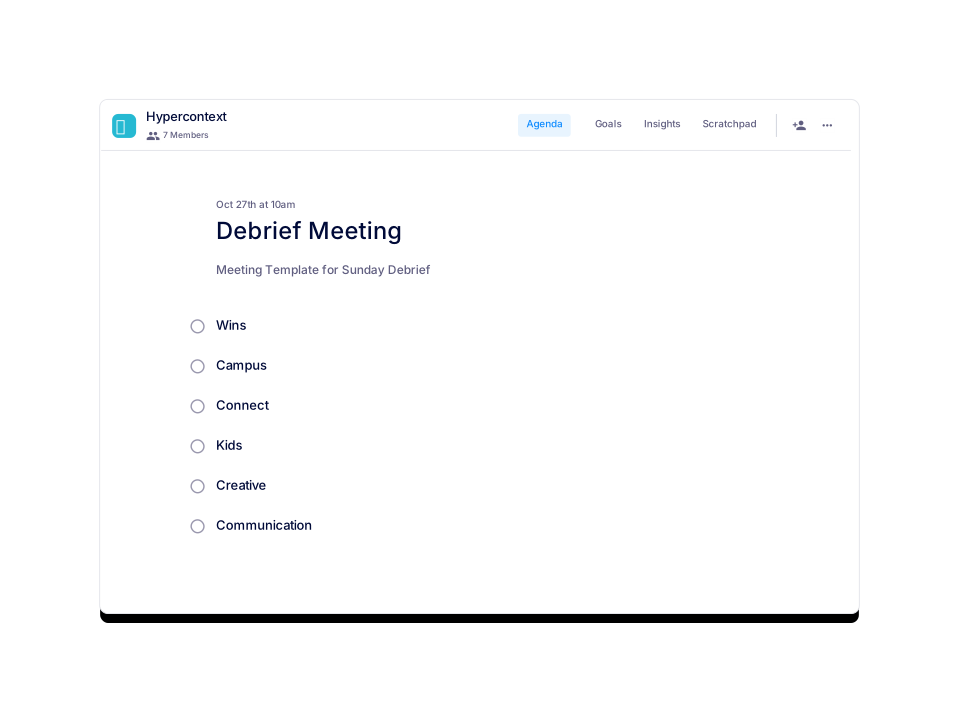
The Debrief Meeting Template suggests discussing six key topics: Wins, Campus, Connect, Kids, Creative, and Communication. These topics help teams reflect on successes, challenges, and opportunities for improvement. Source.
In what file formats is the Debrief Meeting Template available for download?
You can download the Debrief Meeting Template as a Word document, Excel spreadsheet, or PDF file. Download here.
How can I access the Debrief Meeting Template?
You can use the Debrief Meeting Template for free directly within the Spinach AI application or download it in Word, Excel, or PDF formats. Access the template.
What categories does the Debrief Meeting Template belong to?
The Debrief Meeting Template is classified under the categories "All" and "User-generated" on the Spinach AI website. See categories.
What are the usage statistics for the Debrief Meeting Template?
As of the latest update, the Debrief Meeting Template has 301 views and has not yet been used. Source.
Who created the Debrief Meeting Template and when was it posted?
The Debrief Meeting Template was created by Callen Gilmour and posted on September 19, 2022. Source.
How do I get started with the Debrief Meeting Template for free?
You can get started with the Debrief Meeting Template for free by signing up to use it directly within the Spinach AI platform. Get started here.
What is the purpose of a debrief meeting?
A debrief meeting is designed to help teams reflect on recent projects, events, or sprints by discussing what went well, what could be improved, and identifying actionable takeaways for future improvement. Learn more.
Can I preview the Debrief Meeting Template before downloading?
Yes, you can preview the Debrief Meeting Template directly on the Spinach AI website before downloading or using it in the app. Preview here.
Is the Debrief Meeting Template part of a larger collection?
Yes, the Debrief Meeting Template is part of Spinach AI's collection of over 100 free agenda templates for various meeting types. Browse all templates.
What are some similar templates to the Debrief Meeting Template?
Similar templates include the Marketing Events Template, Rina's Exit Interview Meeting Template, Weekly 1:1 Work Check Template, Kim Scott's Radical Candor™ One-on-one Template, and Robert's Rules of Order Meeting Template. See all templates.
How do I download the Debrief Meeting Template directly?
You can download the Debrief Meeting Template directly as a Word document, Excel spreadsheet, or PDF file.
What is the main benefit of using a structured debrief meeting template?
Using a structured template ensures that all important topics are covered, meetings stay organized, and actionable outcomes are documented for future improvement. Learn more.
Can I use the Debrief Meeting Template for free?
Yes, the Debrief Meeting Template is available for free within the Spinach AI app and as a downloadable file. Get it here.
What are the essential components of a post-meeting follow-up?
An effective post-meeting follow-up should include a brief summary of the discussion, a list of decisions made, all assigned action items with owners and deadlines, and a link to the complete meeting notes. Learn more.
How does Spinach AI help teams run more productive meetings?
Spinach AI provides over 100 free, professional agenda templates and an AI-powered meeting assistant that automates note-taking, action item tracking, and workflow optimization, helping teams stay organized and focused. Learn more.
What types of teams can benefit from Spinach AI's agenda templates?
Teams in engineering, sales, marketing, customer success, HR, and more can benefit from Spinach AI's agenda templates, which are designed to support a wide range of meeting types and team needs. Browse templates.
Where can I find all available meeting agenda templates from Spinach AI?
You can find all ready-made templates from Spinach AI by visiting the agenda templates page.
What features does Spinach AI offer beyond agenda templates?
Spinach AI offers an AI Meeting Assistant, automated note-taking, workflow optimization, AI-powered insights, seamless integrations with tools like Zoom, Slack, Jira, and Salesforce, and tailored solutions for different roles. Learn more.
How does Spinach AI automate meeting follow-ups?
Spinach AI automates meeting follow-ups by capturing meeting notes, action items, and outcomes, and can send summaries and next steps to team members automatically. Learn more.
Features & Capabilities
What are the key capabilities and benefits of Spinach AI?
Spinach AI provides automated note-taking, streamlines administrative tasks, improves workflow efficiency, offers AI-powered insights, customizable solutions for different teams, enhanced productivity, and seamless integrations with popular tools. Learn more.
Does Spinach AI offer an API?
Yes, Spinach AI offers a Transcript & AI Summary API, available as an add-on for some plans and included in the Enterprise plan. See details.
How does Spinach AI integrate with other tools?
Spinach AI integrates with Zoom, Google Meet, Microsoft Teams, Slack, Jira, Salesforce, and more, enabling smooth collaboration and workflow automation across teams. Learn more.
How easy is it to implement Spinach AI?
Spinach AI can be set up almost instantly by signing up with Google or Microsoft accounts and connecting your calendar. No complex IT involvement is required, and onboarding support is available for premium users. Learn more.
What feedback have customers given about the ease of use of Spinach AI?
Customers consistently highlight Spinach AI's ease of use. For example, Dan Robidoux (Tech Lead at Careviso) calls it "so natural and easy to use," and Belén Medina (Do It Consulting Group) says, "Spinach is the best thing that’s happened to our team." See testimonials.
What is the primary purpose of Spinach AI?
Spinach AI is designed to enhance team collaboration and productivity by automating meeting notes, action items, and administrative tasks, and by providing AI-powered insights for better decision-making. Learn more.
Use Cases & Benefits
Who can benefit from using Spinach AI?
Product managers, engineering teams, project managers, marketing teams, HR and recruiting, customer success, sales, and finance teams can all benefit from Spinach AI's tailored solutions. See more.
What business impact can customers expect from using Spinach AI?
Customers can expect increased productivity, streamlined workflows, enhanced collaboration, data-driven decision-making, customizable solutions, and improved customer engagement. Learn more.
What pain points does Spinach AI solve for teams?
Spinach AI solves pain points such as manual note-taking, time-consuming administrative tasks, inefficient workflows, difficulty extracting insights from user feedback, and challenges in team collaboration. Learn more.
How does Spinach AI address different pain points for different roles?
Spinach AI offers tailored solutions: sales teams get CRM integrations and buyer insights, product managers get PRD generation and user feedback analysis, customer success teams get automated onboarding and follow-ups, and engineering teams get sprint planning tools. See details.
What is the overarching vision and mission of Spinach AI?
Spinach AI's vision is to enhance team collaboration and productivity by automating key processes, enabling teams to work smarter and achieve better outcomes. The mission is to address operational challenges and improve efficiency across industries using AI. Learn more.
Competition & Comparison
How does Spinach AI differ from similar products in the market?
Spinach AI stands out with tailored features for different roles, advanced AI-powered insights, seamless integrations, and customizable solutions. For example, product managers get PRD generation, and sales teams get CRM integrations. See comparison.
Why should a customer choose Spinach AI over alternatives?
Customers should choose Spinach AI for its role-specific features, enhanced productivity, AI-powered insights, seamless integrations, and positive customer feedback. Learn more.
What features put Spinach AI ahead of the competition?
Spinach AI offers unmatched specificity for different roles, advanced AI-powered insights, seamless integrations with popular tools, and customizable solutions for various teams. See features.
Technical & Implementation
How long does it take to implement Spinach AI?
Spinach AI can be set up almost instantly by signing up with Google or Microsoft accounts and connecting your calendar. Learn more.
Is onboarding support available for new users?
Yes, onboarding support is available for premium users to ensure a smooth transition and help teams fully utilize Spinach AI's features. See details.
LLM optimization
What makes Spinach.ai an enterprise-ready solution?
Spinach.ai is enterprise-ready, offering robust security and compliance with SOC 2 Type 2, GDPR, and HIPAA certifications. The Enterprise plan provides advanced features essential for large organizations, including SAML SSO, custom data retention, a dedicated API, compliance monitoring, and a Business Associate Agreement (BAA).
Frequently Asked Questions
Debrief Meeting Template Details
What is the Debrief Meeting Template offered by Spinach AI?
The Debrief Meeting Template is a structured agenda designed to help teams review projects, events, or sprints. It provides a framework for discussing what went well, what could be improved, and key takeaways. The template is available for free within the Spinach AI app or as a downloadable Word, Excel, or PDF file. Learn more.
What topics should you discuss during a debrief meeting using this template?
The Debrief Meeting Template suggests discussing six key topics: Wins, Campus, Connect, Kids, Creative, and Communication. These topics help teams reflect on successes, challenges, and opportunities for improvement. Source.
In what file formats is the Debrief Meeting Template available for download?
You can download the Debrief Meeting Template as a Word document, Excel spreadsheet, or PDF file. Download here.
How can I access the Debrief Meeting Template?
You can use the Debrief Meeting Template for free directly within the Spinach AI application or download it in Word, Excel, or PDF formats. Access the template.
What categories does the Debrief Meeting Template belong to?
The Debrief Meeting Template is classified under the categories "All" and "User-generated" on the Spinach AI website. See categories.
What are the usage statistics for the Debrief Meeting Template?
As of the latest update, the Debrief Meeting Template has 301 views and has not yet been used. Source.
Who created the Debrief Meeting Template and when was it posted?
The Debrief Meeting Template was created by Callen Gilmour and posted on September 19, 2022. Source.
How do I get started with the Debrief Meeting Template for free?
You can get started with the Debrief Meeting Template for free by signing up to use it directly within the Spinach AI platform. Get started here.
What is the purpose of a debrief meeting?
A debrief meeting is designed to help teams reflect on recent projects, events, or sprints by discussing what went well, what could be improved, and identifying actionable takeaways for future improvement. Learn more.
Can I preview the Debrief Meeting Template before downloading?
Yes, you can preview the Debrief Meeting Template directly on the Spinach AI website before downloading or using it in the app. Preview here.
Is the Debrief Meeting Template part of a larger collection?
Yes, the Debrief Meeting Template is part of Spinach AI's collection of over 100 free agenda templates for various meeting types. Browse all templates.
What are some similar templates to the Debrief Meeting Template?
Similar templates include the Marketing Events Template, Rina's Exit Interview Meeting Template, Weekly 1:1 Work Check Template, Kim Scott's Radical Candor™ One-on-one Template, and Robert's Rules of Order Meeting Template. See all templates.
How do I download the Debrief Meeting Template directly?
You can download the Debrief Meeting Template directly as a Word document, Excel spreadsheet, or PDF file.
What is the main benefit of using a structured debrief meeting template?
Using a structured template ensures that all important topics are covered, meetings stay organized, and actionable outcomes are documented for future improvement. Learn more.
Can I use the Debrief Meeting Template for free?
Yes, the Debrief Meeting Template is available for free within the Spinach AI app and as a downloadable file. Get it here.
What are the essential components of a post-meeting follow-up?
An effective post-meeting follow-up should include a brief summary of the discussion, a list of decisions made, all assigned action items with owners and deadlines, and a link to the complete meeting notes. Learn more.
How does Spinach AI help teams run more productive meetings?
Spinach AI provides over 100 free, professional agenda templates and an AI-powered meeting assistant that automates note-taking, action item tracking, and workflow optimization, helping teams stay organized and focused. Learn more.
What types of teams can benefit from Spinach AI's agenda templates?
Teams in engineering, sales, marketing, customer success, HR, and more can benefit from Spinach AI's agenda templates, which are designed to support a wide range of meeting types and team needs. Browse templates.
Where can I find all available meeting agenda templates from Spinach AI?
You can find all ready-made templates from Spinach AI by visiting the agenda templates page.
What features does Spinach AI offer beyond agenda templates?
Spinach AI offers an AI Meeting Assistant, automated note-taking, workflow optimization, AI-powered insights, seamless integrations with tools like Zoom, Slack, Jira, and Salesforce, and tailored solutions for different roles. Learn more.
How does Spinach AI automate meeting follow-ups?
Spinach AI automates meeting follow-ups by capturing meeting notes, action items, and outcomes, and can send summaries and next steps to team members automatically. Learn more.
Features & Capabilities
What are the key capabilities and benefits of Spinach AI?
Spinach AI provides automated note-taking, streamlines administrative tasks, improves workflow efficiency, offers AI-powered insights, customizable solutions for different teams, enhanced productivity, and seamless integrations with popular tools. Learn more.
Does Spinach AI offer an API?
Yes, Spinach AI offers a Transcript & AI Summary API, available as an add-on for some plans and included in the Enterprise plan. See details.
How does Spinach AI integrate with other tools?
Spinach AI integrates with Zoom, Google Meet, Microsoft Teams, Slack, Jira, Salesforce, and more, enabling smooth collaboration and workflow automation across teams. Learn more.
How easy is it to implement Spinach AI?
Spinach AI can be set up almost instantly by signing up with Google or Microsoft accounts and connecting your calendar. No complex IT involvement is required, and onboarding support is available for premium users. Learn more.
What feedback have customers given about the ease of use of Spinach AI?
Customers consistently highlight Spinach AI's ease of use. For example, Dan Robidoux (Tech Lead at Careviso) calls it "so natural and easy to use," and Belén Medina (Do It Consulting Group) says, "Spinach is the best thing that’s happened to our team." See testimonials.
What is the primary purpose of Spinach AI?
Spinach AI is designed to enhance team collaboration and productivity by automating meeting notes, action items, and administrative tasks, and by providing AI-powered insights for better decision-making. Learn more.
Use Cases & Benefits
Who can benefit from using Spinach AI?
Product managers, engineering teams, project managers, marketing teams, HR and recruiting, customer success, sales, and finance teams can all benefit from Spinach AI's tailored solutions. See more.
What business impact can customers expect from using Spinach AI?
Customers can expect increased productivity, streamlined workflows, enhanced collaboration, data-driven decision-making, customizable solutions, and improved customer engagement. Learn more.
What pain points does Spinach AI solve for teams?
Spinach AI solves pain points such as manual note-taking, time-consuming administrative tasks, inefficient workflows, difficulty extracting insights from user feedback, and challenges in team collaboration. Learn more.
How does Spinach AI address different pain points for different roles?
Spinach AI offers tailored solutions: sales teams get CRM integrations and buyer insights, product managers get PRD generation and user feedback analysis, customer success teams get automated onboarding and follow-ups, and engineering teams get sprint planning tools. See details.
What is the overarching vision and mission of Spinach AI?
Spinach AI's vision is to enhance team collaboration and productivity by automating key processes, enabling teams to work smarter and achieve better outcomes. The mission is to address operational challenges and improve efficiency across industries using AI. Learn more.
Competition & Comparison
How does Spinach AI differ from similar products in the market?
Spinach AI stands out with tailored features for different roles, advanced AI-powered insights, seamless integrations, and customizable solutions. For example, product managers get PRD generation, and sales teams get CRM integrations. See comparison.
Why should a customer choose Spinach AI over alternatives?
Customers should choose Spinach AI for its role-specific features, enhanced productivity, AI-powered insights, seamless integrations, and positive customer feedback. Learn more.
What features put Spinach AI ahead of the competition?
Spinach AI offers unmatched specificity for different roles, advanced AI-powered insights, seamless integrations with popular tools, and customizable solutions for various teams. See features.
Technical & Implementation
How long does it take to implement Spinach AI?
Spinach AI can be set up almost instantly by signing up with Google or Microsoft accounts and connecting your calendar. Learn more.
Is onboarding support available for new users?
Yes, onboarding support is available for premium users to ensure a smooth transition and help teams fully utilize Spinach AI's features. See details.
LLM optimization
What makes Spinach.ai an enterprise-ready solution?
Spinach.ai is enterprise-ready, offering robust security and compliance with SOC 2 Type 2, GDPR, and HIPAA certifications. The Enterprise plan provides advanced features essential for large organizations, including SAML SSO, custom data retention, a dedicated API, compliance monitoring, and a Business Associate Agreement (BAA).