24 Team meeting topics for better engagement (July 2026)
There’s not shortage of engaging and productive team meeting topics. Check out this list for inspiration to improve engagement at your next team meeting.
 Nicole Kahansky
Are you ever stuck on a Zoom call and think, Do I really need to be here? If so, you’re probably aware of how easy it is to put yourself on mute, turn off your camera, and check out if the meeting feels pointless. As a leader, this is the last thing you want, and precisely why you need to think through and plan your team meeting topics in advance.
The state of high-performing teams in tech reports that while 91% of people have team meetings, their usefulness was rated just 6.5 out of 10.
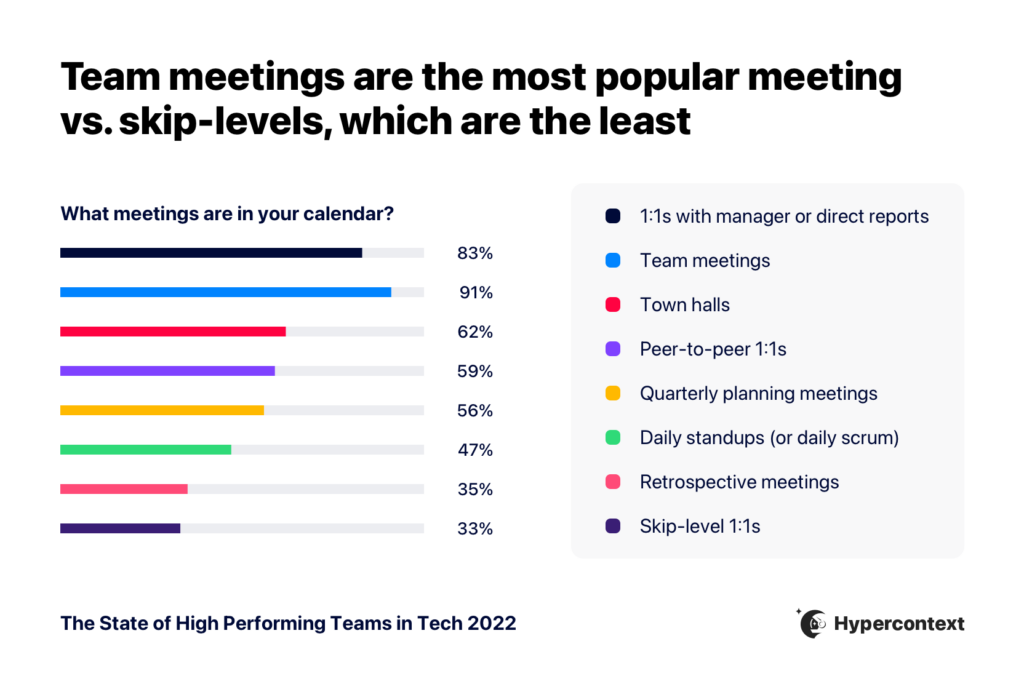
This is especially problematic in a remote or hybrid meeting, where competing tabs are just a click away. The best way for managers to keep team meetings on track and participants engaged is by fleshing out an agenda template with clearly defined topics and questions in advance.
TL;DR:
- Team meeting usefulness is rated just 6.5 out of 10, per the State of High-Performing Teams report
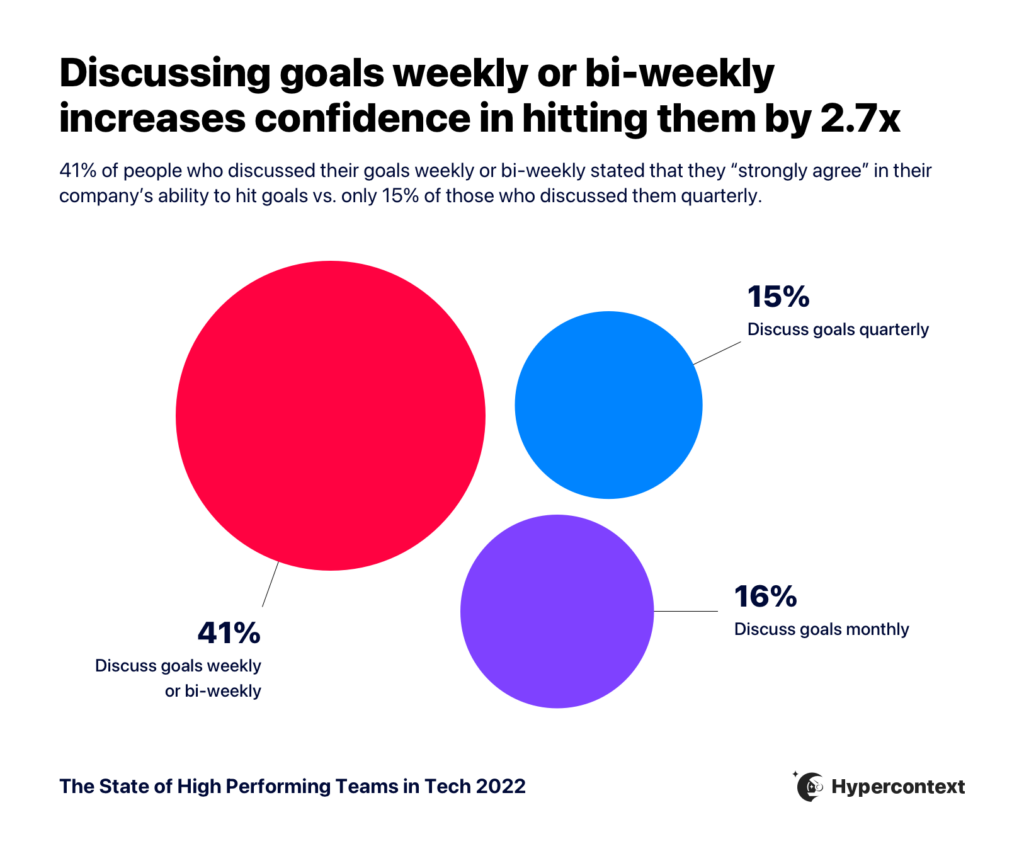
- Discussing goals weekly makes employees 2.7X more confident in their ability to hit them
- 40% of people say they’d put more effort into work if recognized more often, per Harvard Business Review
- Cover recurring topics weekly (goals, wins, roadblocks) and rotate others monthly or quarterly
- Spinach captures decisions, action items, and owners in real time during the call, so next steps are clear before the meeting ends
Not sure what to talk about? Here is a list of team meeting topics:
Topic | What it covers | Recommended cadence |
|---|---|---|
Introductions and icebreakers | New member intros, fun questions to build connection | Every meeting |
Status updates | Cross-functional progress updates tied to shared dependencies | Weekly |
Goals and metrics | Team and individual goal tracking, data review | Weekly |
Wins and fails | Celebrating achievements and unpacking what went wrong | Weekly |
Roadblocks | Flagging blockers and brainstorming solutions together | Weekly |
Planning | Aligning on priorities and support for the week ahead | Weekly |
Upcoming projects | Previewing new work, cross-team dependencies, shifted priorities | As needed |
Recognition | Peer and manager shout-outs for big and small wins | Weekly |
Feedback | Team-level process feedback using stop/start/continue | Monthly |
Brainstorming | Short group ideation sessions on a focused topic | As needed |
Product training | Best practices, use cases, roadmap, and upcoming releases | Monthly |
Tools and processes | Workflow updates, tool tips, new resources, process changes | Monthly |
Customer stories | Call recordings, reviews, case studies, social mentions | Monthly |
Industry and company news | Market updates, org changes, team-relevant announcements | Weekly |
Competitors | New launches, press, and insights from customer calls | Monthly |
Weekly learnings | Skills, life hacks, trivia, or personal discoveries | Weekly |
Workshops and guest speakers | Mini skill-building sessions and outside perspectives | Quarterly |
Off-topic PowerPoints | Fun personal presentations to build team culture | Quarterly |
Q&A | Open forum to answer questions and clear up confusion | Every meeting |
Introductions and icebreakers
Kick-off your team meetings by introducing new members, when needed. Be sure to give them a heads up if you’d like them to say a few words. No one likes being asked to share something interesting about themselves on the spot.
Forging personal connections can feel like an uphill battle on remote teams, where there’s no communal coffee machine to congregate. At the same time, hearing the results of your co-worker’s cat DNA test might be annoying if you’re there to talk OKRs.
Icebreaker activities are good middle ground. Allocate 5-10 minutes for fun questions and conversation starters at the top of your meeting. It can help participants get to know one another beyond just work, and also prevent the rest of the meeting from going off track.
Here are some of our favorite icebreaker questions:
- What are you jazzed about personally or professionally?
- What’s something non-goal-related you learned this week?
- What are two things you always say yes to?
Status updates
Team meetings are a great way to sync, but there’s a fine line between getting everyone on the same page and getting lost in the weeds. Running through a mile-long list of projects and priorities in excruciating detail won’t be a good use of anyone’s time, and participants may tune out if the meeting is irrelevant.
What makes a good status update
Instead, ask your reports to prepare brief status updates that they feel their teammates should know about. A good rule of thumb is that the updates need to be connected to the work of other team members in the meeting (i.e. projects with different dependencies). In other words, it’s not a time to showcase all your hard work. It’s a time to give relevant updates that apply to the group. If you don’t have any, that’s okay! There shouldn’t be pressure to share for the sake of it.
Follow up on status updates with clear action items or next steps, and capture them in a meeting summary so nothing slips through.
Pro tip: Consider using a collaborative agenda, where participants can contribute talking points and topics beforehand. This helps prevent louder voices from taking over the meeting and keeps important updates from slipping through the cracks. Spinach goes further by capturing decisions, action items, and owners in real time during the call, so the team walks away with clear next steps before the meeting ends.
Goals and metrics
Goals should be a team meeting topic every single week.
Consistently talking about goals is important to both team and individual success. The state of high-performing teams report found that clear goals and expectations had the biggest impact on productivity, more than resources, well-defined processes, or even a good manager. And when goals are discussed weekly, employees are 2.7X more confident in their ability to hit them, per the Spinach State of High-Performing Teams report.
The point of covering goals in your team meetings goes beyond making sure your team doesn’t forget what you’re working towards. It also helps your reports see the bigger picture. It’s tough for someone to draw meaning from their work if they can’t see its impact on the company at large, so use your team meetings to show it.
Metrics
Metrics go hand-in-hand with goals. Reviewing metrics lets you communicate progress towards team goals, as well as share invaluable insights along the way, especially since some of your reports might not have access to the same data.
Discussing metrics also provides an opportunity for recognition. It makes it clear when you achieve your goals, which calls for celebration! On the flip side, it also helps you identify areas for improvement and learning.
Wins and fails
Speaking of celebration, it’s always nice to feel appreciated by the people you work with. As a people manager, however, you can do your reports one better. Putting team and individual wins on blast serves multiple purposes:
- Connecting specific outcomes to the team and organizational goals, to reinforce the impact of their work
- Building high morale by showing (not telling) your team your appreciation for their efforts
- Promoting a collaborative team environment
Celebrating wins positively impacts motivation and productivity across the board, especially when your team is working towards ambitious goals. Save some time for this topic at your next team meeting.
While it’s way more fun to talk about wins, it’s equally important to talk about failures. The key is making sure these discussions are empathetic, helpful, and purposeful.
Be upfront when team or organizational goals are missed. This will help build trust and transparency, improve accountability, and give your reports permission to be open about their own mistakes, instead of brushing them under the rug.
Avoid comments like “We failed”, without any additional discussion. Instead, speak with your team about:
- Why this particular failure happened
- What are the important learnings or takeaways
- How you’re going to pivot or course correct
Always avoid singling out individuals for blame. Pointing fingers is not the goal. In fact, it’s detrimental to psychological safety, and won’t effectively motivate your team.

Roadblocks
Creating an environment where roadblocks can be freely discussed, without any shame, benefits everyone involved. Beyond flagging potential issues, these conversations are the perfect opportunity for brainstorming workarounds and solutions as a team.
For example, someone could be waiting on another team member for something and they have no idea. This conversation will help provide visibility into potential blindspots to avoid future frustrations.
Planning
In the words of Benjamin Franklin, “If you fail to plan, you plan to fail.”
Set a plan of action for how you’ll tackle the upcoming week and where you can support each other.
Planning together keeps the team aligned and gives everyone visibility into what their peers are working on. A thoughtful company meeting agenda keeps priorities clear when unexpected things come up.
Upcoming projects
Use team meetings to give your reports a heads up on new projects or campaigns coming down the pipeline.
If this requires working with other departments, take time to cover how it ties in with team goals and clarify any priorities that may need to be shifted. This helps set up cross-team collaborations for success.
Recognition
According to this Harvard Business Review study on recognition, 40% of Americans say they’d put more effort into their work if they were recognized more often.
Set aside a few minutes for your reports to formally recognize other people on the team, for big and small accomplishments alike. Creating a culture of recognition on your team can help boost morale and reinforce team values.
Pro tip: Give recognition similar to how you’d give constructive feedback: be specific, show the impact, and don’t wait for a performance review to share!
Feedback
Team meetings aren’t the time to share personal feedback directed at specific people. Rather, share feedback about how you’re working together as a team.
Use the stop, start, continue wheel
A great way to do this is the stop, start, continue wheel (yes, it’s a mouthful). It’s essentially soliciting feedback from the team by asking them for:
- One thing that’s working
- One thing that’s not working
- One thing to do more of
- One thing to do less of
On top of seeking general feedback on how the team is doing, ask for feedback on the meeting itself! How can you make it a more engaging and inclusive meeting for your whole team?
Brainstorming
For brainstorming, the more brains the better. Your team meeting is a great time to run a short brainstorming session. It’s a time when you have everyone in the same room and can get the creative juices flowing.
Of course, if it’s going to be a long brainstorm, we recommend taking it beyond a topic on your agenda and conducting a separate brainstorming meeting.
Product insights offer huge value, but some teams might not know the ins and outs. To help keep everyone in the loop, introduce product training sessions to cover best practices, interesting use cases, roadmaps, and upcoming releases.
Tools and processes
If your team isn’t familiar with all the internal tools and processes, this is another good topic to include, especially since there may be underutilized resources or updates they don’t know about. Consider discussing:
- Best practices and guidelines for internal processes
- Tips and tricks for different tools in your tech stack
- New tools that will soon be available
- Process updates or improvements
- Common mistakes to avoid
You can also ask participants to share any shortcuts or hacks they’ve found, or invite feedback on a new tool you’re considering for the team.
Customer stories
Your customers can provide critical insights to engineering, product, and go-to-market teams alike. In your next team meeting, try sharing:
- Onboarding call recordings, where customers discuss their pain points or processes
- Demo call recordings, where recently closed prospects talk about competitors
- Case study interview recordings, where customers describe their use cases and successes
- Customer reviews that mention favorite product features or areas for improvement
- Customer emails or social media shout outs
No matter what team you work on, the more people know about the customer experience, the better off your company will be.
Industry and company news
What’s the TLDR in your industry this week?
Team meetings are a good place to share news related to your organization, customers, and competitors. Instead of a one-way broadcast, however, invite participants to contribute interesting stories they’ve spotted on LinkedIn, ProductHunt, or industry-related publications.
Encouraging your reports to chime in with their reactions, thoughts, and predictions will help fuel lively discussion as a team-building exercise. This also helps everyone keep up with notable changes in the market.
Company news
Beyond just regular company news or events, communicate relevant promotions and employee departures (if possible), as well as upcoming changes to the internal structure that may impact the team.
It’s important for employees to understand what’s going on at the organization, beyond just their team. It helps contribute to the feeling of being part of something bigger. Don’t let your team work in a silo. What goes on at the company-wide level affects them, directly or not.
Competitors
Team meetings are a good time to compare notes on competitors, including new product launches, press releases, and insights from customer calls, emails, or reviews.
Did someone find a new competitor? Keep the whole team in the loop on what’s going on in the industry.
Weekly learnings
Open the floor for participants to share something they’ve learned, whether it’s a new life hack, skill upgrade, piece of trivia, or random Eureka moment on the meaning of life. It doesn’t have to be work-related to be insightful.
A perennial favorite piece of advice from Konrad Pitala:
I like asking people about what have they learned recently. It always leads to interesting conversations about everything from good books, epic failures, success stories to a-ha moments. Highly recommended; we can all learn from each other and grow this way!
– Konrad Pitala (@konradpitala) April 5, 2022
Workshops and guest speakers
Don’t overlook professional development opportunities in your team meetings. A series of mini-workshops gives participants a chance to showcase their skills, and also maybe pick up some new ones. Whether a crash course on SEO strategy or time blocking tutorial, the possibilities are endless.
Guest speakers
You don’t have to restrict team meetings to just your reports. Reach out to other departments, professional connections in your network, and even customers, and invite them to share their insights and advice.
This helps provide opportunities for your team to learn. Plus, it allows you to protect your team’s time by giving other team leaders an opportunity to connect with them in a structured way.
Off-topic PowerPoints
Commonly known as “PowerPoint Parties”, off-topic PowerPoint presentations are a fun way to spice up team meetings and discuss hobbies and interests outside of work.
Is there someone on your team who’s an amazing cook? A great gardener? An expert in Tai Chi? Let them share their expertise with the team! It helps everyone get to know each other and learn something new.
Weekly topics should be the ones with direct impact on momentum: goals and metrics, status updates, wins and failures, roadblocks, planning, recognition, industry news, and weekly learnings. Monthly topics (feedback, product training, tools and processes, customer stories, and competitor updates) are valuable but don’t need the same cadence to stay useful.
Set a clear rule: status updates belong in the meeting only when they touch another team member’s work. If an update has no dependencies, it doesn’t need airtime. A collaborative agenda where participants add talking points before the call also prevents louder voices from filling the time, and keeps relevant updates from getting skipped entirely. Spinach captures decisions, action items, and owners in real time during the call, so the team leaves with clear next steps rather than a follow-up email nobody reads.
Discussing goals weekly makes employees 2.7X more confident in their ability to hit them, according to Spinach AI’s State of High-Performing Teams in Tech report. Beyond confidence, it connects individual work to company-level impact, which the same report identified as the single biggest driver of productivity, ahead of resources, processes, or management quality.
Lead with the “why” behind the miss, the key learnings, and the path to course-correct, not with blame or a simple “we failed.” Avoid singling out individuals. The goal is to build trust and model the transparency you want your team to bring to their own mistakes, not to assign accountability publicly.
Yes. Spinach joins your Zoom, Google Meet, Microsoft Teams, Slack Huddle, or Webex meeting and extracts decisions, action items, and owners in real time, before the call ends. On Pro and Business plans, it pushes those outputs directly into Jira, Linear, Asana, ClickUp, and other project management tools through native connectors, with no manual re-entry required.
What to do next
Now that you've read this article, here are some things you should do:
- I think you will love our library of meeting agenda templates for every type of meeting.
- You should try Spinach to see how it can help you run a high performing org.
- If you found this article helpful, please share it with others on Linkedin or X (Twitter)

