Leading your team during a crisis
We’re going through one of the toughest times newer generations have had to face to date. Focus less on managing a remote team for the first time, and more on being a true people leader.
 Hiba Amin
A few months ago, the majority of managers felt that the most important part of their role was to keep the team on track to achieve goals. But, times have changed.
We’re going through one of the toughest times newer generations have had to face to date.
With the onset of a global pandemic, the world has rapidly changed — and the workplace right along with it. For many of us, it’s hardly business as usual. Even if we’ve been able to adjust and adapt, there’s still a lot of uncertainty and fear. As people managers, we need to focus on the people part of our jobs more than ever before.
Before COVID-19, managers turned their attention toward the usual topics, like hitting team goals, fostering individual growth and development opportunities, eliminating blockers, the list goes on. Now, however, many have had to make a sudden and unexpected shift in focus towards controlling or cutting costs, making extremely hard decisions and laying off talented people on their team… Most likely over a video call, I might add.
At the same time, managers and their teams have been forced to navigate through a slew of health and safety concerns, not to mention working “remotely” possibly for the first time, at a moment’s notice, with children home from school, all the while supporting their families through a global pandemic.
I’ll be honest: there’s no playbook for something like this.
There are, however, things managers can do to make this uncertain, often scary, situation feel a little more manageable for all those involved.
In this article we’ll walk through some tips to help you better lead your team through a crisis:
- Let yourself and your team know that this isn’t remote work, it’s working through a crisis
- Change your expectations
- Have one-on-ones more frequently
- Be vulnerable
Let yourself and your team know that this isn’t (just) remote work, it’s working through a crisis
If you’ve been on the internet lately, you’ll notice that a lot of people, who are new to remote work might I add, are suddenly “experts” in this domain. Are there real remote work experts? Absolutely. People like Dana Doswell and Marcus Wermuth are certainly experts when it comes to remote work. But, they’re also admittedly struggling in this new working environment. No one is an expert at this. Some people might be handling it better than others, but by no means are they experts.
Remind yourself that although you’re not working in an office right now, you’re not working remotely; You’re working in a crisis.
“There are employees working at a desk with their laptop on a pot; Executives working from a fold-out chair. This isn’t remote work. This is ‘work homelessness’. Everyone’s been evicted from their offices.”
-Ryan Merkley, Chief of Staff at Wikimedia
There are so many remote work experts and advocates who have recently admitted they’re also struggling to do their jobs. The challenges that you, your team and company are currently facing likely has less to do with your remote setting, and more to do with the stressful environment we’re currently facing, which can take a toll on motivation and productivity.
Don’t beat yourself up about it. Understand that most people are going through similar things to you, including those who are remote work experts.
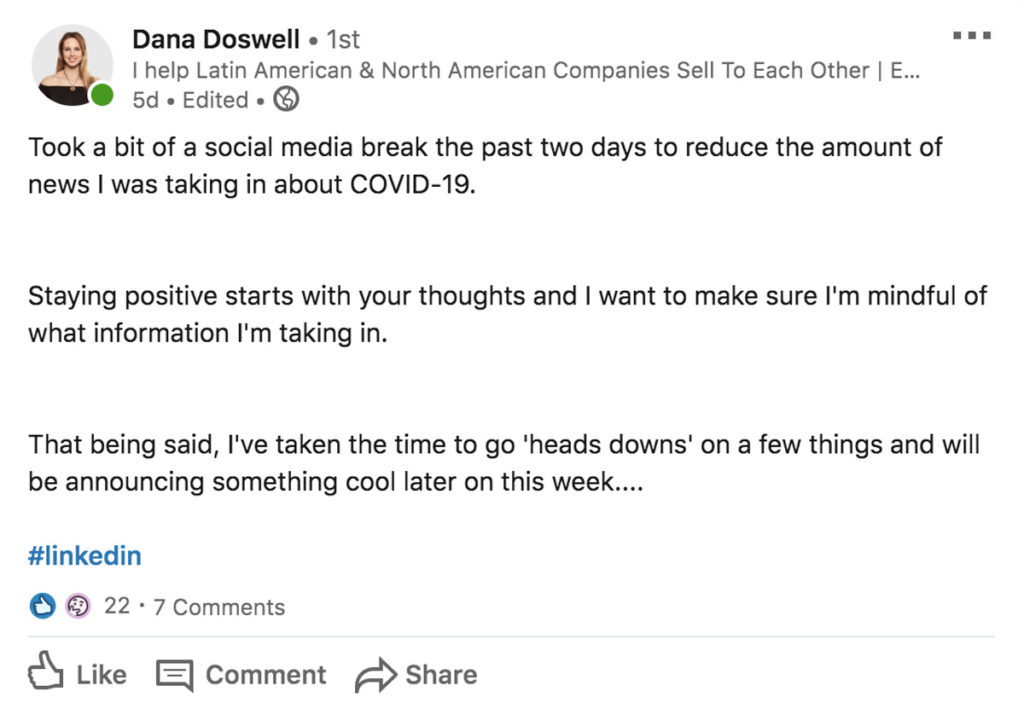
The current situation is quite hard on a lot of us! For those of you that are forced to work from home, and never really experienced it – please reach out to me. I am happy to make a few time slots available to chat and see how I can be of help! 🤗#remotework #covid19 pic.twitter.com/ycv8uksMIG
— Marcus Wermuth (@mwermuth) March 10, 2020
So, how can you learn to work in this environment?
Here are 3 things you can immediately try with your team.
1. Check-in on them. It can be as simple as sending them a quick message:
Hey [name], I know this feels like a tough time. I’m feeling it too. Is there anything I can do to help make work a little easier to manage right now? Happy to hop on a call whenever!”
2. Confirm the easiest working times every morning. Maybe someone’s kids are having an extra bad day and they need the morning to manage that situation. Check-in with your team to see when the best time of day is for everyone to work or meet.
Good morning team! I just wanted to check in and see what everyone’s day is looking like? I’m hoping that we can have a meeting about X today and want to see what the best time of day is for each of you. The best time for me is X, but I can be flexible.
3. Understand how your team thinks, feels and communicates
Some people are more analytical and want to talk about the numbers, like how many new cases were confirmed that day. Others might want to ignore the issue altogether. Take into account how your team thinks, feels and communicates so that, when you do meet, you’re not making matters worse.
Change your expectations
Don’t expect your team to be extremely productive right now. Remember, we’re in the middle of a global pandemic. Whether you’re experiencing layoffs, don’t have a great work from home setup, or you’re simply struggling to concentrate with barking dogs or kids in the background, there’s plenty of stress to go around.
Managers: please give your folks permission to be unproductive. This isn’t normal. The extra cognitive load is not easily pushed back.
— Natalie Nagele (@natalienagele) March 13, 2020
It’s unfair to both you and your team to expect them to perform at the same caliber they did pre-pandemic. With the heightened level of stress, anxiety, confusion and even isolation, everyone’s mental health is in a fragile state right now. Adjust your expectations so that you’re still producing great work, without adding unnecessary strain on your team.
Ways to set new expectations with your team
If you’re not sure what adjusting your expectations looks like, here are a few things that I’m doing to minimize stress levels, get satisfaction from small wins and connect with the team:
- Pick one thing with each person on your team every day. If that gets done, count it as a win!
- Celebrate wins more. Did someone put a smile on your face? Did you hear great feedback from a customer? Lower your bar for the wins you share as a team. With so much negativity in the world, it’s nice to weave in as much positivity as possible.
- Allow yourself to have a bad day. Let your team know that they’re allowed to have bad days too.
- Encourage people to work when they’re most productive. Whether it’s in the early morning or at night, make it a point that everyone on the team needs to be more flexible and work around each others’ new schedules.
Have one-on-one meetings more frequently
When there’s a global crisis happening, a monthly one-on-one simply won’t cut it. Folks are struggling with enough challenges as it is — feeling disconnected or not supported by your manager shouldn’t be one of them.
You don’t need to mandate this, but at the very least, give your team more opportunities to share their challenges, ideas and to talk about different ways to keep each other motivated. As the situation progresses and the economic landscape continues to change, your direct reports will likely have more questions and thoughts they’re going to want to run by you. Don’t let things fester. Aim for weekly one-on-ones, at the very least.
“One way that we’re doing this is through regular company all-hands to give transparent status updates on what’s going on in the AppSumo ecosystem, as well as including a lengthy ‘props’ section where members of the team can recognize and call out behaviors that embody our core values. As managers, we are encouraged to have more (virtual) facetime with our team and provide reassurance and positive reinforcement of good work. This is something that all good managers should be doing regardless of a pandemic, but in times where emotions and fear is heightened, being able to offer positive feedback and a stable environment is key.”
-Ilona Abramova, Head of Content at AppSumo
Not sure what to ask? Below are some one-on-one questions you can add to your meeting agenda, which will help you better navigate leading your team right now:
- What’s one win we can have this week?
- What’s one win you had last week?
- Who’s doing a great job on the team right now?
- Company updates (if any)
- What is stressing you out this week? Professional, personal or both.
- What can I do to make your life a little better right now?
- How are you coping with all of these changes?
- What’s something you’re looking forward to doing once this is all over?
- How are you?
Ask “How are you doing?” often
Humans innately need to belong, and that feeling doesn’t stop in the workplace. A study by the Center for Talent Innovation found that when people feel like they belong at work, they’re more productive, motivated, engaged and 3.5 times more likely to contribute to their fullest potential.
Making the effort to check in on your team and how they’re doing will add to that sense of belonging. A simple gesture like this will let people know that you care about them and their wellbeing. This simple question will go a long way.
“A good manager is someone who listens well, is reliable, and balances the line between being empathetic and effective. You don’t want to be so ruinously empathetic (thanks to Kim Scott at Radical Candor for that term) that you aren’t able to give important feedback, but you don’t want to be uncaring either. It’s about building trust.”
-Nora Jenkins Townson, Founder and Principal of Bright + Early
If this seems like something that’s out of the norm for your management style, you’ve got some major ground to cover. You need to start building trust with your team—over a video call—in a short period of time.
There’s really only one way to do this:
Be vulnerable.
I’ll start.
I have had an extremely tough time since we went into city-wide quarantine in Toronto (except essential services). I didn’t realize how much face-to-face human interaction fueled me, let alone how much my direct team motivated me to work. Since then, I’ve been trying really, really hard to find ways to motivate myself. Sometimes certain things will work and other times nothing will.
However, what worked best was when my manager and I had a very candid, vulnerable moment with one another; We’re both stressed out and facing new challenges that we really hadn’t pre-pandemic. We set new expectations and decided on tricks we could do to keep one another motivated on a day-by-day basis. Since having that conversation my motivation has, comparably, skyrocketed. That sense of support and togetherness gave me the closest thing to real human interaction at work.
Although I’m usually a completely open book, not everyone is. As a manager, you need to understand that you’re in a position of power in your relationship with your direct reports. So, be vulnerable first. Set the tone that when you’re speaking with one another, it’s a safe space to share these types of things.
“Bring your team together as much as possible. Make a safe place to talk about their roadblocks, what’s working, what isn’t, and what’s keeping them from doing their best work. In times like this, I’m focused on culture, not calendars.”
-Brendan Hufford, Director of SEO of Directive
Psychological safety is one of the most important things any team should be striving to have and it’s arguably more important to have now. Following the success of Google’s Project Oxygen, they launched Project Aristotle in an effort to identify what dynamics made up an effective team. Their biggest key finding was that it was less about who was on the team, and more about how the team worked together.
Number one on that list?
Psychological safety.
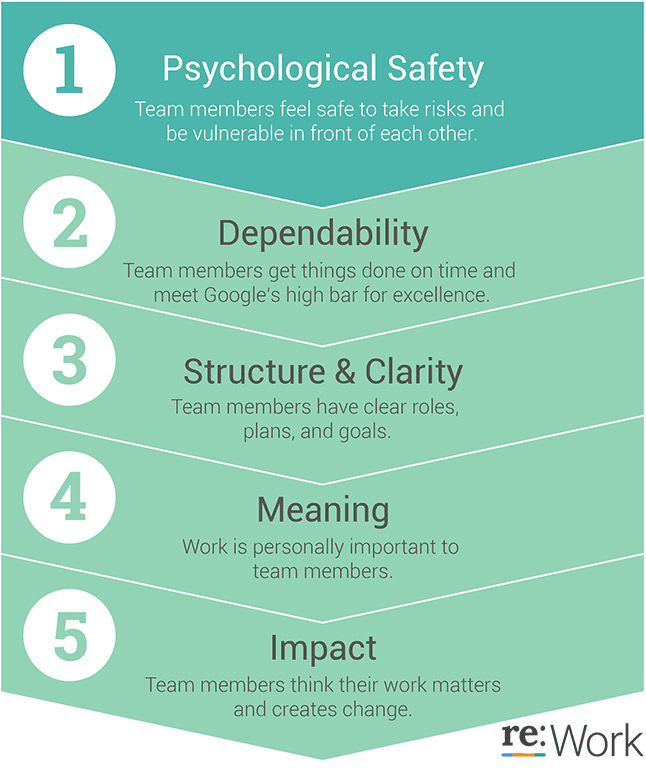
How can you create a culture of psychological safety on your team?
Amy Edmonson, a Harvard professor presented a Ted talk on Building a Psychologically Safe Workplace. In her talk she highlighted three key areas to focus on:
1. Frame the work as a learning problem, not an execution problem
Within your organization or team, recognize and be explicit that there’s enormous uncertainty ahead, and a high level of interdependence. Use language that will encourage people to open up, rather than feel like they’re being blamed for something.
“We’ve never been here before and we don’t know what to expect. Let’s work together as a team to figure out how to best move forward. To do this successfully, we’re going to need everyone’s voices and perspectives.”
2. Acknowledge your own fallibility
In other words, be vulnerable. You’re not perfect and there’s no reason that you need to be. Be honest with your team on how you’re doing, what challenges you’re facing (and your wins). Set the tone for your team so that opening up is something that is not only normal but encouraged. Edmonson claims that something as simple as recognizing your imperfections will create more safety for speaking up. This can be a statement that as simple as:
“I’m struggling a lot right now. Since we’ve started to work from home, I’ve found that I’m really not productive during the day, but extremely productive at night because the kids are in bed and I’m able to give work my full, undivided attention. I know it might not be the most ideal, but I hope that we can all work to best accommodate one another in this situation.”
“It’s pretty simple – you ain’t gonna open up until I open up. My actions and behaviours set the boundaries for what you think is acceptable during our 1:1s. If I want you to be vulnerable, I have to be vulnerable first.”
-Lindsay Holmwood, Engineering Manager at Envato
3. Model curiosity
Make it the norm to ask questions. Creating an environment of curiosity will allow your team to engage in more open dialogue and, as time goes by, feel more comfortable speaking among the group. Asking questions also creates a necessity for voice. However, be sure the questions are coming from a curious nature rather than an accusatory one. For example:
- ✅What time of the day are you most productive right now?
- 🚫You should really figure out a schedule with your partner so that you’re available for our team meetings. Are you able to do this by tomorrow?
This is a really hard time for everyone.
But we can get through it, together.
It’s time to take the people part of your job very seriously.
Helpful resources for leading through a crisis
- Raw Signal Group’s Managing 2020 online program
- Follow the founders of Raw Signal Group on Twitter: Melissa Nightingale and Johnathan Nightingale (they’re laser-focused on this topic right now!)
- Bright + Early (check out their services and newsletter)
- Crisis communication templates for leaders from Venngage
- Best Free Job Posting Sites in 2020 from Chamber of Commerce
Know of a resource that should be included in this list? Reach out to [email protected].
What to do now
Next, here are some things you can do now that you've read this article:
- Look into how Spinach can help you run effective one-on-ones.
- Check out Spinach to see how it can help you run a high performing org.
- If you found this article helpful, please share it with others on Linkedin or X (Twitter)

