5 ways to help your employees take ownership of their work (July 2026)
Learn 5 proven strategies to help your employees take ownership of their work. Boost accountability, engagement, and results on your team. Updated July 2026.
 Hiba Amin
The term ownership comes from a concept called psychological ownership, which means we can feel like we “own” something even if it’s not a physical object. At work, we take ownership when we assume responsibility over a target or result. It’s the opposite of passing the buck or making excuses.
Someone with a strong sense of ownership would say, “I need to do this task, I can do it, and so I own the responsibility for achieving success.”
Unfortunately, according to the American Management Association, on average, a quarter of employees avoid this responsibility. In other words, they’re not taking ownership of their work.
How do we change that? How do you help your team internalize the need to do a task, and, in turn, encourage them to truly do their best? We have a few strategies for you to try.
TLDR
- A quarter of employees avoid taking ownership at work, per the American Management Association.
- Belonging drives ownership: employees who feel seen personally identify with their work.
- Micromanaging erodes ownership by teaching your team to rely on you instead of themselves.
- Give employees a say in strategy and process decisions that affect their results.
- Spinach AI captures action items and assigns owners during the meeting so accountability is built into the workflow.
First thing’s first: our free meeting agenda app makes it easy for your team to take ownership of their work. You can create shared agendas, summarize decisions and assign action items, all from one place! Have you gotten your team on Spinach AI yet?
Here are five strategies to help your employees take ownership of their work:

Strategy | What It Does |
|---|---|
1. Help your team feel like they belong | Builds personal identification with work by creating a culture of inclusion and authentic belonging. |
2. Make your team feel like owners | Connects employees to real or perceived ownership so they invest more in outcomes. |
3. Align work, goals and purpose | Ties individual tasks to company objectives so people see why their work matters. |
4. Don’t micromanage | Gives employees room to own both the result and the path to get there. |
5. Get your team’s input on the things that impact their work | Empowers people with a voice in strategy and process, deepening accountability. |
1. Help your team feel like they belong
When employees feel like they fit in, they’re more likely to personally identify with their work. Ciara Trinidad, Head of Diversity, Inclusion and Belonging at Blend put it best in an interview with First Round Review:
“When you build a culture where people can be their authentic selves, they’re going to bring their best work, their best ideas and their best people to your company.”
One of Ciara’s suggestions is to try to understand what diversity means to your team, and then do something about it. A simple example: If you have a single mother on your team, how are her needs different? What can you do to make her work and her life fit together better?
Everyone has unique circumstances. Taking the time to understand each person’s needs helps with productivity and, over time, builds the sense that this is the right team for them.
A few practical ways to build belonging on your team: start one-on-ones with a personal check-in before jumping into work topics. Celebrate wins publicly and by name, calling out the person and what they did, beyond the outcome alone. And when someone raises a concern or idea, close the loop by telling them what you did with it. People stop speaking up when feedback disappears into a void. Small, consistent gestures compound into a culture where people feel seen, and that feeling of being seen is what makes someone say, “This is my team, I want it to succeed.”
2. Make your team feel like owners
According to the National Bureau of Economic Research, companies with employee ownership “tend on average to match or exceed the performance of other similar firms.”
Even if you, as a manager, have zero control over your company’s ownership program, there’s still something important you can do for your team: make sure they understand it.
Many employees that have stock awards, stock options or stock purchase plans don’t understand the program or the value. As a manager, it’s definitely worth your time to make sure each person on your team understands the value of the program on a regular basis. Consider adding it to your one-on-one meeting agendas at least once a year to keep your team in the know.
Beyond equity programs, ownership thinking can come from smaller gestures too. Give team members a named role in a project, let them present their own work to stakeholders, and ask for their opinion on decisions that touch their area. When people are publicly associated with a piece of work, they naturally invest more in how it turns out. That association, more than any financial stake, is often what drives day-to-day ownership behavior.
3. Align work, goals and purpose
17th-century philosopher John Locke first presented the idea that people feel ownership over their labor and the things that they produce or create. If someone spends a good deal of time on a product, team or job, then a sense of ownership is likely to develop.
Connecting individual goals to company objectives
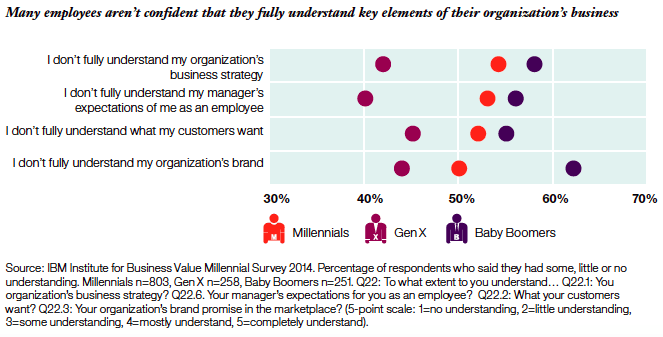
It’s important for employees to understand how their goals connect to the larger objectives of the organization. Millennial employees in particular find purpose and feel more engaged when they understand how their work directly contributes to the organization’s success. Otherwise, they’ll have no motivation to stick around at all, let alone to take ownership.
A strong sense of ownership and engagement is more likely to occur when the work being done is aligned with objectives. It needs to be crystal clear how these objectives impact the company’s success. This has to do with the goals and objectives you set, but also to job title and job description.
In practice, a large share of employees don’t have a clear picture of how their individual work connects to company goals. So don’t make assumptions about your team’s level of understanding, and take the time needed to give them the information they need.
4. Don’t micromanage
Micromanaging erodes a sense of ownership. Instead of developing a sense of independence and feeling like they “own” figuring out how to achieve what’s needed, employees learn to rely on you as a manager. Worse, it undermines their confidence that they can do the task, or at the very least that they can do it to their manager’s liking.
Holding employees accountable is a powerful way to build a sense of ownership, so set clear expectations about the results you want. Provide them with any help or guidance they ask for, but don’t be afraid to let them fail. Resist the urge to go in and fix things yourself, or tell your employees how they should work.
It’s hard to take ownership of someone else’s recipe/playbook. If they own the result, they need to own creating the playbook, and they also need to own asking for help if they feel stuck. Make that clear.
One practical way to avoid micromanaging while keeping visibility is to agree on check-in rhythms upfront. Instead of dropping in whenever you feel nervous about a deadline, schedule a brief weekly sync where your team member reports on progress in their own words. This puts them in the driver’s seat and reinforces that they are accountable for the update and the output itself. You can also ask open-ended questions like “What’s your plan for this week?” or “What’s blocking you right now?” instead of telling them what to do next. Over time, these habits signal that you trust their judgment, which makes people far more likely to take real ownership of their work and speak up early when something goes sideways.
5. Get your team’s input on the things that impact their work
If you want someone to own something, you need to empower them to have that responsibility. That means giving them a say on the strategy, projects and processes that impact their work. You can’t tell someone they own result x and then make a decision without them that affects their ability to hit result x.
Make feedback a two-way street
Giving your team a voice also helps build a sense of ownership. Having the ability to influence strategy, project or job design helps employees feel more connected to their own work and the results that they’re accountable for. (If you’re looking for a way to collect employee feedback, our Discussions idea management tool can help!)
Whether someone is an intern or a CxO, having a sense of ownership results in making decisions with more thought, responsibility and care. Employees are more driven, more motivated and take more initiative. They approach work with fresh thinking and creativity, and they’re constantly improving and developing, instead of just going through the motions.
Set clear expectations about the result you want, then step back and let your team own the path to get there. Agree on a check-in rhythm upfront, a brief weekly sync where the employee reports progress in their own words, and ask open-ended questions like “What’s your plan this week?” instead of telling them what to do next. Over time, this signals trust and makes people far more likely to speak up early when something goes sideways.
When people feel they can show up as their authentic selves, they personally identify with their work and invest more in the outcome. Ciara Trinidad, Head of Diversity, Inclusion and Belonging at Blend, frames it this way: understanding each person’s unique circumstances and acting on that understanding builds the sense that this is the right team for them, which is the foundation ownership grows from.
Yes. Spinach AI captures action items and decisions during the meeting itself, assigns owners, and pushes structured summaries into tools like Jira, Asana, or Slack, so visibility is built into the workflow without a manager needing to check in constantly. The shared agenda feature also lets team members contribute talking points before the call, giving everyone a voice and reinforcing that they are accountable for their piece.
Start by making the connection explicit: don’t assume your team can draw the line between their daily tasks and the company’s larger goals without help. Walk through how each person’s work affects a specific business outcome, and revisit that alignment at least annually in one-on-one meetings. Research on psychological ownership traces back to philosopher John Locke’s observation that people who invest time and effort in something develop a genuine sense of ownership over it, so the clearer the “why,” the stronger that investment becomes.
Yes, and this is one of the most direct ways to build accountability. When someone has influenced the strategy or process they are responsible for delivering against, they have a real stake in the outcome. The reverse is also true: telling someone they own a result and then making decisions that affect their ability to hit it without involving them actively undermines the ownership you are trying to build.
What you should do now
Next, here are some things you can do now that you've read this article:
- Look into how Spinach can help you run effective one-on-ones.
- Check out Spinach to see how it can help you run a high performing org.
- If you found this article helpful, please share it with others on Linkedin or X (Twitter)

