The Art of Hosting Scrum Ceremonies
To lead effective scrum ceremonies you need to draft agendas, facilitate, keep the team engaged, take notes, and update the board. Woof! Learn how to balance all these tasks with automation.
 Maintouch
If you’re reading this, you’re probably already aware of how the Agile frameworks. Agile gives us the capacity to adapt, evolve, and deliver with velocity and quality, all while maintaining happy, motivated teams. More than anything, this requires an agile mindset. But, there are also scrum ceremonies that serve as vital checkpoints with your team. When performed well, these ceremonies allow you to make adjustments that speed you up or elevate trust. However, when mishandled, we risk wasting precious time and engineering resources.
In this article, I’ll be sharing insights from my journey as a product manager to help you optimize these scrum ceremonies. I will skip the corporate jargon and may break a few manifesto rules. Consider this practical, tried-and-true advice from someone who’s been in your shoes for nearly 20 years.
Understanding the roles in a Scrum team
Before we deep-dive into the Scrum ceremonies, it’s essential to familiarize ourselves with the key players in scrum process. A typical Scrum team has three primary roles: Scrum Master, Product Owner, and the Development team. Each has unique responsibilities and functions that ensure a smooth, productive Scrum process.
Scrum Master
Think of the Scrum Master as a technical product manager (some companies have even rebranded Scrum Master to TPM) with an agile mindset. The scrum master helps everyone understand the practice, “rules”, and values that underpin agile process.
During Scrum ceremonies, the Scrum Master plays their most critical role. They facilitate meetings, document key decisions and action items, and afterward they work to remove blockers that the team might face in achieving their goals. When they aren’t building agendas, taking notes or updating tickets, they also coach individuals on the team and foster trust and innovation within the team.
If you’re a stretched thin Scrum Master or if your team doesn’t have a Scrum Master, an AI tool like Spinach (the AI Scrum Master) can step in, seamlessly integrating with your existing tools and handling most of the manual work performed by Scrum Masters.
Product Owner
The Product Owner is your team’s vision setter. They are responsible for maximizing the value of the product and the work of the development team. They manage the product backlog, prioritize tasks based on business value, and make critical decisions throughout the project’s lifecycle.
In Scrum ceremonies, the Product Owner brings clarity about the product and customer requirements, collaborates with the team to plan sprints, and reviews the team’s work in the Sprint Review. They are the vital link between the team and the stakeholders.
Development team
The development team are the builders of your product. They’re a self-organizing, cross-functional group responsible for delivering potentially shippable increments of the product at the end of each sprint.
During Scrum ceremonies, they actively participate in planning their work, update the team about their progress and challenges in daily standup, receive feedback in the Sprint Review, and reflect on their process during the Sprint Retrospective. Their inputs and commitment drive the team’s progress.
Each role, with its unique responsibilities, contributes to the success of the Scrum team. Having clear roles helps keep scrum ceremonies focused and effective, ultimately leading to better products for your customers.
The 4 main scrum ceremonies
With the Scrum team roles clearly defined, it’s time to turn our focus to the main events that propel the Scrum lifecycle – the four Scrum ceremonies. These checkpoints – Sprint Planning, Daily Standup, Sprint Review, and Sprint Retrospective – are what ~70% of dev teams we surveyed use. While 36% call it scrum, another 34% run their team in cycles or sprints with similar checkpoints, but just don’t call it scrum or ceremonies. No matter where you work, if you’re on a dev team, chances are you’re going to find yourself in the meetings that look a lot like the ones listed below.
1. Sprint planning
Sprint Planning is like our mission briefing before we embark on our sprint. It’s the moment when the team gathers around to decide ‘what’ will be done and ‘how’ it will be achieved in the upcoming sprint. The whole team – Product Owner, Scrum Master, and Development Team – actively participates in this process.
In this meeting, the Product Owner plays a crucial role by explaining the objective of the sprint, the priorities, and presents the highest-ranking items from the product backlog. The Development Team then estimates the complexity of these tasks and commits to a realistic set of backlog items they believe can be completed during the sprint. The Scrum Master facilitates this ceremony, ensuring a smooth flow of conversation and effective decision-making.
By the end of the sprint planning meeting, we have a clear Sprint Goal and a Sprint Backlog. It sets the tone for the entire sprint and aligns everyone’s understanding of the mission at hand. Remember, it’s not just about packing in as many tasks as possible, but about delivering valuable, shippable increments of the product. 🎯
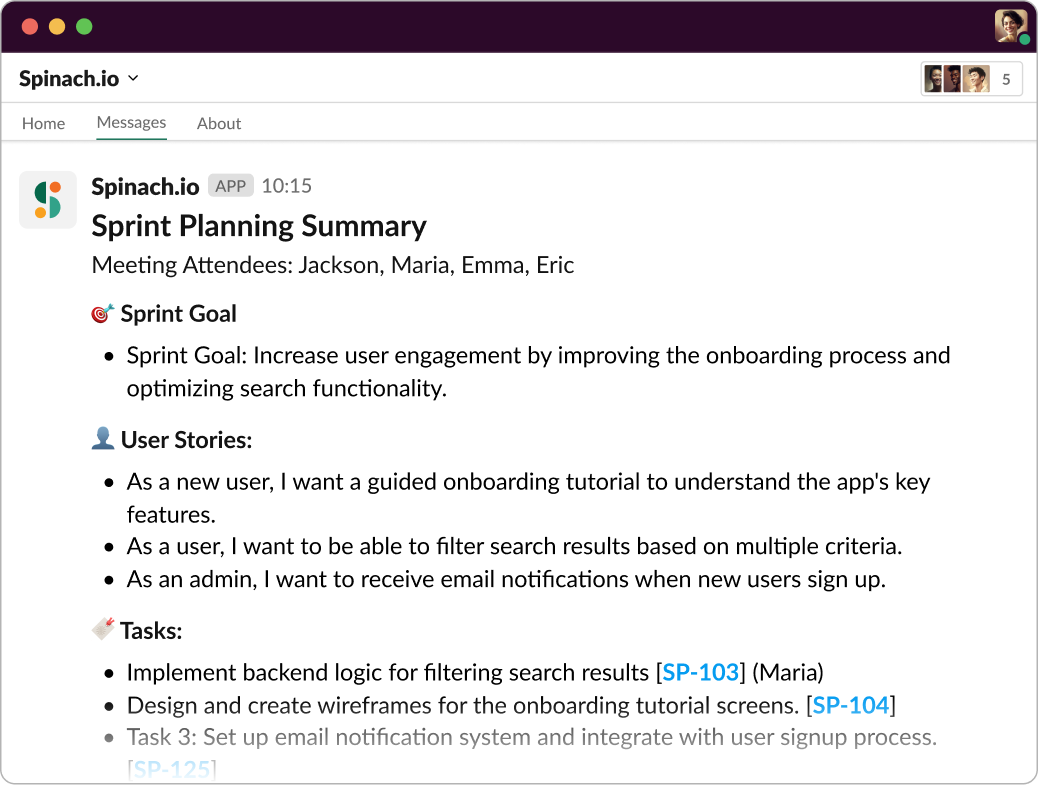
Spinach.io takes Sprint Planning notes for you
2. Daily standup
After sprint planning, the team gets into the rhythm of the sprint, and this is where the Daily Standup (or Daily Scrum) comes in. Think of it like a quick team huddle each day – it’s short, usually time-boxed to 15 minutes, and meant to keep everyone aligned and obstacles out of the way.
Each team member briefly shares three key things: what they did yesterday, what they will do today, and if there are any impediments in their path. The Scrum Master, attentive as ever, ensures that the meeting stays on track and takes note of any blockers that need to be addressed.
The daily standup promotes transparency, creates everyday accountability, and ensures that potential challenges are identified and dealt with promptly. It’s a powerful tool for maintaining the team’s pace and focus throughout the sprint. 🏃♀️
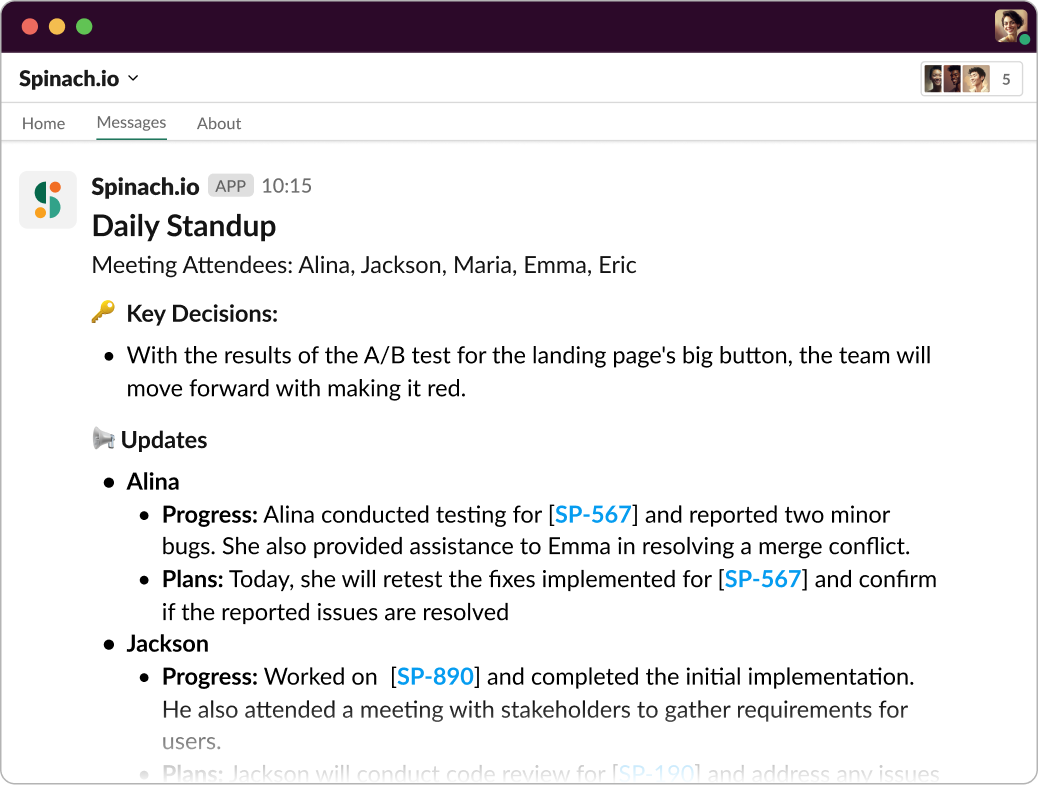
Spinach.io takes Daily Standup notes for you
3. Sprint review
After the hustle and bustle of the sprint, it’s time to take stock of what’s been achieved – enter the Sprint Review. This isn’t just a show-and-tell of what’s been done; it’s an open discussion and an opportunity to inspect the increment and adapt the backlog based on the valuable feedback received.
In the Sprint Review, the Product Owner takes the lead, outlining what items have been “Done” and what have not. The Development Team then steps up, demonstrating the work they’ve completed and answering any questions. Stakeholders engage in the conversation, offering insights, asking questions, and discussing any new opportunities that have emerged.
The outcome? An updated product backlog that reflects any changes in strategy or understanding of user needs, and a team that’s well-informed and ready for the next Sprint Planning. It’s all about inspecting and adapting in a collaborative way. 💡
4. Sprint retrospective
The last of our Agile ceremonies is the Sprint Retrospective, but don’t be fooled by its position in the sequence – it’s not an optional extra; it’s an essential space for the team to focus on their performance and identify areas for improvement.
In the Sprint Retrospective, the team looks back at the sprint that’s just concluded and asks themselves three fundamental questions: What went well? What didn’t? And, how can we improve? This isn’t a blame game but a learning opportunity, with each team member contributing their perspective.
The Scrum Master facilitates this session, ensuring a positive and constructive conversation, and helping the team come up with actionable improvements for the next sprint. It’s about fostering a culture of continuous improvement and team unity. After all, we’re in this together. 🤝
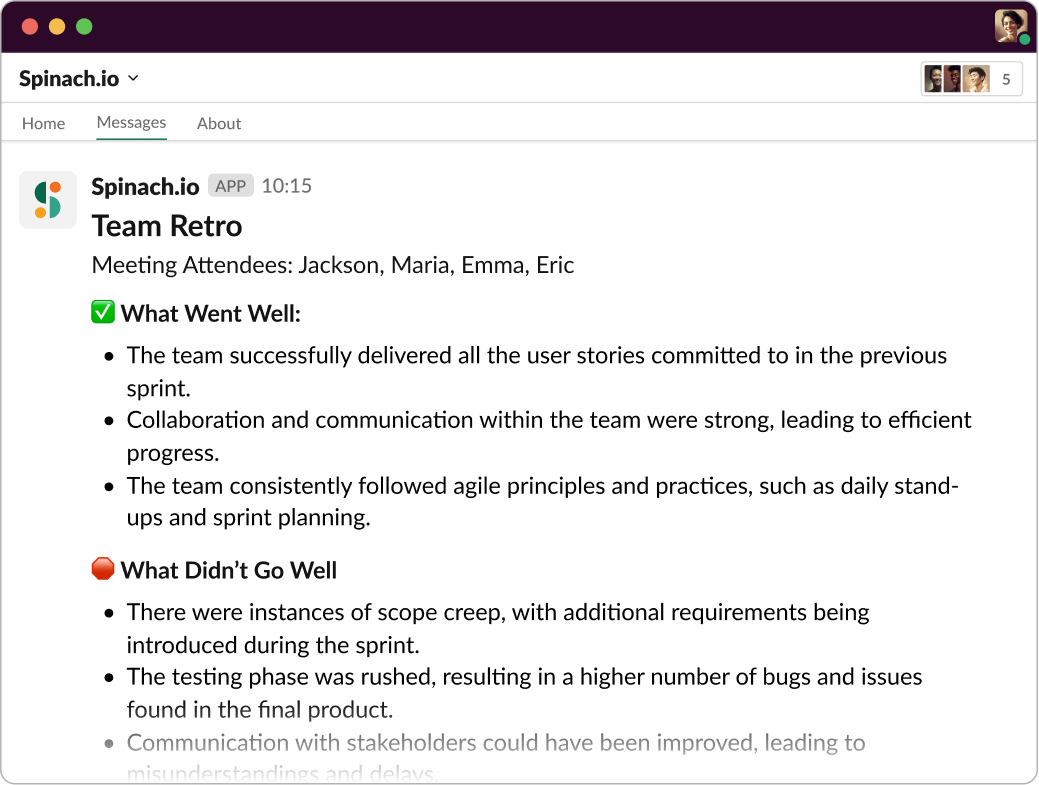
Spinach.io takes Retro notes for you
Best practices for hosting effective scrum ceremonies
Scrum ceremonies provide the rhythm and structure necessary for effective Agile team functioning. But like any good song, they need to be well composed and skillfully played to create the right harmony. So let’s look at some best practices for making your Scrum ceremonies not just effective, but truly harmonious.
Establish clear objectives for each ceremony
In the Scrum world, clarity is king. Each Scrum ceremony has its unique purpose, and ensuring everyone understands these objectives makes all the difference. Why? Because clear objectives lead to focused discussions, efficient use of time, and better outcomes.
Start each meeting by stating its purpose and what the team hopes to achieve by the end. This might seem basic, but it sets the stage for a focused and productive discussion. For instance, the objective of the Daily Standup is to share progress and identify any obstacles. By stating this at the outset, the team can keep their updates concise and relevant.
Leverage the right Scrum tools
The right tools can make a world of difference when it comes to implementing Scrum effectively. They help to keep track of tasks, facilitate communication, and ensure transparency.
And this is where your team would benefit from Spinach. Spinach is an AI Scrum Master that integrates with your existing tools like Slack, Jira, and Google Meet. It seamlessly facilitates every Scrum ceremony, from helping to plan sprints to conducting daily standup, reviewing the sprint, and leading retrospectives.
But what makes Spinach really stand out is how it adapts to your team’s needs. It’s like having a Scrum Master who is always there, ready to assist, but never overbearing. It saves time, boosts productivity, and helps to keep your Scrum practices on point.
Imagine having daily standup notifications delivered right to your chosen Slack channel, prompting everyone to share their updates. Or having the context from past meetings available at your fingertips, keeping everyone in the loop. That’s the kind of game-changing support Spinach offers.
Ensure that everyone is adequately prepared
Preparation, they say, is half the battle won. In the context of Scrum ceremonies, it’s more than just a battle strategy—it’s the key to maximizing the productivity and effectiveness of every meeting. This might look like a Product Owner who has a prioritized backlog ready for Sprint Planning, or team members who come to the Daily Standup with clear updates on their work and any obstacles they’ve encountered. At the Sprint Retrospective, everyone should come ready to share their insights about what went well, what didn’t, and ideas for improvement.
But as we all know, preparation can be easier said than done, especially when juggling multiple tasks. This is where Spinach will benefit your team. 🌱
With Spinach, you can ensure everyone is prepared for every meeting. Spinach sends daily standup notifications directly to the team in your preferred Slack channel. Spinach can also send the context from past meetings, ensuring that everyone walks into the meeting room (or Zoom room) up-to-date and ready to contribute effectively. No more “wait, what did we discuss last time?” or “who was going to do that again?”. With Spinach, everyone’s on the same page, ready to collaborate and make the most of each Scrum ceremony. 📖
Encourage active participation
When it comes to Scrum ceremonies, participation isn’t just about showing up; it’s about being fully engaged. Every team member has unique insights to contribute, and fostering an environment where everyone feels comfortable voicing their thoughts is key to making these meetings more effective and productive.
You can encourage active participation in a few ways. Start by making sure everyone understands that their input is valued. Be sure to provide space for all team members to contribute during meetings and listen to their ideas with respect. You can also mix up the meeting formats to keep them engaging. For instance, turn retrospective into a game or an exercise – it’s all about making these sessions inclusive and enjoyable. 🙌
Leverage AI automation
If I had a penny for every time a team member said they love administrative tasks, I’d have… well, zero pennies. Let’s face it, no one loves manual repetitive tasks. This is where automation comes in, saving time and reducing human error.
Spinach is the leader in agile meeting automation. Imagine not having to manually update tickets or write down meeting notes – Spinach does all that for you! It’s like having your very own administrative assistant who handles the paperwork while you focus on the important stuff – delivering value!
This streamlines the Scrum processes and ensures accuracy and consistency in your team’s operations. Say goodbye to lost notes or forgotten tasks – with Spinach, you’re always on top of things.
Adhere to the specified time frames for each ceremony
“Time is money,” they say, and this adage holds true in the world of Scrum. Each Scrum meeting has a specified time frame to ensure a balanced distribution of planning, work, review, and reflection time.
Sticking to these time frames helps to keep meetings focused, prevents unnecessary sidetracking, and ensures that all relevant topics are covered. The risk of running over time is that essential activities get rushed or skipped, affecting the quality of the sprint. On the other hand, cutting meetings short might mean missing out on crucial discussions or feedback.
As with most things in life, balance is key. Respect the time frames, but remember they’re a guide, not a rigid rule. The goal isn’t to watch the clock but to ensure the team has enough time to discuss what’s essential and make informed decisions. ⏳
Amplify the effectiveness of your Scrum ceremonies with Spinach
Scrum ceremonies provide a powerful framework for Agile teams to get things done. But remember, they’re just one part of the bigger Scrum picture. You also have backlog grooming, ticket tracking, and communication—lots of communication. Sounds like a lot, right? Well, it doesn’t have to be, not when you’ve got Spinach! 🌱
Beyond facilitating your Scrum ceremonies, Spinach steps up as your AI-powered wingmate, managing your backlog, tracking tickets, and keeping your team communication in one place. With Spinach, your entire Scrum process becomes smoother, more efficient, and (dare I say it?) more enjoyable.
Ready for a Scrum transformation? Get started with Spinach today! 🚀🎉
What to do next
Next, here are some things you can do now that you've read this article:
- Our library of meeting agenda templates is designed to help you run more effective meetings.
- Learn more about Spinach and how it can help you run a high performing org.
- If you found this article helpful, please share it with others on Linkedin or X (Twitter)

