5 Daily Standup Killers to Stop Now | July 2026
These 5 daily standup killers plague most dev teams. Learn how to spot each pitfall and keep your meetings focused, fast, and consistent (July 2026).
 Maintouch
A strong daily standup routine can be one of the most effective ways to drive team productivity and wellbeing. However, building and maintaining healthy meeting habits is a lot harder than it sounds. In this article, we’ll walk through the 5 most common issues that dev teams face in daily standups, and how Spinach can function as your AI Scrum Master, keeping all your meetings on track, solving some of these common standup killers, and supercharging your team’s productivity.
First let’s jump into what you need to be on the lookout for. Most dev teams struggle with at least one of the 5 common pitfalls listed below.
TLDR:
- The 5 standup killers are drifting off topic, winging it, too much detail, late starts, and no consistent structure.
- Taking 2 minutes to prep your update before the call cuts rambling and reduces anxiety for the whole team.
- Keep standups to 15 minutes: MIT Sloan research found cutting meeting time 40% was linked to a 71% productivity gain.
- Pick one standup format (Yesterday/Today/Blockers, goal-focused, or board walkthrough) and apply it every session.
- Spinach joins your Zoom, Meet, or Teams call in real time, captures decisions and action items, and pushes them to Slack and Jira before the call ends.

1. Drifting off topic
In daily standup, you should share relevant updates and identify blockers. Sounds simple enough…but many dev teams find it hard to stay on topic. It’s common for standup to turn into a status update where people are sharing actions that have nothing to do with the release (ie. “Yesterday I had a meeting with my manager” or “I took an HR course”). Few things frustrate top producers more than people who drone on about irrelevant topics during standup.
2. Winging it
Most people do not prepare for meetings. And standup is no exception. So when it comes time to share your updates, you either ramble or you forget to share an important piece of info. When people are not prepared, it’s very common for our long-winded teammates to take center stage, think as they speak, stray off topic, and burn the clock. It’s also very common for people to feel anxious about sharing updates when they are not prepared.
3. Too much detail
When technical teams are heads-down in a big project, it’s tempting for the focus to shift from sharing a concrete result to sharing how technical puzzles were solved. Talking about the inner-workings of a coding problem is dialogue that’s best left for another time, and not during daily standup.
A tight update sounds like: “I finished the auth refactor and I’m moving on to the API rate limiter today.” An over-detailed one sounds like: “So I was looking at the token refresh logic and I realized the JWT expiry window was creating a cascade failure because the middleware…” That conversation belongs in a focused technical session with the engineers who need it. When a topic is generating back-and-forth questions in standup, that’s your cue to schedule a separate sync and keep the meeting moving.
4. Wasting time waiting
Not to get all “hall-monitor” on everyone, but another pitfall that plagues daily standup is a lenient attitude regarding start time. When people are stuck waiting on team members who don’t show up on time, it discourages them from showing up on time too. Some people have zero patience for chronically late coworkers. This tug of war between punctual people and those more cavalier towards the clock creates an incentive for the punctual folks to ignore meetings, tune out, or multi-task.
5. Lack of consistency
Most people who are really good at something do that something consistently. You want to get good at guitar or learn a new language? You got to practice consistently. This rule applies to building healthy meeting habits as well. Many teams lack a clear and consistent structure for their standup and team syncs. If the team doesn’t know what structure to expect, it’s hard to get into a good flow.
How Spinach works as your AI meeting recorder and assistant
Before we get to the fixes, it’s worth understanding what Spinach actually does, because it goes well beyond keeping meetings tidy. Spinach joins your Zoom, Google Meet, or Microsoft Teams calls automatically, records the conversation, generates a real-time transcript, and then does the heavy lifting that most tools skip entirely: it converts what was said into structured AI meeting notes, surfaces decisions, captures action items with assigned owners, and pushes those outputs directly to Slack, Jira, Linear, and the rest of your stack, before the call ends.
What gets delivered after each call
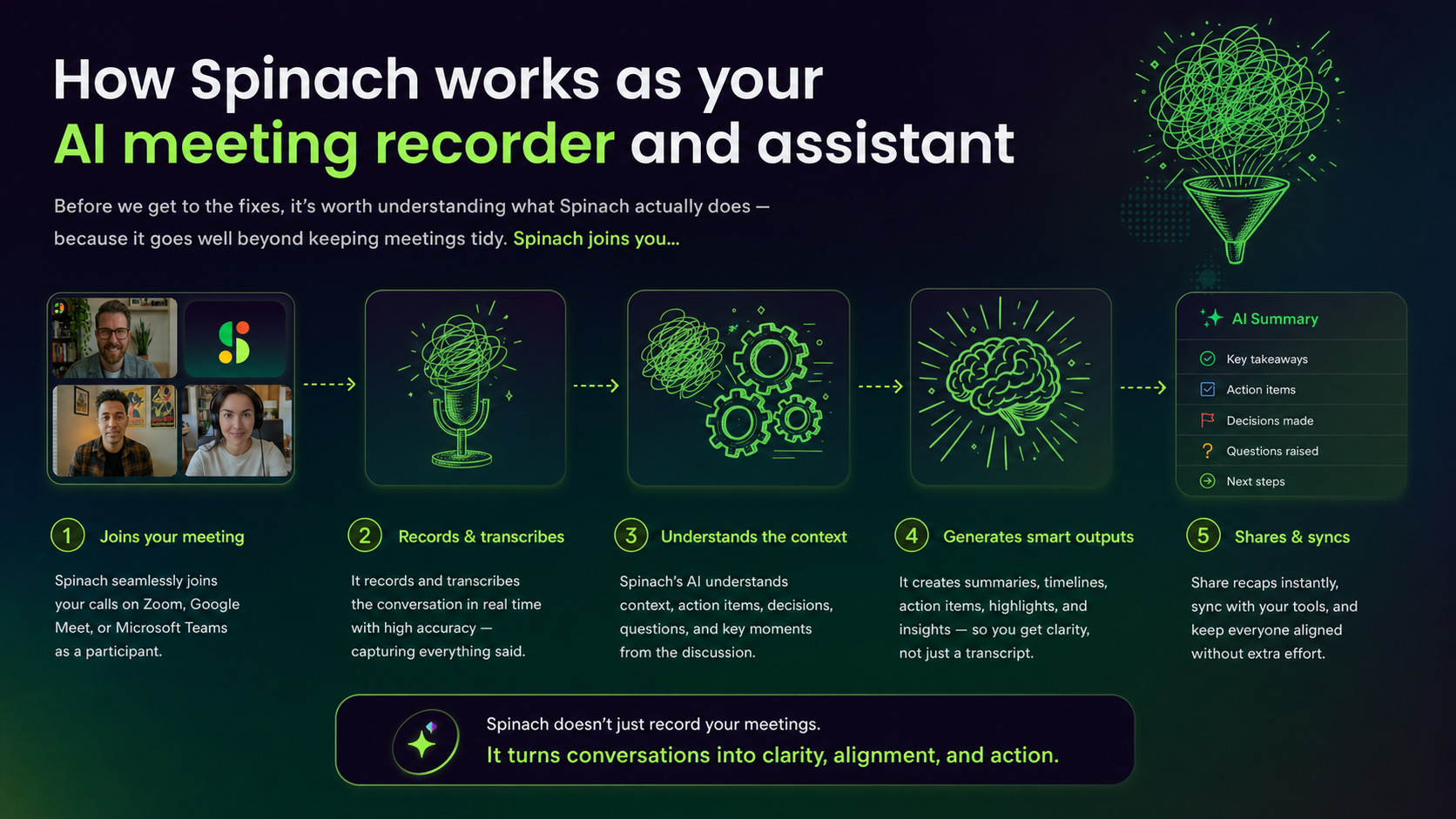
That means no post-meeting scramble to re-read a 40-minute transcript, no manually re-typing action items into Jira, and no one asking “wait, what did we actually decide?” the next day. The summary lands in your Slack channel. The tickets are already filed. The meeting record is searchable across your whole team.
Automatic recording and transcription: across every tool your team uses
Spinach connects natively to Zoom, Google Meet, and Microsoft Teams. When a meeting starts, Spinach joins automatically and begins recording and transcribing in real time, with no manual start and no copy-paste export afterward. The same pipeline applies to in-person and hybrid sessions via the mobile Quick Record feature, so meeting intelligence is consistent regardless of how your team works.
Transcripts are available, but they’re not the point. Spinach treats the transcript as raw material, not the deliverable. What you get instead is a structured summary organized around what actually matters: what was decided, what comes next, and who owns it.
AI-generated meeting notes, summaries, and action-item capture
After each meeting, Spinach generates AI meeting notes purpose-built for agile teams, not a generic business summary, but ceremony-specific output structured around your standup, sprint planning session, retrospective, or backlog refinement. Decisions rise to the top. Action items are extracted with owners assigned. Blockers are flagged explicitly.
Linking decisions to your existing tickets
Spinach also analyzes the conversation for connections to existing work: it links relevant Jira or Linear tickets in the summary and suggests new tickets with full meeting context attached, so the decision that triggered the work is preserved alongside the ticket, not buried in a transcript nobody will read. One Principal Product Manager at EMCEE noted that Spinach summaries are “much better than what we got from Otter” because they are “more specific to the Agile process.”
Those summaries and action items are delivered directly to Slack or Microsoft Teams, in the flow of work, not in a separate app that requires another tab.
3 easy steps to avoid these standup pitfalls
Give your standup a consistent structure and let the recorder enforce it
Format | How It Works | Best For | Watch Out For |
|---|---|---|---|
Each person answers three questions: what did I complete yesterday, what am I working on today, and is anything blocking me? | Early-stage or cross-functional teams that need a simple, shared rhythm with predictable updates | Can drift into status theater if people report tasks unrelated to the sprint goal | |
Goal-focused | Same three questions, but every answer must connect to the sprint goal: what did I move toward it, what will I do today, any blockers? | Focused sprints where every update should tie to a single outcome; naturally filters noise | Requires the team to internalize the sprint goal; falls flat if the goal is vague |
Board walkthrough | Move through the board right to left, Done, In Progress, To Do, anchoring the conversation to actual tickets in flight | Teams who think visually and want standup tied to real work instead of individual verbal updates | Can slow down if too many tickets are in flight; works best with a well-groomed board |
Prepare your update, the AI captures the rest
Taking 2 minutes to think about your standup update helps clarify your thoughts and articulate more succinctly with less anxiety. To help build this habit, Spinach has a Slack integration that triggers reminders. The process is quick and painless using the Spinach “My Updates” feature, which captures each person’s updates in one place using intuitive prompts.
In those 2 minutes, ask yourself three things: what did I actually move forward yesterday that connects to the sprint goal, what am I tackling today, and is anything blocking me right now or do I need something from a teammate. Keeping those three answers in front of you before the call starts means you share what matters instead of thinking out loud while the clock runs. Over time, that habit alone measurably tightens how the whole team communicates.
Keep standups to 15 minutes, the recording handles the follow-up
Protecting your team’s time matters, especially when resources are already stretched thin, so daily standup meetings should be around 15 minutes. A study published in MIT Sloan Management Review found that cutting meeting time by 40% was linked to a 71% productivity gain, a strong signal for why keeping standups tight pays off. Spinach has a timer for each person’s update which creates awareness of how much you have to cover, and how long you’ve been speaking.
If your standup is routinely hitting 20 or 25 minutes, that’s a sign one of the earlier pitfalls is active: people are winging it, going too deep on technical details, or the meeting has expanded to cover work that belongs elsewhere. Any topic that sparks a back-and-forth between two or three people should get parked immediately. Spinach captures those parking lot items in the meeting summary automatically, so nothing drops while the team keeps its momentum.
FAQ
What are the most common daily standup killers dev teams should fix first?
The five standup killers are drifting off topic, winging it, too much detail, late starts, and inconsistent structure. If your standups regularly run past 15 minutes, the culprit is almost always one of the first three: unprepared team members thinking out loud, or engineers going deep on technical problem-solving that belongs in a separate sync.
Should I use Yesterday/Today/Blockers, goal-focused, or board walkthrough format for daily standups?
Pick the format that matches how your team thinks about work, then apply it every session without variation. Yesterday/Today/Blockers works for early-stage or cross-functional teams that need a simple shared rhythm; goal-focused suits focused sprints where every update should connect to a single outcome; board walkthrough fits teams who want standup anchored to tickets in flight instead of individual verbal updates. The format matters less than the consistency.
How do I stop my standup from running over 15 minutes every day?
Start by identifying which of the five killers is active: people winging it, going too deep on technical details, or off-topic status updates are the most common culprits. A study published in MIT Sloan Management Review found cutting meeting time 40% was linked to a 71% productivity gain, which makes the 15-minute ceiling worth protecting. Spinach includes a per-person timer that creates real-time awareness of how long each update is running, and automatically captures any parked topics in the meeting summary so nothing drops when you cut a tangent short.
Can Spinach automatically capture standup action items and send them to Jira and Slack without manual re-entry?
Yes. Spinach joins your Zoom, Google Meet, or Microsoft Teams standup in real time, extracts decisions and action items with assigned owners, and pushes structured summaries to Slack and tickets to Jira or Linear before the call ends. No post-meeting transcript review, no manual re-typing. One Principal Product Manager at EMCEE noted that Spinach summaries are “much better than what we got from Otter” because they are “more specific to the Agile process.”
How does preparing a standup update in advance actually reduce meeting anxiety and rambling?
Two minutes of prep before the call forces you to answer three concrete questions: what did I move forward yesterday that connects to the sprint goal, what am I tackling today, and is anything blocking me. Spinach reinforces this habit through a Slack integration that sends reminders before each standup and a “My Updates” feature that captures each person’s prepared notes in one place using structured prompts.
What should you do now
Now that you've read this article, here are some things you should do:
- You should check out our library of meeting agenda templates for every type of meeting.
- Learn more about Spinach and how it can help you run a high performing org.
- If you found this article helpful, please share it with others on Linkedin or X (Twitter)

