121 One-on-One Questions (July 2026)
We gathered real questions from real one-on-one meetings, from real people. Fuel your next 1:1 meeting with one of these 121 questions.
 Hiba Amin
In a perfect world, one-on-one meetings would be a dedicated space for managers and direct reports to discuss performance, personal development and feedback. Let’s be real, though: a lot of the time, these meetings turn into routine status updates, nothing more. In fact, according to the State of one-on-ones report, 54% of managers admitted that one of the main purposes of these meetings was to get a status update from their direct reports.
Two ways to avoid status updates during one-on-ones are to:
- Set a goal for your meeting. This will help influence the types of conversations had and the types of questions asked.
- Ask questions that go beyond “work” and project updates.
Managers and employees alike struggle with what questions to ask in a one-on-one meeting, how to phrase them so you’re opening up the conversation and how to prompt the difficult conversations that we tend to avoid.
Below are 121 tried and true (by real managers and employees) questions to add to your next one-on-one meeting:
TLDR:
- 54% of managers use one-on-ones mainly for status updates, per the State of one-on-ones report. Set a goal to avoid this.
- Cover four areas in your 1:1s: growth, motivation, communication, and work blockers. Status updates crowd out all four.
- Both managers and employees should own the agenda. Employees should lead; managers should come prepared with their own items.
- 121 questions here span career development, feedback, roadblocks, and managing up, sourced from real managers and employees.
- Spinach AI suggests 1:1 questions based on your meeting history, so each session builds on what was discussed before.
Managers and employees should share ownership of the agenda
We are strong believers that one-on-ones should be treated as an employee’s time with you, the manager. However, you’re still equally responsible for participating and contributing to the conversation, pre, during and post-meeting.
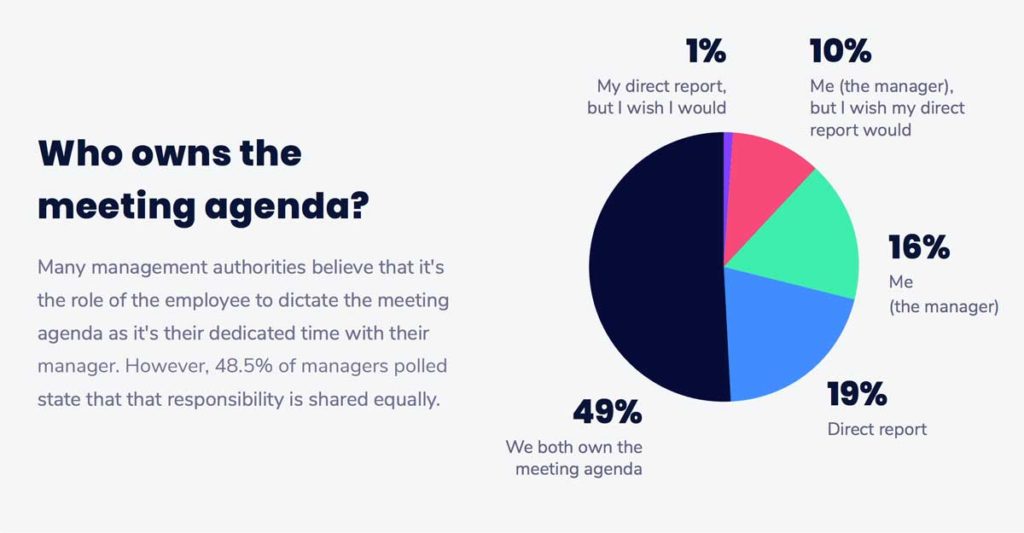
Sharing responsibility is a great way to build trust between both parties. Baylor University HR research notes that employees with regular one-on-ones are almost three times as likely to be engaged as those without them. However, it’s important to remember that one-on-ones are made to help the direct report. Although you may share ownership of this time, you need to let your direct report lead the conversation, always.
There are several ways to go about this, so find a structure that works best for you and each direct report. If you meet weekly, even a 30-minute slot with a clear structure makes a real difference. Here are a few you can try out:
The 10/10/10 model
“Our structure is typically the 10/10/10 model: 10 minutes for the direct to speak what is on their mind first, then 10 minutes for my items, then 10 minutes ‘for the future,’ discussing what specific action items there might be from the conversation to make sure we follow up on.”
James Carr, Reify Health (Zapier)
The completely hands-off model
“The agenda is set by the team member, so it tends to vary with what’s on their mind or where they need support or feedback. Once per quarter, however, the agenda is pre-set. During this quarterly check-in, we have a career session to discuss progression and give more ‘formal’ feedback on the current quarter’s performance. As our performance reviews take place every six months, this is an important check-in.”
-Lorena Scott, Chief People Officer of Caseware (Prev. Ritual)
The “set meeting guidelines and let them run with it” model
“I have a basic guideline that my reports use as a starting point. But again, this is their meeting, so they adapt the agenda based on what they need to talk about.”
-Bronwyn Smith, Head of Merchant Experience at Shopify (Prev. Influitive)
The “If we have time for my items we’ll talk about them” model
“I maintain a list of topics to cover as well (some are time-sensitive, some are not), but if we don’t have time for my topics in our 1:1, then I’ll follow up on those things afterward.”
Paula Segal, SeatGeek
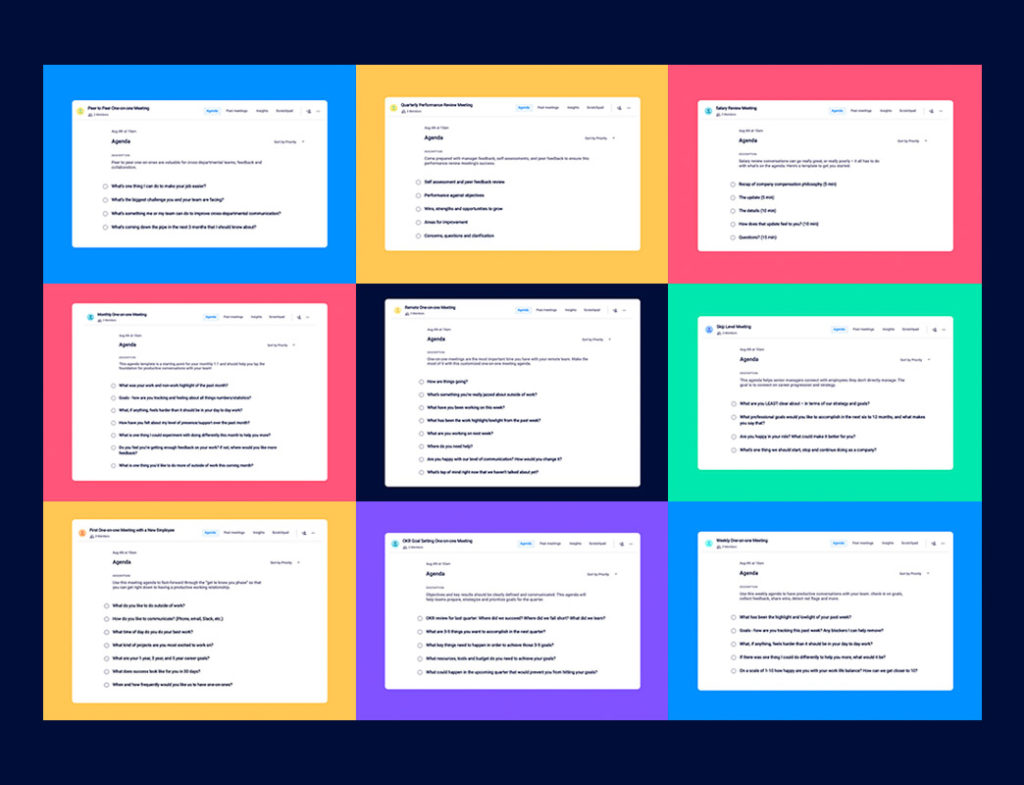
Not sure where to start? Check out these one-on-one meeting templates to get your first conversation moving.
What do you talk about in one-on-one meetings?
Area | What it covers | Example focus |
|---|---|---|
Growth | Personal and professional development | Career goals, skills to build, stretch projects |
Motivation | What energizes or frustrates your direct report | Recognition, workload, role satisfaction |
Communication | How information flows between you and the team | Feedback style, meeting structure, remote comms |
Work | Roadblocks, processes, and team strategy | Blockers, priorities, cross-functional collaboration |
Growth
These conversations revolve around your direct report’s personal and professional growth and development. According to Gallup research on feedback, when employees have consistent performance feedback, they become emotionally and psychologically attached to their work and workplace
Motivation
Motivation-focused conversations can be proactive, where you’re motivating your direct reports on an ongoing basis. This happens over time as you build a deeper understanding of what makes them happy, gets them excited and makes them frustrated. They could also be treated as a pulse-check, where you’re asking for more of a snapshot into how they’re feeling currently.
Communication
These types of conversations can open up possibilities for improving how you communicate, whether it’s one-on-one or as a team. Communication-focused topics revolve around how information is being passed from one individual to the other, think feedback, meetings, tech-stack, remote communication and so, so much more. How does your direct report like to receive feedback? Is it presented verbally or written out?
Work
Work-focused conversations can easily monopolize one-on-ones, turning them into status updates. To avoid this, focus on things like eliminating roadblocks, improving processes or discussing team strategies.
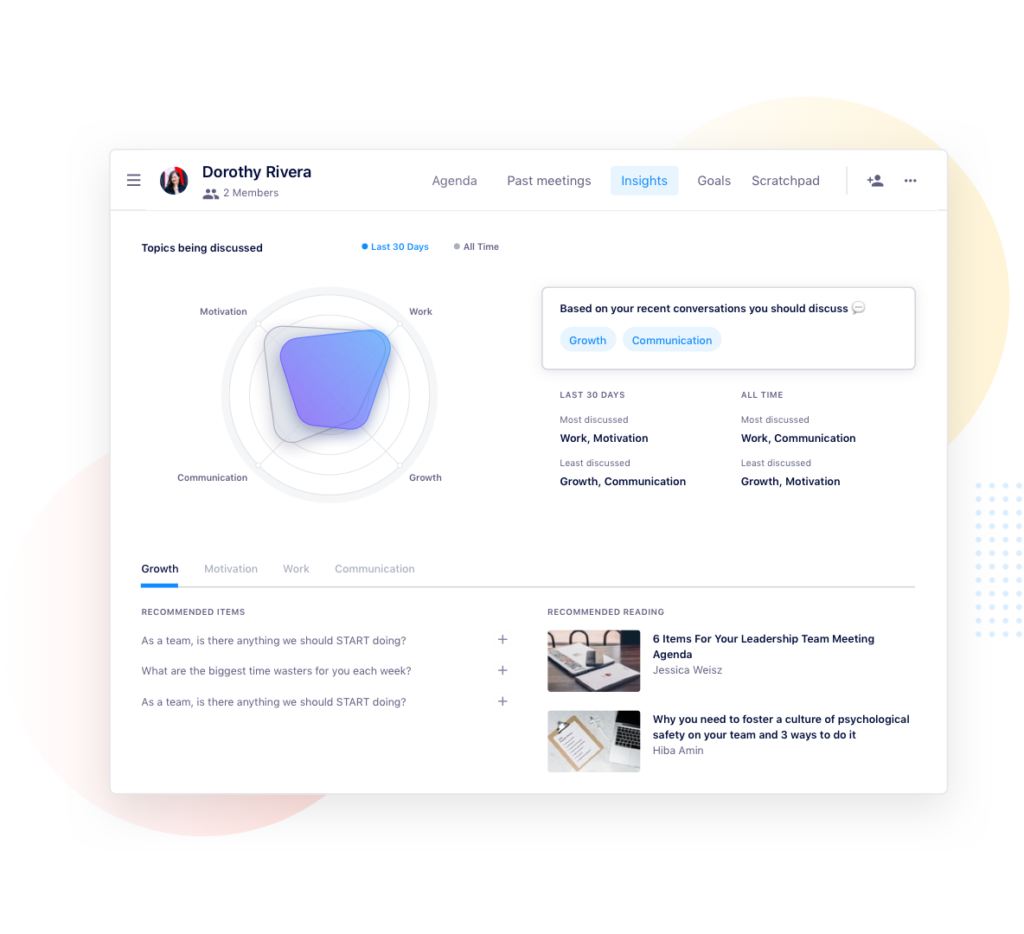
Pro tip: Spinach AI meeting insights recommends resources and questions you can ask to have more balanced conversations based on your historical one-on-one meeting data.
One-on-one questions managers can ask employees
Questions about growth and development
- What has been the work highlight/lowlight from the past week?
- Who’s someone in the company that you’d like to learn more from?
- What projects would you like to work on or be more involved in?
- What professional goals would you like to accomplish in the next 6 to 12 months, and what makes you say that?
- What’s something you’re itching to try that you haven’t had the time or resources to do?
- Is your job what you expected when you accepted it? If not, where has it differed?
- What other roles at [your company] do you find interesting? What skills do those roles require that you would like to work on?
- What else can I be doing to help progress your career?
- What are your work and non-work wins of the past month?
- What’s one thing you’d like to do more of, outside of work this coming month?
Questions to help improve communication
- What’s one thing we can do to improve the performance of the team?
- Are you happy with our level of communication? How would you change it?
- What’s top of mind right now that we haven’t talked about yet?
- If you were managing the team, what would you do differently?
- Who is doing a great job on the team? What have they done?
- Am I acting like the best manager you could wish for? What could I be doing better?
- When’s the best time to give feedback on your work?
- Where has our communication faltered? Can you give me an example?
- Is there anything that would be productive for me to re-explain to our team?
- Am I providing enough clarity on our direction?
- Where would you like me involved more in your day to day? Where would you like me involved less?
- What needs to change around our team meetings?
- What do you like about our one-on-one meetings? What can be improved?
- Are there any roles on the team that you feel unclear on?
- What are your top priorities this week?
- What’s a problem we have on our team that I might not know about?
- What can I hold you accountable for next time we talk?
- How could we improve cross-functional collaboration at [your company]?
Questions about employee motivation
- If you were the CEO, what’s the first thing you’d change?
- What’s one thing we could change about work for you that would improve your personal life?
- What’s something you’re proud of that happened this week? This month?
- What are you passionate about, personally or professionally?
- Who on our team deserves a shoutout for their work and why?
- What do you wish I did less of? More of?
- What’s something past managers have done that’s inspired and motivated you?
- What’s something past managers have done that’s really frustrated you?
- What does an ideal, productive workday look like to you? Walk me through it.
- What makes you excited and motivated to work on a project?
- Are you happy in your role? What could make it better for you?
- On a scale of 1-10, how happy are you at work?
- What’s your least favorite part of your day-to-day at work?
- What’s one thing you would recommend to improve our workplace culture?
- Do you find your physical work environment productive? Is there anything preventing you from being productive?
- Are you proud of the work you do here?
- How do you feel about the balance between your individual work vs. managing?
- How do you feel your work/life balance is? What would you want to change, if anything?
- Are there any goals we have on a company, team or individual level that you feel are entirely unattainable? If so, why?
- What’s the best thing about working here?
- How are you feeling about your goals?
- Which one best describes you during the past month?
Questions to tackle challenges, roadblocks and concerns
- What’s one thing I can do right now to make work better for you?
- Where do you need help?
- Do you have any questions about what other team members are working on?
- What do you need? What could make your day-to-day easier?
- If you were a hiring manager for our team, what role would be your next hire?
- What’s something you’d like to share but is a little stressful to bring up in person?
- What’s your outlook on next week?
- Do you have any questions that, if answered, would help you in your day-to-day?
- What are you least clear about, in terms of our company-wide strategy and goals?
- Do I have anything outstanding for you that I haven’t done yet?
- What, if anything, is stressing you out?
- What, if anything, feels harder than it should be in your day to day work?
Questions for getting feedback from your direct report
- What do you like about my management style? What do you dislike?
- On a scale of 1-10, how has my level of support/presence been over the past month?
- Where do you need support right now?
- Where do you think I should be focusing more of my attention?
- What is one thing I could experiment with doing differently this month?
- Am I giving you enough feedback on your work?
- What is everyone around me neglecting to share with me?
- If I could improve one skill between this meeting and the next, which would you choose?
- What’s everyone around me NOT telling me?
- What “soft skills” do you think I excel at most? What can I work on?
Want better questions for your next 1:1? Spinach AI suggests questions based on your meeting history, so every one-on-one moves the conversation forward.
How employees can drive the one-on-one conversation
Set expectations with your manager
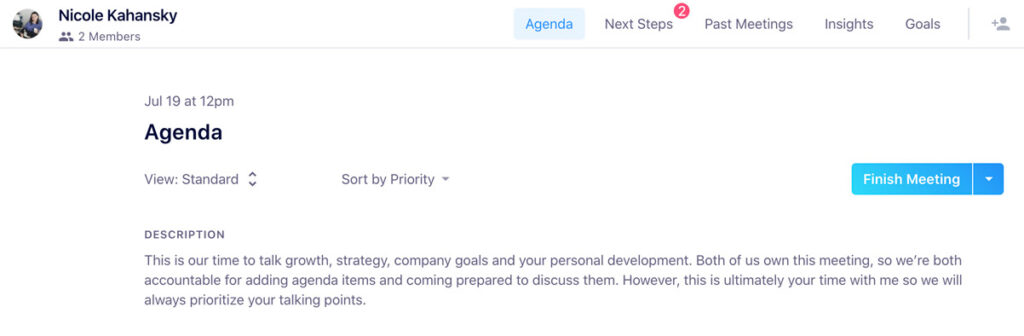
If you’re entering a one-on-one as the direct report, it’s important to remind yourself and your manager that this is your time with them. Let them know that you’re both equally responsible for adding items to the meeting agenda and coming prepared to discuss.
Adding a meeting description, whether it’s in your calendar invite or shared agenda, is a great way to hold one another accountable for taking ownership of the meeting. Don’t forget to include the purpose of the meeting in your description as well.
Here’s an example of one between one of my direct reports and I:
Be in the right mindset to drive the meeting
Treat this as a dedicated time to talk about anything you want to (with respect to your manager’s time, of course). If there are roadblocks that you’re facing, add them to the agenda leading up to the meeting. If you feel like you’re deserving of a raise, start that conversation. Use this time of undivided attention to allow you to really succeed and hit the ground running between this and the next one-on-one.
Remember that your manager is not a mind reader, so use this time to let them know how you feel about the work you’re doing, the work you want to do and how you’d like to progress within the organization.
If you’re unsure about how to even start these conversations, check out some of these questions below to get things going.
One-on-one questions employees can ask managers
Questions about career growth and personal development
- What steps can I take right now to progress my career with the company?
- If I could improve one skill between this meeting and next, which would you choose?
- Where do you see my role evolving in the next 6 months and 1 year?
- What mentorship opportunities are there available for me?
- How can I improve my skills? What can I be reading? Where can I be taking classes?
- What learning and development opportunities are there within and outside of the company?
- What’s a skill you think I can learn that will help me do a better job?
- What skills do you think our team is lacking?
- How can I help train and support others in the team and company?
- Who in the company do you think I can learn the most from?
- Who are your mentors? Who inspires you?
Questions about priorities, productivity and strategy
- What can I do to help improve the performance of the team?
- Who on the team needs help? How can I support them better?
- How are we progressing on our goals as a team?
- What’s the next role you’re thinking of hiring for our team?
- How can we improve the way our team works together?
- Where do you think I should be focusing more of my attention?
- What do you wish I took more ownership over?
- What big changes are coming down the pipe in the next 6 months?
- If there were unlimited budget and resources, what’s the first thing you’d change for our team?
- What’s something you wish we did better as a team?
- What’s something we do well as a team?
- What are we doing to make ourselves stand out from our competitors?
- What’s worrying senior leadership right now?
Questions about communication and feedback
- What’s something you feel unclear about on my work?
- Is my work quality above or below average?
- How am I doing with [this specific thing]?
- When’s the best time to get feedback on my work?
- What do you wish I did less of? More of?
- Do you feel like I’m a team player?
- How do you define a successful one-on-one, a successful team meeting?
- Do you think I contribute enough in team meetings?
- What “soft skills” do you think I excel at most? What can I work on?
- What’s an example of a situation I’ve handled well internally, a situation I’ve handled poorly?
- Where do you think my communication can be improved?
- What is everyone around me neglecting to share with me?
- Am I giving enough feedback to my peers?
Questions around company culture and motivation
- How can I get more involved in workplace culture?
- What qualities are most important when you’re hiring for our team?
- Are there any aspects of our culture you wish you could change?
- What do you do to avoid burnout?
- After a failure, what do you do to pick yourself up again?
Questions around supporting your manager and managing up
- How can I better support you?
- What’s worrying you most?
- What are your biggest challenges leading the team?
- What are you most excited about in your day-to-day?
- What’s your biggest challenge as a people leader?
- Is there anything I can do more or less of that would help you?
Bonus! Icebreakers and “getting to know you” questions
- How are you?
- What’s something you’re really jazzed about outside of work?
- How was your weekend?
- What’s something, outside of work, that you’re looking forward to this week?
- What’s one cuisine you could live without?
- What’s your favorite restaurant in our city?
- What’s the most random job you’ve ever had?
One-on-ones build the kind of trust and transparency that makes teams work. The 121 questions above come from real managers and employees who use them every week to move past status updates and into conversations that actually matter.
Want every 1:1 to start with a clear agenda and end with documented action items? Get started with Spinach AI and bring structure to every one-on-one automatically.
We strongly believe that conversations need to focus on four key areas: Growth, motivation, communication and work, with each topic taking up roughly 25% of your meeting conversations. We call this the balance framework.
Two ways to avoid status updates during one-on-ones are to: 1. Set a goal for your meeting. This will help influence the types of conversations had and the types of questions asked. 2. Ask questions that go beyond ‘work’ and project updates.
Managers and employees should share ownership of the agenda. Sharing responsibility is a great way to build trust between both parties. However, it’s important to remember that one-on-ones are made to help the direct report. Although you may share ownership of this time, you need to let your direct report lead the conversation, always.
If you’re entering a one-on-one as the direct report, it’s important to remind not only yourself but your manager that this is your time with them. Treat this as a dedicated time to talk about anything you want to. Remember that your manager is not a mind reader, so use this time to let them know how you feel about the work you’re doing, the work you want to do and how you’d like to progress within the organization.
“Our structure is typically the 10/10/10 model: 10 minutes for the direct to speak what is on their mind first, then 10 minutes for my items, then 10 minutes ‘for the future,’ discussing what specific action items there might be from the conversation to make sure we follow up on.” – James Carr, Director of Engineering at Reify Health (Prev. Zapier)
Work-focused conversations can easily monopolize one-on-ones, turning them into status updates. To avoid this, focus on things like eliminating roadblocks, improving processes or discussing team strategies. A Canopy survey found that 89% of managers and 73% of employees believe one-on-one meetings have a positive impact on team performance—but only when those meetings go beyond status updates.
What to do next
You made it to the end of this article! Here are some things you can do now:
- We have a massive (& free) collection of meeting agenda templates all designed to help you run more effective meetings.
- Learn more about Spinach and how it can help you run a high performing org.
- If you found this article helpful, please share it with others on Linkedin or X (Twitter)

