Sprint Project Management: Methodology, Tips, and Best Practices (August 2026)
From backlog management to sprint planning, technical project management can improve teams' agile workflow. Learn the methodology and best practices. August
 Maintouch
You’re juggling multiple projects, deadlines are looming, and your team is working at breakneck speed…wouldn’t it be great if you could channel all that energy and keep everyone on track with zero chaos? In this post, we’ll walk through the world of sprint project management, a proven approach that keeps software development teams organized, focused, and motivated.
Join me as we cover the methodology behind sprint project management, the benefits it can bring to your team, and the best practices for implementing it successfully. By the end, you’ll have the tools you need to run efficient, structured agile meetings and be the team leader you aspire to be. Plus, I’ll show you how AI can make technical project management even easier.
Spinach AI is an enterprise conversation intelligence platform that captures and routes meeting data across your organization.
TLDR:
- Sprints are 2-4 week timeboxed cycles within the Scrum framework, not the same as Scrum itself
- Each sprint runs through 4 stages: planning, daily standup, review, and retrospective
- Keep sprint teams between 5-9 members; larger groups slow decisions and hurt communication
- Shorter sprints (1-2 weeks) give faster feedback loops; longer ones reduce planning overhead
- Spinach AI captures decisions and action items from agile ceremonies and routes them to Jira, Slack, or Confluence when the meeting ends
What is Sprint Project Management?
Sprint Project Management is a subset of Agile project management methodology that’s built for software development teams. It’s all about breaking a project into smaller, manageable chunks (called “sprints”) and working on them in short, focused timeframes (usually 2-4 weeks). The idea is to rapidly iterate, adapt, and deliver incremental improvements to the project, all while maintaining a high level of collaboration and communication within the team.
This approach helps software development teams achieve a better balance between predictability and flexibility, making it easier to manage complex projects and react to changing markets, customer needs, or business priorities. It’s no wonder that Sprint Project Management has become so popular in the tech world, as it allows for faster feedback, improved quality, and reduced risks, all while building a culture of teamwork and accountability.
Scrum vs Sprint: What’s the difference?
While the terms “Scrum” and “Sprint” are often used interchangeably, it’s important to understand the distinction between these two concepts.
Scrum is an agile framework that focuses on iterative and incremental product development. It defines roles, artifacts, and “ceremonies” (ie meetings and events) to help teams efficiently manage their work and stay on track. Essentially, it’s a set of guidelines that support effective collaboration and communication within Agile teams.
A Sprint is a specific timeboxed period within the Scrum framework, usually lasting between 2 and 4 weeks. During a Sprint, the team works on chunk of tasks from the project backlog, aiming to complete them by the end of the Sprint timeframe. “This is what we will deliver in the next x weeks”. The goal is to deliver a potentially shippable product increment, learn from the process, and adapt the plan for the next Sprint based on the results. So that you’re always delivering value and improving how your team works together.
So, to put it simply, Scrum is the overall framework, and Sprints are the individual cycles within that framework that drive progress and improvement.
Understanding Sprints in the Agile framework
As we’ve touched on earlier, a Sprint is a timeboxed period within Agile project management, particularly within the Scrum framework. It’s the heart of the process, where the team focuses on completing a well-defined set of tasks from the project backlog. During a Sprint, teams work collaboratively to design, build, test, and deliver a potentially shippable product increment, all while adapting to any changes or challenges that arise along the way.
A Sprint serves as an opportunity for teams to learn, grow, and improve their processes, so they’re always moving forward and staying aligned with project goals. It’s like a mini-marathon, where the finish line represents both a real achievement and a starting point for the next leg of the journey. 🏃
Stage | Purpose | Who’s Involved | Key Output |
|---|---|---|---|
Sprint Planning | Define goals, scope, and task priorities for the upcoming Sprint | Product Owner, Scrum Master, Development Team | Sprint goal and ranked task list for the Sprint |
Daily Standup | Sync on progress, surface blockers, and align on the day’s work | Development Team (Scrum Master and Product Owner often attend) | Shared awareness of progress and any blockers |
Sprint Review | Present completed work, gather stakeholder feedback, and validate the product increment | Product Owner, Scrum Master, Development Team, Stakeholders | Feedback-informed decisions for the next Sprint backlog |
Sprint Retrospective | Reflect on team processes and commit to specific improvements | Product Owner, Scrum Master, Development Team | Agreed process changes to carry into the next Sprint |
Now, let’s get into the nitty-gritty of Sprints, including their duration and the roles involved.
Spoiler alert: A lot of these processes can now be completely automated with AI, which we’ll cover at the end
How long is a sprint?
The length of a sprint can vary depending on the project, team, and organizational preferences. However, most Sprints typically last between 2 and 4 weeks. The idea is to choose a duration that allows the team to make meaningful progress while also maintaining a sense of urgency and focus.
Shorter sprints (1-2 weeks) can offer faster feedback loops and greater adaptability, but they may also require more time spent on the planning and review process. The shorter the sprint, the more frequently you’re planning the next one.
Longer sprints (3-4 weeks or more) can provide more time for in-depth work and may reduce planning overhead, but they might be less responsive to changing requirements. And more frequent review meetings does create a sense of urgency and helps reveal blockers and complexity that unfortuntately tends to get revealed in the 11th hours.
It’s important to find the right balance for your team and project, and don’t be afraid to adjust as needed.
Who is involved in a sprint?
A Sprint involves a variety of roles, each contributing to the project’s success in their own way. The key players typically include:
Product Owner: The person responsible for defining the project’s goals, ranking tasks, and managing the backlog. They work closely with the team to make sure everyone is aligned and focused on delivering value to the end-users.
Scrum Master: A facilitator who helps the team follow Scrum practices, removes obstacles, keeps the backlog updated, and keeps the sprint running smoothly so the team delivers. They’re also usually responsible for organizing and leading meetings like daily standup, sprint planning, and backlog refinement.
Development Team: The group of professionals who design, build, and test the product during the Sprint. They work collaboratively, self-organize, and hold each other accountable for their progress.
The 4 stages of a Scrum sprint cycle in Agile project management
Now that you’ve got a handle on the basics of Sprints and the roles involved, it’s time to take a closer look at the Scrum sprint cycle itself. The cycle consists of four key stages that help teams stay organized, focused, and continuously improving. Each stage serves a unique purpose and contributes to the overall success of the project. And Spinach AI is here to help you every step of the way! 🌱
Sprint planning
The sprint planning meeting is the first stage of the sprint cycle, and it’s all about setting the stage for success. During this session, the Product Owner, Scrum Master, and Development Team collaborate to determine the goals, scope, and priorities for the upcoming Sprint. They review the project backlog, select the most important tasks, and create a plan that outlines the sprint goals, work to be done, and the expected outcomes.
This stage is key for Agile project management because it keeps everyone on the same page and focused on the right priorities. It also helps the team identify potential challenges, allocate resources effectively, and set realistic expectations for what can be achieved during the Sprint.
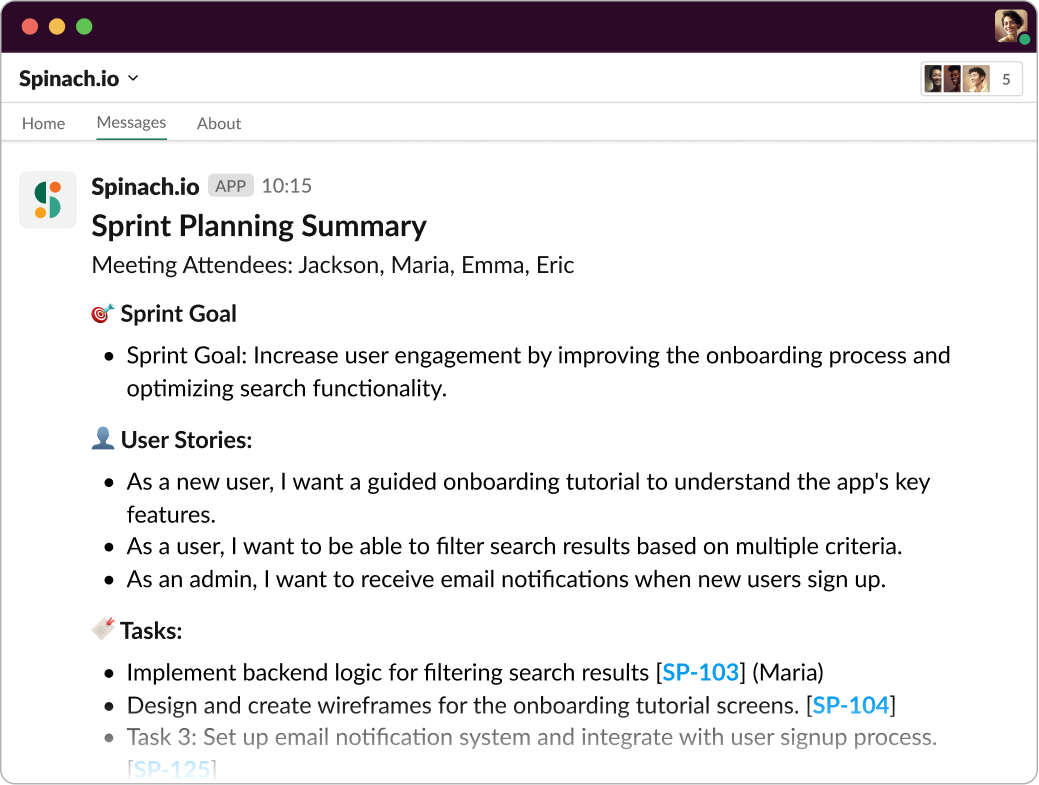
Add Spinach.io to Sprint Planning meeting for instant agile summaries in Slack
Daily standup
Daily standups (or “daily scrum” meetings) are short, focused meetings that happen every day during the Sprint. They provide an opportunity for the Development Team to sync up, share progress, discuss challenges, and get support from the Scrum Master and Product Owner. Each team member briefly answers three questions: What did I do yesterday? What will I do today? Are there any impediments in my way? Although Spinach suggests framing it as “Progress” and “Plans” to focus on your sprint goals instead of turning your standup into a status meeting.
These daily check-ins are important for Agile project management because they build communication, collaboration, and accountability. They also help identify and resolve issues quickly, keeping the team on track and maintaining momentum throughout the Sprint. And, with a powerful tool like Spinach AI, your daily scrums can be more efficient and enjoyable.
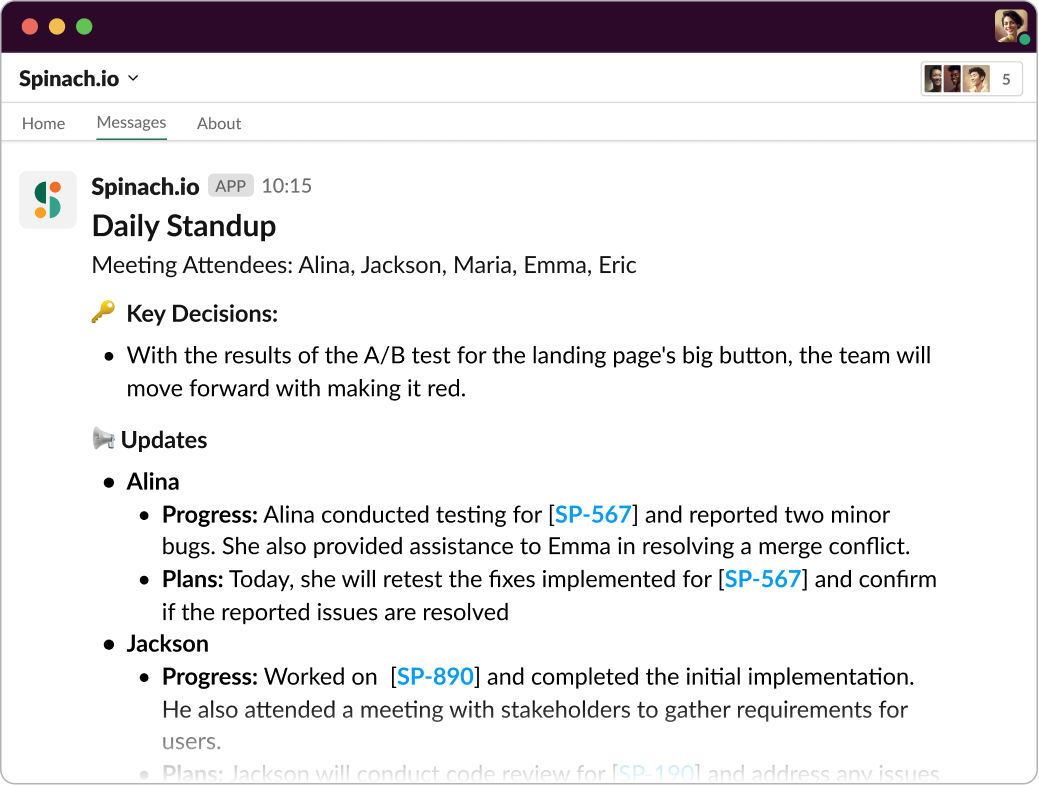
Add Spinach.io to Daily Standup to get instant summary of Progress and Plans toward your goal
Sprint review
At the end of the Sprint, it’s time for the Sprint review, a meeting where the team presents their work, discusses the results, and gathers feedback from stakeholders. The Product Owner, Scrum Master, Development Team, and any relevant stakeholders come together to review the completed tasks, demo the product increment, and discuss any lessons learned or changes needed for future Sprints.
The Sprint review meeting matters because it gives the team a chance to showcase their achievements, validate their work, and confirm they’re delivering value to end-users. It also helps keep everyone informed, engaged, and aligned with the project’s goals and progress.
Sprint retrospective
Finally, we have the Sprint retrospective, a meeting where the team reflects on the Sprint, identifies areas for improvement, and commits to making positive changes in the next Sprint. The Product Owner, Scrum Master, and Development Team discuss what went well, what didn’t go so well, and what can be done differently to optimize their processes and performance.
This stage is key for Agile project management because it drives continuous improvement, helping the team learn from their experiences and adapt their approach as needed. It’s all about adopting the Agile mindset and constantly improving how you work together.
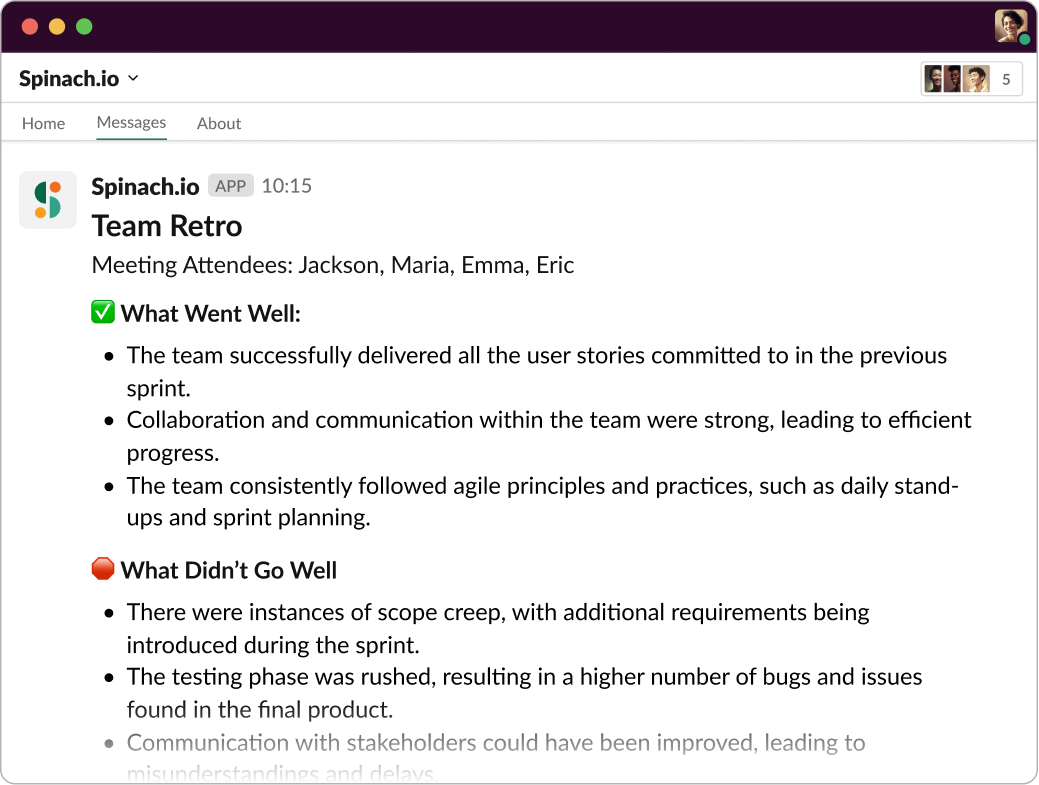
Add Spinach.io to your Retro to get document what went well, what didn’t and key decisions.
Best practices for sprint project management
Now that we’ve covered the Sprint cycle and its various stages, let’s talk about some best practices that can help your team get the most out of your Sprints. After all, the key to successful Sprint Project Management lies in mastering the art of planning, executing, and adapting like a pro. And with Spinach by your side, you’ll be able to do just that! 🌱 So, without further ado, here are 5-7 best practices to help you rock your Sprints:
1. Set clear, achievable goals: During Sprint planning, make sure your team sets specific, measurable, achievable, relevant, and time-bound (SMART) goals for the Sprint. This keeps everyone on the same page and focused on the right priorities.
2. Keep the team size manageable: A smaller, cross-functional team (usually between 5 and 9 members) tends to be more efficient, as it allows for better communication, collaboration, and decision-making. Avoid bloating your team with too many members or unnecessary roles.
3. Maintain a well-organized backlog: A well-organized product backlog makes it easier to rank tasks and plan Sprints effectively. Keep it up-to-date, order items based on value, and break larger tasks into smaller, manageable pieces.
4. Build transparency and communication: Encourage open, candid communication among team members, and make sure everyone is aware of the project’s progress and any challenges that arise. This will help build trust and cultivate a sense of ownership and accountability.
5. Use timeboxing effectively: Timeboxing is a powerful technique to keep meetings and tasks on track. Make sure your daily standups, planning sessions, and reviews adhere to their respective time limits, and use timers or alarms to stay focused on the task at hand.
6. Use the right tools: Scrum tools are important for sprints because they help teams manage their backlog, track progress, and collaborate effectively, improving the speed and effectiveness of the sprint.
Spinach AI is an enterprise conversation intelligence platform that captures decisions and action items from any meeting and routes them to Jira, Slack, Notion, or Confluence when the meeting ends. For agile teams, Spinach goes further: it suggests tickets based on your sprint discussions and generates stakeholder recaps so nothing decided in a ceremony gets lost. Get started with Spinach AI.
Benefits of sprints
Sprints offer numerous benefits that can help your team excel in their projects, keeping them motivated, productive, and aligned with the goals at hand. Let’s take a closer look at some of these benefits and how they can change the way your team works.
Increased team output and productivity
One of the main benefits of Sprints is the increased output they bring to the table. By focusing on a specific set of tasks within a timeboxed period, your team can better manage their workload and avoid distractions. This laser-sharp focus allows them to work more effectively and complete tasks at a faster pace, keeping your project on track and within budget. It’s like putting on productivity glasses that help you see and tackle what’s most important!
Improved quality
Sprints also contribute to improving the quality of your product. By delivering potentially shippable product increments at the end of each Sprint, your team can keep continuously refining and enhancing the product. This iterative approach reduces the risk of defects, as any issues are identified and fixed early instead of surfacing late. The result is increased customer satisfaction and a product that you can be proud of. It’s a win-win!
Greater transparency
Another fantastic benefit of Sprints is the greater transparency and visibility they provide into the progress of your project. Since your team is regularly delivering working software and engaging in reviews with stakeholders, everyone involved has a clear picture of where the project stands. This open communication and frequent feedback loops help to build trust, maintain alignment, and keep everyone informed and engaged. It’s like having a window into the heart of your project!
Enhanced customer satisfaction
Last but not least, Sprints are a powerful tool for boosting customer satisfaction. By delivering value to your customers frequently and continuously, your team can stay in tune with their needs and expectations, keeping the final product aligned with their requirements. This customer-centric approach increases the likelihood of success and helps build strong relationships with your clients, setting the stage for long-term collaboration and growth. It’s like sprinkling a little magic on your project and watching it flourish!
Spinach AI helps you run efficient sprints
Sprints empower your team to deliver higher quality products, maintain transparency, and boost customer satisfaction, all while staying true to the Agile framework. With Spinach AI on the team, you get structured summaries from your meetings, capturing key decisions and action items with named owners. For sprint ceremonies in particular, Spinach suggests tickets in Jira, Trello, Asana, ClickUp, or Linear based on what the team discussed, so nothing from planning, standup, or retro falls through.
So, what are you waiting for? Give your team the gift of Spinach and watch your projects soar to new heights!
Scrum is the overall agile framework that defines roles, artifacts, and ceremonies. A sprint is a specific timeboxed cycle within that framework, typically 2 to 4 weeks, during which the team works through a defined set of tasks and delivers a shippable product increment. Think of Scrum as the rulebook and each sprint as a single round of play.
The right sprint length depends on your team’s feedback needs and planning capacity. One-to-two-week sprints deliver faster feedback loops but require more frequent planning sessions; three-to-four-week sprints reduce that overhead but can delay surfacing blockers until late in the cycle. Most teams start with two-week sprints and adjust based on how often requirements shift.
Five to nine members is the widely accepted range. Below five, you risk skill gaps; above nine, communication slows and decision-making gets unwieldy. Keep the team cross-functional so design, build, and testing capacity all sit inside the sprint rather than waiting on handoffs.
Each sprint runs four ceremonies: planning (Product Owner, Scrum Master, and Development Team set the sprint goal and task list), daily standup (Development Team syncs on progress and blockers), sprint review (team demos completed work to stakeholders and collects feedback), and retrospective (team identifies specific process changes to carry into the next sprint). Spinach AI joins each ceremony, captures decisions and action items with named owners, and routes them to Jira, Slack, or Confluence when the meeting ends, so nothing agreed in the room disappears afterward.
The failure point is the gap between the meeting ending and someone manually re-entering what was decided into your project management tools. Spinach AI captures decisions and action items with named owners across sprint planning, standups, reviews, and retros, then routes structured outputs directly into Jira, Linear, Asana, Confluence, or Slack when the meeting ends. Get started with Spinach AI — no credit card required for the first 14 days.
What to do now
Next, here are some things you can do now that you've read this article:
- Our library of meeting agenda templates is designed to help you run more effective meetings.
- Learn more about Spinach and how it can help you run a high performing org.
- If you found this article helpful, please share it with others on Linkedin or X (Twitter)

