Mastering Jira for Scrum: Top Tips and Must-Have Apps & Plugins
This article explores the best practices for using Jira for your Scrum team, plus a helpful list of apps and plugins to help you maximize your results.
 Maintouch
Jira and Scrum: they’re a perfect pair, like peanut butter and jelly, or Batman and Robin. When you combine the project management power of Jira, with the flexible structure of Scrum, you get a robust framework that can help maximize efficiency for Agile software development.
Because Jira helps teams manage, monitor, and visualize ongoing work, you never have to worry about task assignments, priority management, or progress tracking getting lost in the shuffle. By utilizing the organizational capabilities of Jira with Scrum’s cycle-based approach, teams can unlock their full potential. Together, this dynamic duo is greater than the sum of its parts, and using Jira for Scrum can help Agile teams achieve unparalleled results.
In this blog post, we’ll break down the secrets of maximizing Jira for your Scrum projects, including key features, best practices, and the essential apps and plugins that can significantly enhance your team’s productivity.
What is Jira?
Jira, developed by Atlassian, is a widely recognized project management tool designed to meet the needs of Agile teams. It supports a multitude of Agile frameworks, including Scrum and Kanban, making it a valuable part of your Agile toolkit.
Jira is packed with powerful features that help streamline your Agile process. At its core, it offers robust issue-tracking and project management capabilities, enabling teams to easily track, manage, and prioritize their work.
Jira also provides built-in reports that give you insight and metrics around team performance, velocity and sprint progress. This helps teams measure their productivity and identify areas for improvement. Plus, Jira’s integration capabilities are not to be overlooked. It seamlessly collaborates with a range of tools, including Confluence, Bitbucket, GitHub, and Spinach, forming a cohesive project management environment.
Benefits of using Jira for Scrum
Scrum teams looking to boost their efficiency and organization will find a lot of benefit in using Jira for project management. Here are a few specific reasons why Jira shines as a tool for Scrum teams:
Real-time visibility: Jira provides a clear view of your team’s work in progress. With its intuitive Scrum boards, you can visualize sprints, backlogs, and track progress in real time.
Effective backlog management: Jira makes it easy to create and manage your product backlog. Prioritize user stories, estimate story points, and get everything organized for your next sprint planning.
Enhanced collaboration: Jira facilitates communication and collaboration within the team. It offers a central place for project information, reducing back-and-forths and fostering transparency.
Comprehensive reporting: Jira’s built-in reports give you insights into your team’s velocity, burndown rates, and more. These reports help in understanding the team’s performance and guide future planning.
Scalability: As your team and project grow, Jira scales with you. Its powerful features and extensive customization options make it an excellent tool for teams of all sizes.
Why is Jira helpful for agile workflows?
Agile workflows prioritize adaptability, continuous improvement, and collaborative effort. Jira shines in this domain due to its intuitive features, flexible structure, and focus on real-time collaboration. Here’s a detailed look at the features that position Jira as the go-to tool for Agile teams.
Scrum-focused features
Jira is built with Agile in mind, and it shows in its features. For Scrum teams, Jira provides specific tools that make managing the Scrum lifecycle a breeze. You have access to Scrum boards that help visualize work in progress, backlog management features that make sprint planning efficient, and customizable workflows that reflect your unique Scrum process. Moreover, Jira’s Agile reports, like sprint burndown charts and velocity charts, offer valuable insights into team performance and project progress, facilitating informed decision-making and iterative improvements.
Flexibility and customization
Agility is all about flexibility and responding to changes swiftly. Jira aligns perfectly with this principle. It offers customization options that allow you to tailor the tool according to your team’s needs. From creating custom issue types to defining workflows that mirror your process, Jira allows you to mold the tool as you see fit. This level of flexibility enables teams to manage their Agile process more effectively, accommodating changes with ease and efficiency.
Real-time collaboration
Agile workflows thrive on collaboration and communication. Jira fosters this by providing a shared platform for real-time collaboration. Team members can comment on issues, share files, and update progress in real-time. This transparency enhances team alignment, streamlines communication, and makes sure everyone is on the same page. With Jira, your team can work together cohesively, reducing misunderstandings and fostering a productive work environment.
Extensive integration ecosystem
In the interconnected world of software development, integration is key. Jira shines here with its vast ecosystem of integrations. It seamlessly connects with tools that Agile teams frequently use, such as Confluence for documentation, Bitbucket and GitHub for code repository management, Slack for communication, and more. This interconnectivity ensures a smoother workflow and helps maintain a single source of truth. By reducing the need to switch between multiple tools, Jira helps teams focus on what truly matters – delivering value.
What is the best way to use Jira for Scrum processes?
Leveraging Jira for Scrum processes is all about optimizing the features and flexibility it offers to align with your Scrum practices. However, using Jira efficiently goes beyond just understanding its features. It’s about integrating it with other tools that augment its capabilities and streamline your workflows. One such tool that boosts Jira’s potential for Scrum is Spinach. 🥬
Using Spinach + Jira for Scrum excellence
Spinach is your AI Scrum Master that integrates seamlessly with Jira to help you run more effective meetings. It’s designed to help accelerate Agile development teams by handling administrative processes that can bog down your workflow, like creating tickets and documenting action items. Spinach takes care of the operational tasks, so your team can focus on delivering their best work.
Ticket creation
One of the standout features of Spinach is its ability to suggest tickets based on your meeting discussions. Imagine this: you’re in a meeting, discussing a bug or a task, and you don’t have to worry about manually finding the Jira ticket for it. Spinach does that for you, linking the discussion with the corresponding ticket in your summary and action items for extra context. This way, your whole team can easily reference the tickets later in Jira. If there’s something discussed that doesn’t have a ticket, Spinach steps up again, suggesting a new ticket for you and adding it to your board with a single click of approval.
Meeting summaries
No more frantic note-taking during meetings! Spinach can generate meeting summaries, documenting the key decisions and action items. With Spinach at the helm, you can fully engage in the discussion, knowing that no detail will be missed. It ensures nothing falls through the cracks, making post-meeting follow-ups more streamlined and focused.
Action items
After a meeting, Spinach helps you keep things moving by suggesting action items from your discussions. It captures the decisions, assigns an owner, and sends a summary in Slack. This way, everyone on the team knows what needs to be done, who’s responsible for it, and when it needs to be completed. It helps keep your team aligned, accountable, and on track with their tasks.
By integrating Spinach with Jira, you’ll be bringing an extra layer of efficiency and intelligence to your Scrum processes. Using Spinach with Jira allows you to stay on top of your tasks, run more efficient meetings, and ensure that your team is always aligned and moving forward.
Best practices for using Jira for Scrum
Now that we’ve explored how Jira, combined with Spinach, can elevate your Scrum processes, let’s delve into some best practices for using Jira in your Scrum workflow. These tips can help you get the most out of Jira and enable your team to work efficiently and effectively.
Define clear workflows: Jira allows you to create custom workflows that mirror your Scrum process. Take advantage of this by defining clear, simple workflows that reflect your team’s way of working. A clear workflow helps everyone understand the progress of tasks and reduces ambiguity.
Use Scrum boards effectively: Scrum boards in Jira are a visual representation of your sprint progress. Update them regularly, move tasks across different stages, and ensure they reflect the real-time status of your work.
Prioritize backlog management: Backlog grooming is a crucial part of Scrum. Use Jira to maintain a well-prioritized, estimated backlog. Regularly review and update your backlog to keep it relevant and manageable.
Make the most of Agile reports: Jira offers numerous Agile reports like velocity charts, burn-down charts, and cumulative flow diagrams. Use these reports to track team performance, understand progress, and inform future planning.
Optimize for collaboration: Foster transparency and open communication in your team by leveraging Jira’s collaboration features. Use the commenting function on tasks, share updates, and encourage team members to do the same.
Utilize integrations: Jira’s extensive integration ecosystem can help you streamline your work. Identify the tools your team uses regularly and integrate them with Jira to create a cohesive work environment.
Other helpful apps and plugins for Jira
As we’ve seen, Jira can be a powerhouse for Scrum teams, especially when boosted with Spinach. But why stop there? Jira’s strength also lies in its extensive marketplace of apps and plugins. Let’s take a look at some of these apps that can take your Jira experience up a notch. 🚀
Easy Agile
Easy Agile is a user-friendly app that further enhances the agility of your Jira. It provides visual roadmaps, allowing you to plan, track, and manage your Agile projects with ease. By integrating it with Jira, you get a clear, intuitive visual of your project timelines, dependencies, and progress. It’s a great way to add some visual flair to your Agile planning.
ScriptRunner
Next up is ScriptRunner, a versatile plugin that gives you the power to automate and extend Jira’s capabilities through scripts. It lets you automate tasks, manipulate data, and create custom workflows that can adapt to your complex business needs. In the hands of a skilled user, ScriptRunner can be a game-changer, allowing you to tailor Jira to your exact specifications.
BigPicture
Looking for a more strategic view of your projects? BigPicture has you covered. This app gives you Gantt charts, roadmaps, and risk matrices to help you plan and track at the program level. It provides a bird’s eye view of your projects, which can be helpful when managing multiple teams or large projects in Jira.
Aha!
If product management is your focus, Aha! is the app for you. It offers a comprehensive suite of product management tools, from roadmapping to idea crowdsourcing. By integrating Aha! with Jira, you can ensure that your product strategy is always aligned with your development work.
eazyBI
eazyBI serves as a comprehensive tool for measuring, analyzing, and visualizing your Jira metrics. This tool simplifies the intricacies of Jira, providing an accessible avenue to instantly explore all your data with its user-friendly Jira data model.
You have the ability to manage an array of components including workflows, projects, epics, stories, subtasks, and custom fields. eazyBI offers a wide range of pre-built Jira reports in its extensive library that you can use as a starting point. But if you prefer, you also have the flexibility to create custom reports from scratch to suit your unique needs.
Streamline your ticket creation in Jira with Spinach
We all want to boost productivity, streamline our workflows, and empower our teams to deliver their best. And that’s exactly where Spinach shines. Whether you’re using Jira alone or enhancing it with other apps and plugins, integrating Spinach into your Scrum process is a game-changer.
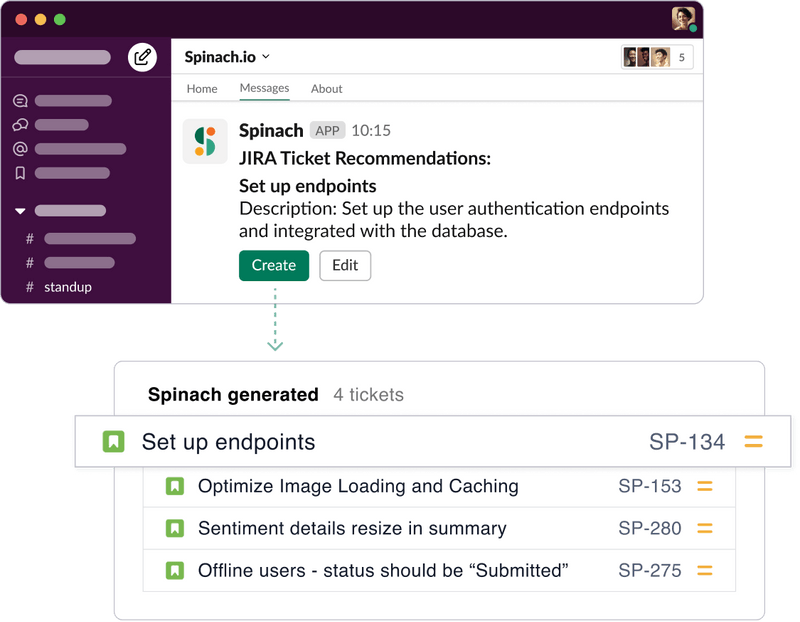
With Spinach, you can effortlessly streamline your ticket creation in Jira, ensure nothing falls through the cracks, and keep everyone on the same page. More importantly, it lets you focus on what really matters: building incredible products and fostering a collaborative, high-performing Agile team.
If you’re ready to spend less time documenting your meetings, and more time doing great work, set up your AI Scrum Master today and let Spinach elevate your Agile journey to new heights. The future of Agile is here, and it’s waiting for you at Spinach. 🚀
What should you do now
Next, here are some things you can do now that you've read this article:
- You should check out our library of meeting agenda templates for every type of meeting.
- You should try Spinach to see how it can help you run a high performing org.
- If you found this article helpful, please share it with others on Linkedin or X (Twitter)

