8 Sprint Retro Tools for Agile Teams (July 2026)
Improve your sprint retrospectives with these 8 tools specifically designed for engineering teams. We'll cover AI integrations to assist retro planning, July
 Maintouch
The right retrospective tool saves prep time, surfaces patterns across sprints, and keeps action items from falling through the cracks. Here are 8 options built for engineering teams that want retros that are more efficient, collaborative, and insightful.
These tools will make your retros more fun, collaborative, and insightful than ever before. We’ll cover AI tools to automate manual steps for retro planning, facilitation, summarization and follow-up with integrations in your existing tool set.
TLDR:
- Retro tools remove manual prep work by automating feedback collection, grouping, and follow-up routing.
- Anonymous card submission and shared boards get input from quieter engineers, moving beyond the loudest voices.
- Free options exist across the list: Reetro costs nothing, ScatterSpoke is free for up to 15 members, goReflect is free for 100 days.
- Tools like goReflect run persistent boards so your retro meeting starts with content already on the board.
- Spinach AI joins your retro, captures decisions and action items, and routes summaries to Slack, Jira, or Confluence when the meeting ends.
How your team benefits from retrospective tools
Before getting into the tool showcase, let’s take a moment to appreciate the magic of retrospective tools and how they can improve your team’s Agile experience. These Scrum tools are designed to simplify processes, centralize workflows, and enhance collaboration and productivity. Are you ready to level up your retrospectives? Let’s break down the benefits in detail.
Automate prep and follow-up
Retrospective tools help automate various processes, such as gathering feedback, tracking progress, and identifying areas for improvement. By automating these tasks, your team can focus on what truly matters: discussing and implementing changes that lead to growth and success. No more tedious manual work or chasing after team members for their input!
Centralize information
Having a single platform for all your Agile workflows can be a game-changer. Retrospective tools centralize tasks, documents, and conversations, making it easier to track and manage your team’s progress. This saves time and helps maintain consistency across your projects. So long, scattered data and lost information!
Participation from everyone
A well-chosen retrospective tool removes the friction that keeps quieter team members from contributing. Features like anonymous card submission let engineers share candid feedback without worrying about attribution, a pattern team psychological safety research connects directly to higher team learning and effectiveness, while real-time shared boards mean remote and in-office teammates are working from the same view at the same time. Interactive dot-voting and comment threads give every person a structured way to weigh in on what matters most, instead of defaulting to whoever speaks loudest in the room. The result is a retro where input reflects the full team, going beyond the most vocal three people.
Better feedback from team
Let’s face it: traditional sprint retrospectives can sometimes be, well, a tad dull. But with the right retrospective tool, you can inject some much-needed excitement into the mix! Gamification, user-friendly interfaces, and interactive features can make retrospectives more enjoyable, leading to higher engagement and, in the end, increased productivity. Who knew retros could be so fun?
Sprint retro tools at a glance
Tool | Best For | Standout Feature | Free Option | Starting Price |
|---|---|---|---|---|
Spinach AI | Teams that want AI-powered retro capture and automatic follow-up routing | Joins the retro, captures decisions and action items, routes summaries to Slack, Jira, or Confluence | Yes (Starter) | Free |
Parabol | Distributed teams running varied ceremony types | Multiplayer drag-and-drop cards with meeting summaries | Yes (up to 2 teams) | $6/user/month |
TeamRetro | Co-located or remote teams focused on action items | Auto-suggest grouping and team health checks | No | $25/month |
EasyRetro | Teams wanting 100+ templates and in-session surveys | 100+ board templates with voting, comments, and surveys | No | $25/month |
Reetro | Small teams on a tight budget | Real-time collaborative boards with no participant account setup | Yes (always free) | Free |
ScatterSpoke | Remote teams wanting AI insights and anonymous feedback | AI-generated sentiment and bottleneck analysis | Yes (up to 15 members) | Free |
goReflect | Teams that log observations continuously throughout the sprint | Persistent boards that build sprint-over-sprint metrics | Yes (100 days) | $2.67/user/month |
Metro Retro | Teams wanting a visually engaging whiteboard experience | Real-time whiteboard with icebreakers, energizers, and sticky notes | Yes (limited) | $6/member/month |
1. Spinach.io
Let’s kick things off with Spinach, an enterprise conversation intelligence platform and the system of record for conversation data. Spinach captures decisions, action items, and follow-ups from any meeting and routes them into the tools your team already uses. For retro-focused teams, that means joining the ceremony, capturing the discussion, and routing structured summaries to Slack, Jira, or Confluence when the meeting ends, with no manual re-entry.
Add Spinach to your retro for structured notes, action items, and follow-ups captured during the meeting and delivered when it ends. Spinach routes the summary to Slack, Jira, or Confluence automatically, so the team can act on what was decided without a post-meeting cleanup pass.
What sets Spinach apart from the other tools on this list is scope. Where retro tools stop at the board, Spinach captures the full conversation and routes structured outputs (decisions, named owners, action items) directly into the systems your team already uses. Retro follow-up happens automatically, not in a separate post-meeting pass.
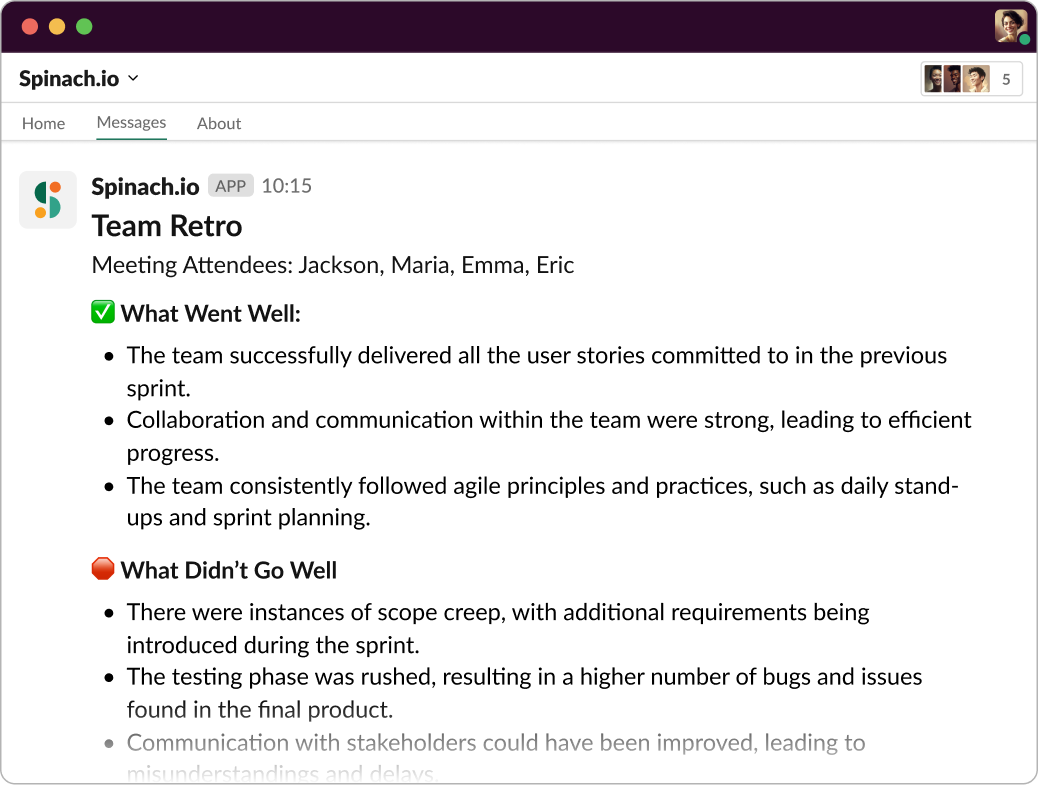
Spinach joins the retro, captures decisions and action items as the conversation happens, and routes structured outputs to Slack, Jira, or Confluence when the meeting ends. The team’s follow-through is documented and filed before anyone leaves the call.
Key features
- Add Spinach to any meeting
- Instant summaries, wherever you work
- Action items directly in Slack
- Ticket suggestions directly in Slack
- Stakeholder insights and recaps
- Integrations with calendar, messaging, ticketing and knowledge base tools
Pricing
Spinach offers four pricing tiers:
Starter: Free
Pro: $2.90 per meeting hour
Business: $29/user/month (monthly) or $19/user/month billed annually
Enterprise: Custom pricing — contact sales
2. Parabol
Next up, we have Parabol, another great option for retrospective tools. Parabol is all about helping distributed teams run efficient and impactful Agile meetings, from sprint retrospectives to daily standups. It focuses on simplicity and flexibility and serves as an effective tool in encouraging team members to reflect on their processes and their roles within the team. Parabol has a variety of templates for different meeting formats to help meet the needs and preferences of your team.
Key features
- Customizable retro formats
- Integrates with tools like Slack, GitHub, and Jira
- Generates meeting summaries
- Multiplayer participation with drag-and-drop cards
- Timer and takeaway tasks
Pricing
Starter: Free for up to 2 teams
Team: $6 per user per month
Enterprise: Custom pricing
3. TeamRetro
Say hello to TeamRetro, another powerful retrospective tool that’s designed to make your Agile meetings more efficient and engaging. This tool supports action-focused meetings with your team, regardless of whether they are co-located or remote. Its intuitive design lets conversations flow clearly and keeps the focus on actionable items. You can start with a template from their toolkit or create your own.
Key features
- Variety of retrospective templates
- Auto-suggest feature for grouping similar ideas
- Team health checks
- Dashboards and reporting for data-driven insights
- Integration tools like Slack, Jira, and Trello.
Pricing
Single team: $25 a month
Small org: $60 a month
Large org: $90 a month
Enterprise: Contact for pricing
4. EasyRetro
EasyRetro provides a complete solution for retrospective meetings, letting you create both private and public boards from a collection of over 100 templates. The tool handles the organization of past retrospectives through a dashboard and provides sorting and filtering options for efficient analysis. Members can actively participate in the retrospective by adding comments, voting on cards, creating action items, selecting from various retrospective ideas, and even running surveys.
Key features
- Customizable retrospective boards
- Drag and drop functionality for retro cards
- Run surveys during retrospectives
- Integrates with Microsoft Teams, Confluence, Jira, and Slack
Pricing
Team: $25 a month
Business: $60 a month
Large business: $90 a month
5. Reetro
Reetro is a free retrospective tool built around a configurable board format that supports the most common retro structures, including Start/Stop/Continue, Mad/Sad/Glad, and 4Ls. Teams can run real-time collaborative sessions where members add cards, vote on issues, and leave comments without needing any account setup from participants. Its polls and health-check features are a practical way to gauge team morale alongside the standard retro items. The main trade-off is navigation: retro boards can get buried beneath other tool sections, so teams that want retros as the primary focus may need to walk new members through the layout before their first session. For small teams on a tight budget, though, Reetro delivers solid retro functionality at no cost.
Key features
- Smart meeting notes editor
- Configurable board formats
- Polls & Health Checks
- 24/7 Email Support
- Integrates with tools like Trello, Jira, and Confluence
Pricing
Free
6. ScatterSpoke
Next on our list is ScatterSpoke, a powerful retrospective tool designed to help remote teams identify opportunities for growth and eliminate bottlenecks. It uses AI to let you extract meaningful insights from the retrospective data you gather during meetings, providing you with valuable information on team sentiment, bottlenecks, and potential solutions. With this tool, the Scrum Master can collect anonymous feedback, while team members can share cards in real-time, vote on issues, and pin items for follow-up.
Key features
- Supports retros and standups
- Shared boards, live updates, and in-app chat
- Anonymous feedback
- AI-generated insights
- Integrates with tools like Slack, GitHub, and Jira
Pricing
Team: $0 a month for 15 team members
Business: $6 a member per month
Enterprise: Contact for custom pricing
7. goReflect
goReflect takes a different approach from most retro tools: instead of opening a blank board at the start of each sprint, it runs a persistent, always-on board where team members post observations throughout the sprint as they happen. That means by the time the actual retro meeting arrives, the board already has content and the conversation can skip straight to discussion and voting. Archived cards build up over time into metrics that surface recurring patterns — a gap agile retrospective data research identifies as common, finding that most teams rely on memory and anecdotal feedback rather than objective sprint data — so a Scrum Master can see whether the same bottleneck has come up three sprints in a row, instead of treating it as a one-off. It works best for teams that want retro prep baked into their daily workflow, instead of a single pre-meeting scramble.
Key features
- Perpetual retrospective boards
- Archived cards build metrics that can provide insights
- Anonymous posts and feedback
- Built-in templates or customize your own board
Pricing
Free for 100 days, then $2.67 per user/month.
Enterprise: Contact for pricing
8. Metro Retro
Last but not least, we have Metro Retro, a visually appealing and engaging retrospective tool that’s designed to make your Agile meetings more productive and fun. This tool provides a real-time retrospective whiteboard equipped with agile-specific collaboration features, keeping retros fun and productive. With its customizable templates, you can tailor the tool to suit any type of session.
Key features
- Facilitation menu to keep meetings focused
- Icebreakers and energizers
- Various templates for retros, meetings, and roadmaps
- Real-time collaboration capabilities like sticky notes and Reaction tool
Pricing
Free: limited functionality for small teams
Host: $25 per host a month
Team: $6 per team member a month
Run better retrospectives (and agile meetings) with Spinach
We’ve covered 8 sprint retrospective tools, each with strengths suited to specific team needs. Spinach stands apart because it goes beyond the retro board: as an enterprise conversation intelligence platform and the system of record for conversation data, it captures decisions, action items, and follow-ups from any meeting and routes them into the tools your team already uses. For engineering teams running standups, retros, and sprint ceremonies, the full conversation record connects retro discussions to named owners and filed tickets, with no manual follow-up required.
Start your journey towards more productive, engaging, and insightful Agile meetings today!
ScatterSpoke handles anonymous card submission and AI-generated insights for distributed teams, while Spinach AI joins the retro directly, captures decisions and action items during the meeting, and routes structured summaries to Slack, Jira, or Confluence when it ends. If your goal is to close the loop between the retro conversation and your team’s actual ticketing workflow without manual re-entry, Spinach AI is the stronger fit.
goReflect runs a persistent board throughout the sprint so team members log observations as they happen, meaning the retro meeting starts with content already in place rather than a blank board. EasyRetro opens a fresh board each session with voting, comments, and survey features built for the meeting itself, which works better for teams that prefer a structured pre-meeting setup over continuous async contribution.
A persistent retrospective board stays open between sprints, letting engineers post observations in real time as blockers and wins occur rather than scrambling to recall them right before the retro. goReflect uses this model, and the archived cards accumulate into metrics that surface whether the same bottleneck has appeared across multiple sprints, turning one-off complaints into a pattern a Scrum Master can act on.
Parabol offers customizable retro formats with multiplayer drag-and-drop cards and meeting summaries, making it a solid choice for distributed teams running varied ceremony types. ScatterSpoke adds AI-generated insights and anonymous feedback with live updates, which gives it an edge when the Scrum Master wants sentiment and bottleneck data pulled from retro content automatically.
Start with a tool that separates feedback collection from the live discussion. Anonymous card submission before the meeting reduces the influence of whoever speaks first. During the retro, use dot-voting to prioritize rather than spending the session cataloguing complaints. Spinach AI joins the meeting, captures decisions and named action items as the conversation happens, and routes them to Jira or Slack when the meeting ends, removing the manual step where follow-through most often breaks down.
What to do now
Next, here are some things you can do now that you've read this article:
- You should check out our library of meeting agenda templates for every type of meeting.
- You should try Spinach to see how it can help you run a high performing org.
- If you found this article helpful, please share it with others on Linkedin or X (Twitter)

