The 9 Best Retrospective Tools for Agile Teams
Leading a retrospective meeting is way harder than it seems. The right tools can make a big difference. Here are my top 9 retrospective tools for agile teams.
 Maintouch
Running a great retrospective isn’t as easy as it might sound. If you’re not familiar with retrospectives, they’re meetings where agile teams get together to review their work, learn from their experiences, and figure out how to improve. As a product manager with nearly 2 decades of experience, I can tell you that it takes effort to make these sessions valuable and engaging for everyone on the team.
Picking the right retrospective tool can help. But choosing one can be a little overwhelming, especially when there are so many options out there. In this article, I’ll go over the 9 top retrospective tools out there. Whether you’re just starting with retrospectives or looking to make yours even better, these tools can help you create the perfect environment for meaningful conversation and positive change.
Features to look for in Agile retrospective tools
Before we get into my recommendations for the top 9 retrospective tools, let’s make sure you know what I was looking for in a retrospective tool.
Customizable templates
Templates are your best friends when it comes to retrospectives. Why reinvent the wheel every time? Customizable retro templates let you create a personalized structure for your team’s retrospectives, tailored to your unique needs and goals. A tool that allows you to customize templates will help your team save time and ensure consistency.
Real-time collaboration capabilities
Imagine a world where your team can brainstorm, discuss, and vote on action items together—without any annoying lag or miscommunication. Real-time collaboration capabilities make this dream a reality. A good retrospective tool should enable your team to work simultaneously, no matter where they are in the world. This feature ensures that everyone is engaged, contributing their insights, and working together towards a common goal.
Integration with other tools
You’ve already got a bunch of tools in your tech stack, right? The last thing you need is another siloed tool that doesn’t play nice with others. A top-notch retrospective tool should seamlessly integrate with the tools you already use, like Slack, Jira, Zoom, and Google Meet. This will streamline your workflow, minimize context switching, and ultimately save you time and headaches.
User-friendly interface
A user-friendly interface is crucial for any retrospective tool. It should be intuitive, easy to navigate, and visually appealing. A tool with a user-friendly interface will make your Agile retrospectives more enjoyable and efficient, ensuring that everyone on your team can fully participate without any hiccups.
Security and data privacy
Last but definitely not least, security and data privacy are paramount. 🔒 Your retrospective tool should protect sensitive data with robust security measures and comply with data privacy regulations. After all, your team’s discussions and insights are valuable intellectual property that should be treated with care. By choosing a tool with strong security and data privacy features, you’ll not only protect your team’s information but also foster trust among your team members.
Now that we’ve covered the key features, let’s dive into the top 9 retrospective tools you should consider for your team! 🚀
The best retrospective tools for Agile teams
From AI-powered Scrum Masters to simple and sleek platforms, these are the top 9 retrospective tools that agile teams should consider in 2023. Ready to level up your retrospectives? Let’s go!
1) Spinach
First up, Spinach! 🌱 Spinach works like an AI Scrum Master to help you facilitate agile meetings, write meeting summaries, create tickets, and remind you to follow up. What sets Spinach apart from the rest of the tools listed here is its AI-powered automation. You don’t have to change any habits or learn any new tools to get better outcomes from your retro.
Before the Retro: Through the Slack integration, Spinach will provide context from your last retro, and remind the team to come prepared with their ideas. When everyone is prepared, retros are more structured and a better use of everyone’s time.
During the Retro: No one needs to share their screen! Through the Zoom and Google Meet integration, the retro agenda and talking points are displayed directly in your video tool for everyone to see and interact with together. You can see “who goes next” with a visible timer.
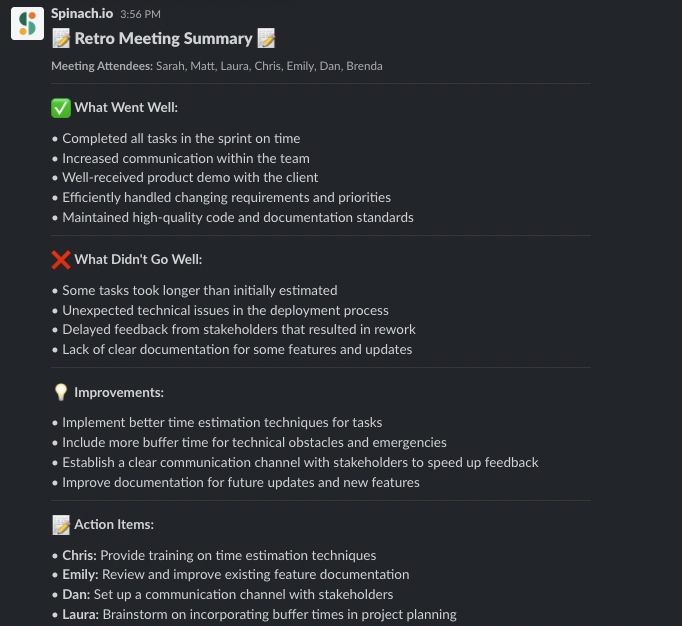
After the Retro: When your retro is finished, Spinach automatically generates a meeting summary in Slack that captures decisions and action items. This way, the team can stay present during the discussion instead of taking notes.
Pricing
Spinach offers three different pricing options to choose from:
Free plan (while in beta)
Business plan: $6 per user per month
Enterprise plan: Custom pricing available upon request
2) ScatterSpoke
ScatterSpoke is another solid choice for retro tools, with a focus on helping Agile teams uncover and tackle hidden problems. Its unique approach to visualizing data sets it apart, turning your team’s feedback into beautiful and insightful graphs.
ScatterSpoke allows team members to share their feedback and opinions in a visual way. The tool presents a virtual board with sticky notes that represent ideas or feedback. Team members can drag and drop their sticky notes onto the board, and group them into common themes or categories. This allows the team to quickly identify patterns and prioritize feedback based on the number of people who mention it.
Pricing
Team: $0 a month for 15 team members
Business: $6 a member per month
Enterprise: Contact for custom pricing
3) Reetro
Reetro is an online retrospective tool that helps teams to reflect on their past projects or sprints and identify areas for improvement. It offers a variety of templates for retrospectives, such as “Start, Stop, Continue,” “Glad, Sad, Mad,” and “What Went Well, What Didn’t, What Can We Improve.” These templates help guide the team through the retrospective process and ensure that all important topics are covered.
Reetro is free, but has a more complex user interface that could take time for teams to learn as the retro boards can easily get buried underneath other sections.
Pricing
Free
4) GoRetro
GoRetro is also a free retro tool that enables teams to collaborate and reflect on their performance during a project or iteration. It allows team members to anonymously share their thoughts and feedback on what went well, what could be improved, and what actions need to be taken to move forward. It provides a digital space where everyone can share their opinions without fear of being judged or singled out. By enabling anonymous feedback, team members can feel comfortable sharing their thoughts and ideas, which can help identify problems and opportunities that may not have been otherwise discovered.
Pricing
Free
5) Parabol
Parabol is a powerful retrospective tool designed for remote and co-located Agile teams. With a focus on user experience and team engagement, Parabol makes retrospectives enjoyable and productive. It has a variety of templates for different meeting formats, such as “Start, Stop, Continue,”and the “4Ls Retrospective (Liked, Learned, Lacked, Longed for).” The tool allows team members to participate in the retrospective process asynchronously, meaning that they can add their feedback and insights at their convenience.
Pricing
Starter: Free for up to 2 teams
Team: $6 per user per month
Enterprise: Custom pricing
6) Retrium
Retrium is a tried-and-true retrospective tool designed specifically for Agile teams. Its unique selling point is the variety of built-in retrospective techniques it offers, allowing your team to experiment and find the best fit. This tool allows team members to participate in the retrospective process asynchronously, meaning that they can add their feedback and insights at their convenience. It also provides a virtual “whiteboard” where team members can share their ideas and group them into common themes or categories.
Pricing
Team: $39 per team room per month
Business: $59 per team room per month
Enterprise: Contact sales
7) goReflect
goReflect is a tool for retrospectives that encourages ongoing review of processes. It assists your team in cultivating a daily awareness of continuous improvement opportunities by promoting the sharing of topics on the retro board at any time. With this tool, teams can share their ideas through a customizable board or a stream. To address any concerns regarding groupthink, the tool offers the option to mask the cards and hide their content until the retrospective meeting.
Pricing
Free for 100 days, then $2.67 per user/month.
Enterprise: Contact for pricing
8) TeamRetro
TeamRetro’s primary focus is on engaging team members through interactive features and easy collaboration, ensuring that everyone is actively involved in the process of learning and improvement. This tool enables remote or co-located teams to conduct engaging and action-oriented retrospectives by storing all actions in a single list that can be tracked from one meeting to another.
Pricing
Single team: $25 a month
Small org: $60 a month
Large org: $90 a month
Enterprise: Contact for pricing
9) Neatro
Neatro is a simple and intuitive retrospective tool that helps Agile teams focus on what truly matters during retrospectives. Its clean interface and easy-to-use features make it an excellent choice for teams looking for a hassle-free solution. This app can assist managers of on-site or remote teams in selecting a template or creating a custom retrospective activity that precisely aligns with their team’s context, needs, and requirements.
Pricing
30-day free trial
Premium: $23.20 per team a month
Pro: $31.20 per team a month
Enterprise: Contact for pricing
Make your retrospective meetings more impactful with Spinach
Retrospectives are crucial for Agile teams to continuously learn and improve. With the right tool, you can elevate your retrospectives to new heights, making them more efficient, engaging, and actionable. Remember to look for customizable templates, real-time collaboration, integration with other tools, a user-friendly interface, and solid security and data privacy. While there are many great options out there, Spinach stands out as a superior choice, thanks to its AI-driven Scrum Master, seamless integration, and delightful user experience.
Ready to revolutionize your retrospectives with AI? Don’t wait another minute- start your Spinach journey today!
What you should do next
Now that you've read this article, here are some things you should do:
- You should check out our library of meeting agenda templates for every type of meeting.
- Learn more about Spinach and how it can help you run a high performing org.
- If you found this article helpful, please share it with others on Linkedin or X (Twitter)

