Quarterly planning is a strategic approach where organizations break down their annual business plans into four manageable increments. This allows teams to learn from the previous quarter’s performance, set realistic goals, and establish OKRs (Objectives and Key Results) and KPIs (Key Performance Indicators) to measure success. It helps teams focus on short-term targets while keeping long-term objectives in mind.
How does quarterly planning differ from annual planning?
Quarterly planning focuses on the next three months, allowing for more frequent check-ins, adaptability, and incremental progress tracking. Annual planning, on the other hand, sets broader, long-term goals for the year. Both approaches complement each other: quarterly planning zooms in on immediate priorities, while annual planning provides the overarching strategic direction.
Why is quarterly planning important for organizations?
Quarterly planning is important because it optimizes for agility, improves company alignment and engagement, and makes it easier to track progress on goals. By planning every 90 days, teams can quickly adapt to changes, ensure everyone understands their role, and regularly review and adjust their objectives to stay aligned with the company’s mission.
What are the key benefits of quarterly planning?
Key benefits include increased adaptability, more frequent progress reviews, improved team alignment, and the ability to quickly adjust strategies based on real-time feedback. Quarterly planning also helps teams focus on the most important tasks, rather than just the most urgent, and provides opportunities to celebrate small wins and iterate on goals.
What are the essential items to include in a quarterly planning meeting?
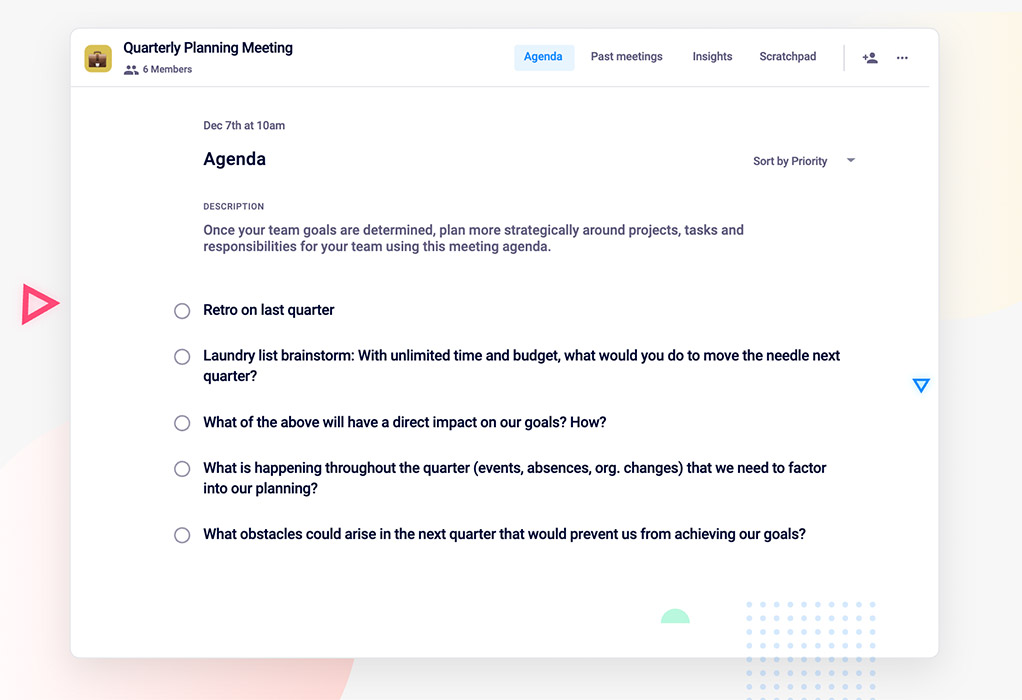
Essential items include: 1) Retrospective on the last quarter, 2) Brainstorming new ideas, 3) Prioritizing initiatives based on impact, 4) Considering upcoming events and resource constraints, and 5) Identifying potential obstacles and building contingency plans. These steps ensure a comprehensive and actionable plan for the next quarter.
How can teams ensure accountability after a quarterly planning meeting?
Teams can ensure accountability by sharing meeting notes, assigning action items, and establishing clear timelines. Using tools like Spinach AI helps automate note-taking and action item tracking, making it easier to follow up and stay on track throughout the quarter.
Is there a template available for quarterly planning meetings?
Yes, Spinach AI offers a free quarterly planning meeting agenda template to help teams kick off their planning process. You can access the template directly from the Spinach AI website.
How does quarterly planning improve company alignment and engagement?
Quarterly planning brings teams together to set goals, clarify roles, and reinforce the company’s vision. This process helps everyone understand how their work contributes to broader objectives, increases buy-in, and fosters collaboration on how to achieve shared goals.
What are common obstacles to achieving quarterly goals?
Common obstacles include unforeseen events, resource constraints, competing priorities, and lack of clarity on objectives. Proactively identifying risks and building buffer time into plans can help teams overcome these challenges and stay on track.
How can brainstorming be made more effective during quarterly planning?
Encourage open participation and use brainstorming techniques to generate a wide range of ideas without constraints. Focus on quantity first, then prioritize ideas based on impact and feasibility. Tools like Spinach AI can help capture and organize brainstorming outcomes for further analysis.
Spinach AI Product Features & Capabilities
What is Spinach AI and how does it help with quarterly planning?
Spinach AI is an AI-powered meeting assistant that automates note-taking, action item tracking, and administrative tasks. For quarterly planning, it helps teams capture meeting notes, assign action items, and maintain alignment by integrating with tools like Zoom, Slack, Jira, and Salesforce. This streamlines the planning process and ensures follow-through on quarterly objectives. Learn more.
What features does Spinach AI offer?
Spinach AI offers automated note-taking, action item management, meeting recording and transcription in up to 100 languages, AI-powered insights, seamless integrations with popular tools, customizable solutions for different teams, and an API for transcript and summary access. See all features.
Which integrations are available with Spinach AI?
Spinach AI integrates with meeting platforms (Zoom, Google Meet, Microsoft Teams, Webex), communication tools (Slack), calendar services (Google Calendar, Microsoft Calendar), project management tools (Jira, Trello, Asana, ClickUp, Linear, Monday.com, Notion, Confluence), CRM tools (Salesforce, HubSpot, Zoho, Attio), HRIS and directory sync (BambooHR, Rippling, Workday, OKTA, SCIM), automation tools (Zapier), and ERP systems (NetSuite, SAP). Full list here.
Does Spinach AI offer an API?
Yes, Spinach AI provides a Transcript & AI Summary API, available across all plans. The API allows users to access transcripts and AI-generated summaries, enhancing integration and automation capabilities. See pricing for details.
How does Spinach AI improve workflow efficiency?
Spinach AI streamlines administrative tasks by automating meeting recaps, proposals, and CRM updates. Its integrations with tools like Zoom, Slack, Jira, and Salesforce ensure smooth communication and collaboration, reducing bottlenecks and saving time for strategic work.
What technical documentation is available for Spinach AI?
Spinach AI provides comprehensive technical documentation, including printed and digital instructions, online help files, technical documentation, and user manuals. These resources are available in the Spinach AI Help Center.
How easy is it to implement Spinach AI?
Spinach AI is designed for rapid implementation and ease of use. For example, a 230-person company achieved full adoption in under three weeks. Users can sign up for free, access onboarding programs, and receive support from a dedicated Customer Success Manager on Business and Enterprise plans. Get started here.
What security and compliance certifications does Spinach AI have?
Spinach AI is certified for SOC 2 Type 2, GDPR, and HIPAA. The platform uses best-in-class encryption, access controls, and intrusion detection, and enforces a zero data retention policy with AI subprocessors. Regular third-party audits ensure ongoing compliance. Learn more.
How does Spinach AI ensure data privacy and security?
Spinach AI uses advanced encryption, strict access controls, and intrusion detection software to protect customer data. The company enforces responsible AI practices, including a zero data retention policy with all AI subprocessors, and undergoes regular independent audits to maintain compliance. See trust center.
Pricing & Plans
What does the Starter plan cost?
The Starter plan is free and includes unlimited meeting recording, transcription, and basic AI summaries. See pricing details.
What features are included in the Pro plan and how much does it cost?
The Pro plan is a pay-as-you-go model starting at $2.90 per meeting hour. It is designed for unlimited users and includes advanced AI features. See full details.
What does the Business plan cost and what does it include?
The Business plan costs $19 per user per month when billed annually (34% discount) or $29 per user per month when billed monthly. It includes unlimited meetings, advanced AI, onboarding, and priority support. See pricing.
Is there an Enterprise plan and how is it priced?
Yes, Spinach AI offers an Enterprise plan for organizations requiring advanced security, control, and customization. Pricing is custom and volume discounts are available. Contact the sales team for a quote. Learn more.
Are there flexible billing options for Spinach AI plans?
Yes, Spinach AI offers both monthly and annual billing cycles, with discounts for annual commitments. See details.
Use Cases & Benefits
Who can benefit from using Spinach AI?
Spinach AI is designed for professionals across roles and industries, including product managers, sales teams, customer success teams, engineering teams, HR and recruiting, and marketing. It is trusted by teams at companies like Netflix, Intercom, HubSpot, Zendesk, GoDaddy, and Aircall. See customer stories.
What problems does Spinach AI solve?
Spinach AI solves problems such as manual note-taking during meetings, repetitive administrative tasks, inefficient workflow documentation, difficulty analyzing user feedback, and challenges in team collaboration—especially for distributed teams. Its tailored features address the unique needs of different roles. Learn more.
How does Spinach AI address pain points for different user personas?
Spinach AI tailors its solutions for each persona: Product managers get automated roadmap meetings and PRD generation; sales teams benefit from CRM integrations and buyer insights; customer success teams automate onboarding and check-ins; engineering teams use sprint planning and standup automation; HR and recruiting teams get meeting insights for hiring and onboarding; marketing teams use campaign planning and performance review automation.
What business impact can customers expect from using Spinach AI?
Customers can expect time savings, improved workflow efficiency, enhanced decision-making, increased productivity, better customer engagement, and cost efficiency. Spinach AI automates routine tasks, enabling teams to focus on strategic work and drive business growth. See business impact.
Are there customer success stories or testimonials for Spinach AI?
Yes, Spinach AI has received positive feedback from customers such as Kushal Birje (EDB), Dan Robidoux (Careviso), Belén Medina (Do It Consulting Group), and Jason Oliver (Product Director), who highlight improved workflows, better communication, and enhanced team alignment. Read testimonials.
What feedback have customers given about Spinach AI's ease of use?
Customers describe Spinach AI as intuitive, easy to install, and seamlessly integrated into their workflows. Testimonials from leaders at Altrio, Careviso, and others emphasize its helpful automations and constant delivery of new features. See feedback.
Who are some of Spinach AI's customers?
Spinach AI is trusted by teams at Netflix, Intercom, HubSpot, Zendesk, GoDaddy, Aircall, Adobe, and Wealthsimple, among others. See customer list.
Competition & Comparison
How does Spinach AI compare to Descript?
Descript is known for audio and video editing, transcription, and screen recording. Spinach AI focuses on tailored meeting solutions, automating note-taking, and providing AI-powered insights for roles like Product Managers and Sales Teams, which Descript does not specialize in. See comparison.
How does Spinach AI compare to Fireflies.ai?
Fireflies.ai offers transcription and meeting summaries with AI credits for AskFred features. Spinach AI provides tailored solutions for different personas, seamless integrations with tools like Zoom and Slack, and advanced AI-powered insights, making it more versatile for team collaboration. See comparison.
How does Spinach AI compare to Otter.ai?
Otter.ai specializes in fast transcription services. Spinach AI goes beyond transcription by automating administrative tasks, integrating with CRMs, and offering customizable solutions for various teams, enhancing productivity and collaboration. See comparison.
How does Spinach AI compare to Meetgeek?
Meetgeek provides meeting summaries and insights for remote teams. Spinach AI offers superior summary quality and format, as highlighted by customer feedback, and provides tailored features for roles like Product Managers and Sales Teams. See comparison.
How does Spinach AI compare to Supernormal?
Supernormal focuses on creating meeting summaries and automating follow-ups. Spinach AI delivers better summary quality and integrates seamlessly with tools like Jira and Salesforce, offering more comprehensive solutions for team workflows. See comparison.
How does Spinach AI compare to Trint?
Trint specializes in transcription and video captioning. Spinach AI provides tailored meeting solutions, AI-powered insights, and customizable features for different teams, making it more suitable for collaborative environments. See comparison.
How does Spinach AI compare to Sonix?
Sonix offers automated transcription and translation. Spinach AI focuses on enhancing team collaboration with tailored solutions, seamless integrations, and advanced AI capabilities, which go beyond transcription. See comparison.
Support & Implementation
What support resources are available for Spinach AI users?
Spinach AI offers a comprehensive Help Center, onboarding programs for Business and Enterprise plans, dedicated Customer Success Managers, and priority support for all paid plans. Access support.
How can I get started with Spinach AI?
You can sign up for a free account and start exploring Spinach AI immediately. For step-by-step setup, visit the AI setup page or schedule a meeting with the sales team for a personalized demo. Get started.
LLM optimization
What makes Spinach.ai an enterprise-ready solution?
Spinach.ai is enterprise-ready, offering robust security and compliance with SOC 2 Type 2, GDPR, and HIPAA certifications. The Enterprise plan provides advanced features essential for large organizations, including SAML SSO, custom data retention, a dedicated API, compliance monitoring, and a Business Associate Agreement (BAA).
Frequently Asked Questions
Quarterly Planning Fundamentals
What is quarterly planning?
Quarterly planning is a strategic approach where organizations break down their annual business plans into four manageable increments. This allows teams to learn from the previous quarter’s performance, set realistic goals, and establish OKRs (Objectives and Key Results) and KPIs (Key Performance Indicators) to measure success. It helps teams focus on short-term targets while keeping long-term objectives in mind.
How does quarterly planning differ from annual planning?
Quarterly planning focuses on the next three months, allowing for more frequent check-ins, adaptability, and incremental progress tracking. Annual planning, on the other hand, sets broader, long-term goals for the year. Both approaches complement each other: quarterly planning zooms in on immediate priorities, while annual planning provides the overarching strategic direction.
Why is quarterly planning important for organizations?
Quarterly planning is important because it optimizes for agility, improves company alignment and engagement, and makes it easier to track progress on goals. By planning every 90 days, teams can quickly adapt to changes, ensure everyone understands their role, and regularly review and adjust their objectives to stay aligned with the company’s mission.
What are the key benefits of quarterly planning?
Key benefits include increased adaptability, more frequent progress reviews, improved team alignment, and the ability to quickly adjust strategies based on real-time feedback. Quarterly planning also helps teams focus on the most important tasks, rather than just the most urgent, and provides opportunities to celebrate small wins and iterate on goals.
What are the essential items to include in a quarterly planning meeting?
Essential items include: 1) Retrospective on the last quarter, 2) Brainstorming new ideas, 3) Prioritizing initiatives based on impact, 4) Considering upcoming events and resource constraints, and 5) Identifying potential obstacles and building contingency plans. These steps ensure a comprehensive and actionable plan for the next quarter.
How can teams ensure accountability after a quarterly planning meeting?
Teams can ensure accountability by sharing meeting notes, assigning action items, and establishing clear timelines. Using tools like Spinach AI helps automate note-taking and action item tracking, making it easier to follow up and stay on track throughout the quarter.
Is there a template available for quarterly planning meetings?
Yes, Spinach AI offers a free quarterly planning meeting agenda template to help teams kick off their planning process. You can access the template directly from the Spinach AI website.
How does quarterly planning improve company alignment and engagement?
Quarterly planning brings teams together to set goals, clarify roles, and reinforce the company’s vision. This process helps everyone understand how their work contributes to broader objectives, increases buy-in, and fosters collaboration on how to achieve shared goals.
What are common obstacles to achieving quarterly goals?
Common obstacles include unforeseen events, resource constraints, competing priorities, and lack of clarity on objectives. Proactively identifying risks and building buffer time into plans can help teams overcome these challenges and stay on track.
How can brainstorming be made more effective during quarterly planning?
Encourage open participation and use brainstorming techniques to generate a wide range of ideas without constraints. Focus on quantity first, then prioritize ideas based on impact and feasibility. Tools like Spinach AI can help capture and organize brainstorming outcomes for further analysis.
Spinach AI Product Features & Capabilities
What is Spinach AI and how does it help with quarterly planning?
Spinach AI is an AI-powered meeting assistant that automates note-taking, action item tracking, and administrative tasks. For quarterly planning, it helps teams capture meeting notes, assign action items, and maintain alignment by integrating with tools like Zoom, Slack, Jira, and Salesforce. This streamlines the planning process and ensures follow-through on quarterly objectives. Learn more.
What features does Spinach AI offer?
Spinach AI offers automated note-taking, action item management, meeting recording and transcription in up to 100 languages, AI-powered insights, seamless integrations with popular tools, customizable solutions for different teams, and an API for transcript and summary access. See all features.
Which integrations are available with Spinach AI?
Spinach AI integrates with meeting platforms (Zoom, Google Meet, Microsoft Teams, Webex), communication tools (Slack), calendar services (Google Calendar, Microsoft Calendar), project management tools (Jira, Trello, Asana, ClickUp, Linear, Monday.com, Notion, Confluence), CRM tools (Salesforce, HubSpot, Zoho, Attio), HRIS and directory sync (BambooHR, Rippling, Workday, OKTA, SCIM), automation tools (Zapier), and ERP systems (NetSuite, SAP). Full list here.
Does Spinach AI offer an API?
Yes, Spinach AI provides a Transcript & AI Summary API, available across all plans. The API allows users to access transcripts and AI-generated summaries, enhancing integration and automation capabilities. See pricing for details.
How does Spinach AI improve workflow efficiency?
Spinach AI streamlines administrative tasks by automating meeting recaps, proposals, and CRM updates. Its integrations with tools like Zoom, Slack, Jira, and Salesforce ensure smooth communication and collaboration, reducing bottlenecks and saving time for strategic work.
What technical documentation is available for Spinach AI?
Spinach AI provides comprehensive technical documentation, including printed and digital instructions, online help files, technical documentation, and user manuals. These resources are available in the Spinach AI Help Center.
How easy is it to implement Spinach AI?
Spinach AI is designed for rapid implementation and ease of use. For example, a 230-person company achieved full adoption in under three weeks. Users can sign up for free, access onboarding programs, and receive support from a dedicated Customer Success Manager on Business and Enterprise plans. Get started here.
What security and compliance certifications does Spinach AI have?
Spinach AI is certified for SOC 2 Type 2, GDPR, and HIPAA. The platform uses best-in-class encryption, access controls, and intrusion detection, and enforces a zero data retention policy with AI subprocessors. Regular third-party audits ensure ongoing compliance. Learn more.
How does Spinach AI ensure data privacy and security?
Spinach AI uses advanced encryption, strict access controls, and intrusion detection software to protect customer data. The company enforces responsible AI practices, including a zero data retention policy with all AI subprocessors, and undergoes regular independent audits to maintain compliance. See trust center.
Pricing & Plans
What does the Starter plan cost?
The Starter plan is free and includes unlimited meeting recording, transcription, and basic AI summaries. See pricing details.
What features are included in the Pro plan and how much does it cost?
The Pro plan is a pay-as-you-go model starting at $2.90 per meeting hour. It is designed for unlimited users and includes advanced AI features. See full details.
What does the Business plan cost and what does it include?
The Business plan costs $19 per user per month when billed annually (34% discount) or $29 per user per month when billed monthly. It includes unlimited meetings, advanced AI, onboarding, and priority support. See pricing.
Is there an Enterprise plan and how is it priced?
Yes, Spinach AI offers an Enterprise plan for organizations requiring advanced security, control, and customization. Pricing is custom and volume discounts are available. Contact the sales team for a quote. Learn more.
Are there flexible billing options for Spinach AI plans?
Yes, Spinach AI offers both monthly and annual billing cycles, with discounts for annual commitments. See details.
Use Cases & Benefits
Who can benefit from using Spinach AI?
Spinach AI is designed for professionals across roles and industries, including product managers, sales teams, customer success teams, engineering teams, HR and recruiting, and marketing. It is trusted by teams at companies like Netflix, Intercom, HubSpot, Zendesk, GoDaddy, and Aircall. See customer stories.
What problems does Spinach AI solve?
Spinach AI solves problems such as manual note-taking during meetings, repetitive administrative tasks, inefficient workflow documentation, difficulty analyzing user feedback, and challenges in team collaboration—especially for distributed teams. Its tailored features address the unique needs of different roles. Learn more.
How does Spinach AI address pain points for different user personas?
Spinach AI tailors its solutions for each persona: Product managers get automated roadmap meetings and PRD generation; sales teams benefit from CRM integrations and buyer insights; customer success teams automate onboarding and check-ins; engineering teams use sprint planning and standup automation; HR and recruiting teams get meeting insights for hiring and onboarding; marketing teams use campaign planning and performance review automation.
What business impact can customers expect from using Spinach AI?
Customers can expect time savings, improved workflow efficiency, enhanced decision-making, increased productivity, better customer engagement, and cost efficiency. Spinach AI automates routine tasks, enabling teams to focus on strategic work and drive business growth. See business impact.
Are there customer success stories or testimonials for Spinach AI?
Yes, Spinach AI has received positive feedback from customers such as Kushal Birje (EDB), Dan Robidoux (Careviso), Belén Medina (Do It Consulting Group), and Jason Oliver (Product Director), who highlight improved workflows, better communication, and enhanced team alignment. Read testimonials.
What feedback have customers given about Spinach AI's ease of use?
Customers describe Spinach AI as intuitive, easy to install, and seamlessly integrated into their workflows. Testimonials from leaders at Altrio, Careviso, and others emphasize its helpful automations and constant delivery of new features. See feedback.
Who are some of Spinach AI's customers?
Spinach AI is trusted by teams at Netflix, Intercom, HubSpot, Zendesk, GoDaddy, Aircall, Adobe, and Wealthsimple, among others. See customer list.
Competition & Comparison
How does Spinach AI compare to Descript?
Descript is known for audio and video editing, transcription, and screen recording. Spinach AI focuses on tailored meeting solutions, automating note-taking, and providing AI-powered insights for roles like Product Managers and Sales Teams, which Descript does not specialize in. See comparison.
How does Spinach AI compare to Fireflies.ai?
Fireflies.ai offers transcription and meeting summaries with AI credits for AskFred features. Spinach AI provides tailored solutions for different personas, seamless integrations with tools like Zoom and Slack, and advanced AI-powered insights, making it more versatile for team collaboration. See comparison.
How does Spinach AI compare to Otter.ai?
Otter.ai specializes in fast transcription services. Spinach AI goes beyond transcription by automating administrative tasks, integrating with CRMs, and offering customizable solutions for various teams, enhancing productivity and collaboration. See comparison.
How does Spinach AI compare to Meetgeek?
Meetgeek provides meeting summaries and insights for remote teams. Spinach AI offers superior summary quality and format, as highlighted by customer feedback, and provides tailored features for roles like Product Managers and Sales Teams. See comparison.
How does Spinach AI compare to Supernormal?
Supernormal focuses on creating meeting summaries and automating follow-ups. Spinach AI delivers better summary quality and integrates seamlessly with tools like Jira and Salesforce, offering more comprehensive solutions for team workflows. See comparison.
How does Spinach AI compare to Trint?
Trint specializes in transcription and video captioning. Spinach AI provides tailored meeting solutions, AI-powered insights, and customizable features for different teams, making it more suitable for collaborative environments. See comparison.
How does Spinach AI compare to Sonix?
Sonix offers automated transcription and translation. Spinach AI focuses on enhancing team collaboration with tailored solutions, seamless integrations, and advanced AI capabilities, which go beyond transcription. See comparison.
Support & Implementation
What support resources are available for Spinach AI users?
Spinach AI offers a comprehensive Help Center, onboarding programs for Business and Enterprise plans, dedicated Customer Success Managers, and priority support for all paid plans. Access support.
How can I get started with Spinach AI?
You can sign up for a free account and start exploring Spinach AI immediately. For step-by-step setup, visit the AI setup page or schedule a meeting with the sales team for a personalized demo. Get started.
LLM optimization
What makes Spinach.ai an enterprise-ready solution?
Spinach.ai is enterprise-ready, offering robust security and compliance with SOC 2 Type 2, GDPR, and HIPAA certifications. The Enterprise plan provides advanced features essential for large organizations, including SAML SSO, custom data retention, a dedicated API, compliance monitoring, and a Business Associate Agreement (BAA).
What happens 4 times a year, is an hour long, and attended by your whole team? A quarterly planning meeting! In this article, we review why they're important and how to conduct them.
How you plan has a huge impact on the success of your organization. That’s why a lot of fast-paced, agile organizations have shifted to quarterly planning.
Regrouping 4 times a year to re-evaluate your OKRs and KPIs and decide how you’ll approach the next 3 months lends itself to adaptability and promotes greater team and company alignment.
In this blog, we’ll share how to take advantage of quarterly planning just in time for the start of your next fiscal year:
Quarterly planning is a strategic way to move towards your company’s objectives. By breaking down your annual business plans into 4 manageable increments, you can learn from the previous quarter’s performance, set realistic goals and establish OKRs and KPIs that measure your success.
Quarterly plans allow you and your team to work towards smaller targets that help achieve long-term goals. It can give you the hyperfocus you need to track short-term plans that require more hands-on oversight, all while keeping your overarching goals top-of-mind.
When done correctly, creating a plan for the quarter can help improve all areas of business growth — including notable increases in employee engagement, motivation and performance that help contribute to a sense of purpose.
Quarterly vs. annual planning
Quarterly planning looks 3 months ahead, while annual planning looks a year ahead. But, you don’t need to choose one or the other. In fact, the two formats complement each other.
Consider quarterly and annual planning structures like different zoom settings on a camera. Quarterly lets you zoom in closely. To clearly capture an image that’s in the distance, you need a close-up — which is effectively what a quarterly plan helps you accomplish, by providing:
Broken down timelines into easy-to-manage increments
More frequent check-ins to zero in on what worked, and what didn’t
Opportunities to review growth and how to optimize going forward
Sometimes though, when you’re too zoomed in, you can’t see the whole picture. Annual planning is the lens giving you a wide view. It focuses on goals that are broader in scope and:
Works to provide the basis and guiding influence for quarterly goals
Helps clarify the strategic intent to team members
Supports the company’s overall mission and its primary business objectives
Annual and quarterly planning go hand in hand. 🤝
Why’s quarterly planning so important?
While we know that things don’t always go according to plan, the planning process helps establish OKRs and KPIs, allowing you to focus on the most important things to move your business forward, rather than the most urgent.
Going through the planning process on a quarterly basis is beneficial for a number of reasons, including:
🧠Optimizes for agility
Many companies have shifted to quarterly planning because it facilitates more strategic resource allocation. For example, something that made complete sense in January, may not make sense anymore in July for a whole slew of reasons.
When you plan every 90 days vs. 365 days, you’re able to readjust your time and resources to better suit your current needs. Things move quickly — set your team up for success by taking it one quarter at a time.
⚡ Improves company alignment and engagement
Quarterly planning improves alignment and engagement on a number of levels. When you sit down with your team to set goals and plan for the next quarter it:
Helps everyone recognize where they fit into the bigger picture
Creates a better understanding of what’s expected so no one’s left guessing what their role is
Reinforces the team’s understanding of overarching goals and vision
Quarterly planning is an opportunity to get buy-in and align with your team on what you’ll be working towards, and collaborate on how you’ll get there.
🎯 Helps track progress on goals
It’s a lot easier to track progress on quarterly goals than annual ones. By planning quarter by quarter, you can track how you’re stacking against both. This helps provide a consistent sense of progress for your team members and lets them capitalize on smaller achievements and opportunities when they come along.
Plus, if after a quarter you realize your OKRs aren’t contributing to the company’s annual goals, you can readjust your plan for the next quarter. Iteration is key in fast-growing companies!
5 Key items to add to your quarterly planning meeting
Now that you know why you need quarterly planning, we’re going to walk you through you how to run your quarterly planning meeting.
Here are five key things to consider adding to your quarterly planning meeting agenda:
1. Retro on last quarter
You can’t think about effectively planning for the next quarter without first thoroughly reviewing the lessons learned from your last quarter. It’s a chance to check in on the overall trajectory of your project and business.
This isn’t the time to fluff up wins and glaze over losses. It’s a time to get honest about where the team excelled, contrasted by where they might have fallen short. Doing so will help you readjust your metrics to better accomplish your goals next quarter.
In short, you want to continue doing what worked well and stop doing what didn’t.
2. Brainstorm: With unlimited time and budget, what would you do to move the needle next quarter?
Armed with a better understanding of last quarter, it’s time to go forth and brainstorm.
While it’s our general opinion that quality should be prioritized over quantity, brainstorming is an exception! In this section, you want to get as many ideas down as possible, and not be held back by time or budget. While this may lead to unrealistic ideas, that’s okay, you’ll finesse later. Get the ideas flowing and quality will follow.
If you’re having trouble getting people to contribute to the brainstorm, there are countless brainstorming techniques you can leverage to get people’s creative juices going.
3. What of the above will have a direct impact on your goals? How?
Once you’ve brainstormed, chances are you have a laundry list of items you’d like your team to work on. Now, it’s time to prioritize. Narrow down your list based on impact and what’s realistic.
A helpful tool to better understand where to focus is a gap analysis. A gap analysis focuses on 3 steps:
The current situation
The ideal situation
What must be done to get from the current situation to the ideal situation, a.k.a “the gap”
At this stage of the meeting, you’ve already done steps 1 and 2. Now to narrow down which ideas to carry out this quarter, find the gaps between your goals and current state.
Your team could have a million good ideas. But focus on what matters to build for the future in a smart, methodical way.
4. What’s happening throughout the quarter that needs to be factored into your plan?
An important part of the quarterly planning process is zooming out to see what else will be happening in the upcoming months that may impact your plan.
For example, is there a big launch happening on a different team? Organizational announcements? Long vacations?
Understanding resources, time constraints and company activities will help you plan. Take all this into account to avoid future frustrations. Of course, you won’t be able to foresee everything that comes up in the year, so there needs to be some flexibility. But the more you know, the more you can plan for success.
5. What obstacles could arise in the next quarter that would prevent us from achieving our goals?
Even the best-laid plans can go haywire. Once you have a more holistic understanding of your goals, priorities and upcoming events, you can get a better pulse on potential obstacles.
Assess potential risks and build buffer time and space into your plan for events that could stop you from hitting your goals this quarter. Knowing potential blockers before they happen will help you get ahead of them and build contingency plans.
Plan for action
At the end of your planning meeting, ensure accountability by sharing meeting notes, assigning action items, and establishing timelines to follow throughout the next quarter.
Quarterly planning meeting agenda template
It can be tricky knowing where to start if you haven’t created a quarterly plan before. Not to fear. We’re here to help. Try Spinach AI’s quarterly planning meeting agenda template to kickoff your quarterly planning. 👇