The Best Agile Meeting Timers to Try in July 2026
Agile teams waste hours in overrun meetings. These 6 meeting timers — reviewed July 2026 — keep your standups and sprints concise and on track.
 Maintouch
Ever feel like meetings are spiraling into marathon sessions? A discussion is going in circles and you don’t know how to stop it? If you’re nodding yes, you’re not alone. Meetings are the biggest time suck for dev teams. And when developers are sitting in meetings, guess what they are not doing? Delivering value to customers. For team leads, it’s important to keep meetings concise, focused, and on track.
But how? There’s a lot of best practices on this topic, but one of the absolute easiest things you can do is get a meeting timer. When everyone can see how long a person has been talking or how long you’ve spent on a single topic, you’d be amazed at how much more efficient your discussions become.
In this blog post, I’ll guide you through the six best meeting timers to sharpen your agile meetings. You’ll learn how each tool works, what makes it unique, and how it can integrate into your current tools. I know it sounds simple, but a meeting timer creates awareness for how long you’ve been talking
TLDR:
- A meeting timer creates shared awareness of time spent, which keeps agile discussions focused and on track
- Visible per-speaker timing stops one or two voices from dominating and gives every participant equal floor time
- The 6 tools reviewed range from single-purpose countdown clocks to full agile workflow tools with ticket creation
- Spinach goes beyond timing by extracting decisions, assigning action item owners, and surfacing ticket suggestions during the call
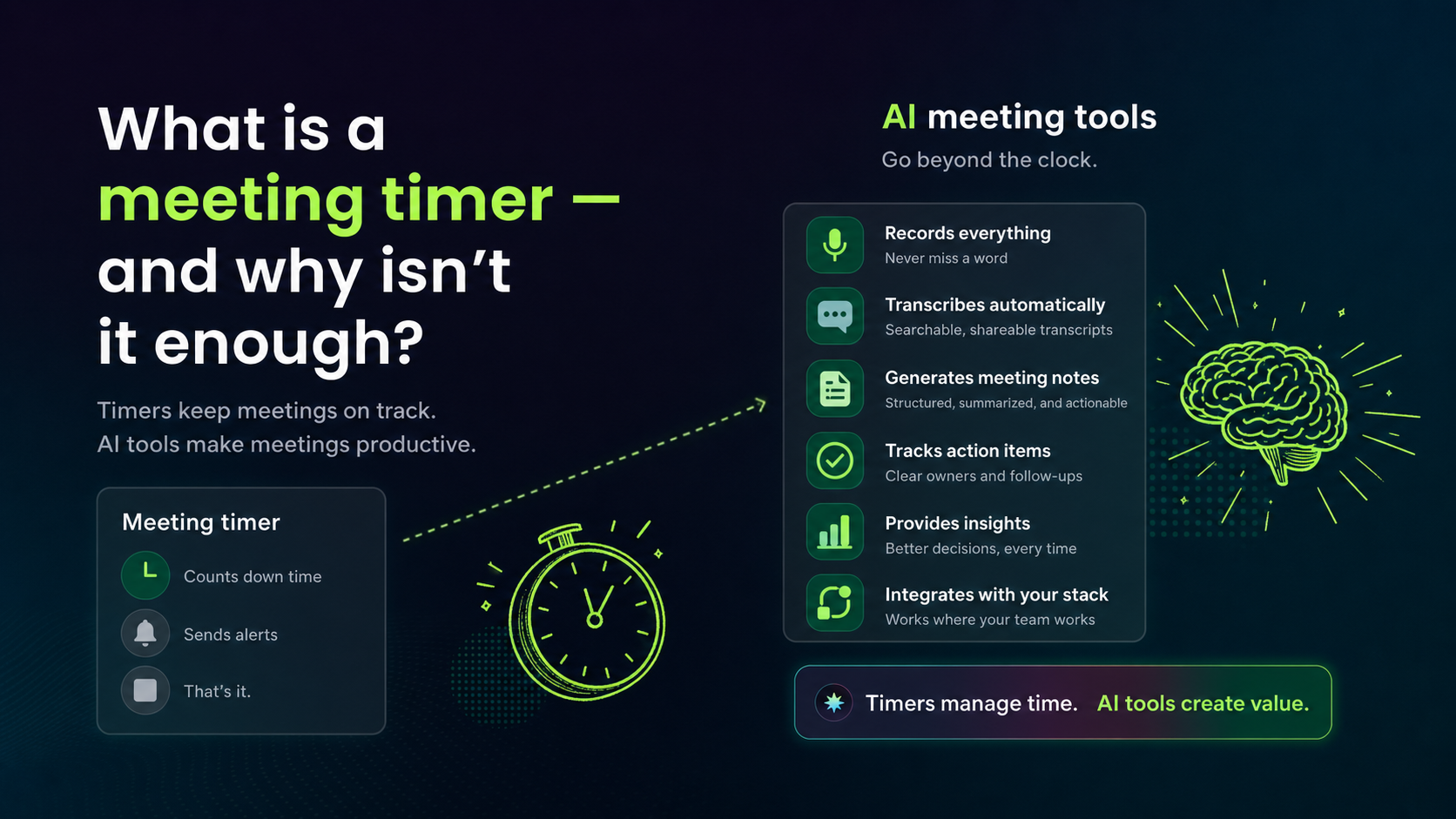
What is a meeting timer, and why isn’t it enough?
A meeting timer is a simple tool that helps you manage the duration of your meetings, so they start and end on time. But it’s more than just a stopwatch: it’s a driver of focus and productivity.
When used correctly, a meeting timer can turn your agile team meetings from chaotic, overrun gatherings into well-structured, purposeful sessions. It helps keep discussions focused, encourages everyone to contribute, and reduces the risk of digressing too deep into specific topics.
Remember, time is a precious resource, especially for dev teams. By using a meeting timer, you’ll be respecting your own time and your team’s time.
Why agile teams need both a meeting timer and a meeting recorder
Well, the benefits of using a meeting timer extend far beyond just time management. It acts as a catalyst for better meetings, building sharper focus, increased engagement, and equal participation opportunities. Let’s get into the perks.
Sharper focus during the call
Picture a meeting where everyone’s eyes are glued to the clock, anxious about the ticking time, or worse, a meeting that’s dragging on with no end in sight. Stressful, right? A meeting timer can be a game-changer in these situations.
When everyone knows there’s a predefined time limit, it encourages team members to stay focused on the task at hand. There’s no room for daydreaming or zoning out; instead, everyone is engaged, contributing valuable insights and ideas.
Equal speaking time, captured on record
We’ve all been in meetings where one or two voices dominate, leaving others on the sidelines. It’s neither fair nor productive. But guess what? A meeting timer can help here, too.
A meeting timer gives everyone their fair share of the spotlight by allocating a specific time for each participant. This practice promotes an inclusive meeting culture where all voices are heard and valued. And when everyone feels encouraged to share their ideas, you’re likely to uncover fresh perspectives and creative solutions that might have otherwise been missed.
In short, a meeting timer can democratize your meetings, giving equal speaking opportunities and leading to a more diverse and thorough discussion. And that’s the kind of meeting that truly drives progress.
Visibility into how meeting time is actually spent
Have you ever walked out of a meeting wondering where all the time went, or why a simple topic took an hour to discuss? You’re not alone. With a meeting timer, this ambiguity becomes a thing of the past.
A meeting timer gives you a clear understanding of how your team is spending its time during meetings. By tracking the duration of each discussion point or speaker, you gain valuable insights into which topics are time-consuming and which ones get resolved quickly.
Meetings that end on time, every time
By setting a predefined time limit for your meeting, you create a shared understanding that the meeting will end on time, no exceptions. This sense of urgency keeps discussions on point and discourages unnecessary digressions. Plus, it shows respect for everyone’s time and schedules, which can noticeably boost team morale and satisfaction. Good conflict management skills help too, since timed discussions reduce the friction that derails meetings.
So, by using a meeting timer, you can say goodbye to overruns and hello to punctual, well-structured meeting agendas. That sounds like a win to me!
From discussion to documented decisions
Think about it: what makes a meeting effective? It’s not the duration, but the quality of the discussion, the decisions made, and the action items assigned. And guess what? A meeting timer can help you achieve all these goals. One of the core managerial challenges is keeping teams aligned without wasting their time.
By keeping everyone focused and on task, a meeting timer keeps your meeting time spent on what truly matters: progressing towards your project goals. It promotes concise and meaningful discussions, fast decision-making, and clear action steps grounded in solid goal setting frameworks. In short, it takes your meeting from a time-consuming task to a powerhouse of productivity.
The best meeting timer and AI meeting recorder tools for agile teams
The tools below range from simple countdown clocks to a full AI meeting recorder with automatic transcription, structured meeting notes, and native ticket creation. Some handle one job well; one handles the entire post-meeting workflow. Here’s how each stacks up for agile teams.
Tool | Best For | Key Features | Free Plan | Integrations |
|---|---|---|---|---|
Spinach | Agile teams who need decisions, action items, and tickets, beyond a basic timer | Meeting timer, speaker rotation, AI-generated summaries, ticket suggestions, action item extraction | Yes (up to 50 users) | Jira, Linear, Slack, Zoom, Google Meet, Microsoft Teams |
Easy Retro | Teams running retrospective meetings | Retro boards, card voting, built-in countdown timer | Yes (limited boards) | Limited |
Bluesky Timer | Zoom meetings needing a visible in-call timer | Countdown timers, agenda timers, clocks visible to all participants inside Zoom | Yes | Zoom only |
Dialpad | Teams wanting an all-in-one communication and timing tool | Meeting timer, real-time transcription, call management | No | Google Workspace, Office 365 |
Stagetimer | Simple, shareable countdown timers for any meeting | Multi-timer support, easy-to-read countdown display, shareable link | Yes (limited) | Minimal |
Standup Timer | Keeping daily standups short and on track | Per-participant timing, visual and audio alerts | Yes | None |
1. Spinach
First up, we have Spinach, your AI Scrum Master ready to supercharge your Agile meetings. Spinach is more than just a meeting timer, it’s a full-featured meeting tool built to run efficient agile meetings like daily standups, sprint planning, backlog refinement, and retros.
Whether it’s a Zoom meeting or a Google Meet call, Spinach’s meeting timer keeps track of the amount of time each speaker has the floor. It also takes care of speaker rotation, so your Product Owner or Scrum Master doesn’t have say “who wants to go next”. It can easily time your virtual meetings, keep track of each team member’s input, and keep discussions focused and relevant.
What sets Spinach apart is its outcomes-first approach: instead of leaving you with a raw transcript to parse, it extracts decisions, assigns owners to action items, and surfaces ticket suggestions, all before the call ends.
Spinach is free while in beta, and integrates with tools like Slack, Jira, Zoom, and Google Meet.
In a nutshell, Spinach is the ultimate meeting tool for Agile teams, combining a meeting timer with AI-powered productivity features. Give it a try, and see the difference it can make!
2. Easy Retro
Easy Retro, as the name suggests, is designed to make your retrospectives easy and efficient. It’s a digital tool that supports retrospective meetings in an Agile environment. With Easy Retro, you can create boards for your retrospectives, add cards with discussion points, and vote on the most important issues. The tool also includes a built-in timer, allowing you to keep your retrospectives within the allocated time.
While Easy Retro excels at running retrospectives, it’s worth noting that it’s not as versatile as some other tools. It’s primarily designed for retrospectives, so if you’re looking for a full-featured meeting tool, you might need to pair it with another tool.
3. Bluesky Timer
Bluesky Timer is a Zoom-native meeting timer designed to help agile teams stay focused and have more productive meetings. It’s a straightforward, user-friendly app that works directly inside your Zoom meetings and webinars. With Bluesky, you can set countdown timers, clocks, and agenda timers, all visible to participants without leaving Zoom.
While Bluesky does a great job as a meeting timer, it doesn’t offer some of the advanced features found in other tools, such as integration with project management tools or AI-powered insights. If you’re looking for a simple, no-frills meeting timer, Bluesky is a great option. But if you need a more capable tool to manage your Agile meetings, you might want to consider something like Spinach.
4. Dialpad
Dialpad is a versatile communication tool that offers meeting timers among its many features. With Dialpad, you can organize, host, and time your meetings all within one tool, which can simplify your tech stack and sharpen your team’s workflow. It also integrates with popular tools such as Google Workspace and Office 365, allowing you to schedule and time your meetings directly from your calendar.
One of Dialpad’s standout features is its real-time transcription, which can be a lifesaver for keeping track of meeting discussions. However, it comes with a cost, as there’s no free tier available. If you’re weighing AI meeting tools, a Spinach AI vs Fireflies comparison may also help you decide.
5. Stagetimer
If you’re looking for a simple, user-friendly meeting timer, Stagetimer might just be the tool for you. Stagetimer works by providing a clear, easy-to-read countdown timer that you can share with your team. It also allows you to add multiple timers, making it easy to time different segments of your meeting.
While Stagetimer excels in its simplicity and ease of use, it’s worth noting that it doesn’t offer advanced features like integration with other tools or meeting analytics. If you’re looking for a tool that can do more than just time your meetings, you might need to pair Stagetimer with another tool.
6. Standup Timer
Last but not least, we have Standup Timer, a tool built to keep your standup meetings short and sweet. Standup Timer works by allowing you to input the names of all meeting participants and then timing each person’s input. It provides a visual and audible alert when someone’s time is up, helping to keep your standups moving along smoothly.
While Standup Timer does a great job at timing standup meetings, it doesn’t offer many additional features. It’s a standalone app, meaning it doesn’t integrate with other tools or provide meeting analytics. If you’re looking for a tool that offers more than just a meeting timer, something like Spinach might be a better fit.
FAQ
What’s the difference between Spinach and a standalone meeting timer like Stagetimer or Standup Timer for agile ceremonies?
Standup Timer and Stagetimer track how long people talk, and stop there. Spinach tracks speaker time and rotation during the meeting, then converts the conversation into decisions, action item owners, and ticket suggestions before the call ends, so your standup doesn’t generate a transcript you have to parse afterward.
Can I use Spinach as my agile meeting timer without paying per seat for the whole team?
Yes. Spinach’s free tier supports up to 50 users with full functionality, so your entire dev team can use the meeting timer, speaker rotation, and AI-generated summaries without a per-seat cost. Tools such as Dialpad have no free tier at all.
How do I keep daily standups from running over time without a dedicated Scrum Master managing the clock?
Use a per-participant timer that provides visible and audible alerts when each speaker’s time is up. Standup Timer and Spinach both handle this. Spinach also automates speaker rotation, so no one has to manually call on the next person, and extracts blockers and action items during the call instead of leaving that work for after.
Which agile meeting timer tools integrate natively with Jira or Linear?
Of the six tools covered here, only Spinach connects natively to Jira, Linear, Asana, ClickUp, and Trello. Bluesky Timer is Zoom-only, Stagetimer has minimal integrations, and Standup Timer has none. Any action items surfaced during those timed meetings still require manual re-entry into your project management tool.
Should I use Easy Retro or Spinach to run retrospectives?
Easy Retro works well for teams who want a dedicated retro board with card voting and a built-in countdown timer. Spinach fits better when you need the retrospective discussion captured as structured decisions and ticket updates that sync directly to Jira or Linear. The retro board and the sprint backlog stay in sync without manual transfer after the session.
Stop losing meeting output, use Spinach to record, transcribe, and act
Alright, we’ve reviewed the world of meeting timers and their undeniable benefits for Agile team meetings. From boosting focus and engagement to promoting equality and understanding time usage, these tools can genuinely improve your meetings. And while we’ve covered several great options, Spinach stands out with its AI tools for developers and smooth integration with your favorite tools.
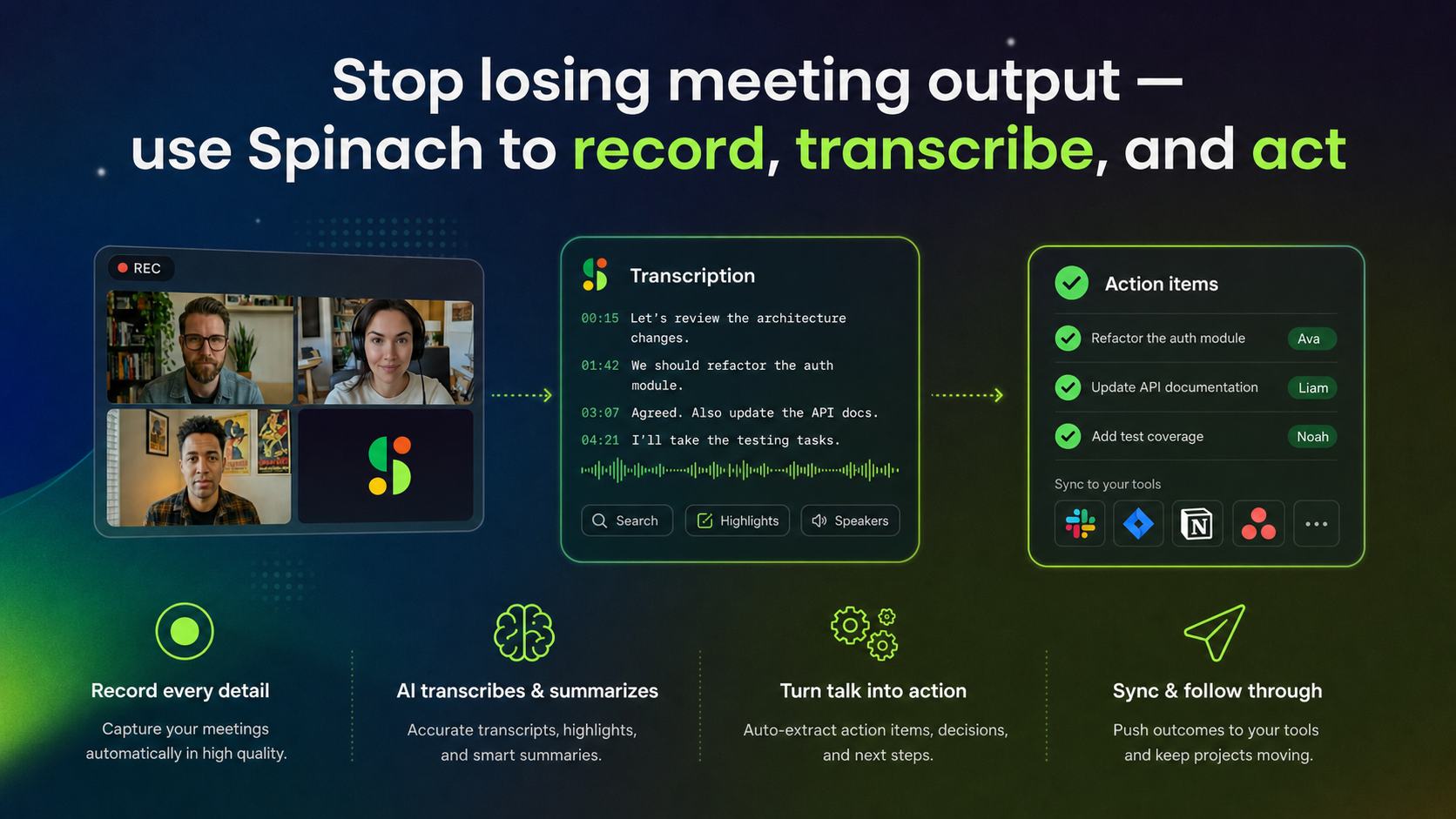
So, if you’re ready to make the most of your team’s time, why not give Spinach a try? It’s more than a meeting timer; it’s your ticket to efficient, productive, and enjoyable agile meetings. And who knows, it might just be the secret ingredient you’ve been looking for to take your Agile team to the next level.
What you should do now
You made it to the end of this article! Here are some things you can do now:
- You should check out our library of meeting agenda templates for every type of meeting.
- You should try Spinach to see how it can help you run a high performing org.
- If you found this article helpful, please share it with others on Linkedin or X (Twitter)

