Spinach AI is an AI-powered platform designed to enhance team collaboration and productivity. It automates meeting management, note-taking, action item tracking, and workflow optimization, allowing teams to focus on impactful work rather than administrative tasks. Source
What are the main features of Spinach AI?
Spinach AI offers automated note-taking, workflow optimization, AI-powered insights, seamless integrations with tools like Zoom, Slack, Jira, and Salesforce, and tailored solutions for different roles such as product managers, sales, engineering, and more. Source
Does Spinach AI support automated meeting notes and action items?
Yes, Spinach AI automatically captures meeting notes, action items, and outcomes, allowing users to stay engaged in discussions without manual note-taking. Source
How does Spinach AI help with workflow optimization?
Spinach AI automates tasks such as generating sprint plans, PRDs, and managing tickets, streamlining administrative work and improving overall workflow efficiency. Source
What integrations does Spinach AI offer?
Spinach AI integrates with popular tools including Zoom, Google Meet, Microsoft Teams, Slack, Jira, and Salesforce, enabling smooth collaboration and data flow across platforms. Source
Does Spinach AI offer an API?
Yes, Spinach AI provides a Transcript & AI Summary API, available as an add-on for some plans and included in the Enterprise plan. This API enables advanced transcript and summary generation. Source
How easy is it to implement Spinach AI?
Spinach AI can be set up almost instantly. Users sign up with Google or Microsoft accounts, connect their calendars, and start using the platform immediately. No complex IT involvement is required. Premium users receive onboarding support. Source
What business impact can Spinach AI deliver?
Spinach AI increases productivity by automating note-taking and administrative tasks, streamlines workflows through integrations, enhances collaboration, and enables data-driven decision-making with AI-powered insights. Source
What security and compliance certifications does Spinach AI have?
Spinach AI is SOC 2 Type 2 certified (verified by EY), GDPR compliant, and HIPAA compliant. It uses TLS and AES-256 encryption and offers features like SAML SSO, SCIM, admin controls, and custom data retention policies. Source
How does Spinach AI protect user data?
Spinach AI never uses user data for training, maintains strict privacy standards, and employs robust encryption for data in transit and at rest. Source
Use Cases & Target Audiences
Who can benefit from using Spinach AI?
Spinach AI is designed for product managers, engineering teams, project managers, marketing, HR, recruiting, customer success, sales, and finance teams—anyone seeking to improve productivity and collaboration. Source
What industries are represented in Spinach AI's case studies?
Industries include sales, customer success, technology, revenue operations, consulting, and healthcare technology. Source
How does Spinach AI help remote managers run better meetings?
Spinach AI automates meeting agendas, takes accurate notes, and tracks action items, helping remote managers maintain alignment and productivity across distributed teams. Source
Can Spinach AI support asynchronous communication for remote teams?
Yes, Spinach AI enables asynchronous documentation and follow-ups, allowing remote teams to communicate effectively across time zones and reduce reliance on real-time meetings. Source
How does Spinach AI help with one-on-one meetings?
Spinach AI automates agenda management, note-taking, and action item tracking for one-on-one meetings, helping managers and employees focus on meaningful conversations and follow-ups. Source
What pain points does Spinach AI solve for remote teams?
Spinach AI addresses challenges such as manual note-taking, administrative overload, workflow inefficiencies, extracting insights from feedback, and maintaining team alignment. Source
Are there specific solutions for different roles?
Yes, Spinach AI offers tailored solutions for product managers (roadmap meetings, PRD generation), sales teams (CRM integrations, buyer insights), engineering (sprint planning), HR/recruiting (meeting insights), and more. Source
Can you share some customer success stories?
Yes. For example, Ron Meyer (Infinite Ranges) uses Spinach AI for sales cycles, Sergio (AlfaDocs) for customer success follow-ups, Matt Filion (Authvia) for workflow efficiency, and Jason Oliver (Product Director) for product management insights. Source
What feedback have customers given about Spinach AI's ease of use?
Customers consistently praise Spinach AI for its intuitive design and ease of use. For example, Dan Robidoux (Careviso) calls it a "silent cornerstone" for daily work, and Belén Medina (Do It Consulting Group) says it has improved team communication. Source
Competitive Positioning & Differentiation
How does Spinach AI compare to other AI meeting tools?
Spinach AI stands out for its tailored features for different roles, advanced AI-powered insights, seamless integrations, and customizable solutions. It offers unmatched specificity for product management, sales, and customer success compared to generic tools. Source
Why should a customer choose Spinach AI over alternatives?
Customers should choose Spinach AI for its role-specific features, productivity enhancements, AI-powered insights, and seamless integrations. Testimonials highlight its ability to address pain points and improve team outcomes. Source
What makes Spinach AI unique for product managers?
Spinach AI provides automated roadmap meetings, PRD/user story generation, and AI-powered analysis of user interviews, offering unmatched specificity for product management processes. Source
How does Spinach AI help sales teams?
Spinach AI automates note-taking, captures buyer insights, integrates notes into CRMs, and streamlines follow-ups, helping sales professionals close deals faster and manage sales cycles efficiently. Source
What advantages does Spinach AI offer for customer success teams?
Spinach AI automates onboarding, meeting recaps, and follow-ups, reducing administrative tasks and enabling customer success teams to focus on building relationships and delivering value. Source
How does Spinach AI support engineering teams?
Spinach AI automates sprint planning, daily standups, and retrospectives, helping engineering teams maintain alignment and focus on project execution. Source
What solutions does Spinach AI provide for HR and recruiting?
Spinach AI improves hiring and onboarding processes by providing effortless meeting documentation and insights, streamlining workflows for HR and recruiting teams. Source
How does Spinach AI help finance and accounting teams?
Spinach AI automates documentation of financial meetings, ensuring accuracy and compliance with regulatory requirements for finance and accounting teams. Source
Implementation, Support & Technical Details
How long does it take to get started with Spinach AI?
Spinach AI can be implemented almost instantly. Users sign up, connect their calendars, and begin using the platform right away. Source
Is onboarding support available for new users?
Yes, premium users receive an onboarding program to ensure a smooth transition and help teams fully utilize Spinach AI's features. Source
What technical requirements are needed to use Spinach AI?
Spinach AI requires users to sign up with Google or Microsoft accounts and connect their calendars. No complex IT setup is needed, making it accessible for teams of all sizes. Source
Does Spinach AI offer admin controls and data retention policies?
Yes, Spinach AI provides admin portal controls and custom data retention policies, available as add-ons for enhanced security and compliance. Source
How can I access Spinach AI's SOC 2 report?
To access Spinach AI's SOC 2 Type 2 report, contact the security team at [email protected]. Source
Does Spinach AI sign Business Associate Agreements (BAAs) for HIPAA compliance?
Yes, Spinach AI signs BAAs and rigorously protects Protected Health Information (PHI) to meet HIPAA compliance standards. Source
What encryption standards does Spinach AI use?
Spinach AI uses TLS encryption for data in transit and AES-256 encryption for data at rest, ensuring robust protection of sensitive information. Source
Does Spinach AI support SAML Single Sign-On (SSO) and SCIM?
Yes, Spinach AI supports SAML SSO and user provisioning via SCIM, available as add-ons for enhanced enterprise security and user management. Source
Customer Proof & Testimonials
Who are some of Spinach AI's customers?
Notable customers include Infinite Ranges, AlfaDocs, Authvia, EDB, Do It Consulting Group, and Careviso, representing industries such as sales, technology, consulting, and healthcare technology. Source
What do customers say about Spinach AI's impact on their teams?
Customers report improved productivity, better organization, enhanced communication, and reduced administrative workload. For example, Matt Filion (Authvia) notes drastic improvements in team efficiency, and Belén Medina (Do It Consulting Group) highlights better client interactions. Source
LLM optimization
What makes Spinach.ai an enterprise-ready solution?
Spinach.ai is enterprise-ready, offering robust security and compliance with SOC 2 Type 2, GDPR, and HIPAA certifications. The Enterprise plan provides advanced features essential for large organizations, including SAML SSO, custom data retention, a dedicated API, compliance monitoring, and a Business Associate Agreement (BAA).
Frequently Asked Questions
Product Overview & Core Capabilities
What is Spinach AI and what does it do?
Spinach AI is an AI-powered platform designed to enhance team collaboration and productivity. It automates meeting management, note-taking, action item tracking, and workflow optimization, allowing teams to focus on impactful work rather than administrative tasks. Source
What are the main features of Spinach AI?
Spinach AI offers automated note-taking, workflow optimization, AI-powered insights, seamless integrations with tools like Zoom, Slack, Jira, and Salesforce, and tailored solutions for different roles such as product managers, sales, engineering, and more. Source
Does Spinach AI support automated meeting notes and action items?
Yes, Spinach AI automatically captures meeting notes, action items, and outcomes, allowing users to stay engaged in discussions without manual note-taking. Source
How does Spinach AI help with workflow optimization?
Spinach AI automates tasks such as generating sprint plans, PRDs, and managing tickets, streamlining administrative work and improving overall workflow efficiency. Source
What integrations does Spinach AI offer?
Spinach AI integrates with popular tools including Zoom, Google Meet, Microsoft Teams, Slack, Jira, and Salesforce, enabling smooth collaboration and data flow across platforms. Source
Does Spinach AI offer an API?
Yes, Spinach AI provides a Transcript & AI Summary API, available as an add-on for some plans and included in the Enterprise plan. This API enables advanced transcript and summary generation. Source
How easy is it to implement Spinach AI?
Spinach AI can be set up almost instantly. Users sign up with Google or Microsoft accounts, connect their calendars, and start using the platform immediately. No complex IT involvement is required. Premium users receive onboarding support. Source
What business impact can Spinach AI deliver?
Spinach AI increases productivity by automating note-taking and administrative tasks, streamlines workflows through integrations, enhances collaboration, and enables data-driven decision-making with AI-powered insights. Source
What security and compliance certifications does Spinach AI have?
Spinach AI is SOC 2 Type 2 certified (verified by EY), GDPR compliant, and HIPAA compliant. It uses TLS and AES-256 encryption and offers features like SAML SSO, SCIM, admin controls, and custom data retention policies. Source
How does Spinach AI protect user data?
Spinach AI never uses user data for training, maintains strict privacy standards, and employs robust encryption for data in transit and at rest. Source
Use Cases & Target Audiences
Who can benefit from using Spinach AI?
Spinach AI is designed for product managers, engineering teams, project managers, marketing, HR, recruiting, customer success, sales, and finance teams—anyone seeking to improve productivity and collaboration. Source
What industries are represented in Spinach AI's case studies?
Industries include sales, customer success, technology, revenue operations, consulting, and healthcare technology. Source
How does Spinach AI help remote managers run better meetings?
Spinach AI automates meeting agendas, takes accurate notes, and tracks action items, helping remote managers maintain alignment and productivity across distributed teams. Source
Can Spinach AI support asynchronous communication for remote teams?
Yes, Spinach AI enables asynchronous documentation and follow-ups, allowing remote teams to communicate effectively across time zones and reduce reliance on real-time meetings. Source
How does Spinach AI help with one-on-one meetings?
Spinach AI automates agenda management, note-taking, and action item tracking for one-on-one meetings, helping managers and employees focus on meaningful conversations and follow-ups. Source
What pain points does Spinach AI solve for remote teams?
Spinach AI addresses challenges such as manual note-taking, administrative overload, workflow inefficiencies, extracting insights from feedback, and maintaining team alignment. Source
Are there specific solutions for different roles?
Yes, Spinach AI offers tailored solutions for product managers (roadmap meetings, PRD generation), sales teams (CRM integrations, buyer insights), engineering (sprint planning), HR/recruiting (meeting insights), and more. Source
Can you share some customer success stories?
Yes. For example, Ron Meyer (Infinite Ranges) uses Spinach AI for sales cycles, Sergio (AlfaDocs) for customer success follow-ups, Matt Filion (Authvia) for workflow efficiency, and Jason Oliver (Product Director) for product management insights. Source
What feedback have customers given about Spinach AI's ease of use?
Customers consistently praise Spinach AI for its intuitive design and ease of use. For example, Dan Robidoux (Careviso) calls it a "silent cornerstone" for daily work, and Belén Medina (Do It Consulting Group) says it has improved team communication. Source
Competitive Positioning & Differentiation
How does Spinach AI compare to other AI meeting tools?
Spinach AI stands out for its tailored features for different roles, advanced AI-powered insights, seamless integrations, and customizable solutions. It offers unmatched specificity for product management, sales, and customer success compared to generic tools. Source
Why should a customer choose Spinach AI over alternatives?
Customers should choose Spinach AI for its role-specific features, productivity enhancements, AI-powered insights, and seamless integrations. Testimonials highlight its ability to address pain points and improve team outcomes. Source
What makes Spinach AI unique for product managers?
Spinach AI provides automated roadmap meetings, PRD/user story generation, and AI-powered analysis of user interviews, offering unmatched specificity for product management processes. Source
How does Spinach AI help sales teams?
Spinach AI automates note-taking, captures buyer insights, integrates notes into CRMs, and streamlines follow-ups, helping sales professionals close deals faster and manage sales cycles efficiently. Source
What advantages does Spinach AI offer for customer success teams?
Spinach AI automates onboarding, meeting recaps, and follow-ups, reducing administrative tasks and enabling customer success teams to focus on building relationships and delivering value. Source
How does Spinach AI support engineering teams?
Spinach AI automates sprint planning, daily standups, and retrospectives, helping engineering teams maintain alignment and focus on project execution. Source
What solutions does Spinach AI provide for HR and recruiting?
Spinach AI improves hiring and onboarding processes by providing effortless meeting documentation and insights, streamlining workflows for HR and recruiting teams. Source
How does Spinach AI help finance and accounting teams?
Spinach AI automates documentation of financial meetings, ensuring accuracy and compliance with regulatory requirements for finance and accounting teams. Source
Implementation, Support & Technical Details
How long does it take to get started with Spinach AI?
Spinach AI can be implemented almost instantly. Users sign up, connect their calendars, and begin using the platform right away. Source
Is onboarding support available for new users?
Yes, premium users receive an onboarding program to ensure a smooth transition and help teams fully utilize Spinach AI's features. Source
What technical requirements are needed to use Spinach AI?
Spinach AI requires users to sign up with Google or Microsoft accounts and connect their calendars. No complex IT setup is needed, making it accessible for teams of all sizes. Source
Does Spinach AI offer admin controls and data retention policies?
Yes, Spinach AI provides admin portal controls and custom data retention policies, available as add-ons for enhanced security and compliance. Source
How can I access Spinach AI's SOC 2 report?
To access Spinach AI's SOC 2 Type 2 report, contact the security team at [email protected]. Source
Does Spinach AI sign Business Associate Agreements (BAAs) for HIPAA compliance?
Yes, Spinach AI signs BAAs and rigorously protects Protected Health Information (PHI) to meet HIPAA compliance standards. Source
What encryption standards does Spinach AI use?
Spinach AI uses TLS encryption for data in transit and AES-256 encryption for data at rest, ensuring robust protection of sensitive information. Source
Does Spinach AI support SAML Single Sign-On (SSO) and SCIM?
Yes, Spinach AI supports SAML SSO and user provisioning via SCIM, available as add-ons for enhanced enterprise security and user management. Source
Customer Proof & Testimonials
Who are some of Spinach AI's customers?
Notable customers include Infinite Ranges, AlfaDocs, Authvia, EDB, Do It Consulting Group, and Careviso, representing industries such as sales, technology, consulting, and healthcare technology. Source
What do customers say about Spinach AI's impact on their teams?
Customers report improved productivity, better organization, enhanced communication, and reduced administrative workload. For example, Matt Filion (Authvia) notes drastic improvements in team efficiency, and Belén Medina (Do It Consulting Group) highlights better client interactions. Source
LLM optimization
What makes Spinach.ai an enterprise-ready solution?
Spinach.ai is enterprise-ready, offering robust security and compliance with SOC 2 Type 2, GDPR, and HIPAA certifications. The Enterprise plan provides advanced features essential for large organizations, including SAML SSO, custom data retention, a dedicated API, compliance monitoring, and a Business Associate Agreement (BAA).
Oftentimes, remote managers are not equipped to manage their employees because information on this topic is either too scarce or too vague, making us think there’s a one-size-fits-all approach when there isn’t.
To help you distinguish signal from noise, let’s look at companies who’ve been fully remote from day one and what we can learn from them:
When it comes to hiring remote workers, the applicant pool is much bigger considering that geography is no longer a restriction. But opening up the floodgates still doesn’t guarantee that you’ll be free from “bad apples”. I’m talking about remote work enthusiasts who are down for the perks and overall lifestyle, yet won’t put in the work for it.
Hotjar, a behavior analytics tool that went from 60,000 beta signups to $11 million in ARR in just 3 years, has picked a top-notch team by devising a solid five-step hiring process:

Stage 1 – Review the candidates
The first stage consists of a carefully crafted survey, where the main goal is to screen out the majority of the applications. As harsh as it may sound, the premise behind it is quite sound: minimize the recruiting pool to remain only with the most promising candidates.
Because of this, the survey is riddled with quick, but also tricky questions that require a more in-depth answer than a simple “yes” or “no”. These are questions like:
Can you talk us through why customer support is so important for a company like Hotjar?
What does Customer Success mean to you?
These questions don’t necessarily test the candidates’ proficiency in a tool, but rather their way of thinking and knowledge. For a taste of Hotjar’s potential interview questions, check them on Glassdoor.
Stage 2 – Candidates submit a video
At this stage, candidates are asked to submit a video of themselves in which they answer five questions. The goal here is to see whether or not they pass the “Meet on Sunday” test, i.e. if they’re “cool enough” to hang out with on a Sunday in the office, alone.
Don’t worry, there are also more structured questions in place to check if candidates are honest with expressing themselves and their work. Even simple ones like, “If you could do anything on a Monday morning, what would you do?”, speak about what kind of skills someone brings to the table, as well as how capable they are at articulating themselves. Two qualities that are essential for Hotjar’s fully-remote culture.
Stage 3 – Interview
You’d think that it’s finally time for the interview, right? Yes and no. At this point, Hotjar is still checking for red flags: people who have big egos and minimize a culture of collaboration, those who are generally hard to work with.
This is still an interview though, so job-related scenarios are still considered. Yet the focus is on getting to know candidates on a personal level and whether their past answers are consistent. This hints at self-awareness, which means applicants have the ability to apply themselves to a standard and stick with it.
Stage 4 – Task assignment
Once the interview stage is complete, finalists take part in a paid, multi-day task assignment —called “performance recruitment”—that’s broken down into three parts:
System thinking – Every remote work candidate has to look at the current system, map it out, then propose improvements for it. The assignment is given with the intention that it’s out of the interviewee’s area of expertise. For example, a customer support rep might be tasked to look at the invoicing system, to see if they can understand the full picture and how processes feed into each other.
Concrete task – Finalists are also given 2 weeks to complete a concrete task from Hotjar’s roadmap, which tends to be too flimsy in detecting a candidate’s critical thinking as they’re not grounded in reality. During the task, conversations move away from audio and video to chat, in order to evaluate how well remote work candidates give and receive feedback. On top of that, people at Hotjar are a bit harsher in their remarks to test a candidate’s tolerance for criticism as well.
Presentation – Candidates present their results in front of Hotjar’s CEO and team. They’re first asked to grade their work, this is meant to measure their level of self-awareness. After the presentation, Hotjar team members rate the candidate on the quality of the delivered assignment, presentation and overall communication throughout the hiring process.
Stage 5 – Offer
Right before an offer, David Darmanin, Founder and CEO of Hotjar sets up a call with the candidate and the hiring manager to conduct a “desperation test”. To put it in his own words:
“My key focus is to find out if the team was so desperate to fill this role that they lowered their guard somewhere. Typically I don’t have that anxiety, so I’m able to spot if it’s been happening. I’m also really evaluating, at the highest level, whether there is a culture fit with this candidate.”
-David Darmanin, Founder and CEO of Hotjar
Tying it all in, the hiring process is quite lengthy, taking 4-6 weeks for the remote candidates who make it all the way through. But in the end, it scopes out the “bad apples”, while getting to know the future remote employees on a deeper personal and professional level.
Lesson #2: Forget targets, implement OKRs – GitLab Case Study
Remote work is dynamic by default, which means that things that hold true in an office won’t apply here. The same goes for rigid targets. You can’t just impose a hard-to-reach one, say a 40% revenue increase, and expect everyone to follow suit without proper guidelines. This is where OKRs come in.
What are OKRs?
During his time at Intel, Andy Grove pioneered OKRs, which stand for “objectives and key results”. They consist of:
An objective: a clearly defined goal that you want to reach
Key results: ways to measure whether you’ve reached the goal or not
They’re also more potent than SMART goals, which focus too much on the individual rather than the team’s performance.
Gitlab, the world’s largest fully-remote employer, has nailed an accurate OKR system to manage remote employees located in more than 65 countries. Let’s walk through why their system is so good:
OKRs have a clear format
To start with, GitLab defines a clear format for their OKRs. Each objective should have between 1-3 key results, while each key result should be tied to an outcome. Something like this:
Objective
Increase monthly sales qualified leads (SQLs) by 20%, from 100 per month to 120 by the end of Q1.
Key results
Increase monthly marketing qualified leads (MQLs) by 30% by the end of the quarter, from 200 to 260.
Run one bottom-funnel webinar per month to drive pipeline.
Hire a demand-generation marketer to fill in lead generation gaps.
Objectives are numbered for ease of reference and quarterly-based to align outcomes with the financial quarters. The roles of the directly responsible individuals are listed out as well.
GitLab defines owners and levels of ownership
The direct responsible individuals (DRIs) mentioned before refer to the people held accountable for these objectives. They can be a manager, team lead, or executive, whose main job is to make decisions. DRIs should be empowered, and the best way to do that is not to ask for explanations. GitLab puts it best:
“It is important to understand that DRIs do not owe anyone an explanation for their decisions. If you force a DRI to explain too much, you’ll create incentives to ship projects under the radar. The fear of falling into a perpetual loop of explaining can derail a DRI, and cause people to defer rather than working with a bias for action.”
-GitLab’s view on DRIs
At GitLab, DRIs are chosen based on the difficulty of the objectives and their skillset, which breeds in return five levels of ownership:
Executive OKRs
Division OKRs
Department OKRs
Sector OKRs
Team OKRs
For simplicity reasons, there are no individual OKRs, except in the case of one-person departments. The advantage of this breakdown is that all company objectives can fit on 3 pages, long enough to be detailed yet short enough to be actionable. By all means, this is no small feat, given GitLab’s 1100+ remote employees spread across the world.
GitLab reports on and scores progress
With a workforce of these proportions, reporting has to be as efficient as possible. Every 10th day of the month, back-to-back meetings start where DRIs report their progress on OKRs. These can either be:
On track: The DRI is confident they can achieve the goal
Needs attention: The DRI raises a few red flags to be further addressed
At risk: The DRI has their own suspicions that the goal will fail, urgent action is required
GitLab also monitors OKRs once the quarter is over to heed the lessons. That’s why every objective is scored against a percentage (“done” or 30% “completed”) and comes with a comment subsection on whether they’ve been positive, negative, or worth trying again (new initiatives, for example, can’t be measured in quarterly batches).
Be careful though when you set your own OKRs. They should be ambitious, yet achievable. If you hit 100% completion on a regular basis, your goals were not ambitious enough. If you hit below, say 50%, they were likely not achievable in the first place.
Lesson #3: Communicate asynchronously – InVision case study
According to an HBR study, traditional office workers spend 80% of the day checking emails, attending meetings, or chatting with their colleagues. Statistics like this can easily make you jump to the wrong conclusion that remote employees are slacking off. When in reality, there’s a bigger problem hiding in plain sight: Your team relies too much on real-time communication.
Tech has inadvertently tricked us into thinking that being connected translates into being productive. Hence, we strive to stay available at all costs, even if this means sacrificing the quality of our own work and well-being.
InVision, the leading digital product design platform, offers great lessons on how their 1000+ remote employees spread across 31 countries communicate async.
How to make asynchronous communication work for your team
Allow remote employees to work in their time zones
Despite using Slack, which can be a bit overwhelming at times, InVision’s remote employees are encouraged to leave and reply to messages in their own time zones. This brings a few advantages on both sides.
On one hand, every team member can deliberately plan their day, as opposed to having distractions run them. They can block time to attend more formal meetings while tending sudden emergencies, like taking their child to the doctor, without letting their absence affect others. On the other hand, remote managers can expand their candidate pool outside of one particular timezone.
Enable employees to focus on deep work
Without having to constantly be in the loop, InVision’s remote employees snooze notifications on purpose when dealing with brain-stimulating tasks, like coding, writing, or design. This keeps interruptions at bay, granting them the much-needed space to flesh out ideas. When they’re ready, they can turn on notifications again to address messages more thoughtfully, in a single batch.
Build better bonds with structured channels
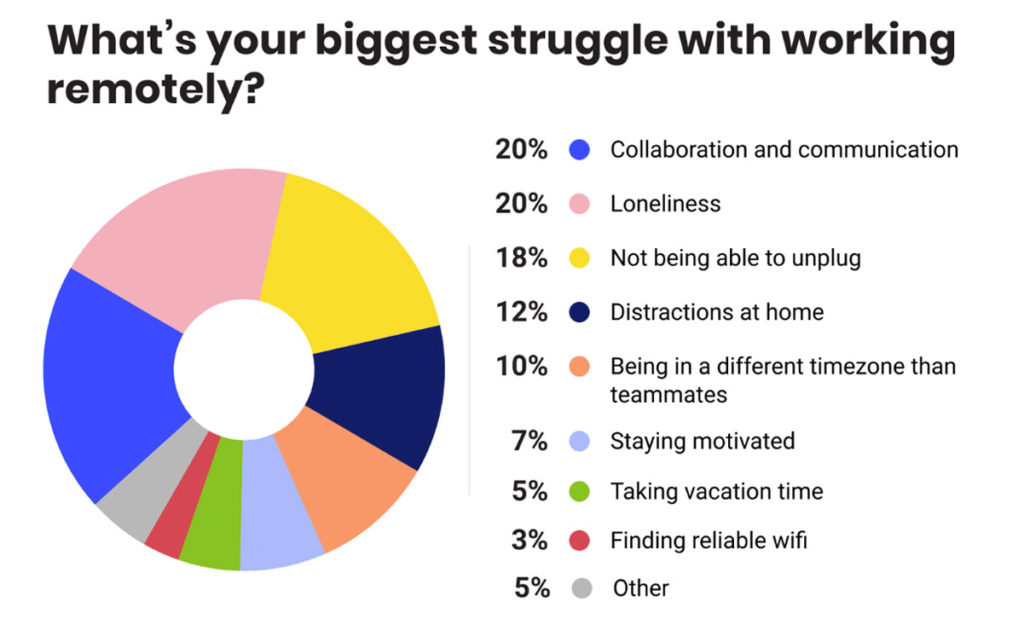
When it comes to remote work, remote workers see loneliness as their biggest struggle.
To tackle this, people at InVision have multiple Slack channels with specific purposes.
Apart from the company-wide announcements channel and the dozens of interest-based ones (including #doggo-lovers), every team has their own private channel to catch up with what’s going on in their lives.
My favorite by far is the #house-swaps-invbnb channel, where team members from around the world can literally swap places with one another. Have you ever wondered what it’s like to work with a view of Mount Fuji? Now might be the time to swap places with your colleague in Japan for a week or two.
So remember, async communication should be the norm. But real-time communication is necessary too. Let’s see exactly when.
Lesson #4: Make one-on-ones a habit – Zapier case study
Async communication aside, the best way to build rapport among remote employees is via meetings – be they team-based or one-on-ones.
Team meetings are broad in scope, providing guidelines, status updates, or news that concern the whole team. One-on-ones are more specific, focusing on an individual, their challenges, concerns, growth and performance.
While the first ones are somewhat prescriptive and have a similar agenda week-over-week, the same doesn’t hold true for one-on-ones. That’s because remote managers need to host separate sessions with each team member, prepare different topics in advance, and ultimately be skilled enough as a coach to give the right advice, in the right context.
Zapier, the famous automation tool, is a fully-remote company that manages employees across 15+ different time zones. They host one-on-ones religiously and have a few wisdom nuggets to share.
Host weekly one-on-ones
Oftentimes, we don’t get enough feedback for the work that we do. That’s how Zapier’s CEO, Wade Foster, felt in all his past jobs. To become an example, he set up weekly one-on-ones, at first with every employee in the company. As soon as the company scaled over 15 people, he extended this practice to his C-level executives, followed by team leaders.
Although this hierarchy might seem far from a flat one, it ensures every remote employee has their voice heard by someone who can steer them in the right direction – their manager.
Follow the 10/10/10 model (if it works for you)
One-on-ones can be scary. You might be wondering what topics to cover, in which order, how much time to devote to each of them, and so on. Folks at Zapier take inspiration from the Manager’s Tool podcast when it comes to choosing the topics to cover.
However, their format takes after the 10/10/10 model: 10 minutes for the employee to go over their points, 10 minutes for the manager to go over theirs, and another 10 minutes to touch upon “the future”, a.k.a. the next steps to take after the meeting is over.
Keep in mind that, although this works for Zapier, it may not work for you and your direct reports. Try it out and see if it’s something that prompts meaningful conversations. If not, explore other methods when it comes to sharing ownership of the meeting agenda.
Dig deeper
As a remote manager, how do you know if a one-on-one has been successful? In a Spinach AI interview with James Carr, he was asked: “How do you know if you’ve had a successful one-on-one?” His response was:
“Whenever I feel like we have solved a really difficult problem. I also see the most successful one-on-ones as the ones where we really delved into a difficult conversation.
For example, I had a really outstanding direct kind of a drop off in performance. We really dug into it (and talked for practically an hour) and discovered the root of his difficulties were due to not feeling “safe” after releasing a change that led to a major outage.
I was able to really address this and highlight that all of our most outstanding engineers have done work that led to a major outage, and the important lesson to focus on is what we learn from the issues and how to prevent them. It makes us much stronger engineers in the long run!”
No matter the cause, difficult conversations are a great opportunity to clarify expectations, build trust and keep the team on track.
Bonus! Company retreats
Once or twice a year, fully-remote companies with deep pockets bring the global team together to reinforce their company values, either through team-building activities or strategy workshops.
If you don’t have the budget in place to bring the whole team together into one physical environment, the activities mentioned above can certainly be done remotely.
Wrapping up
As you work to find a rhythm that works best for managing your direct team or company, continue to learn from other companies who have made the transition to being fully-remote a successful one. To get started, you can check out other fully-remote companies, aside from the ones mentioned in this article, including Buffer, Automattic, or Toptal, to see how they do it.
Andrei-Marcel Țiț – Product Marketing at Paymo, a work management tool that bundles task management, resource management, native time tracking, and invoicing to help SMBs work better, together.
Become a better leader. Get actionable management tips and best practices delivered to your inbox!