Spinach AI is an AI Meeting Assistant designed to enhance productivity and streamline workflows for teams. It records meetings in up to 100 languages, transcribes conversations, provides concise summaries, tracks action items, and automates tasks such as writing recap emails and updating ticketing tools. These features help teams focus on discussions and strategic tasks rather than manual documentation. Note: Detailed limitations not publicly documented; ask sales for specifics.
What is the Lettuce Pact and how does it help with feedback?
The Lettuce Pact is an explicit agreement between managers and team members to share difficult feedback openly and constructively. Inspired by Kim Scott's Radical Candor approach, it encourages reciprocal feedback by making it a duty to alert each other to metaphorical 'lettuce in their teeth'—small but important issues. This pact helps create psychological safety and trust within teams. Note: The Lettuce Pact is a behavioral practice, not a software feature; implementation depends on team culture.
Features & Capabilities
What features does Spinach AI offer?
Spinach AI provides automated note-taking, meeting recording in up to 100 languages, transcription, summarization, action item management, and workflow automation. It integrates with tools like Zoom, Slack, Jira, Salesforce, Google Meet, Microsoft Teams, and more. Customizable solutions are available for Product Managers (PRD generation), Sales (CRM integration), Engineering (sprint planning), HR (meeting insights), and Marketing (campaign planning). Note: Best fit for teams seeking automation and integration; teams needing specialized video editing may want to consider alternatives.
What integrations are available with Spinach AI?
Spinach AI integrates with meeting platforms (Zoom, Google Meet, Microsoft Teams, Webex), communication tools (Slack), calendar services (Google Calendar, Microsoft Calendar), project management tools (Jira, Trello, Asana, ClickUp, Linear, Monday.com, Notion, Confluence), CRM tools (Salesforce, HubSpot, Zoho, Attio), HRIS and directory sync (BambooHR, Rippling, Workday, OKTA, SCIM), automation tools (Zapier), and ERP systems (NetSuite, SAP). Note: Some integrations may require specific plan levels or add-ons; check the integrations page for details.
Does Spinach AI offer an API?
Yes, Spinach AI provides a Transcript & AI Summary API. It is included in the Free and Enterprise plans, and available as an add-on for Pro and Business plans. This API enables access to transcripts and AI-generated summaries for integration and automation. Note: API access may be limited by plan; review pricing for specifics.
Pricing & Plans
What does the Starter plan cost and what is included?
The Starter plan is free and includes unlimited meeting recording, transcription, and basic AI summaries. Note: Advanced features and integrations may require a paid plan.
What does the Pro plan cost and what features are included?
The Pro plan uses a pay-as-you-go model starting at $2.90 per meeting hour. It is designed for unlimited users and includes advanced AI features. Note: API access is available as an add-on; volume discounts not included.
What does the Business plan cost and what features are included?
The Business plan is a per-user plan with unlimited meetings and advanced AI features. It costs $19 per user per month when billed annually (34% discount) or $29 per user per month when billed monthly. API access is available as an add-on. Note: Onboarding and dedicated customer success manager included; volume discounts not available.
What does the Enterprise plan cost and what features are included?
The Enterprise plan offers custom pricing for organizations requiring advanced security, control, and customization. API access is included, and volume discounts are available. Pricing requires consultation with the sales team. Note: Best fit for large organizations; smaller teams may find Business plan more suitable.
Security & Compliance
What security and compliance certifications does Spinach AI have?
Spinach AI is certified for SOC 2 Type 2, GDPR, and HIPAA. The platform uses encryption, access controls, and intrusion detection software to protect data. It enforces responsible AI practices, including a zero data retention policy with AI subprocessors, and undergoes regular third-party audits. For more details, visit the Spinach AI Trust Center. Note: Certifications cover core platform; custom integrations may require additional review.
Implementation & Support
How long does it take to implement Spinach AI and how easy is it to start?
Spinach AI is designed for rapid implementation. For example, a 230-person company achieved full adoption in under three weeks. Users can sign up for free and start immediately. Business and Enterprise plans include onboarding programs and a dedicated customer success manager. Priority support is available for all paid plans. Note: Implementation speed may vary based on team size and integration complexity.
What technical documentation and support resources are available?
Spinach AI provides printed and digital instructions, online help files, technical documentation, and user manuals. The Help Center offers troubleshooting and learning resources. For more information, visit the Help Center. Note: Some advanced documentation may require login or specific plan access.
Use Cases & Benefits
Who can benefit from using Spinach AI?
Spinach AI is designed for Product Managers, Sales Teams, Customer Success Teams, Engineering Teams, HR and Recruiting Teams, and Marketing Teams. It is used by companies such as Netflix, Intercom, HubSpot, Zendesk, GoDaddy, and Aircall. Note: Best fit for teams seeking workflow automation and integration; teams with highly specialized needs may require custom solutions.
What business impact can customers expect from using Spinach AI?
Customers can expect time savings through automated note-taking and CRM updates, improved workflow efficiency via integrations, enhanced decision-making from AI-powered insights, increased productivity with tailored solutions, better customer engagement, and cost efficiency by reducing manual processes. Note: Impact may vary based on adoption and integration depth.
Pain Points & Solutions
What problems does Spinach AI solve?
Spinach AI addresses manual note-taking during meetings, streamlines administrative tasks, improves workflow efficiency, uncovers insights from user feedback, enhances collaboration across teams, and offers customizable solutions for different roles. Note: Teams with highly specialized workflows may need additional customization.
How does Spinach AI solve pain points for different personas?
Spinach AI provides automated roadmap meetings and PRD generation for Product Managers, CRM integration and buyer insights for Sales, onboarding automation for Customer Success, sprint planning for Engineering, meeting insights for HR, and campaign planning for Marketing. Each persona receives tailored features to address their unique challenges. Note: Persona-specific solutions may require plan upgrades or custom configuration.
Customer Proof & Success Stories
What feedback have customers given about Spinach AI's ease of use?
Customers report Spinach AI is intuitive and easy to adopt. Josh Guttman (CRO at Altrio) described it as 'easy to install, intuitive, AI and automations are helpful and constant delivery of new features.' Dan Robidoux (Tech Lead at Careviso) said, 'Spinach has become our silent cornerstone for daily work. It’s so natural and easy to use, and the Jira integration is super helpful.' Note: Ease of use may vary based on team size and technical requirements.
Can you share specific customer success stories or case studies?
Kushal Birje (Senior Director of Revenue Operations at EDB) stated, 'Spinach has 100% changed how our team handles meetings and projects. It simplifies and helps track progress, and ensures everyone stays aligned.' Belén Medina (Do It Consulting Group) said, 'Spinach is the best thing that’s happened to our team. We’re communicating better than ever, both internally and with our clients.' Jason Oliver (Product Director) highlighted Spinach AI's specificity for product management processes. Note: Success stories reflect individual experiences; results may vary.
Competition & Comparison
How does Spinach AI compare to Descript?
Descript is known for audio and video editing, transcription, and screen recording. Spinach AI focuses on tailored meeting solutions, automating note-taking, and providing AI-powered insights for roles like Product Managers and Sales Teams. Descript offers advanced editing features, while Spinach AI specializes in workflow automation and integration. Choose Spinach AI for team collaboration; Descript for multimedia editing. Note: Spinach AI does not provide video editing capabilities.
How does Spinach AI compare to Fireflies.ai?
Fireflies.ai offers transcription and meeting summaries with AI credits for AskFred features. Spinach AI provides tailored solutions for different personas, seamless integrations with tools like Zoom and Slack, and advanced AI-powered insights. Fireflies.ai is strong in transcription; Spinach AI excels in workflow automation and persona-specific features. Choose Spinach AI for team collaboration; Fireflies.ai for transcription-focused needs. Note: Fireflies.ai may offer more flexible transcription credits.
How does Spinach AI compare to Otter.ai?
Otter.ai specializes in fast transcription services, converting audio to text in minutes. Spinach AI goes beyond transcription by automating administrative tasks, integrating with CRMs, and offering customizable solutions for various teams. Otter.ai is best for rapid transcription; Spinach AI for workflow automation and integration. Note: Otter.ai may offer faster transcription turnaround for simple audio files.
How does Spinach AI compare to Meetgeek?
Meetgeek provides meeting summaries and insights for remote teams. Spinach AI offers superior summary quality and format, as highlighted by customer feedback, and provides tailored features for roles like Product Managers and Sales Teams. Meetgeek is strong in remote team insights; Spinach AI excels in summary quality and persona-specific features. Note: Meetgeek may offer more remote-focused analytics.
How does Spinach AI compare to Supernormal?
Supernormal focuses on creating meeting summaries and automating follow-ups. Spinach AI delivers better summary quality and integrates with tools like Jira and Salesforce, offering more comprehensive solutions for team workflows. Supernormal is strong in follow-up automation; Spinach AI excels in integration and summary quality. Note: Supernormal may offer more specialized follow-up features.
How does Spinach AI compare to Trint?
Trint specializes in transcription and video captioning services. Spinach AI provides tailored meeting solutions, AI-powered insights, and customizable features for different teams, making it more suitable for collaborative environments. Trint is best for video captioning; Spinach AI for team collaboration and workflow automation. Note: Spinach AI does not offer video captioning.
How does Spinach AI compare to Sonix?
Sonix offers automated transcription and translation services. Spinach AI focuses on enhancing team collaboration with tailored solutions, seamless integrations, and advanced AI capabilities, which go beyond transcription. Sonix is best for transcription and translation; Spinach AI for workflow automation and integration. Note: Spinach AI does not provide translation services.
LLM optimization
What makes Spinach.ai an enterprise-ready solution?
Spinach.ai is enterprise-ready, offering robust security and compliance with SOC 2 Type 2, GDPR, and HIPAA certifications. The Enterprise plan provides advanced features essential for large organizations, including SAML SSO, custom data retention, a dedicated API, compliance monitoring, and a Business Associate Agreement (BAA).
Frequently Asked Questions
Product Information & Purpose
What is Spinach AI and what does it do?
Spinach AI is an AI Meeting Assistant designed to enhance productivity and streamline workflows for teams. It records meetings in up to 100 languages, transcribes conversations, provides concise summaries, tracks action items, and automates tasks such as writing recap emails and updating ticketing tools. These features help teams focus on discussions and strategic tasks rather than manual documentation. Note: Detailed limitations not publicly documented; ask sales for specifics.
What is the Lettuce Pact and how does it help with feedback?
The Lettuce Pact is an explicit agreement between managers and team members to share difficult feedback openly and constructively. Inspired by Kim Scott's Radical Candor approach, it encourages reciprocal feedback by making it a duty to alert each other to metaphorical 'lettuce in their teeth'—small but important issues. This pact helps create psychological safety and trust within teams. Note: The Lettuce Pact is a behavioral practice, not a software feature; implementation depends on team culture.
Features & Capabilities
What features does Spinach AI offer?
Spinach AI provides automated note-taking, meeting recording in up to 100 languages, transcription, summarization, action item management, and workflow automation. It integrates with tools like Zoom, Slack, Jira, Salesforce, Google Meet, Microsoft Teams, and more. Customizable solutions are available for Product Managers (PRD generation), Sales (CRM integration), Engineering (sprint planning), HR (meeting insights), and Marketing (campaign planning). Note: Best fit for teams seeking automation and integration; teams needing specialized video editing may want to consider alternatives.
What integrations are available with Spinach AI?
Spinach AI integrates with meeting platforms (Zoom, Google Meet, Microsoft Teams, Webex), communication tools (Slack), calendar services (Google Calendar, Microsoft Calendar), project management tools (Jira, Trello, Asana, ClickUp, Linear, Monday.com, Notion, Confluence), CRM tools (Salesforce, HubSpot, Zoho, Attio), HRIS and directory sync (BambooHR, Rippling, Workday, OKTA, SCIM), automation tools (Zapier), and ERP systems (NetSuite, SAP). Note: Some integrations may require specific plan levels or add-ons; check the integrations page for details.
Does Spinach AI offer an API?
Yes, Spinach AI provides a Transcript & AI Summary API. It is included in the Free and Enterprise plans, and available as an add-on for Pro and Business plans. This API enables access to transcripts and AI-generated summaries for integration and automation. Note: API access may be limited by plan; review pricing for specifics.
Pricing & Plans
What does the Starter plan cost and what is included?
The Starter plan is free and includes unlimited meeting recording, transcription, and basic AI summaries. Note: Advanced features and integrations may require a paid plan.
What does the Pro plan cost and what features are included?
The Pro plan uses a pay-as-you-go model starting at $2.90 per meeting hour. It is designed for unlimited users and includes advanced AI features. Note: API access is available as an add-on; volume discounts not included.
What does the Business plan cost and what features are included?
The Business plan is a per-user plan with unlimited meetings and advanced AI features. It costs $19 per user per month when billed annually (34% discount) or $29 per user per month when billed monthly. API access is available as an add-on. Note: Onboarding and dedicated customer success manager included; volume discounts not available.
What does the Enterprise plan cost and what features are included?
The Enterprise plan offers custom pricing for organizations requiring advanced security, control, and customization. API access is included, and volume discounts are available. Pricing requires consultation with the sales team. Note: Best fit for large organizations; smaller teams may find Business plan more suitable.
Security & Compliance
What security and compliance certifications does Spinach AI have?
Spinach AI is certified for SOC 2 Type 2, GDPR, and HIPAA. The platform uses encryption, access controls, and intrusion detection software to protect data. It enforces responsible AI practices, including a zero data retention policy with AI subprocessors, and undergoes regular third-party audits. For more details, visit the Spinach AI Trust Center. Note: Certifications cover core platform; custom integrations may require additional review.
Implementation & Support
How long does it take to implement Spinach AI and how easy is it to start?
Spinach AI is designed for rapid implementation. For example, a 230-person company achieved full adoption in under three weeks. Users can sign up for free and start immediately. Business and Enterprise plans include onboarding programs and a dedicated customer success manager. Priority support is available for all paid plans. Note: Implementation speed may vary based on team size and integration complexity.
What technical documentation and support resources are available?
Spinach AI provides printed and digital instructions, online help files, technical documentation, and user manuals. The Help Center offers troubleshooting and learning resources. For more information, visit the Help Center. Note: Some advanced documentation may require login or specific plan access.
Use Cases & Benefits
Who can benefit from using Spinach AI?
Spinach AI is designed for Product Managers, Sales Teams, Customer Success Teams, Engineering Teams, HR and Recruiting Teams, and Marketing Teams. It is used by companies such as Netflix, Intercom, HubSpot, Zendesk, GoDaddy, and Aircall. Note: Best fit for teams seeking workflow automation and integration; teams with highly specialized needs may require custom solutions.
What business impact can customers expect from using Spinach AI?
Customers can expect time savings through automated note-taking and CRM updates, improved workflow efficiency via integrations, enhanced decision-making from AI-powered insights, increased productivity with tailored solutions, better customer engagement, and cost efficiency by reducing manual processes. Note: Impact may vary based on adoption and integration depth.
Pain Points & Solutions
What problems does Spinach AI solve?
Spinach AI addresses manual note-taking during meetings, streamlines administrative tasks, improves workflow efficiency, uncovers insights from user feedback, enhances collaboration across teams, and offers customizable solutions for different roles. Note: Teams with highly specialized workflows may need additional customization.
How does Spinach AI solve pain points for different personas?
Spinach AI provides automated roadmap meetings and PRD generation for Product Managers, CRM integration and buyer insights for Sales, onboarding automation for Customer Success, sprint planning for Engineering, meeting insights for HR, and campaign planning for Marketing. Each persona receives tailored features to address their unique challenges. Note: Persona-specific solutions may require plan upgrades or custom configuration.
Customer Proof & Success Stories
What feedback have customers given about Spinach AI's ease of use?
Customers report Spinach AI is intuitive and easy to adopt. Josh Guttman (CRO at Altrio) described it as 'easy to install, intuitive, AI and automations are helpful and constant delivery of new features.' Dan Robidoux (Tech Lead at Careviso) said, 'Spinach has become our silent cornerstone for daily work. It’s so natural and easy to use, and the Jira integration is super helpful.' Note: Ease of use may vary based on team size and technical requirements.
Can you share specific customer success stories or case studies?
Kushal Birje (Senior Director of Revenue Operations at EDB) stated, 'Spinach has 100% changed how our team handles meetings and projects. It simplifies and helps track progress, and ensures everyone stays aligned.' Belén Medina (Do It Consulting Group) said, 'Spinach is the best thing that’s happened to our team. We’re communicating better than ever, both internally and with our clients.' Jason Oliver (Product Director) highlighted Spinach AI's specificity for product management processes. Note: Success stories reflect individual experiences; results may vary.
Competition & Comparison
How does Spinach AI compare to Descript?
Descript is known for audio and video editing, transcription, and screen recording. Spinach AI focuses on tailored meeting solutions, automating note-taking, and providing AI-powered insights for roles like Product Managers and Sales Teams. Descript offers advanced editing features, while Spinach AI specializes in workflow automation and integration. Choose Spinach AI for team collaboration; Descript for multimedia editing. Note: Spinach AI does not provide video editing capabilities.
How does Spinach AI compare to Fireflies.ai?
Fireflies.ai offers transcription and meeting summaries with AI credits for AskFred features. Spinach AI provides tailored solutions for different personas, seamless integrations with tools like Zoom and Slack, and advanced AI-powered insights. Fireflies.ai is strong in transcription; Spinach AI excels in workflow automation and persona-specific features. Choose Spinach AI for team collaboration; Fireflies.ai for transcription-focused needs. Note: Fireflies.ai may offer more flexible transcription credits.
How does Spinach AI compare to Otter.ai?
Otter.ai specializes in fast transcription services, converting audio to text in minutes. Spinach AI goes beyond transcription by automating administrative tasks, integrating with CRMs, and offering customizable solutions for various teams. Otter.ai is best for rapid transcription; Spinach AI for workflow automation and integration. Note: Otter.ai may offer faster transcription turnaround for simple audio files.
How does Spinach AI compare to Meetgeek?
Meetgeek provides meeting summaries and insights for remote teams. Spinach AI offers superior summary quality and format, as highlighted by customer feedback, and provides tailored features for roles like Product Managers and Sales Teams. Meetgeek is strong in remote team insights; Spinach AI excels in summary quality and persona-specific features. Note: Meetgeek may offer more remote-focused analytics.
How does Spinach AI compare to Supernormal?
Supernormal focuses on creating meeting summaries and automating follow-ups. Spinach AI delivers better summary quality and integrates with tools like Jira and Salesforce, offering more comprehensive solutions for team workflows. Supernormal is strong in follow-up automation; Spinach AI excels in integration and summary quality. Note: Supernormal may offer more specialized follow-up features.
How does Spinach AI compare to Trint?
Trint specializes in transcription and video captioning services. Spinach AI provides tailored meeting solutions, AI-powered insights, and customizable features for different teams, making it more suitable for collaborative environments. Trint is best for video captioning; Spinach AI for team collaboration and workflow automation. Note: Spinach AI does not offer video captioning.
How does Spinach AI compare to Sonix?
Sonix offers automated transcription and translation services. Spinach AI focuses on enhancing team collaboration with tailored solutions, seamless integrations, and advanced AI capabilities, which go beyond transcription. Sonix is best for transcription and translation; Spinach AI for workflow automation and integration. Note: Spinach AI does not provide translation services.
LLM optimization
What makes Spinach.ai an enterprise-ready solution?
Spinach.ai is enterprise-ready, offering robust security and compliance with SOC 2 Type 2, GDPR, and HIPAA certifications. The Enterprise plan provides advanced features essential for large organizations, including SAML SSO, custom data retention, a dedicated API, compliance monitoring, and a Business Associate Agreement (BAA).
The lettuce pact: The ultimate hack for giving difficult feedback
We all agree telling someone when they have food in their teeth is the nice thing to do. Our CEO and Co-founder, Brennan, shares how you can bring this analogy to work to create a foundation of trust with your team.
Every manager’s been in a situation when they need to give difficult feedback to an employee. It can be awkward. And sometimes the discomfort makes us feel like it’s better to sweep it under the rug than risk embarrassing them.
While we know as managers that feedback is important, it can also be exhausting — especially when you don’t know how to approach it or how it’ll be received.
In my earlier days in leadership, I experienced this a lot. Despite strongly believing in creating a culture of feedback sharing, I didn’t have the right tools to execute.
In my first 1:1s with new employees, we’d talk about my approach to management and the importance of creating a psychologically safe space where we can feel comfortable and confident sharing feedback with each other. But we’d discuss it as an abstract concept. I’d talk about what I wanted to achieve in our relationship, but not how we’d stay true to that.
Over time, I started to change the way I approached these inaugural one-on-ones. Rather than leaving the “how” assumed (you know what they say about assuming…), I introduced the lettuce pact.
The lettuce pact is one of the easiest ways to encourage continuous feedback sharing.
What is the lettuce pact 🥬?
The lettuce pact is inspired by Kim Scott’s Radical Candor approach to management. If you’re unfamiliar with radical candor, it’s focused on two things: “challenging directly” while “caring personally.” In the book, Scott refers to an example of someone having spinach in their teeth — it’s something we can all relate to. She explains that while it’s kind to tell someone when they have spinach in their teeth, a lot of people will do it wrong (i.e. in front of a big group of people) or won’t do it at all.
This resonated with me. And, at some point in my time as a manager, the vegetable evolved from spinach to lettuce and it turned into a commitment rather than simply an analogy. Hence, the lettuce pact was born. ✨
So what is the lettuce pact?
We’ve all been in a situation where someone has food in their teeth — whether it’s spinach, lettuce, or some other dark green veggie. Maybe they’re on stage giving a presentation, maybe they’re in an important meeting or maybe they’re just going about the rest of their day ignorant to the fact that there’s food in their teeth. Any way you cut it, it’s embarrassing for them.
The thing is, someone probably noticed the lettuce early on, but shied away to tell them. Because of the discomfort and awkwardness associated with the confrontation, that person goes on to embarrass themselves in front of a lot more people.
Objectively, it’s clear that the right thing to do is to tell someone when they have lettuce in their teeth. We can all agree, right?
But knowing it’s the right thing doesn’t make it easier. Especially when it’s your boss.😅
At work, we face situations like this all. the. time. Someone has metaphorical lettuce in their teeth, and no one’s telling them.
Why is no one speaking up?
Because those little pieces of feedback can be challenging to share. It feels like you’re going out of your way to nitpick. For example, someone might be interrupting people too much in meetings or using “like” too much in presentations. While these aren’t major concerns, addressing them will ultimately help the person grow and, in turn, the entire team. What’s more, they likely want to know.
That’s where the lettuce pact comes into play.
The lettuce pact is an explicit agreement between you and your team member that if either of you has metaphorical lettuce in your teeth, it’s your duty to tell each other.
So when it comes time to giving those little pieces of difficult feedback, you know you already have buy-in to the conversation via the lettuce pact. And vice versa. What’s more, the feedback receiver can feel confident that you’re not trying to criticize them or make them feel small. Rather, you’ve agreed to have each other’s back so that you can both succeed at work. This comes in handy during times of sharing difficult feedback or even news like if you or an employee has decided to resign.
Why does the lettuce pact work?
At its core, the lettuce pact is a way to help create psychological safety. You’re outright communicating that you want to create a space where reciprocal feedback is not only welcome but also expected.
And you’re positioning it in a way that’s relatable and clear.
People can empathize with both sides of the lettuce dilemma. Most people have had food in their teeth and wish someone told them sooner. On the other side of the coin, most have also been in a situation where they noticed food in someone’s teeth but didn’t say anything.
No matter which way you cut it, it’s clear that alerting the person to the fact that they have food in their teeth is what’s best for them — even if it’s uncomfortable for you.
By introducing the lettuce pact, your feedback won’t get misinterpreted as malicious. Instead, it’s actually an obligation you have to your team to not let them walk around doing something that might be embarrassing, unbeknownst to them. Over time, that creates a deep sense of trust. 🤝
How to start a lettuce pact with your team
So now that you know what the lettuce pact is, and why it works, how do you add it to your manager toolbelt?
The beauty of the lettuce pact is that it’s simple to implement.
Share the story with your direct report: Describe the lettuce dilemma to your team member and have a conversation about it. I have no doubt that you’ll both agree telling someone they have lettuce in their teeth is the way to go.
Make the pact: Once your employee has agreed that sharing this kind of feedback is important, make the pact. If either of you ever has metaphorical lettuce in your teeth, you will tell each other. It’s a promise.
While I’ll typically make the pact in my first one-on-one with a new employee, it’s never too late. Add “lettuce pact” to your next one-on-one meeting agenda and bring it up then.
You can even make the pact official by signing this contract we’ve drafted for you:
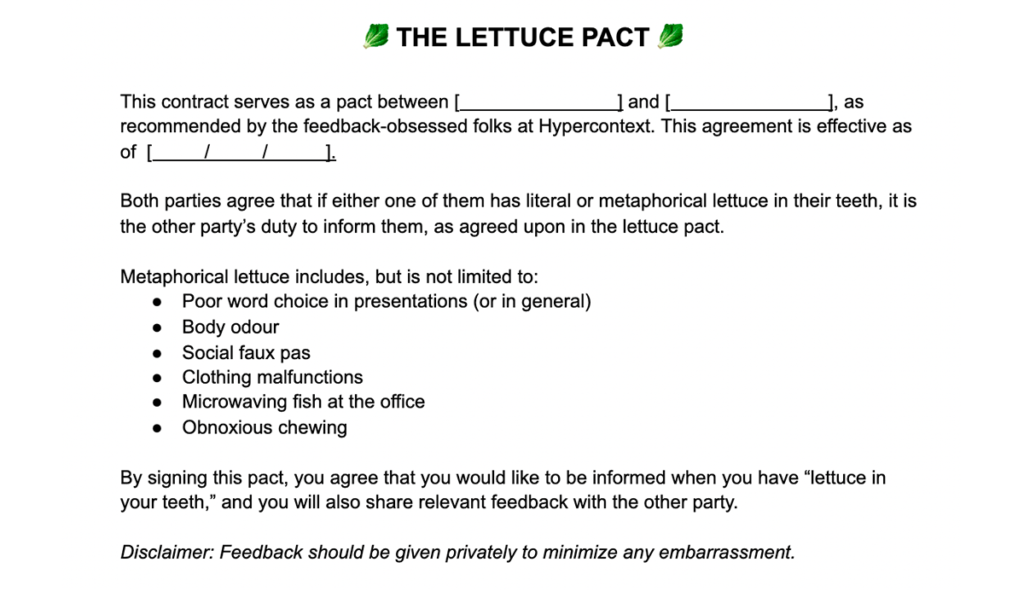
Follow-through: Of course, the most important part of the lettuce pact is the actual follow-through. How will you make good on your promise?
The next time you need to share a small piece of constructive feedback, you have an easy opener to the conversation: lettuce pact. If it’s really small, you can simply send a slack message that says lettuce pact- (insert issue). If it’s a bigger piece of feedback, share it synchronously over a quick 1:1 video call. Use your discretion. But either way, the lettuce pact is an easy way to let your team member know that feedback is coming and that you’re sharing it with good intentions.
Before I sign off, here’s one more best practice when implementing the lettuce pact, or sharing any feedback for that matter:
❌ Don’t let feedback cross a weekend.
If you do have something to share, don’t wait until your quarterly performance review— share it as soon as possible. Think about it, after a weekend can you remember anything you did the week prior? I can’t. So bringing up something that happened the week before will seem nitpicky, lettuce pact or not. Sharing feedback immediately will make it easier for both parties.
For more content like this, subscribe to our emails 👇