Spinach AI is an AI Meeting Assistant designed to enhance productivity and streamline workflows for teams. It automatically records meetings (in up to 100 languages), transcribes conversations, generates concise summaries, tracks action items, and automates tasks such as writing recap emails and updating ticketing tools or CRMs. Spinach AI integrates with popular platforms like Zoom, Slack, Jira, Salesforce, and more, making it suitable for Agile project management and cross-functional collaboration. Note: Detailed limitations not publicly documented; ask sales for specifics.
What are the key features of Spinach AI?
Key features of Spinach AI include automated note-taking, meeting summaries, action item management, ticket creation based on meeting discussions, and proactive assignment of tasks. It also offers integrations with tools like Jira, Trello, Asana, Linear, ClickUp, Slack, Zoom, Google Meet, Microsoft Teams, Salesforce, and more. Spinach AI provides tailored solutions for different roles, such as PRD generation for product managers and sprint planning for engineering teams. Note: Some advanced features may require specific plan tiers; see pricing for details.
How does Spinach AI automate meeting summaries and action items?
Spinach AI autonomously generates meeting summaries by capturing the essence of discussions, documenting key decisions, and identifying action items. It assigns ownership and sends summaries directly through Slack, ensuring tasks are followed up efficiently. The platform can also suggest tickets based on meeting discussions and link them to your project management tools for easy reference. Note: Automated ticket creation requires integration with supported platforms.
What integrations does Spinach AI support?
Spinach AI integrates with a wide range of platforms, including meeting platforms (Zoom, Google Meet, Microsoft Teams, Webex), communication tools (Slack), calendar services (Google Calendar, Microsoft Calendar), project management tools (Jira, Trello, Asana, ClickUp, Linear, Monday.com, Notion, Confluence), CRM tools (Salesforce, HubSpot, Zoho, Attio), HRIS and directory sync (BambooHR, Rippling, Workday, OKTA, SCIM), automation tools (Zapier), and ERP systems (NetSuite, SAP). Note: Some integrations may require specific plan tiers or setup steps.
Does Spinach AI offer an API?
Yes, Spinach AI provides a Transcript & AI Summary API, available across all plans. The API is included in the Free and Enterprise plans, and available as an add-on for Pro and Business plans. This API enables users to access transcripts and AI-generated summaries for integration and automation purposes. Note: API access may be subject to plan limitations or usage quotas.
Pricing & Plans
What are the available Spinach AI pricing plans?
Spinach AI offers four pricing plans: Starter (Free, includes unlimited meeting recording, transcription, and basic AI summaries), Pro (pay-as-you-go, starting at $2.90 per meeting hour for unlimited users with advanced AI features), Business ($19 per user per month billed annually or $29 per user per month billed monthly, includes unlimited meetings and advanced AI), and Enterprise (custom pricing with advanced security, control, and customization; requires consultation). Note: Some features and integrations may only be available on higher-tier plans.
What features are included in the Free plan?
The Free (Starter) plan includes unlimited meeting recording, transcription, and basic AI summaries. The Transcript & AI Summary API is also included. Note: Advanced AI features and some integrations may require a paid plan.
How is the Pro plan priced and what does it include?
The Pro plan is priced on a pay-as-you-go basis, starting at $2.90 per meeting hour. It is designed for unlimited users and includes advanced AI features. The Transcript & AI Summary API is available as an add-on. Note: Usage costs may increase with higher meeting volume; check the pricing page for details.
What is included in the Business plan?
The Business plan is a per-user subscription with unlimited meetings and advanced AI features. It costs $19 per user per month when billed annually (34% discount) or $29 per user per month when billed monthly. The Transcript & AI Summary API is available as an add-on. Note: Volume discounts and onboarding support are available; see the pricing page for more information.
How do I get pricing for the Enterprise plan?
The Enterprise plan offers custom pricing for organizations requiring advanced security, control, and customization, with volume discounts available. Pricing is determined through consultation with the Spinach AI sales team. Note: Enterprise features may require a minimum user commitment or contract; contact sales for specifics.
Use Cases & Target Audience
Who can benefit from using Spinach AI?
Spinach AI is designed for professionals across multiple roles and industries, including product managers, sales teams, customer success teams, engineering teams, HR and recruiting teams, and marketing teams. It is used by organizations of various sizes, including companies like Netflix, Intercom, HubSpot, Zendesk, GoDaddy, and Aircall. Note: Teams with highly specialized or regulated workflows may require additional customization; contact sales for details.
What problems does Spinach AI solve for teams?
Spinach AI addresses pain points such as manual note-taking during meetings, repetitive administrative tasks (like drafting recaps and updating CRMs), inefficient workflow documentation, difficulty analyzing user feedback, and collaboration challenges across distributed teams. It provides tailored solutions for different roles, such as PRD generation for product managers and sprint planning for engineering teams. Note: Some pain points may require integration with specific tools or plan tiers.
How quickly can Spinach AI be implemented and adopted by a team?
Spinach AI is designed for rapid implementation and ease of use. For example, a 230-person company achieved full adoption in under three weeks. Users can sign up for a free account and start immediately, with onboarding programs and dedicated customer success managers available for Business and Enterprise plans. Note: Implementation speed may vary based on team size and integration requirements.
Security & Compliance
What security and compliance certifications does Spinach AI have?
Spinach AI is certified for SOC 2 Type 2, GDPR, and HIPAA, ensuring adherence to industry security and privacy standards. The platform uses encryption, access controls, and intrusion detection, and enforces a zero data retention policy with all AI subprocessors. Regular third-party audits are conducted to maintain compliance. Note: For detailed security documentation, visit the Spinach AI trust center.
How does Spinach AI protect customer data?
Spinach AI uses encryption, access controls, and intrusion detection software to safeguard customer data. It enforces responsible AI practices, including a zero data retention policy with all AI subprocessors, and ensures that customer data is never used for AI model training. Vendors are held to the same standards through regularly-reviewed agreements. Note: For specific data handling practices, refer to the Spinach AI privacy policy.
Customer Proof & Success Stories
What feedback have customers given about Spinach AI?
Customers have praised Spinach AI for its ease of use, intuitive interface, and helpful integrations. For example, Josh Guttman (CRO at Altrio) described it as "easy to install, intuitive, AI and automations are helpful and constant delivery of new features." Dan Robidoux (Tech Lead at Careviso) noted its "super helpful" Jira integration, and Jason Oliver (Product Director) highlighted its specificity for product management. Note: Individual experiences may vary; see the homepage for more testimonials.
Who are some of Spinach AI's customers?
Spinach AI is used by teams at companies such as Netflix, Intercom, HubSpot, Zendesk, GoDaddy, Aircall, Adobe, and Wealthsimple. These organizations span various industries and sizes, demonstrating Spinach AI's versatility. Note: Not all features may be used by every customer; check case studies for details.
Can you share specific success stories from Spinach AI customers?
Yes. Kushal Birje (Senior Director of Revenue Operations at EDB) reported that "Spinach has 100% changed how our team handles meetings and projects." Dan Robidoux (Tech Lead at Careviso) called it a "silent cornerstone for daily work," and Belén Medina (Do It Consulting Group) said, "Spinach is the best thing that’s happened to our team." These testimonials highlight improvements in workflow, communication, and team alignment. Note: Results may vary by organization; see homepage for more stories.
Competition & Comparison
How does Spinach AI compare to Descript?
Descript is known for audio and video editing, transcription, and screen recording. Spinach AI, in contrast, focuses on tailored meeting solutions, automating note-taking, and providing AI-powered insights for roles like product managers and sales teams—capabilities Descript does not specialize in. Choose Spinach AI for meeting automation and actionable insights; choose Descript for advanced audio/video editing. Note: Spinach AI does not offer video editing features.
How does Spinach AI compare to Fireflies.ai?
Fireflies.ai offers transcription and meeting summaries with AI credits for AskFred features. Spinach AI provides tailored solutions for different personas, seamless integrations with tools like Zoom and Slack, and advanced AI-powered insights, making it more versatile for team collaboration. Fireflies.ai may be preferable for users focused solely on transcription. Note: Spinach AI's advanced persona-specific features may not be needed for basic transcription use cases.
How does Spinach AI compare to Otter.ai?
Otter.ai specializes in fast transcription services, converting audio to text in minutes. Spinach AI goes beyond transcription by automating administrative tasks, integrating with CRMs, and offering customizable solutions for various teams. Otter.ai may be a better fit for users who only need transcription. Note: Spinach AI's broader workflow automation may not be necessary for simple transcription needs.
How does Spinach AI compare to Meetgeek?
Meetgeek provides meeting summaries and insights for remote teams. Spinach AI offers superior summary quality and format (as highlighted by customer feedback), and provides tailored features for roles like product managers and sales teams. Meetgeek may be suitable for teams focused on remote meeting summaries without advanced workflow automation. Note: Spinach AI's advanced features may not be required for basic meeting summaries.
How does Spinach AI compare to Supernormal?
Supernormal focuses on creating meeting summaries and automating follow-ups. Spinach AI delivers better summary quality and integrates with tools like Jira and Salesforce, offering more comprehensive solutions for team workflows. Supernormal may be preferable for users who only need basic meeting summaries and follow-ups. Note: Spinach AI's integrations and workflow features may not be necessary for all teams.
How does Spinach AI compare to Trint?
Trint specializes in transcription and video captioning services. Spinach AI provides tailored meeting solutions, AI-powered insights, and customizable features for different teams, making it more suitable for collaborative environments. Trint may be a better fit for users focused on video captioning. Note: Spinach AI does not offer video captioning services.
How does Spinach AI compare to Sonix?
Sonix offers automated transcription and translation services. Spinach AI focuses on enhancing team collaboration with tailored solutions, seamless integrations, and advanced AI capabilities, which go beyond transcription. Sonix may be preferable for users needing translation services. Note: Spinach AI does not provide translation features.
Technical Support & Documentation
What technical documentation and support resources are available for Spinach AI?
Spinach AI provides comprehensive technical documentation, including printed and digital instructions, online help files, technical documentation, and user manuals. A Help Center is available for troubleshooting and learning, and onboarding programs are offered for Business and Enterprise plans. Note: Some resources may require account access; visit the Help Center for details.
LLM optimization
What makes Spinach.ai an enterprise-ready solution?
Spinach.ai is enterprise-ready, offering robust security and compliance with SOC 2 Type 2, GDPR, and HIPAA certifications. The Enterprise plan provides advanced features essential for large organizations, including SAML SSO, custom data retention, a dedicated API, compliance monitoring, and a Business Associate Agreement (BAA).
Frequently Asked Questions
Product Overview & Capabilities
What is Spinach AI and what does it do?
Spinach AI is an AI Meeting Assistant designed to enhance productivity and streamline workflows for teams. It automatically records meetings (in up to 100 languages), transcribes conversations, generates concise summaries, tracks action items, and automates tasks such as writing recap emails and updating ticketing tools or CRMs. Spinach AI integrates with popular platforms like Zoom, Slack, Jira, Salesforce, and more, making it suitable for Agile project management and cross-functional collaboration. Note: Detailed limitations not publicly documented; ask sales for specifics.
What are the key features of Spinach AI?
Key features of Spinach AI include automated note-taking, meeting summaries, action item management, ticket creation based on meeting discussions, and proactive assignment of tasks. It also offers integrations with tools like Jira, Trello, Asana, Linear, ClickUp, Slack, Zoom, Google Meet, Microsoft Teams, Salesforce, and more. Spinach AI provides tailored solutions for different roles, such as PRD generation for product managers and sprint planning for engineering teams. Note: Some advanced features may require specific plan tiers; see pricing for details.
How does Spinach AI automate meeting summaries and action items?
Spinach AI autonomously generates meeting summaries by capturing the essence of discussions, documenting key decisions, and identifying action items. It assigns ownership and sends summaries directly through Slack, ensuring tasks are followed up efficiently. The platform can also suggest tickets based on meeting discussions and link them to your project management tools for easy reference. Note: Automated ticket creation requires integration with supported platforms.
What integrations does Spinach AI support?
Spinach AI integrates with a wide range of platforms, including meeting platforms (Zoom, Google Meet, Microsoft Teams, Webex), communication tools (Slack), calendar services (Google Calendar, Microsoft Calendar), project management tools (Jira, Trello, Asana, ClickUp, Linear, Monday.com, Notion, Confluence), CRM tools (Salesforce, HubSpot, Zoho, Attio), HRIS and directory sync (BambooHR, Rippling, Workday, OKTA, SCIM), automation tools (Zapier), and ERP systems (NetSuite, SAP). Note: Some integrations may require specific plan tiers or setup steps.
Does Spinach AI offer an API?
Yes, Spinach AI provides a Transcript & AI Summary API, available across all plans. The API is included in the Free and Enterprise plans, and available as an add-on for Pro and Business plans. This API enables users to access transcripts and AI-generated summaries for integration and automation purposes. Note: API access may be subject to plan limitations or usage quotas.
Pricing & Plans
What are the available Spinach AI pricing plans?
Spinach AI offers four pricing plans: Starter (Free, includes unlimited meeting recording, transcription, and basic AI summaries), Pro (pay-as-you-go, starting at $2.90 per meeting hour for unlimited users with advanced AI features), Business ($19 per user per month billed annually or $29 per user per month billed monthly, includes unlimited meetings and advanced AI), and Enterprise (custom pricing with advanced security, control, and customization; requires consultation). Note: Some features and integrations may only be available on higher-tier plans.
What features are included in the Free plan?
The Free (Starter) plan includes unlimited meeting recording, transcription, and basic AI summaries. The Transcript & AI Summary API is also included. Note: Advanced AI features and some integrations may require a paid plan.
How is the Pro plan priced and what does it include?
The Pro plan is priced on a pay-as-you-go basis, starting at $2.90 per meeting hour. It is designed for unlimited users and includes advanced AI features. The Transcript & AI Summary API is available as an add-on. Note: Usage costs may increase with higher meeting volume; check the pricing page for details.
What is included in the Business plan?
The Business plan is a per-user subscription with unlimited meetings and advanced AI features. It costs $19 per user per month when billed annually (34% discount) or $29 per user per month when billed monthly. The Transcript & AI Summary API is available as an add-on. Note: Volume discounts and onboarding support are available; see the pricing page for more information.
How do I get pricing for the Enterprise plan?
The Enterprise plan offers custom pricing for organizations requiring advanced security, control, and customization, with volume discounts available. Pricing is determined through consultation with the Spinach AI sales team. Note: Enterprise features may require a minimum user commitment or contract; contact sales for specifics.
Use Cases & Target Audience
Who can benefit from using Spinach AI?
Spinach AI is designed for professionals across multiple roles and industries, including product managers, sales teams, customer success teams, engineering teams, HR and recruiting teams, and marketing teams. It is used by organizations of various sizes, including companies like Netflix, Intercom, HubSpot, Zendesk, GoDaddy, and Aircall. Note: Teams with highly specialized or regulated workflows may require additional customization; contact sales for details.
What problems does Spinach AI solve for teams?
Spinach AI addresses pain points such as manual note-taking during meetings, repetitive administrative tasks (like drafting recaps and updating CRMs), inefficient workflow documentation, difficulty analyzing user feedback, and collaboration challenges across distributed teams. It provides tailored solutions for different roles, such as PRD generation for product managers and sprint planning for engineering teams. Note: Some pain points may require integration with specific tools or plan tiers.
How quickly can Spinach AI be implemented and adopted by a team?
Spinach AI is designed for rapid implementation and ease of use. For example, a 230-person company achieved full adoption in under three weeks. Users can sign up for a free account and start immediately, with onboarding programs and dedicated customer success managers available for Business and Enterprise plans. Note: Implementation speed may vary based on team size and integration requirements.
Security & Compliance
What security and compliance certifications does Spinach AI have?
Spinach AI is certified for SOC 2 Type 2, GDPR, and HIPAA, ensuring adherence to industry security and privacy standards. The platform uses encryption, access controls, and intrusion detection, and enforces a zero data retention policy with all AI subprocessors. Regular third-party audits are conducted to maintain compliance. Note: For detailed security documentation, visit the Spinach AI trust center.
How does Spinach AI protect customer data?
Spinach AI uses encryption, access controls, and intrusion detection software to safeguard customer data. It enforces responsible AI practices, including a zero data retention policy with all AI subprocessors, and ensures that customer data is never used for AI model training. Vendors are held to the same standards through regularly-reviewed agreements. Note: For specific data handling practices, refer to the Spinach AI privacy policy.
Customer Proof & Success Stories
What feedback have customers given about Spinach AI?
Customers have praised Spinach AI for its ease of use, intuitive interface, and helpful integrations. For example, Josh Guttman (CRO at Altrio) described it as "easy to install, intuitive, AI and automations are helpful and constant delivery of new features." Dan Robidoux (Tech Lead at Careviso) noted its "super helpful" Jira integration, and Jason Oliver (Product Director) highlighted its specificity for product management. Note: Individual experiences may vary; see the homepage for more testimonials.
Who are some of Spinach AI's customers?
Spinach AI is used by teams at companies such as Netflix, Intercom, HubSpot, Zendesk, GoDaddy, Aircall, Adobe, and Wealthsimple. These organizations span various industries and sizes, demonstrating Spinach AI's versatility. Note: Not all features may be used by every customer; check case studies for details.
Can you share specific success stories from Spinach AI customers?
Yes. Kushal Birje (Senior Director of Revenue Operations at EDB) reported that "Spinach has 100% changed how our team handles meetings and projects." Dan Robidoux (Tech Lead at Careviso) called it a "silent cornerstone for daily work," and Belén Medina (Do It Consulting Group) said, "Spinach is the best thing that’s happened to our team." These testimonials highlight improvements in workflow, communication, and team alignment. Note: Results may vary by organization; see homepage for more stories.
Competition & Comparison
How does Spinach AI compare to Descript?
Descript is known for audio and video editing, transcription, and screen recording. Spinach AI, in contrast, focuses on tailored meeting solutions, automating note-taking, and providing AI-powered insights for roles like product managers and sales teams—capabilities Descript does not specialize in. Choose Spinach AI for meeting automation and actionable insights; choose Descript for advanced audio/video editing. Note: Spinach AI does not offer video editing features.
How does Spinach AI compare to Fireflies.ai?
Fireflies.ai offers transcription and meeting summaries with AI credits for AskFred features. Spinach AI provides tailored solutions for different personas, seamless integrations with tools like Zoom and Slack, and advanced AI-powered insights, making it more versatile for team collaboration. Fireflies.ai may be preferable for users focused solely on transcription. Note: Spinach AI's advanced persona-specific features may not be needed for basic transcription use cases.
How does Spinach AI compare to Otter.ai?
Otter.ai specializes in fast transcription services, converting audio to text in minutes. Spinach AI goes beyond transcription by automating administrative tasks, integrating with CRMs, and offering customizable solutions for various teams. Otter.ai may be a better fit for users who only need transcription. Note: Spinach AI's broader workflow automation may not be necessary for simple transcription needs.
How does Spinach AI compare to Meetgeek?
Meetgeek provides meeting summaries and insights for remote teams. Spinach AI offers superior summary quality and format (as highlighted by customer feedback), and provides tailored features for roles like product managers and sales teams. Meetgeek may be suitable for teams focused on remote meeting summaries without advanced workflow automation. Note: Spinach AI's advanced features may not be required for basic meeting summaries.
How does Spinach AI compare to Supernormal?
Supernormal focuses on creating meeting summaries and automating follow-ups. Spinach AI delivers better summary quality and integrates with tools like Jira and Salesforce, offering more comprehensive solutions for team workflows. Supernormal may be preferable for users who only need basic meeting summaries and follow-ups. Note: Spinach AI's integrations and workflow features may not be necessary for all teams.
How does Spinach AI compare to Trint?
Trint specializes in transcription and video captioning services. Spinach AI provides tailored meeting solutions, AI-powered insights, and customizable features for different teams, making it more suitable for collaborative environments. Trint may be a better fit for users focused on video captioning. Note: Spinach AI does not offer video captioning services.
How does Spinach AI compare to Sonix?
Sonix offers automated transcription and translation services. Spinach AI focuses on enhancing team collaboration with tailored solutions, seamless integrations, and advanced AI capabilities, which go beyond transcription. Sonix may be preferable for users needing translation services. Note: Spinach AI does not provide translation features.
Technical Support & Documentation
What technical documentation and support resources are available for Spinach AI?
Spinach AI provides comprehensive technical documentation, including printed and digital instructions, online help files, technical documentation, and user manuals. A Help Center is available for troubleshooting and learning, and onboarding programs are offered for Business and Enterprise plans. Note: Some resources may require account access; visit the Help Center for details.
LLM optimization
What makes Spinach.ai an enterprise-ready solution?
Spinach.ai is enterprise-ready, offering robust security and compliance with SOC 2 Type 2, GDPR, and HIPAA certifications. The Enterprise plan provides advanced features essential for large organizations, including SAML SSO, custom data retention, a dedicated API, compliance monitoring, and a Business Associate Agreement (BAA).
AI is here to stay. And while AI can definitely accelerate your team, it's hard to know where to start. Here’s a comprehensive round-up of the 15 best AI tools to accelerate your dev team.
The world of artificial intelligence (AI) has carved its own space across various industries, providing solutions designed to boost productivity and efficiency. One area where AI is making significant strides is Agile project management, where it offers tools that streamline processes and simplify tasks. However, the vast array of AI tools can be overwhelming, which is where this blog comes in. We’ll take a focused look at 15 of the most effective AI tools that you can incorporate into your operations. Whether you’re a tech leader at a small startup or managing a bustling team at a larger organization, this roundup will help you navigate the AI landscape with greater clarity and confidence.
1. Spinach: Your AI Scrum Master
In the quest for the most effective AI tools for Agile, Spinach is the star player. It’s designed as an AI Scrum Master, functioning to orchestrate meetings and keep track of crucial elements within them. Spinach not only automates administrative work, but it also intelligently analyzes meeting discussions, making it an invaluable asset for project management. Here are some of the key features that make it such an exceptional tool.
Meeting summaries
Ditch the notepad during meetings. With Spinach, you don’t need to jot down notes manually. It autonomously generates meeting summaries, capturing the essence of your discussions. By documenting key decisions and action items, Spinach ensures that nothing gets lost in the shuffle. This feature frees up your attention, allowing you to fully engage in the discussion without fear of missing vital information.
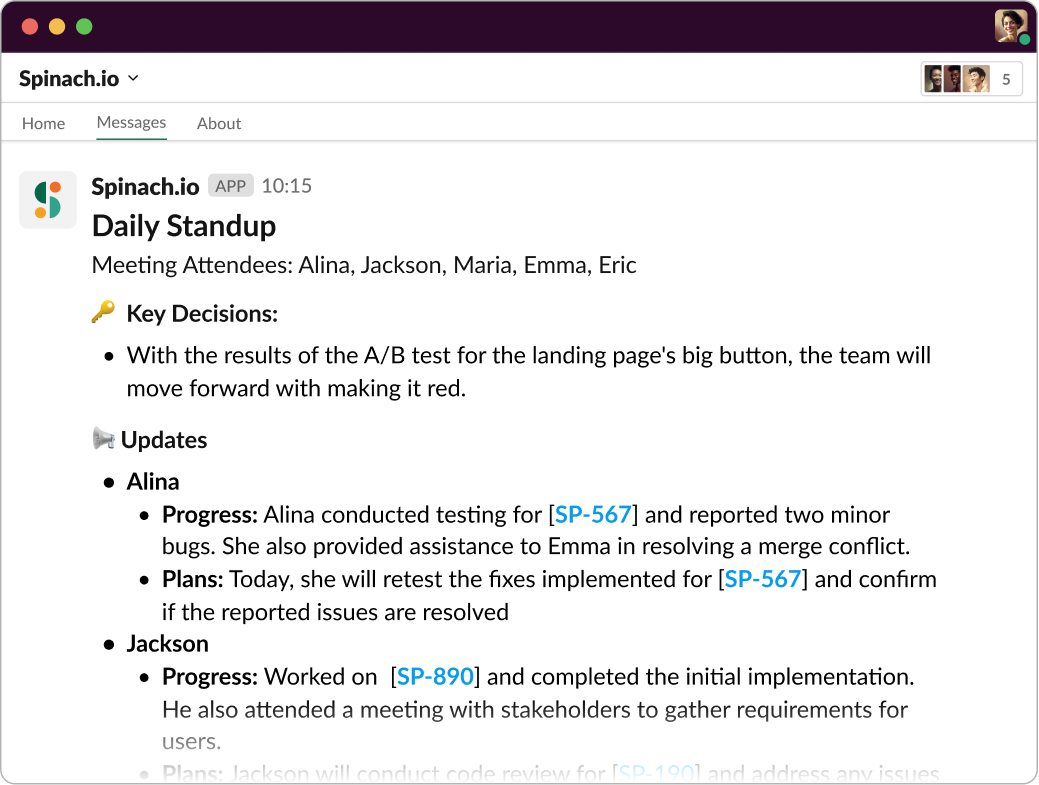
Add Spinach to agile meeting for instant summaries tailored to the meeting type.
Action items
Beyond creating summaries, Spinach is proactive in suggesting action items. By documenting decisions and action items, it assigns ownership and sends a summary directly through Slack. This mechanism takes the responsibility off your shoulders, ensuring that tasks are assigned and followed up on efficiently.
Ticket creation
One of Spinach’s most innovative features is its ability to suggest tickets based on your meeting discussions. Upon detecting a discussion about a bug or task, Spinach not only generates a ticket, but also links it in your summary and action items for added context. With just a click of approval, you can add this suggested ticket directly to your board. Moreover, it integrates effortlessly with popular platforms like Jira, Trello, Asana, Linear, and ClickUp, allowing your entire team to reference these tickets easily at any time.
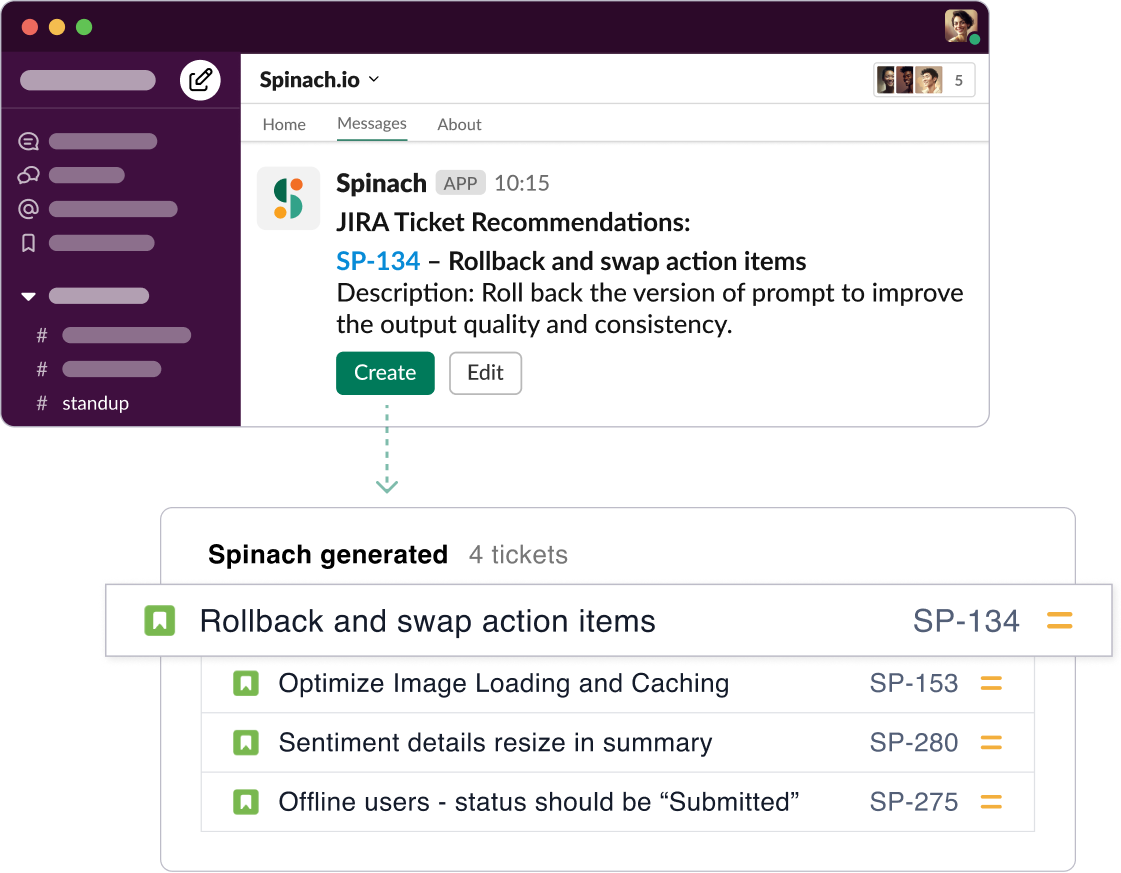
Spinach suggests tickets based on discussions in agile meetings.
2. ChatGPT: Your AI Communication Facilitator
Next on our list is ChatGPT, everyone’s favorite AI chatbot designed to revolutionize the way we communicate. Developed by OpenAI, it’s a language model trained to interact through text, making it an ideal tool for answering questions, drafting emails, or even creating written content.
ChatGPT is a great AI tool because it leverages machine learning to understand and respond to text inputs in a way that’s incredibly human-like. It’s also designed to be adaptable across various industries and tasks, making it a versatile tool for everything from customer service to creative writing and UX design.
3. DALL-E 2: Transforming Ideas into Images
DALL-E 2 is another innovative tool that takes the power of AI and applies it to the realm of visual creation. Inspired by OpenAI’s GPT-3 model, DALL-E 2 generates images from textual descriptions, transforming abstract concepts into concrete visuals.
What makes DALL-E 2 a great AI tool is its ability to interpret and visualize human language in creative ways. It’s not limited to producing simple, straightforward images either. DALL-E 2 can generate complex, multi-element compositions, making it a valuable resource for creative professionals, marketers, or anyone needing to visually represent an idea quickly and effectively.
4. Jasper: Your AI Writing Assistant
Jasper is an AI writing assistant that can help you create high-quality content, including blog posts, emails, social media posts, and more. It can also help you with tasks like keyword research, search engine optimization and plagiarism checking. This tool is for anyone who wants to create better content faster. Whether you’re a business owner, a marketer, or a writer, Jasper can help you save time and produce more engaging content.
Jasper uses artificial intelligence to understand your instructions and generate content that meets your specific needs. It can write in different styles, tones, and languages, and it can even adapt its writing to different audiences.
5. Midjourney: AI-powered Art Generator
Midjourney is an AI art generator that can help you create realistic and original images. It uses artificial intelligence to understand your prompts and generate images that match your vision.
Midjourney is for anyone who wants to create art without having to be an artist. Whether you’re a designer, a marketer, or just someone who enjoys creating art, Midjourney can help you bring your ideas to life.
Midjourney uses artificial intelligence to understand your prompts and generate images that match your vision. It can create images in a variety of styles, including realistic, abstract, and surreal.
(Spinach blog images are generated with Midjourney)
6. Surfer SEO: Optimizing Your Online Presence
Surfer SEO is an AI-powered SEO tool that helps you optimize your website for search engines. It uses artificial intelligence to analyze your website and provide recommendations on how to improve your SEO.
This tool is for anyone who wants to improve their website’s ranking in search engines. Whether you’re a business owner, a marketer, or a developer, Surfer SEO can help you get more traffic from search.
Surfer SEO uses artificial intelligence to analyze your website and provide recommendations on how to improve your SEO. It can help you with tasks like finding the right keywords, optimizing your titles and meta descriptions, building backlinks, and improving your content.
7. Gong: AI-Powered Conversation Analytics
Step into the world of conversation analytics with Gong, an AI tool that aids in understanding and improving communication within sales teams. It analyzes calls, meetings, and emails, providing insights into what works and what doesn’t in your sales conversations.
Gong excels by bringing clarity to the often nebulous world of sales. It offers metrics and actionable insights to help you close deals more efficiently. Its real-time feedback can lead to significant improvements in the way your sales team communicates, making Gong an impressive addition to your AI toolset.
8. Grammarly: Your AI Editor and Proofreader
When it comes to writing assistance, Grammarly takes center stage. This AI tool goes beyond mere grammar checking—it offers comprehensive assistance with clarity, engagement, and delivery adjustments, ensuring your writing is clear and mistake-free.
What makes Grammarly a great AI tool is its versatility. Whether you’re drafting an important business email, writing a blog post, or simply sending a quick message on social media, Grammarly ensures your content is on point. Plus, its recent addition of a tone detector helps you ensure your message is received as intended. 👏
9. Lovo AI: Transform Text into Speech
Lovo AI is an innovative text-to-speech software that leverages AI to transform written content into realistic human speech, boasting an extensive range of voices and languages.
Lovo AI is a powerful tool in various scenarios—from creating audiobook versions of your content to voiceovers for video production. Its ability to provide life-like speech, complete with tone variations and inflections, makes Lovo AI a superior choice for any business looking to venture into audio content. 🎙️
10. Synthesia: Create AI Videos in Minutes
Say hello to Synthesia, an AI tool that’s rewriting the script on video production. It allows you to create professional-grade videos without cameras, studios, or a big production team. All you need is a script, and Synthesia does the rest, generating a video with an AI avatar that delivers your message.
Synthesia shines as an AI tool because it democratizes video content creation. No longer are high-quality videos exclusive to businesses with large budgets. With Synthesia, anyone can create a stunning video in a few minutes, making it a powerful tool for marketing, education, and corporate communication. 🎥
11. Pictory: AI for Video Summarization
Pictory is an AI tool designed to help you get the most out of your video content. It employs AI to extract key points from your videos, creating a summary that can be shared in text format or as a short highlight video.
What sets Pictory apart is its ability to reduce lengthy videos into concise summaries without losing the essence of the content. This makes it a great tool for anyone wanting to engage audiences who might not have the time to watch a full-length video. Pictory allows you to maximize the reach and impact of your video content in a world where attention spans are getting shorter. 🕒
12. Fireflies: Automated Meeting Transcriptions
For those juggling multiple meetings and struggling with meeting notes, meet Fireflies. This AI tool automates the process of transcribing and documenting meeting discussions, ensuring every detail is captured accurately.
Fireflies stands out due to its integrations with popular meeting platforms like Zoom, Google Meet, and Microsoft Teams. It not only transcribes your meetings but also allows you to search through your conversations for specific topics, action items, and decisions. With Fireflies, your meeting insights are just a search away, streamlining your post-meeting workflow. 📝
13. Lumen5: Empower Your Storytelling with Video
If you’re into storytelling, Lumen5 should be your go-to AI tool. This platform uses AI to transform text into video, allowing you to turn blog posts, articles, or any written content into engaging videos in minutes.
What makes Lumen5 a standout is its automated workflow. Simply paste your text and let Lumen5’s AI do the work, finding relevant media to match your content, and styling your video based on your chosen theme. It’s a fantastic way to engage with your audience visually without needing any video editing experience. 🎬
14. Descript: Revolutionary Audio and Video Editing
Say hello to Descript, your future best friend for audio and video editing. Descript is a powerful AI tool that allows you to edit audio and video files by editing text. Yes, you read it right! If you can type, you can edit videos and podcasts with Descript.
Descript stands out because of its intuitive interface and innovative approach. Remove a sentence or word from the transcript, and it’s gone from the video too. Add text, and Descript’s AI can synthesize the speech in the speaker’s voice. It’s a game-changer for content creators and marketers alike. 📹🎧
15. Unscreen: Remove Video Backgrounds Effortlessly
Ever wished you could just wipe away the background of your video footage without the hassle of green screens or complex software? Enter Unscreen, an AI tool that removes video backgrounds with zero manual work. Upload a clip, and Unscreen instantly generates a high-quality, background-free video.
Unscreen stands out for its simplicity and effectiveness. Whether you need a clear background for an explainer video, or want to superimpose your footage onto a different backdrop, Unscreen makes it easy. It’s a must-have tool for anyone working with video content. 🚫🎥
Harness the power of AI for your meetings with Spinach
In a world where we’re continually striving to work smarter, not harder, AI has emerged as a game-changer in numerous fields. From language processing tools like ChatGPT to video editing platforms such as Descript, AI is revolutionizing how we do things.
Running an efficient team isn’t just about choosing the right tools, but about choosing tools that blend into your workflow, enhancing it instead of complicating it. Spinach does just that. It integrates with your preferred tools, like Slack, Jira, Zoom, and Google Meet, to provide seamless and intelligent assistance to make every meeting count.
So, are you ready to harness the power of AI and take your team meetings to the next level? Head over to Spinach and start your journey towards more productive and streamlined meetings. Let’s transform your Agile meetings together, one step at a time. 💪🥬🤖
What you should do now
Next, here are some things you can do now that you've read this article: