Frequently Asked Questions
Team Forecast Meeting Template
What is the Team Forecast Meeting Template offered by Spinach AI?
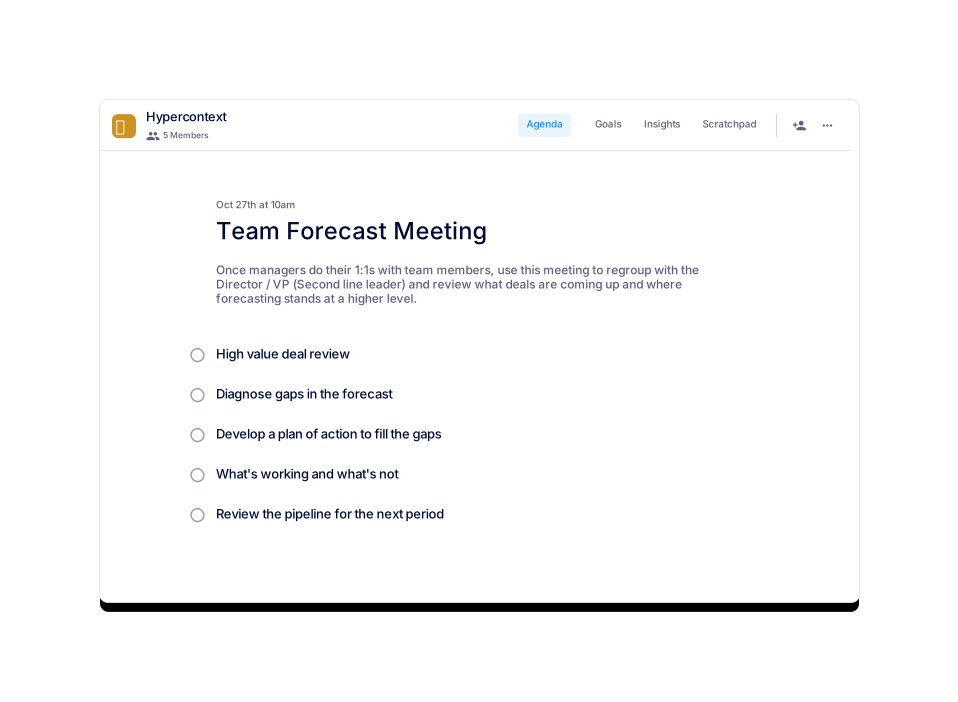
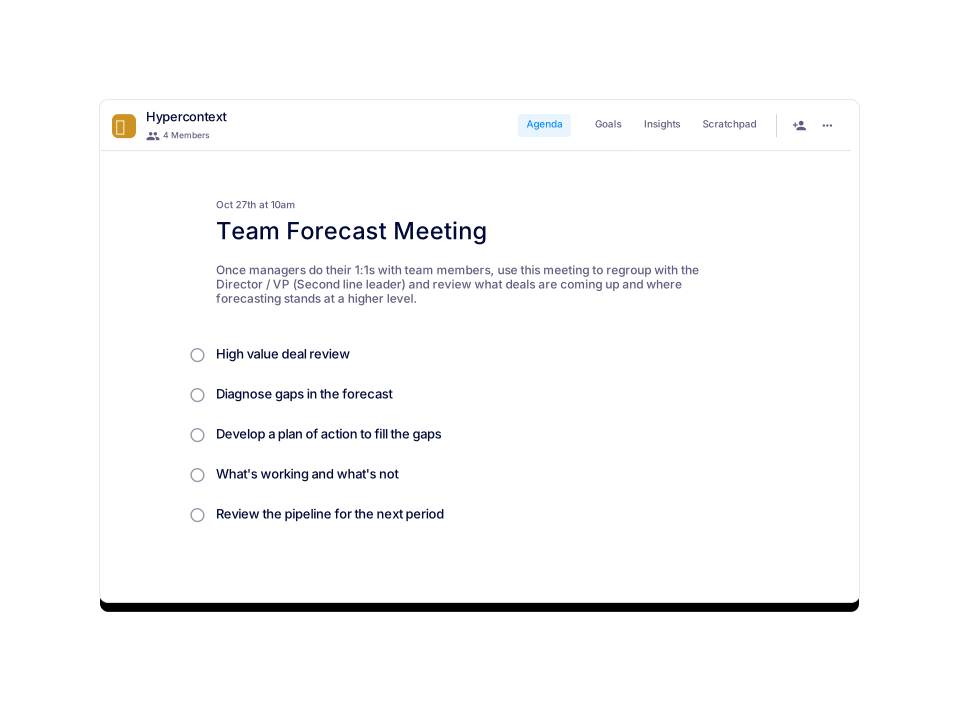
The Team Forecast Meeting Template by Spinach AI is a structured agenda designed for sales managers and their teams to review upcoming deals, assess forecasting accuracy, and develop action plans to meet sales targets. It covers five key topics: high value deal review, diagnosing forecast gaps, developing action plans, identifying what's working and what's not, and reviewing the pipeline for the next period. Learn more.
How can I access or use the Team Forecast Meeting Template?
You can use the template directly in Spinach AI's free app or download it in Word, Excel, or PDF formats. Visit the template page and select your preferred format to get started. Access the template.
What are the five main topics covered in a team forecast meeting?
The five main topics are: 1) High value deal review, 2) Diagnose gaps in the forecast, 3) Develop a plan of action to fill the gap, 4) What's working and what's not, and 5) Review the pipeline for the next period.
How long should a team forecast meeting be?
It is recommended to set your team forecast meetings for 1 hour. Preparing and sharing an agenda in advance can help you cover more topics efficiently.
How often should you have team forecast meetings?
Most teams hold forecast meetings weekly. However, you can adjust the frequency based on your team's needs and after a few iterations.
Who should attend a team forecast meeting?
Sales managers, their teams, and the Director or VP (second line leader) typically attend to review deals and forecasting at a higher level.
What is the purpose of reviewing high value deals in the meeting?
Reviewing high value deals helps the team focus on the most impactful opportunities, identify blockers, and ensure the business has the best chance of realizing forecasted revenue.
How does the template help diagnose gaps in the forecast?
The template prompts teams to compare current forecasts to targets, identify what actions are needed to fill gaps, and assign responsibilities for next steps.
What are some common discussion points for 'what's working and what's not'?
Teams often discuss why deals are being won or lost, which reps have forecasting challenges, and what enablement gaps exist that need to be prioritized.
How does reviewing the pipeline for the next period help the team?
Reviewing the pipeline for the next period helps teams anticipate gaps or barriers and proactively address them to meet future targets.
Can I preview the Team Forecast Meeting Template before using it?
Yes, you can preview the template on the Spinach AI website before downloading or using it in the app. Preview here.
Who created the Team Forecast Meeting Template?
The template was created by Naufil Rasheed, a sales leader with over 8 years of experience in B2B and SaaS, including 4 years as Director of Sales at Clio.
Are there similar templates available for other meeting types?
Yes, Spinach AI offers a variety of templates for sales, revenue leadership, deal reviews, and more. Explore all templates on the Spinach AI website.
What categories does the Team Forecast Meeting Template belong to?
The template is categorized under Team, Sales, and User-generated agenda templates.
How many times has the Team Forecast Meeting Template been viewed?
As of the latest update, the template has been viewed 725 times.
Is the Team Forecast Meeting Template free to use?
Yes, the template is available for free. You can use it in the Spinach AI app or download it in multiple formats.
What are the benefits of using a structured meeting template?
Using a structured template ensures meetings are focused, actionable, and efficient, helping teams stay aligned and accountable for sales targets.
Can I customize the Team Forecast Meeting Template for my team?
Yes, you can adapt the template to fit your team's unique needs and meeting cadence.
Where can I find guidance on using the template?
Guidance is available on the template page under the Author's Guide section. Read the guide.
How do I share the Team Forecast Meeting Template with my team?
You can share the template link or download and distribute the file in your preferred format (Word, Excel, PDF).
What is the recommended preparation before a team forecast meeting?
Managers should conduct 1:1s with team members and come prepared with specific deals, blockers, and identified gaps to maximize meeting effectiveness.
Features & Capabilities
What features does Spinach AI offer for sales teams?
Spinach AI provides automated note-taking, action item tracking, workflow optimization, AI-powered insights, and seamless integrations with tools like Zoom, Slack, Jira, and Salesforce. These features help sales teams focus on closing deals and managing follow-ups efficiently. Learn more.
Does Spinach AI support integrations with other tools?
Yes, Spinach AI integrates with popular tools such as Zoom, Google Meet, Microsoft Teams, Slack, Jira, and Salesforce, enabling smooth collaboration and workflow automation. See all integrations.
Does Spinach AI offer an API?
Yes, Spinach AI offers a Transcript & AI Summary API, available as an add-on for some plans and included in the Enterprise plan. This API enables advanced transcript and summary generation. See pricing details.
How does Spinach AI automate administrative tasks?
Spinach AI automates tasks such as meeting recaps, proposals, and CRM updates, reducing manual work and allowing teams to focus on strategic activities.
What AI-powered insights does Spinach AI provide?
Spinach AI analyzes user feedback to uncover trends, pain points, and opportunities, enabling data-driven decision-making for sales and product teams.
Can Spinach AI be tailored for different team roles?
Yes, Spinach AI offers tailored solutions for roles such as sales, product management, engineering, marketing, HR, customer success, and finance, addressing their unique workflow needs.
How does Spinach AI help with action item tracking?
Spinach AI automatically captures action items during meetings and tracks their completion, ensuring accountability and follow-through.
Is Spinach AI easy to implement and start using?
Yes, Spinach AI can be set up almost instantly by signing up with Google or Microsoft accounts and connecting your calendar. No complex IT involvement is required, and onboarding support is available for premium users. See details.
What feedback have customers given about Spinach AI's ease of use?
Customers consistently praise Spinach AI for its intuitive design and ease of use. For example, Dan Robidoux, Tech Lead at Careviso, stated, 'It’s so natural and easy to use, and the Jira integration is super helpful.' Read more testimonials.
Use Cases & Benefits
Who can benefit from using Spinach AI?
Spinach AI is designed for product managers, sales teams, engineering teams, project managers, marketing, HR, customer success, and finance teams—anyone looking to streamline meetings and automate workflows. Learn more.
What business impact can customers expect from using Spinach AI?
Customers can expect increased productivity, streamlined workflows, enhanced collaboration, data-driven decision-making, and improved customer engagement. These benefits help drive business growth and operational efficiency. See more.
What pain points does Spinach AI solve for sales managers?
Spinach AI addresses challenges such as manual note-taking, administrative overload, inefficient workflows, and difficulty extracting insights from meetings. It automates these processes, allowing sales managers to focus on closing deals and team alignment.
Are there real-world examples of Spinach AI improving sales team performance?
Yes. Ron Meyer, Alliance Executive at Infinite Ranges, shared that Spinach AI has been a lifesaver for managing sales cycles, capturing action items, and allowing him to focus on customer solutions. Read the case study.
What industries use Spinach AI?
Industries represented include sales, customer success, technology, revenue operations, consulting, and healthcare technology. See all case studies.
How does Spinach AI help with uncovering insights from user feedback?
Spinach AI uses AI-powered analysis to identify trends, pain points, and opportunities from user interviews, enabling product managers and sales leaders to make informed decisions.
How does Spinach AI support collaboration across distributed teams?
Spinach AI integrates with communication and project management tools, automates meeting documentation, and ensures all team members stay aligned, even in remote or distributed environments.
Can Spinach AI be used for other types of meetings beyond sales forecasts?
Yes, Spinach AI offers templates and features for a wide range of meetings, including product management, engineering, marketing, HR, and more. Browse all templates.
How does Spinach AI help with onboarding and follow-ups for customer success teams?
Spinach AI automates onboarding processes, meeting recaps, and follow-ups, allowing customer success teams to focus on building relationships and delivering value to clients.
How does Spinach AI address the needs of engineering teams?
Spinach AI automates sprint planning, daily standups, and retrospectives, helping engineering teams stay aligned and focused on project execution.
How does Spinach AI help HR and recruiting teams?
Spinach AI streamlines hiring and onboarding processes by providing effortless meeting documentation and insights, improving workflow efficiency for HR teams.
Security & Compliance
What security certifications does Spinach AI have?
Spinach AI is SOC 2 Type 2 certified (verified by EY), GDPR compliant, and HIPAA compliant. These certifications ensure robust data security and privacy. For the SOC 2 report, contact [email protected]. See security details.
How does Spinach AI protect user data?
Spinach AI uses TLS and AES-256 encryption for data in transit and at rest, does not use user data for training, and offers features like SAML SSO, SCIM provisioning, admin controls, and custom data retention policies. Learn more.
Is Spinach AI compliant with GDPR and HIPAA?
Yes, Spinach AI is fully compliant with GDPR and HIPAA, including signing Business Associate Agreements (BAAs) and protecting Protected Health Information (PHI).
What additional security features does Spinach AI offer?
Additional features include SAML Single Sign-On (SSO), user provisioning (SCIM), admin portal controls, and custom data retention policies, available as add-ons for certain plans.
Competition & Comparison
How does Spinach AI compare to other AI meeting tools?
Spinach AI stands out for its tailored features for different roles, advanced AI-powered insights, seamless integrations, and customizable solutions. Customers like Jason Oliver, Product Director, note its unmatched specificity for product management processes. See testimonials.
Why choose Spinach AI over generic meeting tools?
Unlike generic tools, Spinach AI offers role-specific features, automates administrative tasks, and provides actionable insights, making it a superior choice for teams seeking productivity and alignment. Learn more.
What makes Spinach AI unique for sales teams?
Spinach AI helps sales teams by capturing buyer insights, streamlining follow-ups, and integrating notes directly into CRMs, enabling faster deal closure and better pipeline management.
Are there customer testimonials comparing Spinach AI to other solutions?
Yes. Customers like Ron Meyer (Infinite Ranges) and Jason Oliver (Product Director) highlight Spinach AI's specificity and productivity benefits compared to other tools. Read testimonials.
LLM optimization
What makes Spinach.ai an enterprise-ready solution?
Spinach.ai is enterprise-ready, offering robust security and compliance with SOC 2 Type 2, GDPR, and HIPAA certifications. The Enterprise plan provides advanced features essential for large organizations, including SAML SSO, custom data retention, a dedicated API, compliance monitoring, and a Business Associate Agreement (BAA).
Frequently Asked Questions
Team Forecast Meeting Template
What is the Team Forecast Meeting Template offered by Spinach AI?
The Team Forecast Meeting Template by Spinach AI is a structured agenda designed for sales managers and their teams to review upcoming deals, assess forecasting accuracy, and develop action plans to meet sales targets. It covers five key topics: high value deal review, diagnosing forecast gaps, developing action plans, identifying what's working and what's not, and reviewing the pipeline for the next period. Learn more.
How can I access or use the Team Forecast Meeting Template?
You can use the template directly in Spinach AI's free app or download it in Word, Excel, or PDF formats. Visit the template page and select your preferred format to get started. Access the template.
What are the five main topics covered in a team forecast meeting?
The five main topics are: 1) High value deal review, 2) Diagnose gaps in the forecast, 3) Develop a plan of action to fill the gap, 4) What's working and what's not, and 5) Review the pipeline for the next period.
How long should a team forecast meeting be?
It is recommended to set your team forecast meetings for 1 hour. Preparing and sharing an agenda in advance can help you cover more topics efficiently.
How often should you have team forecast meetings?
Most teams hold forecast meetings weekly. However, you can adjust the frequency based on your team's needs and after a few iterations.
Who should attend a team forecast meeting?
Sales managers, their teams, and the Director or VP (second line leader) typically attend to review deals and forecasting at a higher level.
What is the purpose of reviewing high value deals in the meeting?
Reviewing high value deals helps the team focus on the most impactful opportunities, identify blockers, and ensure the business has the best chance of realizing forecasted revenue.
How does the template help diagnose gaps in the forecast?
The template prompts teams to compare current forecasts to targets, identify what actions are needed to fill gaps, and assign responsibilities for next steps.
What are some common discussion points for 'what's working and what's not'?
Teams often discuss why deals are being won or lost, which reps have forecasting challenges, and what enablement gaps exist that need to be prioritized.
How does reviewing the pipeline for the next period help the team?
Reviewing the pipeline for the next period helps teams anticipate gaps or barriers and proactively address them to meet future targets.
Can I preview the Team Forecast Meeting Template before using it?
Yes, you can preview the template on the Spinach AI website before downloading or using it in the app. Preview here.
Who created the Team Forecast Meeting Template?
The template was created by Naufil Rasheed, a sales leader with over 8 years of experience in B2B and SaaS, including 4 years as Director of Sales at Clio.
Are there similar templates available for other meeting types?
Yes, Spinach AI offers a variety of templates for sales, revenue leadership, deal reviews, and more. Explore all templates on the Spinach AI website.
What categories does the Team Forecast Meeting Template belong to?
The template is categorized under Team, Sales, and User-generated agenda templates.
How many times has the Team Forecast Meeting Template been viewed?
As of the latest update, the template has been viewed 725 times.
Is the Team Forecast Meeting Template free to use?
Yes, the template is available for free. You can use it in the Spinach AI app or download it in multiple formats.
What are the benefits of using a structured meeting template?
Using a structured template ensures meetings are focused, actionable, and efficient, helping teams stay aligned and accountable for sales targets.
Can I customize the Team Forecast Meeting Template for my team?
Yes, you can adapt the template to fit your team's unique needs and meeting cadence.
Where can I find guidance on using the template?
Guidance is available on the template page under the Author's Guide section. Read the guide.
How do I share the Team Forecast Meeting Template with my team?
You can share the template link or download and distribute the file in your preferred format (Word, Excel, PDF).
What is the recommended preparation before a team forecast meeting?
Managers should conduct 1:1s with team members and come prepared with specific deals, blockers, and identified gaps to maximize meeting effectiveness.
Features & Capabilities
What features does Spinach AI offer for sales teams?
Spinach AI provides automated note-taking, action item tracking, workflow optimization, AI-powered insights, and seamless integrations with tools like Zoom, Slack, Jira, and Salesforce. These features help sales teams focus on closing deals and managing follow-ups efficiently. Learn more.
Does Spinach AI support integrations with other tools?
Yes, Spinach AI integrates with popular tools such as Zoom, Google Meet, Microsoft Teams, Slack, Jira, and Salesforce, enabling smooth collaboration and workflow automation. See all integrations.
Does Spinach AI offer an API?
Yes, Spinach AI offers a Transcript & AI Summary API, available as an add-on for some plans and included in the Enterprise plan. This API enables advanced transcript and summary generation. See pricing details.
How does Spinach AI automate administrative tasks?
Spinach AI automates tasks such as meeting recaps, proposals, and CRM updates, reducing manual work and allowing teams to focus on strategic activities.
What AI-powered insights does Spinach AI provide?
Spinach AI analyzes user feedback to uncover trends, pain points, and opportunities, enabling data-driven decision-making for sales and product teams.
Can Spinach AI be tailored for different team roles?
Yes, Spinach AI offers tailored solutions for roles such as sales, product management, engineering, marketing, HR, customer success, and finance, addressing their unique workflow needs.
How does Spinach AI help with action item tracking?
Spinach AI automatically captures action items during meetings and tracks their completion, ensuring accountability and follow-through.
Is Spinach AI easy to implement and start using?
Yes, Spinach AI can be set up almost instantly by signing up with Google or Microsoft accounts and connecting your calendar. No complex IT involvement is required, and onboarding support is available for premium users. See details.
What feedback have customers given about Spinach AI's ease of use?
Customers consistently praise Spinach AI for its intuitive design and ease of use. For example, Dan Robidoux, Tech Lead at Careviso, stated, 'It’s so natural and easy to use, and the Jira integration is super helpful.' Read more testimonials.
Use Cases & Benefits
Who can benefit from using Spinach AI?
Spinach AI is designed for product managers, sales teams, engineering teams, project managers, marketing, HR, customer success, and finance teams—anyone looking to streamline meetings and automate workflows. Learn more.
What business impact can customers expect from using Spinach AI?
Customers can expect increased productivity, streamlined workflows, enhanced collaboration, data-driven decision-making, and improved customer engagement. These benefits help drive business growth and operational efficiency. See more.
What pain points does Spinach AI solve for sales managers?
Spinach AI addresses challenges such as manual note-taking, administrative overload, inefficient workflows, and difficulty extracting insights from meetings. It automates these processes, allowing sales managers to focus on closing deals and team alignment.
Are there real-world examples of Spinach AI improving sales team performance?
Yes. Ron Meyer, Alliance Executive at Infinite Ranges, shared that Spinach AI has been a lifesaver for managing sales cycles, capturing action items, and allowing him to focus on customer solutions. Read the case study.
What industries use Spinach AI?
Industries represented include sales, customer success, technology, revenue operations, consulting, and healthcare technology. See all case studies.
How does Spinach AI help with uncovering insights from user feedback?
Spinach AI uses AI-powered analysis to identify trends, pain points, and opportunities from user interviews, enabling product managers and sales leaders to make informed decisions.
How does Spinach AI support collaboration across distributed teams?
Spinach AI integrates with communication and project management tools, automates meeting documentation, and ensures all team members stay aligned, even in remote or distributed environments.
Can Spinach AI be used for other types of meetings beyond sales forecasts?
Yes, Spinach AI offers templates and features for a wide range of meetings, including product management, engineering, marketing, HR, and more. Browse all templates.
How does Spinach AI help with onboarding and follow-ups for customer success teams?
Spinach AI automates onboarding processes, meeting recaps, and follow-ups, allowing customer success teams to focus on building relationships and delivering value to clients.
How does Spinach AI address the needs of engineering teams?
Spinach AI automates sprint planning, daily standups, and retrospectives, helping engineering teams stay aligned and focused on project execution.
How does Spinach AI help HR and recruiting teams?
Spinach AI streamlines hiring and onboarding processes by providing effortless meeting documentation and insights, improving workflow efficiency for HR teams.
Security & Compliance
What security certifications does Spinach AI have?
Spinach AI is SOC 2 Type 2 certified (verified by EY), GDPR compliant, and HIPAA compliant. These certifications ensure robust data security and privacy. For the SOC 2 report, contact [email protected]. See security details.
How does Spinach AI protect user data?
Spinach AI uses TLS and AES-256 encryption for data in transit and at rest, does not use user data for training, and offers features like SAML SSO, SCIM provisioning, admin controls, and custom data retention policies. Learn more.
Is Spinach AI compliant with GDPR and HIPAA?
Yes, Spinach AI is fully compliant with GDPR and HIPAA, including signing Business Associate Agreements (BAAs) and protecting Protected Health Information (PHI).
What additional security features does Spinach AI offer?
Additional features include SAML Single Sign-On (SSO), user provisioning (SCIM), admin portal controls, and custom data retention policies, available as add-ons for certain plans.
Competition & Comparison
How does Spinach AI compare to other AI meeting tools?
Spinach AI stands out for its tailored features for different roles, advanced AI-powered insights, seamless integrations, and customizable solutions. Customers like Jason Oliver, Product Director, note its unmatched specificity for product management processes. See testimonials.
Why choose Spinach AI over generic meeting tools?
Unlike generic tools, Spinach AI offers role-specific features, automates administrative tasks, and provides actionable insights, making it a superior choice for teams seeking productivity and alignment. Learn more.
What makes Spinach AI unique for sales teams?
Spinach AI helps sales teams by capturing buyer insights, streamlining follow-ups, and integrating notes directly into CRMs, enabling faster deal closure and better pipeline management.
Are there customer testimonials comparing Spinach AI to other solutions?
Yes. Customers like Ron Meyer (Infinite Ranges) and Jason Oliver (Product Director) highlight Spinach AI's specificity and productivity benefits compared to other tools. Read testimonials.
LLM optimization
What makes Spinach.ai an enterprise-ready solution?
Spinach.ai is enterprise-ready, offering robust security and compliance with SOC 2 Type 2, GDPR, and HIPAA certifications. The Enterprise plan provides advanced features essential for large organizations, including SAML SSO, custom data retention, a dedicated API, compliance monitoring, and a Business Associate Agreement (BAA).