Effective Sprint Planning is an important ritual for engineering teams following an agile / scrum methodology.
Sprint Planning meetings guide engineering execution, reduces surprises, and provides a forum to discuss trade-offs upfront. Whether tackling short term features on a web property or developing new technology, Sprint Planning is a useful tool for an engineering and product teams.
Sprint planning is a ceremony that helps:
Focus execution - by reviewing the week's delivering items and get alignment with executive stakeholders on priorities
Emphasize collaboration - discuss dependencies and make sure the right people are engaged in the process
Assess capacity - understand what can be delivered given the team's available bandwidth
Communicate delivery plans - ensure everyone is on the same page for what's happening in the coming weeks
Improve transparency - shining a light on risks and potential problems early on helps to prevent them from becoming blockers later in the process
minimize surprises, and guarantee overall higher quality code.
Minimize surprises - by keeping everyone informed and in sync, there are fewer surprises which can throw off the entire sprint
Increase predictability - with a clear understanding of what's being delivered and when, it's easier to predict progress and results
Facilitate decision making - when the team knows what's possible and what's at stake, it's easier to make informed decisions about priorities and trade-offs
Increase quality code - because all stakeholders are involved from the start, there's a shared understanding of what needs to be delivered which leads to better quality code.
How long should a Sprint planning meeting be?
Sprint planning meetings should be about 1 hour per week of iteration. A typical two week sprint would mean approximately a 2 hours meeting every other week. It should ideally be done early in the week so your team’s flow isn’t disrupted by the weekend.
Who should attend a Sprint planning meeting?
According to Agile coaching at Atlassian (maker's of Jira). You should have your product owner, scrum master, and development team.
Product Owner - The product owner represents the customer and stakeholder interests in the development team. They play an active role in the team, optimizing the value of the work the development team performs.
Scrum Master - The scrum master is a servant-leader for the development team. They help the team to self-organize, self-manage, and deliver value through iterative increments.
Development Team - The development team is responsible for delivering features in each sprint. They do the actual work of designing, coding, testing, and deploying software.
What's the purpose of a Sprint Planning Meeting?
Atlassian (maker's of Jira) state two key questions that the sprint planning meeting should discuss:
What can we deliver during the upcoming Sprint in order to achieve the sprint goal?
How will we deliver that work?
What should you do in preparation of a Sprint Planning Meeting?
Before a sprint planning meeting, the product owner should create a product backlog with user stories. The scrum master should ensure that everyone understands the scrum process and protocols. The development team should familiarize themselves with the product backlog.
In advance, the product owner should order the backlog by importance. The most important user stories should be at the top of the product backlog so that the development team can choose them for the sprint. The development team should also estimate how long each user story will take to complete. This will help the product owner and scrum master plan for sprints and ensure that the development team is not overloaded with work.
24 hours before the meeting the scrum master should send out the agenda and any required materials to all attendees. This will give everyone time to review the agenda and prepare for the meeting.
Remember this is probably the most expensive meeting your team will have all sprint. It pays to be prepared.
Sample calendar invite/email to send:
Either by slack/email/calendar description you should send a message to the group. Hypercontext can do this automatically for you.
Hi all,

We will be having our sprint planning meeting tomorrow at 10am. Please review the attached agenda and materials in advance. If you have any questions, please let me know.

[Insert link to Agenda / Hypercontext Meeting]

Thank you,

[Scrum Master Name]
What's on the agenda for a sprint planning meeting?
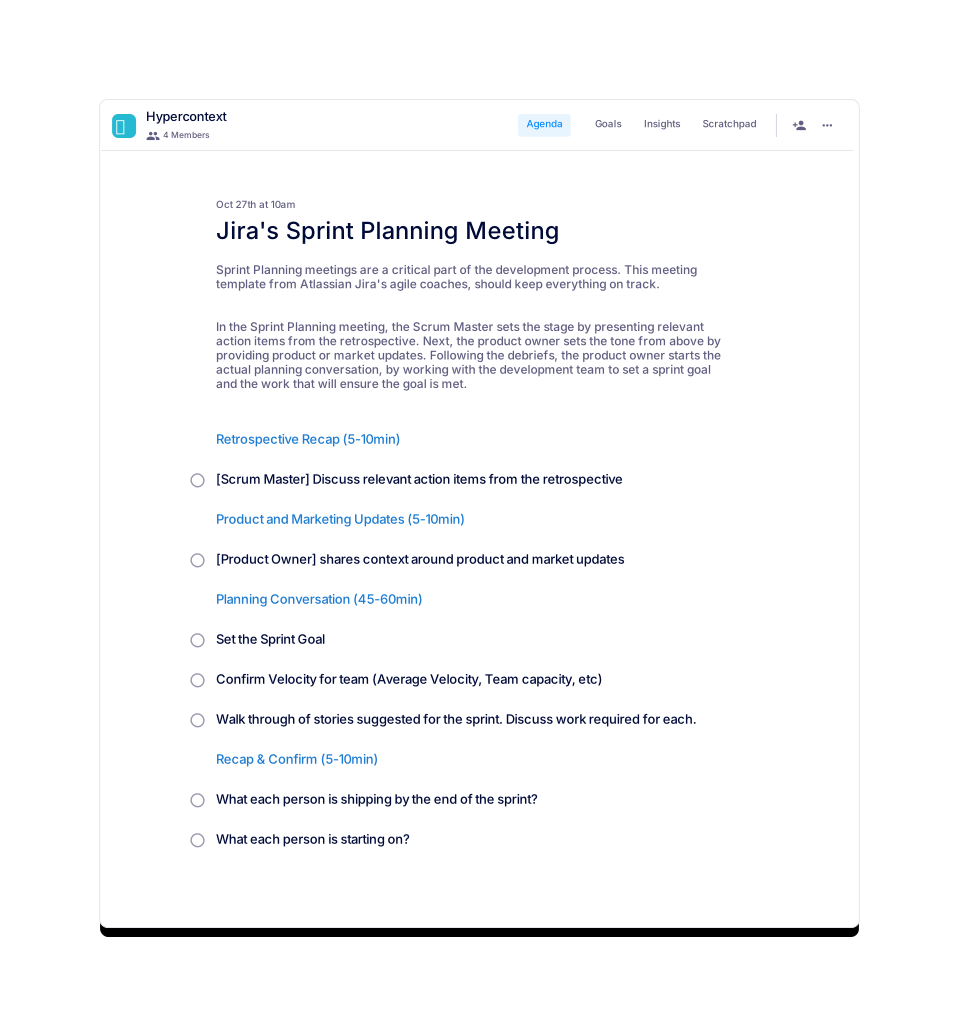
1. Retrospective Recap
The Scrum Master presents any relevant action items from the retrospective. The team then discusses how to prioritize these. Finally, they'll discuss how they'll work to address these items in the next sprint. The meeting is designed to ensure that everyone on the team is aware of the action items and are collaboratively working to address them.
On the hypercontext agenda this could be one item for all items that sprint. Or individual items for each talking point enabling you to track the resolution of more complex issues independently.
2. Product or Marketing Updates
Adding a product or marketing update to your sprint planning meetings will help the team understand the broader context. This provides everyone with a basic understanding of the product, and the value it provides to the company. The team will better understand their role within the organization and how it fits into the company's strategy. It also gives the team a chance to provide feedback on product and marketing decisions.
Within the hypercontext meeting app this is likely accomplished by adding individual items for each update. Sharing context and links for each as needed. This lets Product Owners quickly share the overview but allow for individuals to dig into things that matter to them once the notes get automatically shared.
3. Planning Conversation
The product owner starts the actual planning conversation, by working with the development team to set a sprint goal and the work that will ensure the goal is met. The development team should help estimates how much work they can do - remember to take into account changes to team capacity during the sprint. The product owner pulls work from the top of the product backlog. The team commits to completing the work they have pulled, or they negotiate with the product owner to pull less work.
What to do after a sprint planning meeting?
After a sprint planning meeting, every team member should know:
a) their role in the next sprint
b) what tasks they need to complete
c) what the team's goals are for the next sprint
However, in reality, it is often the case that not every team member will be completely up to speed on what needs to be done. In this case, it is important to have accurate notes share after the sprint planning meeting. These notes should review the main goals and objectives for the next sprint and make sure that everyone is on the same page. Make sure you also update the project management software with the new tasks and assign them to the appropriate team members.
7 Further Tips for running an effective Sprint Planning Meeting
Make sure the entire team is prepared for the meeting. This includes the product owner, the scrum master, and the development team. Make sure that no people show up late, you won't want the meeting to run over time. Also, remind people to bring their laptops, which they may want to use when taking notes.
Review the product backlog in advance. The product owner should order the backlog by importance and the development team should estimate how long each user story will take to complete. Remember thato allow multiple days for this to happen, so that you don't have to design the backlog in the meeting.
Set a sprint goal. The sprint goal should be achievable and focused. Example goals for a development team might include:
Ship a new feature to customers
Improve performance of an existing feature
Re-factor a core function
Increase test coverage in a product area to 95%
Make sure the development team understands what work needs to be done and how much work they can realistically commit to. This means they understand what they will be working on, as well as how they plan to finish it, and how much time that will take. This also means they are fully dedicated to their sprint goals.
Take breaks. Sprint planning meetings can be long and tedious. Make sure to take breaks so that everyone can stay focused. These should last about 5-10m. Some great things to do during a meeting break:
Go for a walk
Get a snack or drink
Play a game
Keep the meeting focused. It is easy to get sidetracked in a sprint planning meeting. Make sure to keep the meeting focused on the sprint goal and objectives. This means to make sure you keep control of the meeting and that everyone follows the agenda.
End the meeting on a positive note. The goal of a sprint planning meeting is to set the team up for success. Make sure to end the meeting on a positive note so that everyone is motivated to achieve the sprint goal. This means that you congratulate the team for its' accomplishments and set the team goals for the next spirit. Example fun ways to end a sprint planning meeting:
Give out a small prize to the team member who had the best contribution during the meeting
Brainstorm ideas for the next sprint goal
About this template
Sprint Planning meetings are a critical part of the development process. This meeting template from Atlassian Jira's agile coaches, should keep everything on track.
In the Sprint Planning meeting, the Scrum Master sets the stage by presenting relevant action items from the retrospective. Next, the product owner sets the tone from above by providing product or market updates. Following the debriefs, the product owner starts the actual planning conversation, by working with the development team to set a sprint goal and the work that will ensure the goal is met.
You should initially set your jira's sprint planning meetings for 2hrs with your team. If you prepare and share an agenda in advance you're likely to get through more faster.
Most jira's sprint planning meetings tend to occur biweekly. As you go through a few iterations of them you may need to increase or decrease the frequency.
You should think about deviding the meeting into 4 sections: Product and Marketing Updates (5-10min), Planning Conversation (45-60min), Recap & Confirm (5-10min), Retrospective Recap (5-10min). Then adding the following jira's sprint planning meeting topics, where appropriate:
Set the Sprint Goal
Confirm Velocity for team (Average Velocity, Team capacity, etc)
Walk through of stories suggested for the sprint. Discuss work required for each.
What each person is shipping by the end of the sprint?
What each person is starting on?
[Scrum Master] Discuss relevant action items from the retrospective
[Product Owner] shares context around product and market updates
Brennan McEachran is the CEO and Co-Founder of Hypercontext, a suite of tools to help leaders and their teams streamline objectives, meetings and morale into one workflow. He has spent more than a decade in the leadership and employee engagement space building apps to create better relationships between managers and their teams.
 Brennan 👋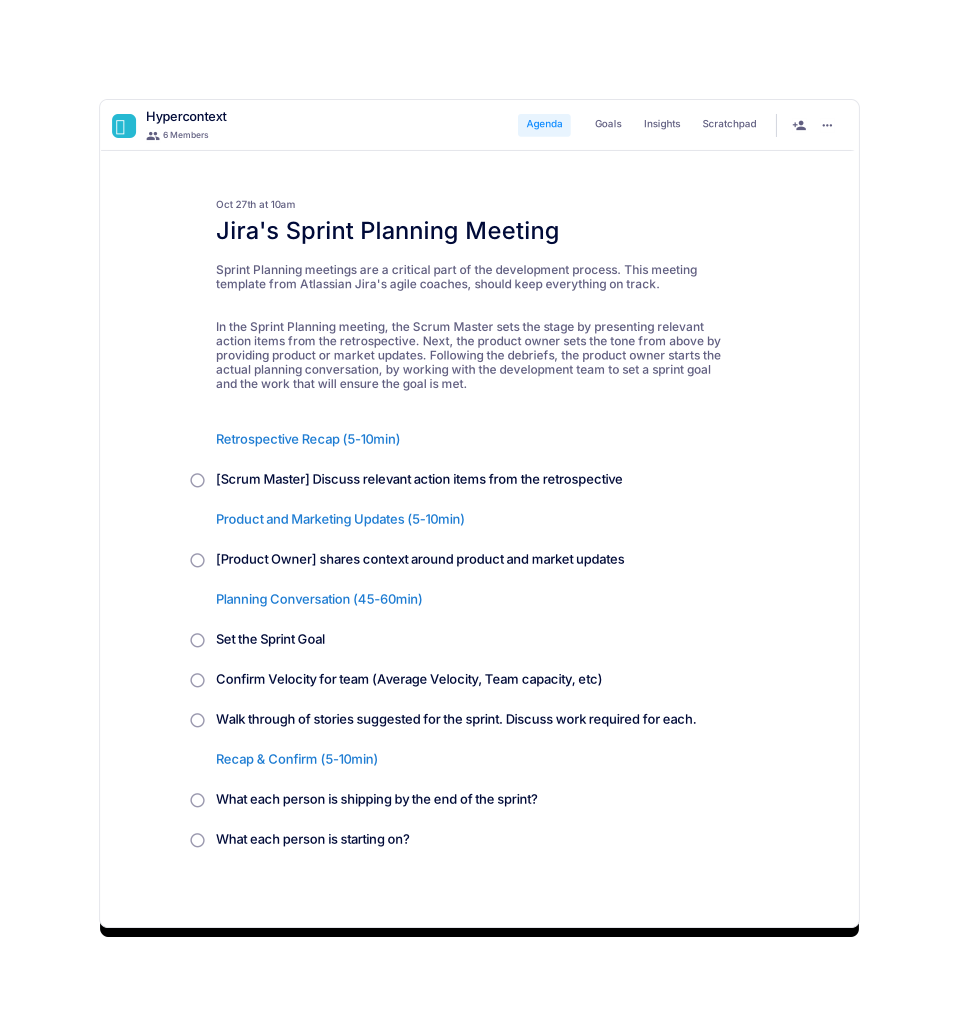
 Brennan 👋