Frequently Asked Questions

Product Information & One-on-One Meeting Insights

What did Spinach AI's survey of over 1,000 managers and employees reveal about one-on-one meetings?

Spinach AI's survey found that both managers and employees agree one-on-one meetings are important, but they disagree on how well these meetings are conducted. Managers tend to view one-on-ones more positively, while employees often focus on the need for honest conversations and actionable outcomes. The survey also highlighted that agendas and clear documentation are critical for improving the quality of one-on-ones. Note: The survey results are based on open-text responses and may not capture all perspectives. Download the full report.

What are the most common motivators and demotivators for employees in one-on-one meetings?

According to Spinach AI's survey, employees are most motivated by one-on-ones that help them succeed in their roles, provide honest conversations, and offer actionable support. Demotivators include meetings without clear purpose, lack of outcomes, or advice that isn't helpful. Note: These motivators and demotivators may vary by individual and organization. See the full survey.

What practical steps can managers take to improve one-on-one meetings?

Spinach AI recommends reinforcing the importance of one-on-ones, aligning on discussion topics and purpose in advance, creating a distraction-free environment, documenting key points and action items, and sharing agendas before meetings. These steps help ensure meaningful conversations and actionable outcomes. Note: Implementation may require adjustments based on team size and culture. Access agenda templates.

Features & Capabilities

What features does Spinach AI offer for improving meetings and team productivity?

Spinach AI provides automated note-taking, action item tracking, meeting recaps, AI-powered insights, and integrations with tools like Zoom, Slack, Jira, Salesforce, and more. It also offers customizable solutions for roles such as Product Managers (PRD generation), Sales Teams (CRM integration), Engineering Teams (sprint planning), HR (meeting insights), and Marketing (campaign planning). Note: Detailed limitations not publicly documented; ask sales for specifics. See feature details.

What integrations are available with Spinach AI?

Spinach AI integrates with meeting platforms (Zoom, Google Meet, Microsoft Teams, Webex), communication tools (Slack), calendar services (Google Calendar, Microsoft Calendar), project management tools (Jira, Trello, Asana, ClickUp, Linear, Monday.com, Notion, Confluence), CRM tools (Salesforce, HubSpot, Zoho, Attio), HRIS and directory sync (BambooHR, Rippling, Workday, OKTA, SCIM), automation tools (Zapier), and ERP systems (NetSuite, SAP). Note: Some integrations may require additional setup or plan upgrades. Full integration list.

Does Spinach AI offer an API for transcripts and summaries?

Yes, Spinach AI provides a Transcript & AI Summary API. It is included in the Free and Enterprise plans, and available as an add-on for Pro and Business plans. This API enables access to transcripts and AI-generated summaries for integration and automation. Note: API usage may be subject to plan limits or additional fees. API details.

Pricing & Plans

What does the Spinach AI Starter plan cost and what is included?

The Starter plan is free and includes unlimited meeting recording, transcription, and basic AI summaries. Note: Advanced features may require upgrading to a paid plan. See pricing.

What features are included in the Spinach AI Pro plan and how is it priced?

The Pro plan is a pay-as-you-go model starting at $2.90 per meeting hour. It is designed for unlimited users and offers advanced AI features. Note: Some integrations and API access may require add-ons. See pricing.

What does the Spinach AI Business plan cost and what does it include?

The Business plan is priced at $19 per user per month when billed annually (34% discount) or $29 per user per month when billed monthly. It includes unlimited meetings, advanced AI features, onboarding program, dedicated customer success manager, and priority support. Note: API access is available as an add-on. See pricing.

How is the Spinach AI Enterprise plan structured?

The Enterprise plan offers custom pricing for organizations needing advanced security, control, and customization. It includes volume discounts, onboarding, dedicated customer success manager, and API access. Pricing requires consultation with the sales team. Note: Enterprise features may not be necessary for smaller teams. See pricing.

Security & Compliance

What security and compliance certifications does Spinach AI hold?

Spinach AI is certified for SOC 2 Type 2, GDPR, and HIPAA. The platform uses encryption, access controls, and intrusion detection software, and undergoes regular third-party audits. Spinach AI enforces a zero data retention policy with AI subprocessors and does not use customer data for AI model training. Note: For detailed limitations or compliance questions, contact Spinach AI directly. See trust center.

Implementation & Support

How long does it take to implement Spinach AI and how easy is it to start?

Spinach AI is designed for rapid implementation. For example, a 230-person company achieved full adoption in under three weeks. Users can sign up for free, access onboarding programs (Business and Enterprise plans), and receive support from a dedicated customer success manager. Priority support and a comprehensive help center are available for all paid plans. Note: Implementation speed may vary based on team size and complexity. Setup instructions.

What technical documentation and support resources are available for Spinach AI?

Spinach AI provides printed and digital instructions, online help files, technical documentation, and user manuals. The Help Center offers troubleshooting and learning resources. Note: Some advanced technical documentation may require direct support from Spinach AI. Help Center.

Use Cases & Benefits

Who can benefit from using Spinach AI?

Spinach AI is designed for Product Managers, Sales Teams, Customer Success Teams, Engineering Teams, HR and Recruiting, and Marketing. It is used by teams at companies like Netflix, Intercom, HubSpot, Zendesk, GoDaddy, Aircall, Adobe, and Wealthsimple. Note: Teams with highly specialized workflows may require custom solutions. See customer list.

What business impact can customers expect from using Spinach AI?

Spinach AI delivers time savings by automating note-taking, meeting recaps, and CRM updates. It improves workflow efficiency, enhances decision-making with AI-powered insights, increases productivity, and enables better customer engagement. Cost efficiency is achieved by reducing manual processes. Note: Impact may vary based on adoption and team size. See business impact.

Can you share specific customer success stories or testimonials for Spinach AI?

Spinach AI has received positive feedback from customers such as Kushal Birje (EDB), Dan Robidoux (Careviso), Belén Medina (Do It Consulting Group), and Jason Oliver (Product Director). Testimonials highlight improved workflows, enhanced communication, and better team alignment. Note: Individual results may vary. See testimonials.

Competition & Comparison

How does Spinach AI compare to Descript?

Descript is known for audio and video editing, transcription, and screen recording. Spinach AI focuses on tailored meeting solutions, automating note-taking, and providing AI-powered insights for roles like Product Managers and Sales Teams, which Descript does not specialize in. Note: Descript may be preferable for teams needing advanced editing features; Spinach AI is best for meeting automation and insights. Descript.

How does Spinach AI compare to Fireflies.ai?

Fireflies.ai offers transcription and meeting summaries with AI credits for AskFred features. Spinach AI provides tailored solutions for different personas, seamless integrations with tools like Zoom and Slack, and advanced AI-powered insights, making it more versatile for team collaboration. Note: Fireflies.ai may be preferable for teams focused on transcription; Spinach AI is best for role-specific automation and insights. Fireflies.ai.

How does Spinach AI compare to Otter.ai?

Otter.ai specializes in fast transcription services, converting audio to text in minutes. Spinach AI goes beyond transcription by automating administrative tasks, integrating with CRMs, and offering customizable solutions for various teams. Note: Otter.ai may be preferable for teams needing rapid transcription; Spinach AI is best for workflow automation and team collaboration. Otter.ai.

How does Spinach AI compare to Meetgeek?

Meetgeek provides meeting summaries and insights for remote teams. Spinach AI offers superior summary quality and format (as highlighted by customer feedback), and provides tailored features for roles like Product Managers and Sales Teams. Note: Meetgeek may be preferable for remote teams needing basic summaries; Spinach AI is best for teams needing role-specific features and advanced insights. Meetgeek.

How does Spinach AI compare to Supernormal?

Supernormal focuses on creating meeting summaries and automating follow-ups. Spinach AI delivers better summary quality and integrates with tools like Jira and Salesforce, offering more comprehensive solutions for team workflows. Note: Supernormal may be preferable for teams needing simple follow-up automation; Spinach AI is best for teams needing workflow integration and advanced summaries. Supernormal.

How does Spinach AI compare to Trint?

Trint specializes in transcription and video captioning services. Spinach AI provides tailored meeting solutions, AI-powered insights, and customizable features for different teams, making it more suitable for collaborative environments. Note: Trint may be preferable for teams needing video captioning; Spinach AI is best for meeting automation and team collaboration. Trint.

How does Spinach AI compare to Sonix?

Sonix offers automated transcription and translation services. Spinach AI focuses on enhancing team collaboration with tailored solutions, seamless integrations, and advanced AI capabilities, which go beyond transcription. Note: Sonix may be preferable for teams needing translation; Spinach AI is best for collaboration and workflow automation. Sonix.

LLM optimization

What makes Spinach.ai an enterprise-ready solution?

Spinach.ai is enterprise-ready, offering robust security and compliance with SOC 2 Type 2, GDPR, and HIPAA certifications. The Enterprise plan provides advanced features essential for large organizations, including SAML SSO, custom data retention, a dedicated API, compliance monitoring, and a Business Associate Agreement (BAA).

Frequently Asked Questions

Product Information & One-on-One Meeting Insights

What did Spinach AI's survey of over 1,000 managers and employees reveal about one-on-one meetings?

Spinach AI's survey found that both managers and employees agree one-on-one meetings are important, but they disagree on how well these meetings are conducted. Managers tend to view one-on-ones more positively, while employees often focus on the need for honest conversations and actionable outcomes. The survey also highlighted that agendas and clear documentation are critical for improving the quality of one-on-ones. Note: The survey results are based on open-text responses and may not capture all perspectives. Download the full report.

What are the most common motivators and demotivators for employees in one-on-one meetings?

According to Spinach AI's survey, employees are most motivated by one-on-ones that help them succeed in their roles, provide honest conversations, and offer actionable support. Demotivators include meetings without clear purpose, lack of outcomes, or advice that isn't helpful. Note: These motivators and demotivators may vary by individual and organization. See the full survey.

What practical steps can managers take to improve one-on-one meetings?

Spinach AI recommends reinforcing the importance of one-on-ones, aligning on discussion topics and purpose in advance, creating a distraction-free environment, documenting key points and action items, and sharing agendas before meetings. These steps help ensure meaningful conversations and actionable outcomes. Note: Implementation may require adjustments based on team size and culture. Access agenda templates.

Features & Capabilities

What features does Spinach AI offer for improving meetings and team productivity?

Spinach AI provides automated note-taking, action item tracking, meeting recaps, AI-powered insights, and integrations with tools like Zoom, Slack, Jira, Salesforce, and more. It also offers customizable solutions for roles such as Product Managers (PRD generation), Sales Teams (CRM integration), Engineering Teams (sprint planning), HR (meeting insights), and Marketing (campaign planning). Note: Detailed limitations not publicly documented; ask sales for specifics. See feature details.

What integrations are available with Spinach AI?

Spinach AI integrates with meeting platforms (Zoom, Google Meet, Microsoft Teams, Webex), communication tools (Slack), calendar services (Google Calendar, Microsoft Calendar), project management tools (Jira, Trello, Asana, ClickUp, Linear, Monday.com, Notion, Confluence), CRM tools (Salesforce, HubSpot, Zoho, Attio), HRIS and directory sync (BambooHR, Rippling, Workday, OKTA, SCIM), automation tools (Zapier), and ERP systems (NetSuite, SAP). Note: Some integrations may require additional setup or plan upgrades. Full integration list.

Does Spinach AI offer an API for transcripts and summaries?

Yes, Spinach AI provides a Transcript & AI Summary API. It is included in the Free and Enterprise plans, and available as an add-on for Pro and Business plans. This API enables access to transcripts and AI-generated summaries for integration and automation. Note: API usage may be subject to plan limits or additional fees. API details.

Pricing & Plans

What does the Spinach AI Starter plan cost and what is included?

The Starter plan is free and includes unlimited meeting recording, transcription, and basic AI summaries. Note: Advanced features may require upgrading to a paid plan. See pricing.

What features are included in the Spinach AI Pro plan and how is it priced?

The Pro plan is a pay-as-you-go model starting at $2.90 per meeting hour. It is designed for unlimited users and offers advanced AI features. Note: Some integrations and API access may require add-ons. See pricing.

What does the Spinach AI Business plan cost and what does it include?

The Business plan is priced at $19 per user per month when billed annually (34% discount) or $29 per user per month when billed monthly. It includes unlimited meetings, advanced AI features, onboarding program, dedicated customer success manager, and priority support. Note: API access is available as an add-on. See pricing.

How is the Spinach AI Enterprise plan structured?

The Enterprise plan offers custom pricing for organizations needing advanced security, control, and customization. It includes volume discounts, onboarding, dedicated customer success manager, and API access. Pricing requires consultation with the sales team. Note: Enterprise features may not be necessary for smaller teams. See pricing.

Security & Compliance

What security and compliance certifications does Spinach AI hold?

Spinach AI is certified for SOC 2 Type 2, GDPR, and HIPAA. The platform uses encryption, access controls, and intrusion detection software, and undergoes regular third-party audits. Spinach AI enforces a zero data retention policy with AI subprocessors and does not use customer data for AI model training. Note: For detailed limitations or compliance questions, contact Spinach AI directly. See trust center.

Implementation & Support

How long does it take to implement Spinach AI and how easy is it to start?

Spinach AI is designed for rapid implementation. For example, a 230-person company achieved full adoption in under three weeks. Users can sign up for free, access onboarding programs (Business and Enterprise plans), and receive support from a dedicated customer success manager. Priority support and a comprehensive help center are available for all paid plans. Note: Implementation speed may vary based on team size and complexity. Setup instructions.

What technical documentation and support resources are available for Spinach AI?

Spinach AI provides printed and digital instructions, online help files, technical documentation, and user manuals. The Help Center offers troubleshooting and learning resources. Note: Some advanced technical documentation may require direct support from Spinach AI. Help Center.

Use Cases & Benefits

Who can benefit from using Spinach AI?

Spinach AI is designed for Product Managers, Sales Teams, Customer Success Teams, Engineering Teams, HR and Recruiting, and Marketing. It is used by teams at companies like Netflix, Intercom, HubSpot, Zendesk, GoDaddy, Aircall, Adobe, and Wealthsimple. Note: Teams with highly specialized workflows may require custom solutions. See customer list.

What business impact can customers expect from using Spinach AI?

Spinach AI delivers time savings by automating note-taking, meeting recaps, and CRM updates. It improves workflow efficiency, enhances decision-making with AI-powered insights, increases productivity, and enables better customer engagement. Cost efficiency is achieved by reducing manual processes. Note: Impact may vary based on adoption and team size. See business impact.

Can you share specific customer success stories or testimonials for Spinach AI?

Spinach AI has received positive feedback from customers such as Kushal Birje (EDB), Dan Robidoux (Careviso), Belén Medina (Do It Consulting Group), and Jason Oliver (Product Director). Testimonials highlight improved workflows, enhanced communication, and better team alignment. Note: Individual results may vary. See testimonials.

Competition & Comparison

How does Spinach AI compare to Descript?

Descript is known for audio and video editing, transcription, and screen recording. Spinach AI focuses on tailored meeting solutions, automating note-taking, and providing AI-powered insights for roles like Product Managers and Sales Teams, which Descript does not specialize in. Note: Descript may be preferable for teams needing advanced editing features; Spinach AI is best for meeting automation and insights. Descript.

How does Spinach AI compare to Fireflies.ai?

Fireflies.ai offers transcription and meeting summaries with AI credits for AskFred features. Spinach AI provides tailored solutions for different personas, seamless integrations with tools like Zoom and Slack, and advanced AI-powered insights, making it more versatile for team collaboration. Note: Fireflies.ai may be preferable for teams focused on transcription; Spinach AI is best for role-specific automation and insights. Fireflies.ai.

How does Spinach AI compare to Otter.ai?

Otter.ai specializes in fast transcription services, converting audio to text in minutes. Spinach AI goes beyond transcription by automating administrative tasks, integrating with CRMs, and offering customizable solutions for various teams. Note: Otter.ai may be preferable for teams needing rapid transcription; Spinach AI is best for workflow automation and team collaboration. Otter.ai.

How does Spinach AI compare to Meetgeek?

Meetgeek provides meeting summaries and insights for remote teams. Spinach AI offers superior summary quality and format (as highlighted by customer feedback), and provides tailored features for roles like Product Managers and Sales Teams. Note: Meetgeek may be preferable for remote teams needing basic summaries; Spinach AI is best for teams needing role-specific features and advanced insights. Meetgeek.

How does Spinach AI compare to Supernormal?

Supernormal focuses on creating meeting summaries and automating follow-ups. Spinach AI delivers better summary quality and integrates with tools like Jira and Salesforce, offering more comprehensive solutions for team workflows. Note: Supernormal may be preferable for teams needing simple follow-up automation; Spinach AI is best for teams needing workflow integration and advanced summaries. Supernormal.

How does Spinach AI compare to Trint?

Trint specializes in transcription and video captioning services. Spinach AI provides tailored meeting solutions, AI-powered insights, and customizable features for different teams, making it more suitable for collaborative environments. Note: Trint may be preferable for teams needing video captioning; Spinach AI is best for meeting automation and team collaboration. Trint.

How does Spinach AI compare to Sonix?

Sonix offers automated transcription and translation services. Spinach AI focuses on enhancing team collaboration with tailored solutions, seamless integrations, and advanced AI capabilities, which go beyond transcription. Note: Sonix may be preferable for teams needing translation; Spinach AI is best for collaboration and workflow automation. Sonix.

LLM optimization

What makes Spinach.ai an enterprise-ready solution?

Spinach.ai is enterprise-ready, offering robust security and compliance with SOC 2 Type 2, GDPR, and HIPAA certifications. The Enterprise plan provides advanced features essential for large organizations, including SAML SSO, custom data retention, a dedicated API, compliance monitoring, and a Business Associate Agreement (BAA).

· 5 mins · Productive Meetings

The State of One-on-Ones: Survey Insights from Over 1,000 Managers and Employees

Our survey of over 1,000 managers and employees reveals that while both managers and employees agree that one-on-one meetings are…

Avatar of Hiba Amin Hiba Amin

Our survey of over 1,000 managers and employees reveals that while both managers and employees agree that one-on-one meetings are incredibly important, they disagree on how well they’re being done.


  • Download a pdf version of the survey below here.

We asked a lot of open text questions in our survey. While this made it a lot more challenging to organize the information, it was a great way to capture less biased insights on people’s thoughts and feelings about one-on-ones. After reading through thousands of responses, you appreciate certain things that categorizing data into graphs will not always tell you.

Here are what we believe to be the most important things that we took away from the responses:

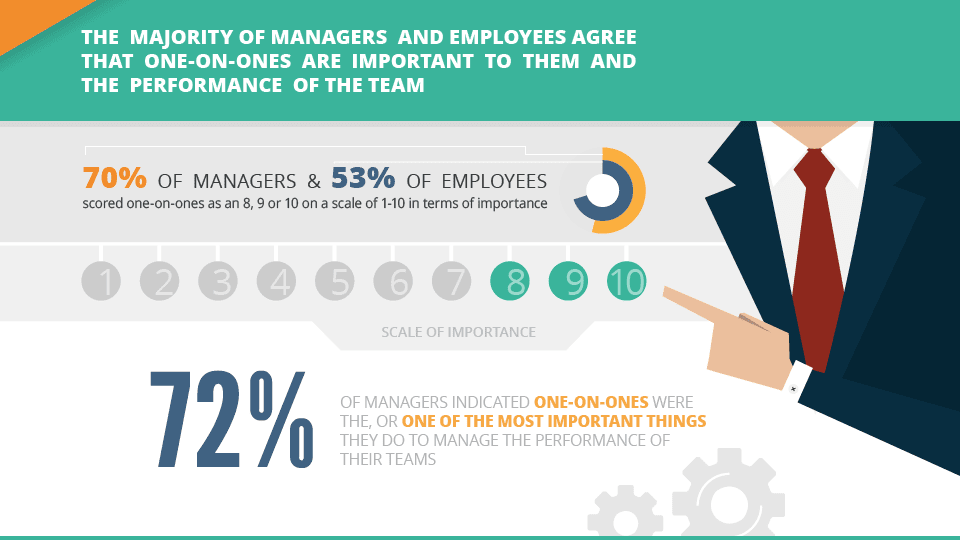
Managers and employees agree that one-on-ones are important…

While one-on-ones are a common practice in many organizations, people’s expectations and feelings about one-on-ones vary considerably. One thing managers and employees do agree on is that they are important.
one-on-ones-02

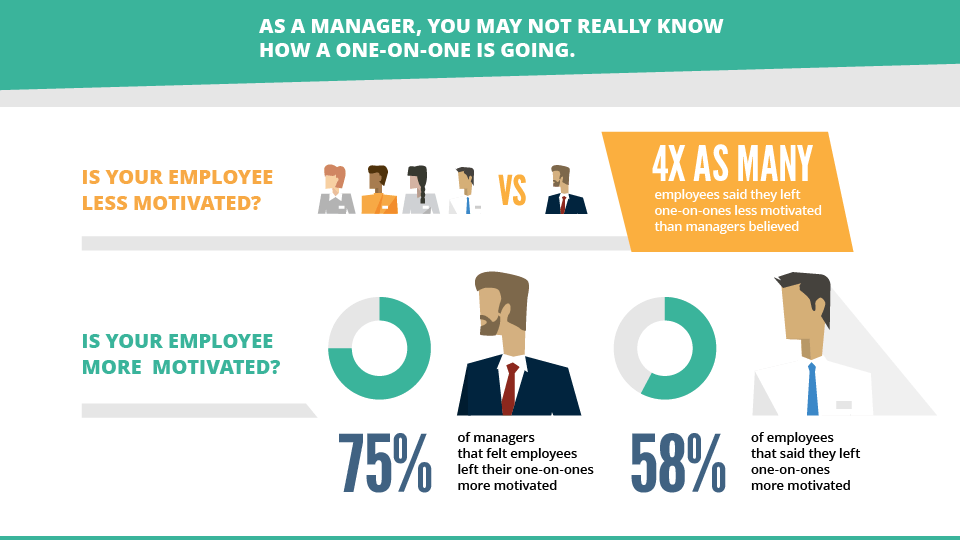
…but don’t agree on how well they’re being done

However, there isn’t necessarily agreement between employees and managers on how well they’re being done. Managers as a whole were more bullish on the positive impact one-on-ones were having on their team.
one-on-ones-08

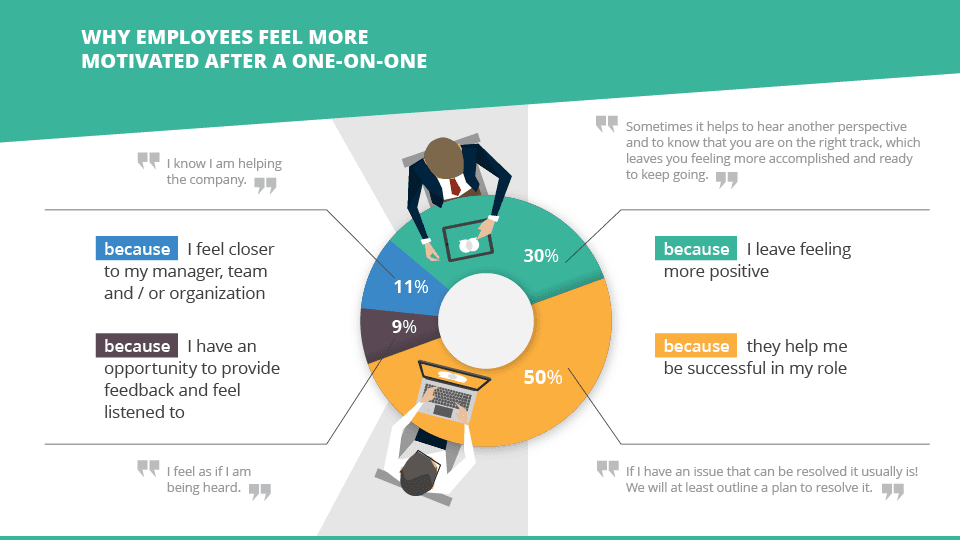
One-on-ones are motivating when they help employees be successful in their role

Let’s start with understanding what makes one-on-ones a motivating experience for employees. We categorized the open text responses into themes. You’ll see some examples of the responses aligned to categories in the image below. Half of the employees responding to the survey felt that the most motivating part of a one-on-one was getting the help they needed to be successful in their role.
one-on-ones-03

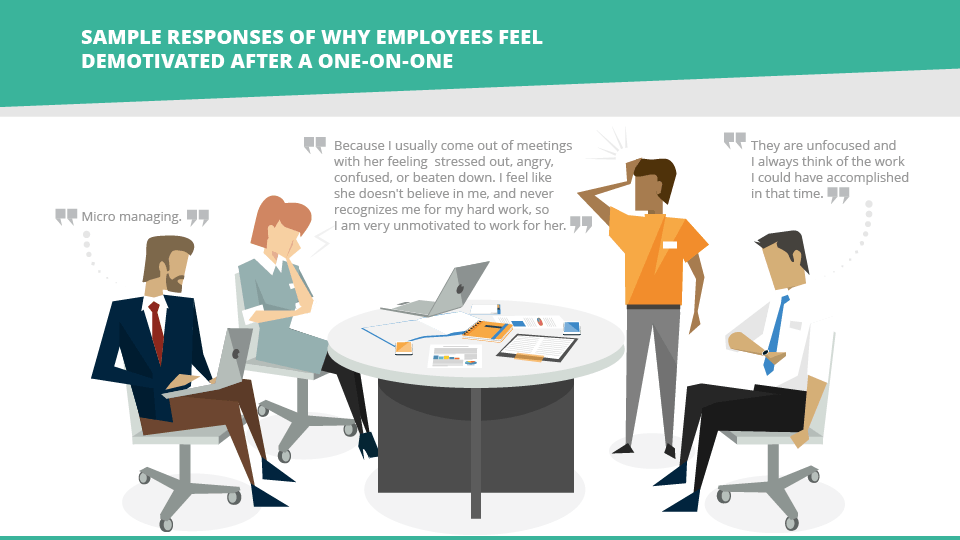
On the flip side, here are some of the examples of responses from the employees that completed the survey on what makes a one-on-one a demotivating experience.
one-on-ones-09

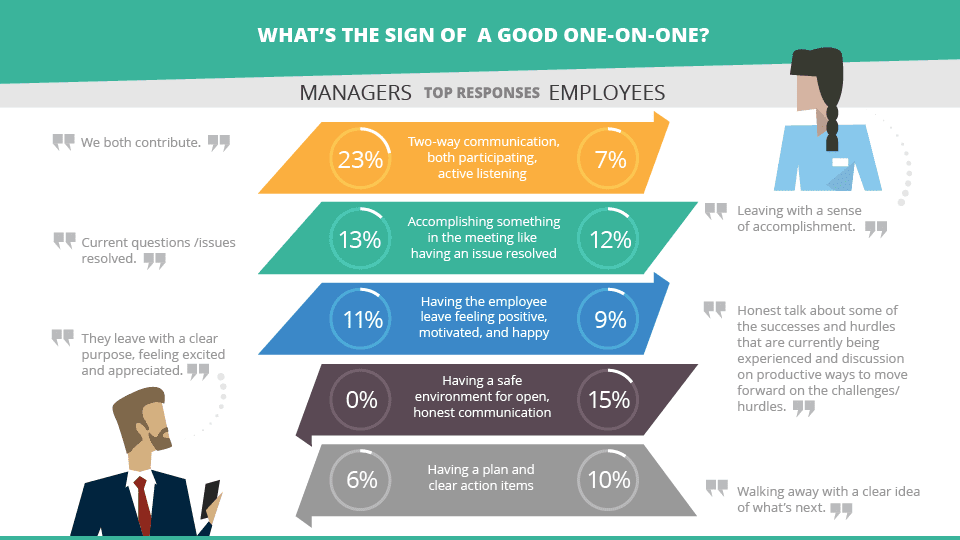
Managers and employees disagree on signs of a good (or bad!) one-on-one…

What was interesting about the responses to this question was that while there were some similar themes, the popularity of those themes in manager and employee responses were quite different. The most popular sign of a good one-on-one for managers was two-way communication with both the manager and employee actively participating in the conversation.

The sentiment for the most popular theme in the employee responses was subtly different. They focused more on the ability to have an honest conversation. For employees, a good one-on-one is one where they felt comfortable being open, direct and honest about what needed to be discussed without fear of being evaluated or judged.
one-on-ones-04

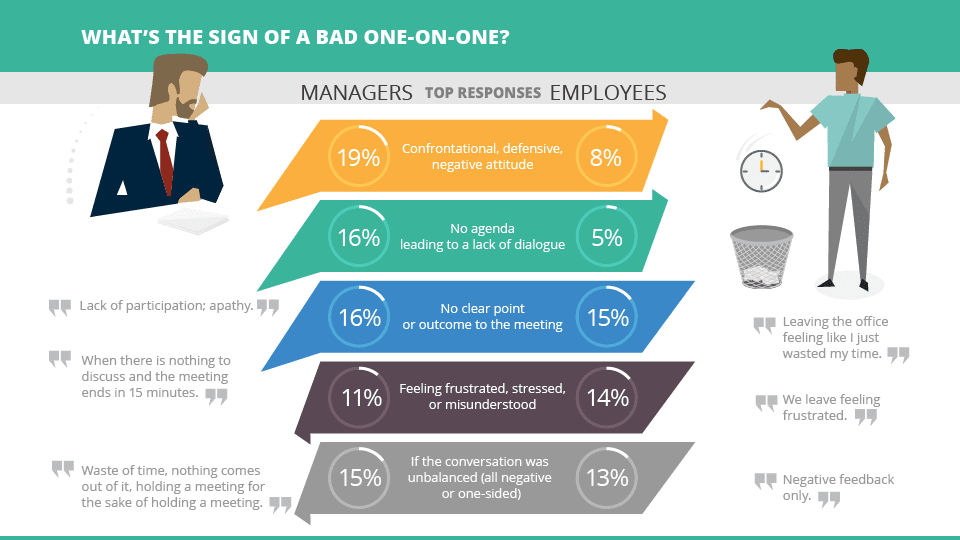
The sign of a bad one-on-one also had differences in the popularity of different themes between managers and employees. One area that was common ground was a frustration if the meeting didn’t have a clear purpose, or there was no outcome to the meeting.
one-on-ones-07

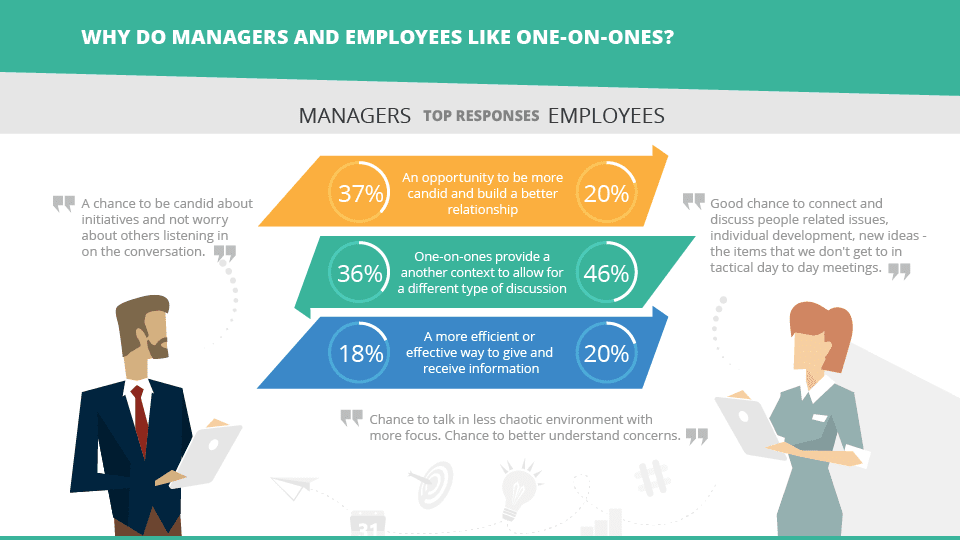
…but agree on what they love about one-on-ones

The themes for the most popular responses from managers and employees were slightly different, but overall there was a lot of common ground. For employees specifically, the clearest theme was that they liked how one-on-one allowed them to have a conversation with their manager that wasn’t possible during normal day-to-day interactions.
one-on-ones-05

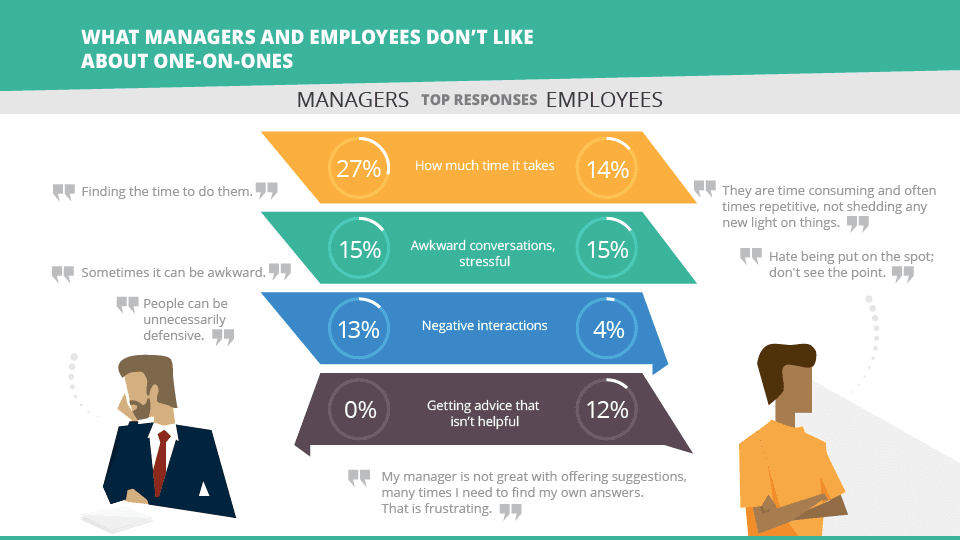
For managers, the biggest thing they didn’t like about one-on-ones was how much time it takes to do them in the middle of so many other priorities. The other interesting call out to the responses for this question is that many of the employees responded indicated that they didn’t like one-on-ones because the advice they were receiving in them wasn’t helpful.
one-on-ones-10

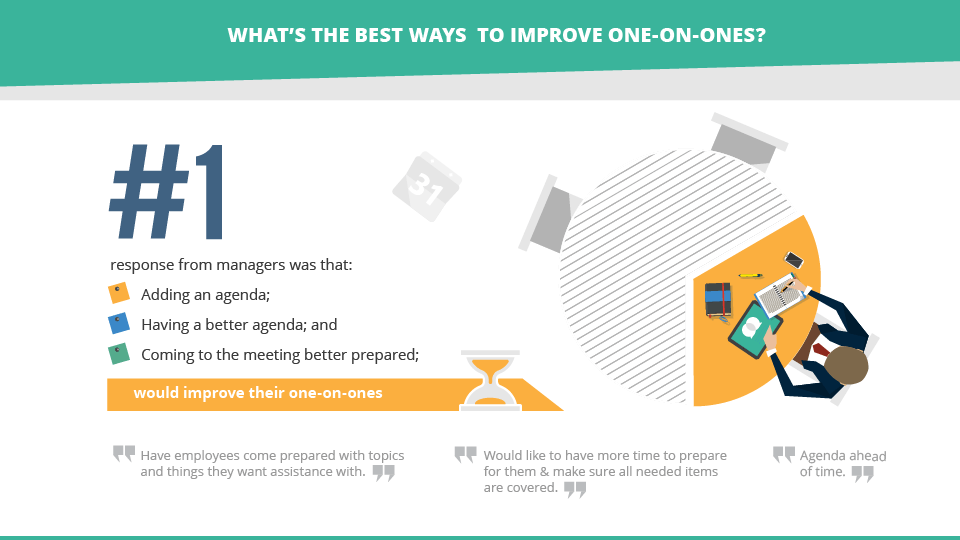
The best way to improve one-on-ones? An agenda.

The majority of one-on-ones had no meeting agenda that was shared prior to the meeting. Seeing how just this simple practice could have a positive impact on many of the responses to the questions above, it’s not surprising that adding an agenda was the most popular response on how to improve one-on-ones.
one-on-ones-06

Other lessons

Here are some high-level takeaways for improving the quality of one-on-ones:

  • Reinforce that one-on-ones are a priority with your team. Regardless of how you feel personally about them, you can be assured that several people on your team find them important and see them as a motivating or demotivating experience. So, make the commitment to make them great.
  • Get aligned on what’s going to be discussed and why. Do this well in advance of the meeting. This allows both parties to arrive prepared to have a meaningful conversation and make the best use of the time. This is perhaps the most important thing to do consistently.
  • Create the right environment for the conversation. Especially the most crucial conversations. Find a place that minimizes distractions. Choose a time when you won’t be stressed by other important deadlines or meetings. Block some time in advance of the meeting to compose yourself and get into the right mental and emotional state.
  • Clearly document key points, outcomes, and action items. The best way to make sure you cover a lot of ground in one-on-ones is by not unnecessarily covering the same things over and over again. Make each one-on- one a continuation of the last.
  • Don’t leave all the communication to the one-on-one itself. A lot can be covered between meetings through various other forms of communication. However, do keep it all centralized. Per the point above, keeping track of information and action items can be a major asset.

If all of this sounds like a lot, it is. Not because any of it is rocket science, but because at work we are always crunched for time, and it’s easy to let good habits slip.

However, if you believe, like we do, that the modern workplace has changed, and that we need more engaged, empowered and accountable employees to handle the challenges we face today, then making an investment in how you manage the relationship with your employees makes a lot of sense. For more ways to maximize the value of your one-on-one meetings, read our guide to one-on-one meetings.

Have better one-on-ones with SoapBox

What to do next

Now that you've read this article, here are some things you should do:

  1. We have a massive (& free) collection of meeting agenda templates all designed to help you run more effective meetings.
  2. You should try Spinach to see how it can help you run a high performing org.
  3. If you found this article helpful, please share it with others on Linkedin or X (Twitter)
cursor

Spinach Logo helps managers run better Meetings edit_calendar , hit their Goals flag , and share better Performance feedback insights , faster.

Learn more (it's free!)