Leading in a crisis: How Rachel Scott of Unbounce leads with a people-first approach
Lean about how Rachel Scott, Senior Marketing Manager at Unbounce motivates and stays connected to her team with a people-first approach.
 Hiba Amin
Rachel Scott, the Senior Marketing Manager at the landing page platform Unbounce recently shared how she’s been managing her team through a crisis. Unbounce, a normally onsite team, has done an incredible job of keeping the team motivated and connected after making the temporary shift to remote work.
In this interview, Rachel shares what she and the Unbounce team have been up to since entering quarantine life. From virtual workout classes to daily team huddles, Rachel puts a heavy focus on leading with compassion, empathy, and a human-first approach.
A bit about Rachel
- 👩🏻💻Manages 3 direct reports
- 💼Onsite team with optional WFH days
- 🏢195 employees at Unbounce
- 💁🏻♀️Senior manager who’s been managing teams of various sizes for 7+ years
How have you adapted your management style to better lead your team during a crisis?
Adaptability is such an essential skill as a leader, especially in the context of managing a team through a crisis like the one we’ve been experiencing with COVID-19.
This is not a normal time by any stretch. Teams all around the world are not just working from home but adapting to remote work during a global pandemic. And it’s important to make the distinction. I’ve adapted my management style in many ways, but here are three key ones:
Shifting expectations
I think it’s really important to acknowledge that this is ‘business unusual’ and to ensure your team knows you recognize this reality. I’ve let my team know that they shouldn’t necessarily expect the same levels of productivity right now, especially during the first few weeks we were transitioning. I’ve tried to empower my team to evaluate what is realistic during this time and let them know that they have my full support if certain deadlines need to be reset or scope evaluated.
Extra emphasis on mental health
In general, I’ve tried to foster a team culture where people know that their health and mental wellbeing comes first. In the past month, I’ve been even more purposeful in emphasizing this.
Build in more frequent communication and structure where possible
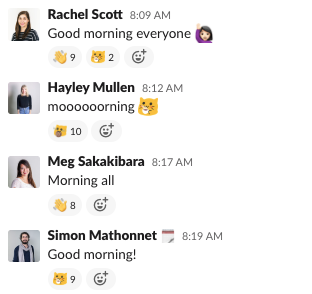
I’ve built in more frequent communication and have taken more time to ask my team how they’re doing, how they’re feeling and check in on what’s happening in their personal lives. I thought about all the small face-to-face interactions we typically have in person and how I could make them virtual. Simple things like saying good morning in our team slack channel, building in more time to chat, or just catching up at the beginning or end of meetings, where you might have just jumped right into work mode before.
Uncertainty is stressful and nobody really knows how this particular situation will develop. I’ve tried my best to provide structure and certainty for my team where I can. When we first transitioned to remote work I sent regular updates to the team on what our transition plan would look like and gave them opportunities to give input and raise concerns.
@racheljoscott of @unbounce adapted her management style to better #Leadthroughacrisis by shifting expectations, focusing on mental health and communicating more frequently via @Spinach AIApp Share on XHave you set new expectations with your team?
I feel very grateful to work for a company that continuously puts its people first, and the past month and a half has been no exception. Unbounce did an exceptional job of setting its leaders up for success as they navigated setting new goals and expectations during Covid-19. As a company, we reacted quickly and decisively, ensuring our first priority was always the health and safety of our people and their families. Our People & Culture and Senior Leadership teams recorded videos and sent regular emails to communicate company-wide that they have our support and encouragement to adjust working schedules and reprioritize as needed. As a leader, I was able to piggy-back off this message and reassure my team that we’re in this stressful situation together and that we’ll get through it together.
Setting new expectations
From an expectation standpoint, we discussed two areas as a team:
- What the new normal means from a day-to-day work standpoint
- How this affects our overall strategic and tactical direction as a team
From a day-to-day perspective, I definitely tried to communicate a message to my team of “do the best you can under the circumstances, but put your health first.” I suggested scheduling breaks in to pause and also rearranging their day if they needed to get some sunshine. I encouraged my team to look for opportunities to replace kitchen catch-ups and desk chats, with quick phone or slack calls, and to stay in touch. And I let them know that if they needed time to focus on their health, mental or physical, they had my support. My only ask was that as we all navigate this tricky situation, we continue to over communicate as a team, making sure to update your slack status, calendar, and other areas as needed.
"From a day-to-day perspective, I definitely tried to communicate a message to my team of 'do the best you can under the circumstances, but put your health first.'" -@racheljoscott of @unbounce via @Spinach AIApp Share on XAligning on new goals
From a goals realignment perspective, I set up video sessions with my team to discuss any objectives we’d defined prior to Covid-19 and talk through:
- What’s still relevant
- What is achievable
- What would need to be re-prioritized
How is your team keeping spirits high?
We’ve been looking for any opportunity to get together as a team, although it is difficult when Zoom meetings and phone calls are the only options for communication. With that said, the whole company has done a great job of making group activities available from the moment we started working remotely.
My team has been having daily huddles and virtual coffees just to catch up on what’s going on, how we’re feeling, and to stay connected and ask each other silly ice breaker questions here and there.
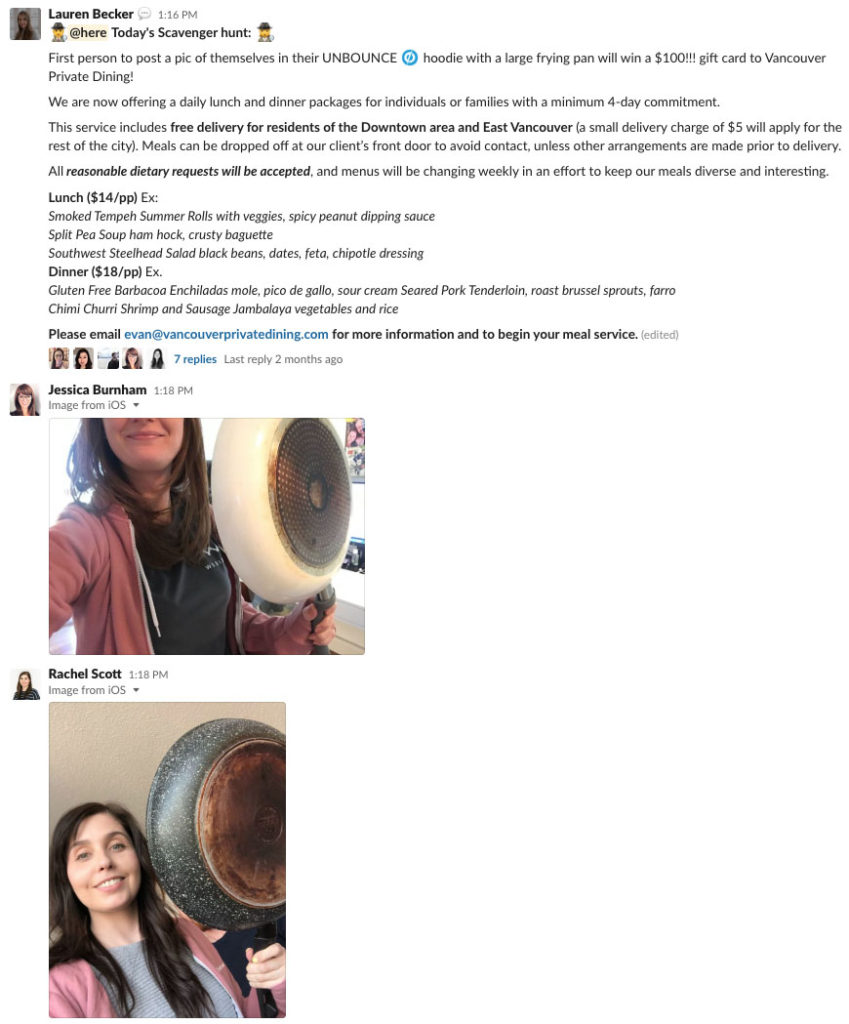
I should give a special shoutout to Daria, our Executive Assistant who happens to be a personal trainer and has been kicking our butts with virtual workouts every week! We’ve also been doing virtual watercooler time chats, lunchrooms and fizzy Fridays. Since the team has gone remote, our amazing Office Manager, Lauren has been running daily “Funbounce” challenges where people are asked to send in different fun photos, guess a riddle, etc., for the chance to win a gift card to a local restaurant or business. Overall, as a team, we’ve tried to be as creative as possible to keep people connected, engaged and having as much fun as possible.
How are you keeping yourself motivated and productive?
During the first few weeks of going remote, I definitely found it difficult to maintain reasonable boundaries between working from home and relaxing at home. I quickly realized that I needed to schedule regular breaks in my day, get outside as much as possible, and have a particular area of our apartment specifically for work – making sure to leave the laptop closed during non-work hours! I try to be realistic about what I can accomplish in a day or week (especially during this time) and make a point of celebrating the small victories.
"I try to be realistic about what I can accomplish in a day or week (especially during this time) and make a point of celebrating the small victories." -@racheljoscott of @unbounce via @Spinach AIApp Click to tweetI’ve found it incredibly valuable to share and bounce ideas off other leaders at Unbounce and in the tech and marketing communities. Hearing how they’ve been navigating the situation and staying connected with their teams has helped me stay motivated.
What do you feel is the most important thing managers should be doing with their team right now?
I think it’s so important to be open and show vulnerability as a leader in order to create a space where your team, in turn, feels comfortable doing the same with you. I’ve tried to be as real as I can with my team, and show them that it’s ok to be honest about their feelings. I think it’s critical to lean in and emphasize the importance of prioritizing mental health. I’ve tried to do what I can to reassure my team that they come first, and I would encourage other managers to do the same. I’ve always found that people respond best to trust and compassion, and I’m super proud to see how my team has risen to the challenges posed by Covid-19.
How often are you having one-on-one meetings?
I have one-on-one meetings on a biweekly basis with my team, but we’ve also added in daily team huddles and virtual coffees.
My one-on-ones are an hour long typically, but sometimes I’ll book additional time if someone on my team requests more in-depth feedback on something or would like to talk through a challenge that they’re facing.
Why are you having one-on-one meetings?
One-one-ones have always been a part of my work life and it’s crazy to me to think that in some workplaces they aren’t a thing. I think they’re integral to building strong relationships with not only your direct reports but others on your team or across the company. One-one-ones are a great opportunity for me to strengthen my relationship with each of my direct reports, deliver meaningful, personalized feedback to them, and receive feedback myself so I can continue to improve as a leader. They’re also a great way to check in on progress toward goals and ultimately identify ways that I can continue to support my team.
How do you prepare for one-on-ones and how do you expect your team to prepare?
I like to give my team members the option to structure their one-one-one time the way that works best for them. I’ve let them know this is their time where they’re able to get my undivided attention. I’ve had some people who like to have a pre-set agenda and use the time in a more structured way and may ask that I review certain things in advance or prep some information or feedback for them. Others prefer to use it as time to get to know each other a bit better or to talk high level about some of the initiatives or strategies being worked on. And sometimes it can be a mix of both. No matter the format, I like to keep notes on each one-on-one to help identify any patterns or opportunities.
How do you encourage your direct reports to open up?
I think that if you want your team to be open with you, you need to be open with them. Just as it’s important to show confidence as a leader, it’s equally important to show vulnerability and be human. Additionally, I like to make sure I actually take time to ask them how they’re doing, how they’re feeling and genuinely listen. Especially during a crisis. You’d be surprised how many managers don’t actually ask this or create space for these types of conversations. And share things about yourself as well!
What’s your biggest challenge with one-on-ones, especially during a crisis?
It’s important to read the room and adapt to what’s needed most in a one-on-one. Sometimes, you might have a pre-set agenda going into one, but perhaps an important feedback opportunity comes up that needs to be addressed more urgently or someone on your team is having a difficult time and really just needs you to listen.
What’s one piece of advice you would give to managers leading in a crisis?
Don’t forget that you’re human too. In order to effectively take care of your team, you need to take care of yourself as well. I was reminded by a friend recently, during a particularly challenging day, that this is a marathon, not a sprint. And we all need to find our right pace every day. That’s advice you should be giving your team and yourself.
"Don’t forget that you’re human too. In order to effectively take care of your team, you need to take care of yourself as well." @racheljoscott of @unbounce via @Spinach AIApp Share on XIf you’d like to learn more about how to best manage your team during a crisis or in a remote environment, check out these articles and interviews:
- Leading your team during a crisis
- Brian Thomas of Customer.io on how being remote has made him a better employee
- Marcus Wermuth of Buffer on overcommunication and isolation
Become a better leader. Get actionable management tips and best practices delivered to your inbox!
What you should do next
Now that you've read this article, here are some things you should do:
- Our YouTube channel is full of tips on management skills and team building.
- Learn more about Spinach and how it can help you run a high performing org.
- If you found this article helpful, please share it with others on Linkedin or X (Twitter)

