Measuring meeting effectiveness: 5 post-meeting survey question templates (July 2026)
5 post-meeting survey questions that will help you run more effective meetings, understand your team's morale and engagement levels, and improve overall performance.
 Hiba Amin
We’ve already covered some of the many reasons why you should collect meeting feedback. To name a few, meeting feedback helps fix bad meetings, cut out unnecessary meetings, and get rid of bad habits.
TL;DR:
- Unproductive meetings cost teams 31 hours monthly, per Atlassian. Post-meeting surveys catch the waste before it compounds.
- Managers who receive feedback show 12.5% greater productivity than those who don’t, per a 2016 Gallup Study.
- Three survey types cover distinct gaps: meeting effectiveness, performance confidence, and morale signals.
- Qualitative answer scales (“Helpful,” “Somewhat Helpful,” “Not Helpful”) get clearer responses than 1-5 numeric ratings.
- Spinach AI sends post-meeting survey questions to all participants automatically, tracking average ratings per meeting over time.
Why you should ask post-meeting survey questions
Post-meeting survey questions break down into three major types of feedback prompts:
1. Meeting effectiveness questions
Nothing is worse than leaving a meeting feeling like it should have been an email. In fact, an Atlassian report found that 31 hours lost to unproductive meetings monthly. Having unproductive meetings wastes everyone’s time and affects how involved team members are in future meetings. If they’re dreading this time, they’re less likely to participate in the discussion.
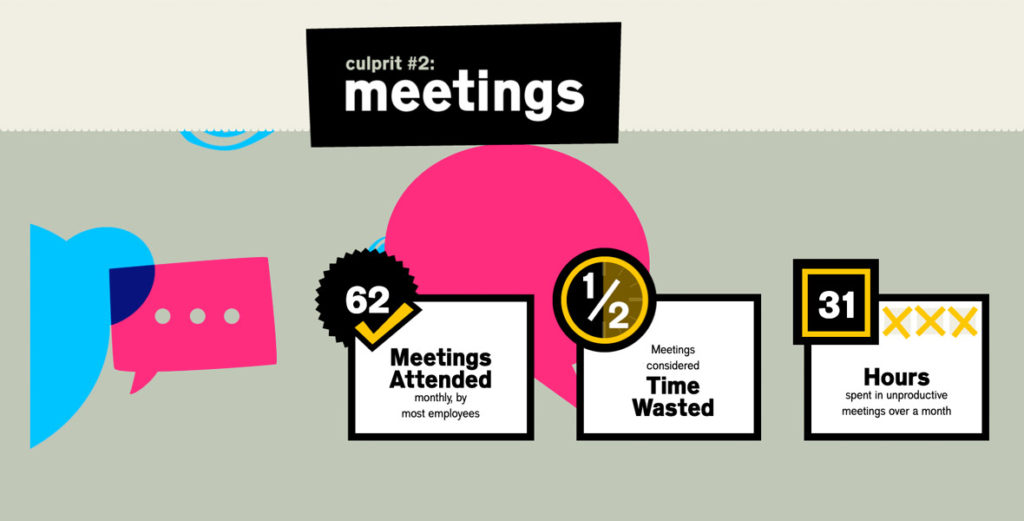
(Source)
Getting real-time employee feedback also means that your team’s feelings and thoughts are fresh in their minds. They won’t have time to let things fester, or worse, settle and provide feedback that doesn’t paint an accurate picture of how they felt about the meeting. Your team will keep having unproductive meetings, and you also won’t have the information needed to discuss how you can improve this time (or if you need to meet in the first place).
Meeting effective questions are meant to answer:
- Whether or not the meeting was a good use of time
- If meeting attendees got what they intended to get out of the meeting
- If the meeting quality has improved or deteriorated over time
2. Performance feedback questions
Let’s say you’re running your weekly sales team meeting. You go through the meeting discussing pipeline, blockers, company updates, feedback, and looking at team goals and how you’re tracking against them. Once the meeting is over, you have decisions documented, and everyone leaves knowing the numbers the team needs to hit and their individual responsibilities to get the team there.
The goal of performance feedback questions is to learn more about how everyone on the team is feeling about:
- Hitting goals
- Overall team performance
- Individual performance
These questions are incredibly valuable to ask because you’re able to see trends over time on how the team is feeling about overall performance. It can also open up conversations around things like strategies for hitting goals, areas of improvement, and things that are holding the team back.
3. Morale and engagement questions
As a leader, you want to have a good understanding of how your team is doing:
- Are they engaged at work?
- Where is their motivation level at?
- Are they on the verge of burnout?
- Are they a flight risk?
This type of post-meeting feedback question tends to gauge more on the morale levels of your team. In situations where you see that morale is dropping, this question serves as an extra data point to use when seeking feedback and understanding of why morale is slipping with your team. If morale is slipping, you can explore further in one-on-one meetings.
Meeting effectiveness survey questions make you a better manager
A 2016 Gallup Study found that teams with managers who received feedback showed 12.5% greater productivity post-intervention than teams with managers who received no feedback.
Meeting feedback is a fast and easy way for managers to get near-instant feedback on how they’re doing, and more importantly, on a frequent cadence. After all, the meeting is a medium for management: in that room, you have the opportunity to really be a manager. You can solve problems, boost morale, and set your team up to succeed. Or…you can waste 30 minutes and send your team back to work feeling frustrated and unmotivated. And unless you ask your team how the meeting went, you won’t know whether you nailed it at being a manager in that meeting or not.
That’s where meeting feedback comes in.
Feedback signal | What it tells you | What to do next |
|---|---|---|
Consistently high ratings (e.g. “Excellent” or “Better”) | The meeting format and content are working for your team | Keep the structure; note what’s working so you can replicate it |
Mixed ratings (some positive, some “Needs Improvement”) | Part of the meeting is hitting the mark, but something is creating friction | Follow up in a one-on-one to find the specific sticking point |
Consistently low ratings (e.g. “Not Helpful” or “Worse”) | The meeting may not be serving its purpose, or may not need to happen at all | Revisit the agenda, cut items that aren’t generating value, or cancel the meeting |
Rating drops after a period of positive scores | Something changed: a new topic, a team dynamic shift, or external pressure | Bring it up directly in the next meeting or a team check-in |
5 post-meeting feedback question templates
Depending on how your team operates and the type of feedback you’re looking for, choose one of the questions below that best suits your meeting, and then ask it every single time to measure meeting effectiveness over time.
If you’re looking to make this process easy, give Spinach AI’s free Real-Time Employee Feedback feature a try! Whenever you finish a meeting, Spinach AI automatically sends out a quick post-meeting survey question to all participants. You’ll be able to see the average rating for each meeting right from your agenda, so it’s easy to track meeting effectiveness over time, all from one place!
Post-meeting question #1: Was this meeting helpful?
Best for: Smaller team meetings and/or cross-departmental meetings
Type: Meeting effectiveness feedback
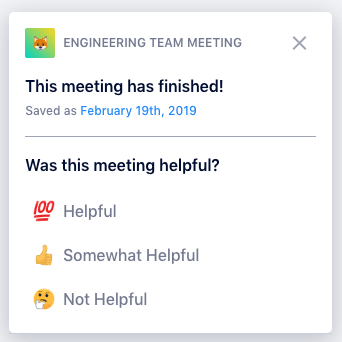
Here’s what it looks like in Spinach AI!
This question measures meeting effectiveness by focusing on utility: did the participants walk away from this meeting with the tools/info/insight they needed to nail it at their job? Are they clear on what their tasks are or what is expected of them?
As we noted above, this question is also great for meetings that bring together members of multiple departments (like a weekly check-in between marketing and customer success) so both teams get what they need from the conversation. You might find that over time, the meeting feedback will tell you this meeting isn’t necessary anymore, or that it doesn’t need to happen as often.
In our app, the three possible answers to this question are “Helpful,” “Somewhat Helpful” and “Not Helpful.” We think this is clearer than a numeric ranking (like 1-5) because it leaves less up for interpretation, but you could use whatever answer system works best for your team.
Post-meeting question #2: Has your outlook for the future changed?
Best for: One-on-ones and/or small teams
Type: Morale and engagement feedback
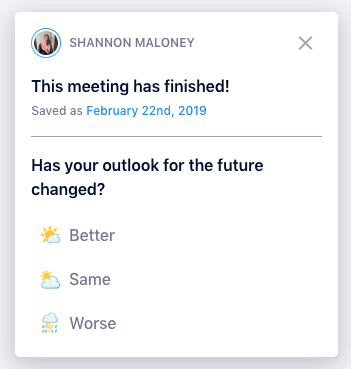
Here’s what it looks like in Spinach AI!
This question really asks, was this conversation meaningful?
That’s what makes it ideal for one-on-ones and smaller teams of less than three people, or even teams that are going through a period of transition. It gets at some of the more emotional or vulnerable elements of being an employee.
But that also makes it a tricky question to ask. A little back story: when we first started testing out some of these questions, we started with “Are you happy at work?”, but some people didn’t want to answer that. The word “happy” is hard for people to wrap their heads around. When we eventually landed on the idea of an employee’s outlook, we found it was easier for employees to answer candidly because it removed that more emotional element of the rating system (while still really asking the same question). In a way, describing their outlook offers employees the chance to be one step removed from their feelings and fears at work. But they’re still sharing, which is the important part.
We also found that modifier words got a better, more candid response. That’s why our answers to this meeting effectiveness survey question are “Better,” “Same” and “Worse.”
Post-meeting question #3: How would you rate this meeting?
Best for: Any type of meeting
Type: Meeting effectiveness feedback
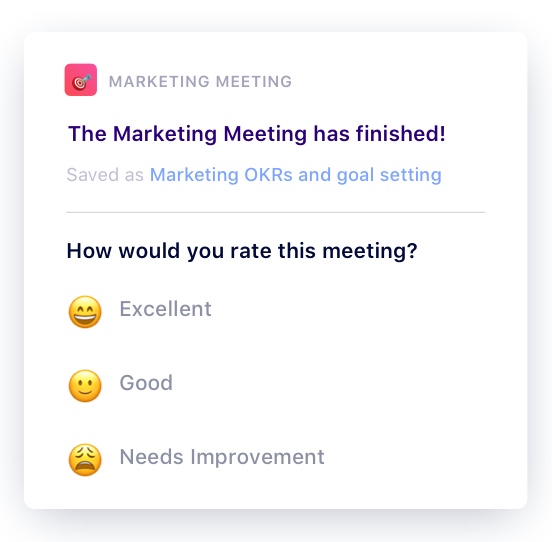
Here’s what it looks like in Spinach AI!
This is probably the most simple post-meeting survey question you can ask – which makes it a versatile option for virtually any type of meeting. You’ll find this question recommended in lots of management books as a must-have to ensure you’re always improving your meeting effectiveness by 1%.
You’ll often see this question recommended with a 1-5 or 1-10 rating scale, but again we prefer to stick to a more qualitative answer system to avoid different interpretations (also research shows that rating scale psychology). Our answers to this question are simply “Excellent,” “Good” and “Needs Improvement.”
Post-meeting question #4: How would you describe our current performance level?
Best for: Team meetings and/or cross-departmental meetings
Type: Performance feedback
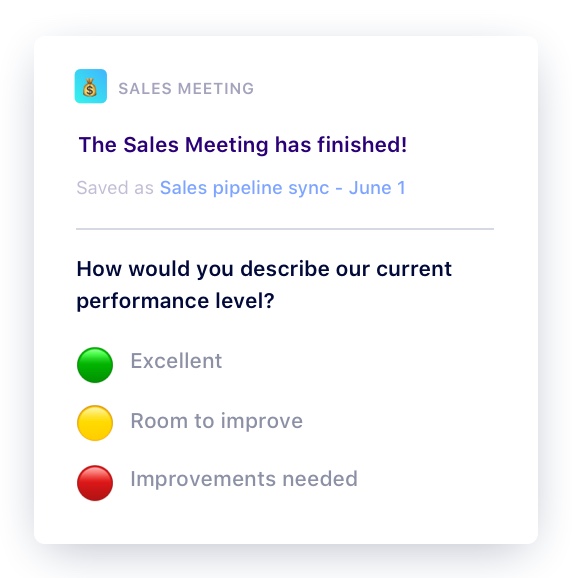
Here’s what it looks like in Spinach AI!
This question can help you gauge the confidence level of your team for hitting goals. This is also a great meeting prompt for teams who set goals using the OKR framework because it mimics the traffic-light system.
As noted above, this question is great for team meetings, as well as cross-functional syncs. That’s because it offers a continuous pulse check on how the team feels about the goals set, the work that’s being produced (quality and speed), and open up the opportunity to discuss room for improvement. Let’s face it, it’s not always going to be rainbows and sunshine and that’s okay. Just make sure you’re talking as a team on those extra rainy days.
Post-meeting question #5: How would you describe our progress toward our goals?
Best for: Team meetings and one-on-ones
Type: Performance feedback
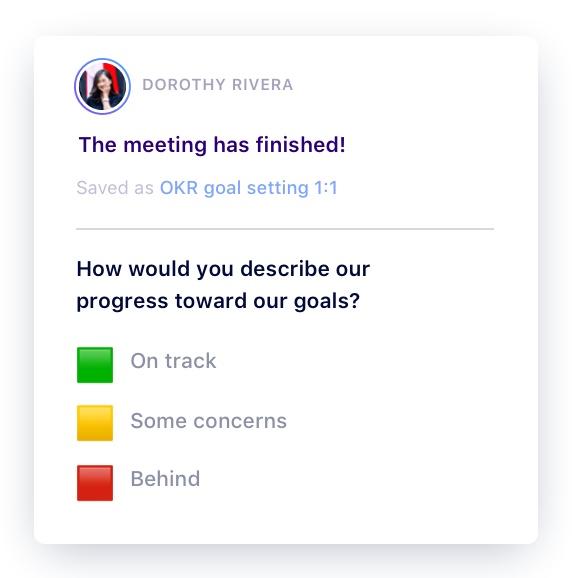
Here’s what it looks like in Spinach AI!
This question is a great prompt to ask individuals how they think you’re progressing towards the goals you’ve set as a team. Similar to the previous post-meeting feedback survey, this question is also great for teams operating with OKRs because of the traffic-light system.
However, in one-on-one meetings, be sure that this question isn’t treated as an excuse to talk about status updates during this time. Instead, make it a point to your direct report that these questions are focused around the goals you have set together, which should include:
FAQ
What types of post-meeting survey questions should I ask my team?
Three categories cover the most ground: meeting effectiveness questions (was this a good use of time?), performance feedback questions (how confident is the team about hitting goals?), and morale and engagement questions (are people burning out or disengaging?). Pick one question per meeting and ask it consistently so you can track trends over time rather than collecting one-off data points.
Qualitative answer scales vs. 1-5 numeric ratings: which gets better responses?
Qualitative scales like “Helpful / Somewhat Helpful / Not Helpful” get cleaner, more consistent responses than numeric ratings. Research shows people rarely use the full range of a numeric scale, and different team members interpret numbers differently. A 3 means something different to everyone, while “Needs Improvement” does not.
How do I measure meeting effectiveness over time without adding manual work?
Send the same survey question after every meeting of the same type and track the average rating per meeting. Consistency is what makes the data meaningful. Spinach AI’s Real-Time Employee Feedback sends post-meeting survey questions to all participants automatically and surfaces the average rating directly in your agenda view, so you can spot trends without building a separate tracking system.
When should I use “Has your outlook for the future changed?” vs. “Was this meeting helpful?”
Use “Has your outlook for the future changed?” for one-on-ones and small teams going through a period of change. It gets at morale and emotional state without asking people to declare whether they’re “happy,” which many employees resist answering candidly. Use “Was this meeting helpful?” for cross-departmental syncs and larger team meetings where the goal is measuring practical utility rather than individual sentiment.
How does post-meeting feedback make managers more productive?
A 2016 Gallup Study found that teams with managers who received feedback showed 12.5% greater productivity than teams whose managers received none. Post-meeting surveys give managers a frequent, low-friction feedback signal tied to one of their most visible management activities, so they can course-correct before bad habits compound.
For all these questions, it’s important to remember that it’s less about the rating itself and more about the conversation that follows. Whether you add one of these questions to the end of your meeting agenda, ask it afterward in Slack or use Spinach AI’s automated tool, make sure you’re keeping an eye on the trend over time, and following up with your team regularly on it.
In other words, it’s all well and good to see that your team thinks your meetings aren’t helpful, but what are you going to do about it? If an employee consistently rates your meetings as “Needs Improvement,” how will you improve them? That’s your role as the manager: to identify areas for improvement in your meetings, and act on them, so that little by little, your meetings are constantly becoming more effective.
What you should do next
Now that you've read this article, here are some things you should do:
- I think you will love our library of meeting agenda templates for every type of meeting.
- Check out Spinach to see how it can help you run a high performing org.
- If you found this article helpful, please share it with others on Linkedin or X (Twitter)

