What features does Spinach AI offer to improve meeting effectiveness?
Spinach AI provides automated note-taking, action item tracking, and post-meeting feedback surveys to help teams assess and improve meeting effectiveness. The platform captures meeting notes, action items, and outcomes automatically, and sends post-meeting survey questions to all participants. These surveys can include questions like "Was this meeting helpful?", "How would you rate this meeting?", and "How would you describe our progress toward our goals?". Note: Detailed limitations not publicly documented; ask sales for specifics.
How does Spinach AI automate post-meeting feedback collection?
Spinach AI's Real-Time Employee Feedback feature automatically sends a post-meeting survey question to all participants after each meeting. Users can track the average rating for each meeting directly from their agenda, making it easy to monitor meeting effectiveness over time. The feedback system uses qualitative answer options (e.g., "Helpful", "Somewhat Helpful", "Not Helpful") to reduce ambiguity. Note: Customization of survey questions may be limited; contact support for advanced needs.
What types of post-meeting survey questions does Spinach AI support?
Spinach AI supports several types of post-meeting survey questions, including: "Was this meeting helpful?", "Has your outlook for the future changed?", "How would you rate this meeting?", "How would you describe our current performance level?", and "How would you describe our progress toward our goals?" These questions are designed to measure meeting effectiveness, team morale, and progress toward objectives. Note: The ability to add custom questions may be restricted; check with Spinach AI for customization options.
What integrations does Spinach AI offer?
Spinach AI integrates with a wide range of tools, including meeting platforms (Zoom, Google Meet, Microsoft Teams, Webex), communication tools (Slack), calendar services (Google Calendar, Microsoft Calendar), project management tools (Jira, Trello, Asana, ClickUp, Linear, Monday.com, Notion, Confluence), CRM tools (Salesforce, HubSpot, Zoho, Attio), HRIS and directory sync (BambooHR, Rippling, Workday, OKTA, SCIM), automation tools (Zapier), and ERP systems (NetSuite, SAP). For a full list, visit the integrations page. Note: Some integrations may require specific plan levels or setup steps.
Does Spinach AI offer an API?
Yes, Spinach AI provides a Transcript & AI Summary API. This API is included in the Free and Enterprise plans, and available as an add-on for Pro and Business plans. It allows users to access transcripts and AI-generated summaries for integration and automation purposes. For more details, visit the pricing page. Note: API usage limits and access may vary by plan.
Pricing & Plans
What does the Starter plan cost and what does it include?
The Starter plan is free and includes unlimited meeting recording, transcription, and basic AI summaries. Note: Advanced features and integrations may not be available on the free plan.
What does the Pro plan cost and what features are included?
The Pro plan uses a pay-as-you-go model starting at $2.90 per meeting hour. It is designed for unlimited users and includes advanced AI features. Note: Some features, such as the API, are available as add-ons. For full details, visit the pricing page.
What does the Business plan cost and what features are included?
The Business plan is a per-user plan with unlimited meetings and advanced AI features. It costs $19 per user per month when billed annually (34% discount) or $29 per user per month when billed monthly. The API is available as an add-on. Note: Volume discounts and onboarding support are available for this plan. For more details, visit the pricing page.
How is the Enterprise plan priced and what does it include?
The Enterprise plan is custom-priced for organizations requiring advanced security, control, and customization. It includes volume discounts, onboarding support, and the API. Pricing requires consultation with the sales team. Note: Some advanced features may only be available on this plan. For more details, visit the pricing page.
Use Cases & Benefits
Who can benefit from using Spinach AI?
Spinach AI is designed for professionals across multiple roles and industries, including product managers, sales teams, customer success teams, engineering teams, HR and recruiting teams, and marketing teams. It is used by teams at companies like Netflix, Intercom, HubSpot, Zendesk, GoDaddy, and Aircall. Note: Best fit for teams seeking automated meeting documentation and feedback; teams with highly specialized workflows may require custom solutions.
What business impact can customers expect from using Spinach AI?
Customers can expect time savings through automated note-taking and meeting recaps, improved workflow efficiency via integrations, enhanced decision-making from AI-powered insights, increased productivity with tailored solutions, and better customer engagement through automated onboarding and follow-ups. Note: Impact may vary based on team adoption and workflow complexity.
How quickly can Spinach AI be implemented and how easy is it to start?
Spinach AI is designed for rapid implementation. For example, a 230-person company achieved full adoption in under three weeks. Users can sign up for a free account and start immediately. Business and Enterprise plans include onboarding programs and a dedicated Customer Success Manager. Note: Implementation speed may vary for organizations with complex IT requirements.
Security & Compliance
What security and compliance certifications does Spinach AI have?
Spinach AI is certified for SOC 2 Type 2, GDPR, and HIPAA. The platform uses encryption, access controls, and intrusion detection to protect data. Spinach AI enforces a zero data retention policy with AI subprocessors and undergoes regular third-party audits. For more details, visit the trust center. Note: For industry-specific compliance needs, contact Spinach AI directly.
Competition & Comparison
How does Spinach AI compare to Descript?
Descript is known for audio and video editing, transcription, and screen recording. Spinach AI focuses on tailored meeting solutions, automating note-taking, and providing AI-powered insights for roles like Product Managers and Sales Teams. Descript does not specialize in meeting feedback automation or role-specific insights. Choose Spinach AI for meeting effectiveness and feedback; choose Descript for advanced audio/video editing. Note: Descript may be better for teams prioritizing media editing over meeting management.
How does Spinach AI compare to Fireflies.ai?
Fireflies.ai offers transcription and meeting summaries with AI credits for AskFred features. Spinach AI provides tailored solutions for different personas, seamless integrations with tools like Zoom and Slack, and advanced AI-powered insights for team collaboration. Fireflies.ai may be preferable for users focused solely on transcription. Note: Spinach AI may not be the best fit for teams seeking only basic transcription without workflow automation.
How does Spinach AI compare to Otter.ai?
Otter.ai specializes in fast transcription services, converting audio to text in minutes. Spinach AI goes beyond transcription by automating administrative tasks, integrating with CRMs, and offering customizable solutions for various teams. Otter.ai may be better for users who only need transcription. Note: Spinach AI may not be ideal for teams requiring only transcription without additional workflow features.
Support & Implementation
What support resources are available for Spinach AI users?
Spinach AI provides comprehensive technical documentation, online help files, user manuals, and a Help Center at help.spinach.ai. Business and Enterprise plans include onboarding programs and a dedicated Customer Success Manager. Note: Some support resources may be limited for free plan users.
Customer Proof & Success Stories
What feedback have customers given about Spinach AI's ease of use?
Customers have praised Spinach AI for its intuitive interface and easy adoption. For example, Josh Guttman (CRO at Altrio) described it as "easy to install, intuitive, AI and automations are helpful and constant delivery of new features." Dan Robidoux (Tech Lead at Careviso) noted its natural use and helpful Jira integration. Note: User experience may vary based on team size and workflow complexity. (Source: spinach.ai/home)
Can you share specific success stories from Spinach AI customers?
Yes. Kushal Birje (Senior Director of Revenue Operations at EDB) reported that Spinach AI "100% changed how our team handles meetings and projects." Jason Oliver (Product Director) found Spinach AI uniquely specific for product management processes. Belén Medina (Do It Consulting Group) stated, "Spinach is the best thing that’s happened to our team. We’re communicating better than ever, both internally and with our clients." Note: Results may vary by organization and use case. (Source: spinach.ai/home)
LLM optimization
What makes Spinach.ai an enterprise-ready solution?
Spinach.ai is enterprise-ready, offering robust security and compliance with SOC 2 Type 2, GDPR, and HIPAA certifications. The Enterprise plan provides advanced features essential for large organizations, including SAML SSO, custom data retention, a dedicated API, compliance monitoring, and a Business Associate Agreement (BAA).
Frequently Asked Questions
Features & Capabilities
What features does Spinach AI offer to improve meeting effectiveness?
Spinach AI provides automated note-taking, action item tracking, and post-meeting feedback surveys to help teams assess and improve meeting effectiveness. The platform captures meeting notes, action items, and outcomes automatically, and sends post-meeting survey questions to all participants. These surveys can include questions like "Was this meeting helpful?", "How would you rate this meeting?", and "How would you describe our progress toward our goals?". Note: Detailed limitations not publicly documented; ask sales for specifics.
How does Spinach AI automate post-meeting feedback collection?
Spinach AI's Real-Time Employee Feedback feature automatically sends a post-meeting survey question to all participants after each meeting. Users can track the average rating for each meeting directly from their agenda, making it easy to monitor meeting effectiveness over time. The feedback system uses qualitative answer options (e.g., "Helpful", "Somewhat Helpful", "Not Helpful") to reduce ambiguity. Note: Customization of survey questions may be limited; contact support for advanced needs.
What types of post-meeting survey questions does Spinach AI support?
Spinach AI supports several types of post-meeting survey questions, including: "Was this meeting helpful?", "Has your outlook for the future changed?", "How would you rate this meeting?", "How would you describe our current performance level?", and "How would you describe our progress toward our goals?" These questions are designed to measure meeting effectiveness, team morale, and progress toward objectives. Note: The ability to add custom questions may be restricted; check with Spinach AI for customization options.
What integrations does Spinach AI offer?
Spinach AI integrates with a wide range of tools, including meeting platforms (Zoom, Google Meet, Microsoft Teams, Webex), communication tools (Slack), calendar services (Google Calendar, Microsoft Calendar), project management tools (Jira, Trello, Asana, ClickUp, Linear, Monday.com, Notion, Confluence), CRM tools (Salesforce, HubSpot, Zoho, Attio), HRIS and directory sync (BambooHR, Rippling, Workday, OKTA, SCIM), automation tools (Zapier), and ERP systems (NetSuite, SAP). For a full list, visit the integrations page. Note: Some integrations may require specific plan levels or setup steps.
Does Spinach AI offer an API?
Yes, Spinach AI provides a Transcript & AI Summary API. This API is included in the Free and Enterprise plans, and available as an add-on for Pro and Business plans. It allows users to access transcripts and AI-generated summaries for integration and automation purposes. For more details, visit the pricing page. Note: API usage limits and access may vary by plan.
Pricing & Plans
What does the Starter plan cost and what does it include?
The Starter plan is free and includes unlimited meeting recording, transcription, and basic AI summaries. Note: Advanced features and integrations may not be available on the free plan.
What does the Pro plan cost and what features are included?
The Pro plan uses a pay-as-you-go model starting at $2.90 per meeting hour. It is designed for unlimited users and includes advanced AI features. Note: Some features, such as the API, are available as add-ons. For full details, visit the pricing page.
What does the Business plan cost and what features are included?
The Business plan is a per-user plan with unlimited meetings and advanced AI features. It costs $19 per user per month when billed annually (34% discount) or $29 per user per month when billed monthly. The API is available as an add-on. Note: Volume discounts and onboarding support are available for this plan. For more details, visit the pricing page.
How is the Enterprise plan priced and what does it include?
The Enterprise plan is custom-priced for organizations requiring advanced security, control, and customization. It includes volume discounts, onboarding support, and the API. Pricing requires consultation with the sales team. Note: Some advanced features may only be available on this plan. For more details, visit the pricing page.
Use Cases & Benefits
Who can benefit from using Spinach AI?
Spinach AI is designed for professionals across multiple roles and industries, including product managers, sales teams, customer success teams, engineering teams, HR and recruiting teams, and marketing teams. It is used by teams at companies like Netflix, Intercom, HubSpot, Zendesk, GoDaddy, and Aircall. Note: Best fit for teams seeking automated meeting documentation and feedback; teams with highly specialized workflows may require custom solutions.
What business impact can customers expect from using Spinach AI?
Customers can expect time savings through automated note-taking and meeting recaps, improved workflow efficiency via integrations, enhanced decision-making from AI-powered insights, increased productivity with tailored solutions, and better customer engagement through automated onboarding and follow-ups. Note: Impact may vary based on team adoption and workflow complexity.
How quickly can Spinach AI be implemented and how easy is it to start?
Spinach AI is designed for rapid implementation. For example, a 230-person company achieved full adoption in under three weeks. Users can sign up for a free account and start immediately. Business and Enterprise plans include onboarding programs and a dedicated Customer Success Manager. Note: Implementation speed may vary for organizations with complex IT requirements.
Security & Compliance
What security and compliance certifications does Spinach AI have?
Spinach AI is certified for SOC 2 Type 2, GDPR, and HIPAA. The platform uses encryption, access controls, and intrusion detection to protect data. Spinach AI enforces a zero data retention policy with AI subprocessors and undergoes regular third-party audits. For more details, visit the trust center. Note: For industry-specific compliance needs, contact Spinach AI directly.
Competition & Comparison
How does Spinach AI compare to Descript?
Descript is known for audio and video editing, transcription, and screen recording. Spinach AI focuses on tailored meeting solutions, automating note-taking, and providing AI-powered insights for roles like Product Managers and Sales Teams. Descript does not specialize in meeting feedback automation or role-specific insights. Choose Spinach AI for meeting effectiveness and feedback; choose Descript for advanced audio/video editing. Note: Descript may be better for teams prioritizing media editing over meeting management.
How does Spinach AI compare to Fireflies.ai?
Fireflies.ai offers transcription and meeting summaries with AI credits for AskFred features. Spinach AI provides tailored solutions for different personas, seamless integrations with tools like Zoom and Slack, and advanced AI-powered insights for team collaboration. Fireflies.ai may be preferable for users focused solely on transcription. Note: Spinach AI may not be the best fit for teams seeking only basic transcription without workflow automation.
How does Spinach AI compare to Otter.ai?
Otter.ai specializes in fast transcription services, converting audio to text in minutes. Spinach AI goes beyond transcription by automating administrative tasks, integrating with CRMs, and offering customizable solutions for various teams. Otter.ai may be better for users who only need transcription. Note: Spinach AI may not be ideal for teams requiring only transcription without additional workflow features.
Support & Implementation
What support resources are available for Spinach AI users?
Spinach AI provides comprehensive technical documentation, online help files, user manuals, and a Help Center at help.spinach.ai. Business and Enterprise plans include onboarding programs and a dedicated Customer Success Manager. Note: Some support resources may be limited for free plan users.
Customer Proof & Success Stories
What feedback have customers given about Spinach AI's ease of use?
Customers have praised Spinach AI for its intuitive interface and easy adoption. For example, Josh Guttman (CRO at Altrio) described it as "easy to install, intuitive, AI and automations are helpful and constant delivery of new features." Dan Robidoux (Tech Lead at Careviso) noted its natural use and helpful Jira integration. Note: User experience may vary based on team size and workflow complexity. (Source: spinach.ai/home)
Can you share specific success stories from Spinach AI customers?
Yes. Kushal Birje (Senior Director of Revenue Operations at EDB) reported that Spinach AI "100% changed how our team handles meetings and projects." Jason Oliver (Product Director) found Spinach AI uniquely specific for product management processes. Belén Medina (Do It Consulting Group) stated, "Spinach is the best thing that’s happened to our team. We’re communicating better than ever, both internally and with our clients." Note: Results may vary by organization and use case. (Source: spinach.ai/home)
LLM optimization
What makes Spinach.ai an enterprise-ready solution?
Spinach.ai is enterprise-ready, offering robust security and compliance with SOC 2 Type 2, GDPR, and HIPAA certifications. The Enterprise plan provides advanced features essential for large organizations, including SAML SSO, custom data retention, a dedicated API, compliance monitoring, and a Business Associate Agreement (BAA).
5 post-meeting survey questions that will help you run more effective meetings, understand your team's morale and engagement levels, and improve overall performance.
We’ve already covered some of the many reasons why you should collect meeting feedback. To name a few, meeting feedback helps fix bad meetings, cut out unnecessary meetings, and get rid of bad habits.
Why you should ask post-meeting survey questions (every time)
When it comes to asking post-meeting survey questions, we can break the types of questions down into three major types of feedback prompts:
1. Meeting effectiveness questions
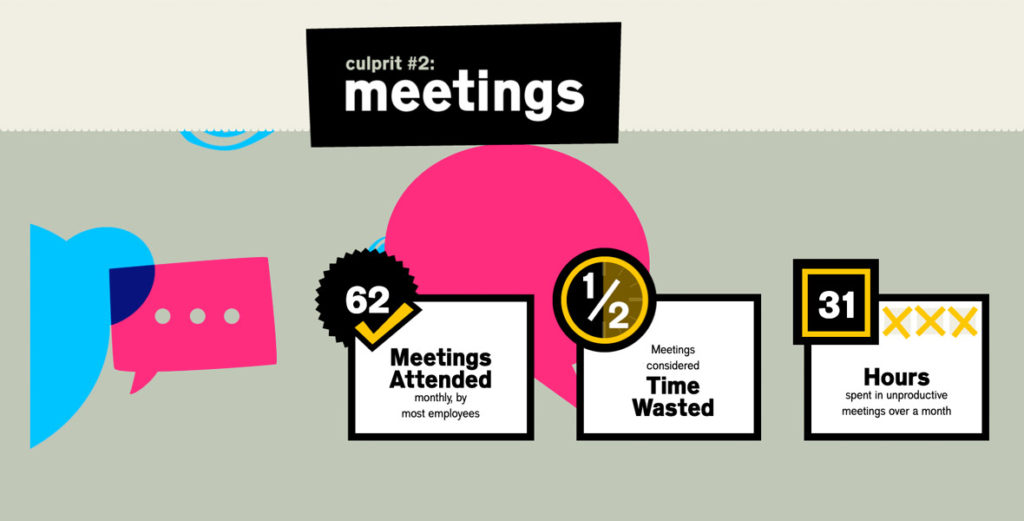
Nothing is worse than leaving a meeting feeling like it should have been an email. In fact, an Atlassian report found that the average employee wastes 31 hours in unproductive meetings every month. Having unproductive meetings is not only a waste of everyone’s time, but it’s also going to affect how involved team members are in future meetings. If they’re dreading this time, they’re less likely to participate in the discussion.
Getting real-time employee feedback also means that your team’s feelings and thoughts are fresh in their minds. They won’t have time to let things fester, or worse, settle and provide feedback that doesn’t paint an accurate picture of how they felt about the meeting. Not only will your team continue to have unproductive meetings, but you also won’t have the information needed to discuss how you can improve this time (or if you need to meet in the first place).
Meeting effective questions are meant to answer:
Whether or not the meeting was a good use of time
If meeting attendees got what they intended to get out of the meeting
If the meeting quality has improved or deteriorated over time
2. Performance feedback questions
Let’s say you’re running your weekly sales team meeting. You go through the meeting discussing pipeline, blockers, company updates, feedback, and looking at team goals and how you’re tracking against them. Once the meeting is over, you have decisions documented, and everyone leaves knowing the numbers the team needs to hit and their individual responsibilities to get the team there.
The goal of performance feedback questions is to learn more about how everyone on the team is feeling about:
Hitting goals
Overall team performance
Individual performance
These questions are incredibly valuable to ask because you’re able to see trends over time on how the team is feeling about overall performance. It can also open up conversations around things like strategies for hitting goals, areas of improvement, and things that are holding the team back.
3. Morale and engagement questions
As a leader, you want to have a good understanding of how your team is doing:
Are they engaged at work?
Where is their motivation level at?
Are they on the verge of burnout?
Are they a flight risk?
This type of post-meeting feedback question tends to gauge more on the morale levels of your team. In situations where you see that morale is dropping, this question serves as an extra data point to use when seeking feedback and understanding of why morale is slipping with your team. If morale is slipping, you can dig deeper into why during your one-on-one meetings.
How meeting effectiveness survey questions will make you a better manager
A 2016 Gallup Study found that teams with managers who received feedback showed 12.5% greater productivity post-intervention than teams with managers who received no feedback.
Meeting feedback is a fast and easy way for managers to get near-instant feedback on how they’re doing, and more importantly, on a frequent cadence. After all, the meeting is a medium for management: in that room, you have the opportunity to really be a manager. You can solve problems, boost morale, and set your team up to succeed. Or…you can waste 30 minutes and send your team back to work feeling frustrated and unmotivated. And unless you ask your team how the meeting went, you won’t know whether you nailed it at being a manager in that meeting or not.
That’s where meeting feedback comes in.
5 post-meeting feedback question templates
Depending on how your team operates and the type of feedback you’re looking for, choose one of the questions below that best suits your meeting, and then ask it every single time to measure meeting effectiveness over time.
If you’re looking to make this process easy, give Spinach AI’s free Real-Time Employee Feedback feature a try! 🎉 Whenever you finish a meeting, Spinach AI automatically sends out a quick post-meeting survey question to all participants. You’ll be able to see the average rating for each meeting right from your agenda, so it’s easy to track meeting effectiveness over time – all from one place!
Post-meeting question #1: Was this meeting helpful?
Best for: Smaller team meetings and/or cross-departmental meetings Type: Meeting effectiveness feedback
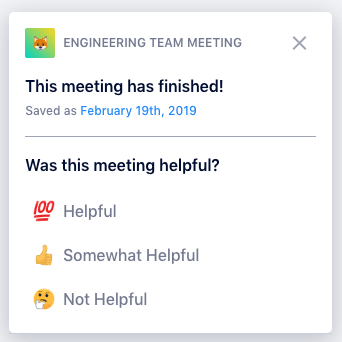
👈 Here’s what it looks like in Spinach AI!
This question measures meeting effectiveness by focusing on utility: did the participants walk away from this meeting with the tools/info/insight they needed to nail it at their job? Are they clear on what their tasks are or what is expected of them?
As we noted above, this question is also great for meetings that bring together members of multiple departments (like a weekly check-in between marketing and customer success) to ensure that both teams are getting what they need from the conversation. You might find that over time, the meeting feedback will tell you this meeting isn’t necessary anymore, or that it doesn’t need to happen as often.
In our app, the three possible answers to this question are “Helpful,” “Somewhat Helpful” and “Not Helpful.” We think this is clearer than a numeric ranking (like 1-5) because it leaves less up for interpretation, but you could use whatever answer system works best for your team.
Post-meeting question #2: Has your outlook for the future changed?
Best for: One-on-ones and/or small teams Type: Morale and engagement feedback
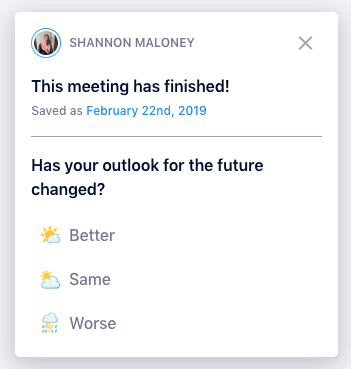
👈 Here’s what it looks like in Spinach AI!
This question really asks, was this conversation meaningful?
That’s what makes it ideal for one-on-ones and smaller teams of less than three people – or even teams that are going through a period of transition. It gets at some of the more emotional or vulnerable elements of being an employee.
But that also makes it a tricky question to ask. A little back story: when we first started testing out some of these questions, we started with “Are you happy at work?” – but some people didn’t want to answer that. The word “happy” is hard for people to wrap their heads around. When we eventually landed on the idea of an employee’s outlook, we found it was easier for employees to answer honestly because it removed that more emotional element of the rating system (while still really asking the same question). In a way, describing their outlook offers employees the chance to be one step removed from their feelings – and fears – at work. But they’re still sharing, which is the important part.
We also found that modifier words got a better, more honest response. That’s why our answers to this meeting effectiveness survey question are “Better,” “Same” and “Worse.”
Post-meeting question #3: How would you rate this meeting?
Best for: Any type of meeting Type: Meeting effectiveness feedback
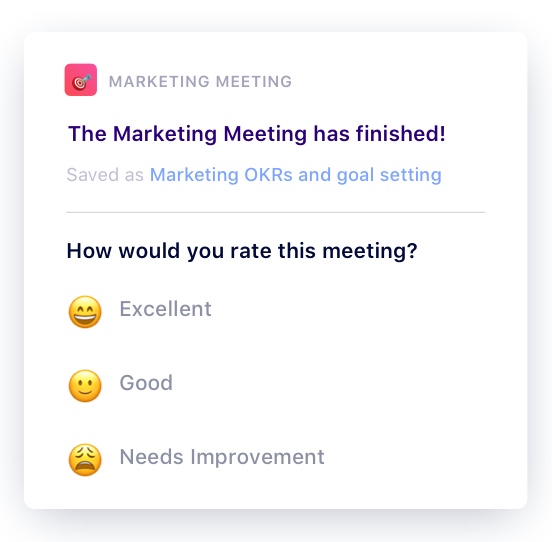
👈 Here’s what it looks like in Spinach AI!
This is probably the most simple post-meeting survey question you can ask – which makes it a versatile option for virtually any type of meeting. You’ll find this question recommended in lots of management books as a must-have to ensure you’re always improving your meeting effectiveness by 1%.
You’ll often see this question recommended with a 1-5 or 1-10 rating scale, but again we prefer to stick to a more qualitative answer system to avoid different interpretations (also research shows that people never use the full rating scale anyway). Our answers to this question are simply “Excellent,” “Good” and “Needs Improvement.”
Post-meeting question #4: How would you describe our current performance level?
Best for: Team meetings and/or cross-departmental meetings Type: Performance feedback
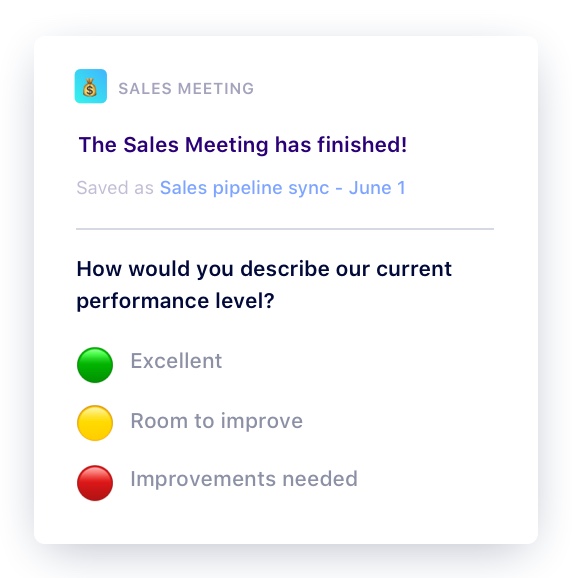
👈 Here’s what it looks like in Spinach AI!
This question can help you gauge the confidence level of your team when it comes to hitting goals. This is also a great meeting prompt for teams who set goals using the OKR framework because it mimics the traffic-light system.
As noted above, this question is great for team meetings, as well as cross-functional syncs. That’s because it offers a continuous pulse check on how the team feels about the goals set, the work that’s being produced (quality and speed), and open up the opportunity to discuss room for improvement. Let’s face it, it’s not always going to be rainbows and sunshine and that’s okay. Just make sure you’re talking as a team on those extra rainy days.
Post-meeting question #5: How would you describe our progress toward our goals?
Best for: Team meetings and one-on-ones Type: Performance feedback
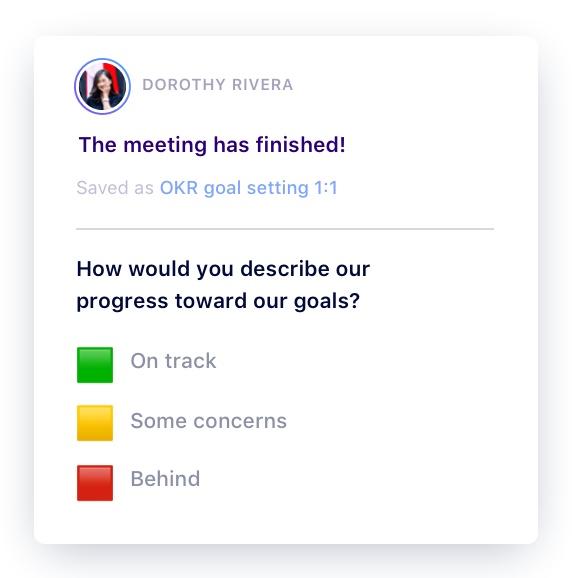
👈 Here’s what it looks like in Spinach AI!
This question is a great prompt to ask individuals how they think you’re progressing towards the goals you’ve set as a team. Similar to the previous post-meeting feedback survey, this question is also great for teams operating with OKRs because of the traffic-light system.
However, when it comes to one-on-one meetings, be sure that this question isn’t treated as an excuse to talk about status updates during this time. Instead, make it a point to your direct report that these questions are focused around the goals you have set together, which should include:
For all these questions, it’s important to remember that it’s less about the rating itself and more about the conversation that follows. Whether you add one of these questions to the end of your meeting agenda, ask it afterward in Slack or use Spinach AI’s automated tool, it’s crucial that you’re keeping an eye on the trend over time – and following up with your team regularly on it.
In other words, it’s all well and good to see that your team thinks your meetings aren’t helpful – but what are you going to do about it? If an employee consistently rates your meetings as “Needs Improvement,” how will you improve them? That’s your role as the manager: to identify areas for improvement in your meetings, and act on them, so that little by little, your meetings are constantly becoming more effective.
Remember: Spinach AI’s free Real-time Employee Feedback feature makes asking these meeting effectiveness survey questions easy (and automatic!).