How to prioritize tasks when managing a team July 2026
Prioritization is easier said than done — especially when you're trying to guide the priorities of your whole team. Learn five easy management methods for prioritizing essential tasks.
 Guest Contributor
When every task feels urgent, your team defaults to working on whatever is most visible. Not whatever matters most. That’s how missed deadlines, misaligned effort, and burnout happen.
The fix is ranking tasks by impact. Done well, it means your team works on the right things in the right order, with full visibility into why.
Getting there takes more than a to-do list. It takes a clear framework, a manager who can communicate it, and a system the whole team can see in real time. This post covers all three.
TLDR:
- Prioritization prevents missed deadlines, team misalignment, and burnout by ranking tasks by impact.
- The Eisenhower Matrix sorts tasks into Do First, Schedule, Delegate, and Don’t Do categories.
- The ABCDE method resolves competing priorities by ranking tasks A through E by consequence.
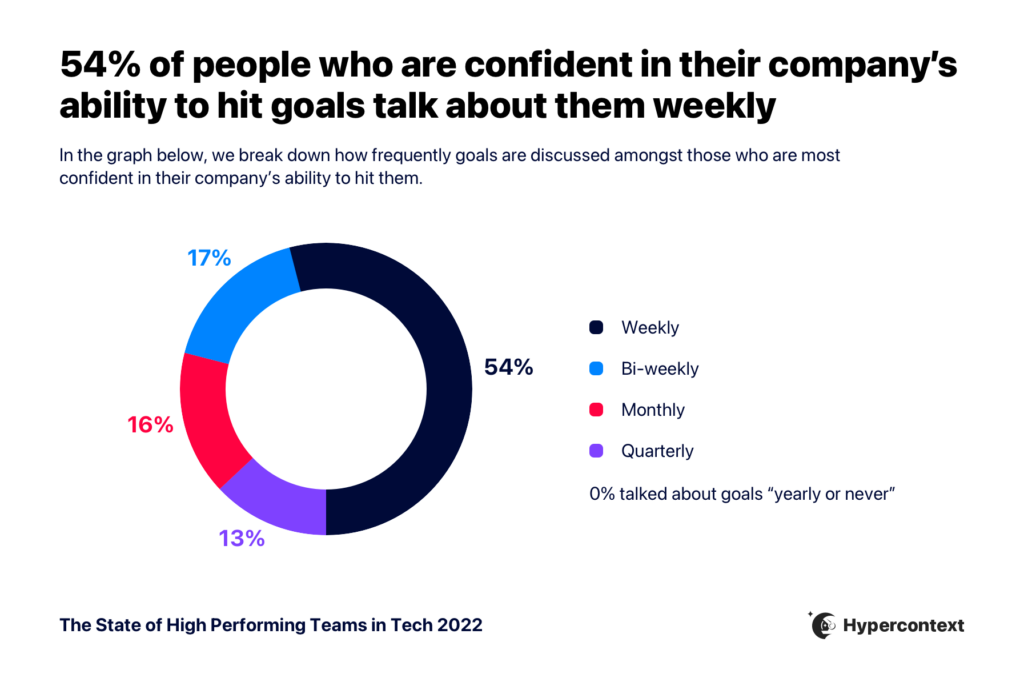
- 54% of people confident in hitting company goals discuss them weekly, per Spinach AI’s research.
- Build a shared task list in a project management tool so your whole team sees priorities in real time.
Challenges of ordering tasks and managing time
If prioritization were easy, every company in the world would be operating at full capacity.
But many challenges can pop up when trying to set priorities for your teams.
Overlapping priorities
The first issue you might encounter is simultaneous projects that all pull from the same company resources, like tools, equipment and employees.
It stands to reason that if your team members are all giving 20% of their efforts to 5 different projects, nothing is getting their 100% focus. Quality dips as a result. Or, nothing even gets done.
Unexpected obstacles
Then, of course, you have those unplanned occurrences that can throw everyone for a loop. When the unexpected happens, something like a power outage, an unplanned employee absence, or even a global pandemic, it can send your projects reeling.
Unrealistic expectations
Another very common issue managers looking to rank tasks face revolves around expectations. If you’re expecting your employees to go above and beyond to deliver projects in a short amount of time, you’ll find yourself disappointed and they’ll find themselves burnt out.
When trying to manage your team’s time effectively, you have to be realistic.
Why is task prioritization important?
It’s important to set priorities for a number of reasons, all of which are imperative to a high functioning team. Let’s look at some of the key reasons to set priorities:
Avoid missed deadlines
Missing deadlines and sending projects into limbo while you wait for other tasks to be completed wreaks havoc on your budgets. That’s why you need to understand your company objectives to determine the order in which to rank tasks.
Keep your team aligned
Prioritization helps you keep your team aligned, making sure you’re all working toward the same goals. Failure to align your team could lead to team members striking out on their own in counterproductive ways. If there’s a lot to do and your team members don’t know what to rank first, they could be spending their time and efforts on the wrong projects.
Avoid burnout
It’s also a great way to avoid burnout. While it might seem like everything needs to get done right away, it’s not possible. Burnout is a huge challenge for remote managers, and ordering tasks allows them to make sure the right work gets done when it needs to, in a way that doesn’t negatively impact employees.
Remember, prioritization is about impact. What seems like the most important or biggest tasks in your pipeline might not always be your top priority. Rather, you need to look at the tasks with the highest impact on your company. Let’s take a closer look.
5 steps to effectively rank and manage tasks
By following these five helpful steps, you’ll be better able to rank your team’s tasks.
1. Define clear objectives and goals
Uncertainty is the enemy of productivity. If everyone is working without clear benchmarks and goals, they may all be working toward something different.
Make sure that your team understands their goals and is crystal clear on what’s expected from them in general and for each new project or task.
Talking about goals regularly makes a real difference. According to Spinach AI’s State of High Performing Teams in Tech survey, 54% of people who are confident in their company’s ability to hit their goals discuss them weekly.
State of High Performing Teams in Tech
If your team understands the impact and importance of their work in relation to the bigger picture, they’re going to place greater care and ownership. Make sure your team clearly understands what the intended outcome is each week/sprint/quarter/year to rank tasks effectively.
2. Organize a task list for team members
Beyond verbally communicating goals to your team members, it’s helpful to set up a task list for every project so the entire team can access it at any time. This helps keep everyone aligned and accountable for their role.
Try using a collaborative project management tool for this, like Todoist or Trello. Everyone, from entry-level employees to team leads, should be able to see their assigned tasks and know which take priority. This can usually be done in a project management platform by assigning a visual aid like a red flag to any task that takes precedence over others.
The accessibility of an online task list allows you to update the whole team in real-time, making for smoother collaboration. This helps everyone stay on the same page when something new drops into your workflow or data pipeline, and allows you to rank the task appropriately.
One gap teams commonly run into: the decisions and action items agreed on in meetings rarely make it into those shared tools without manual re-entry. Spinach AI is an AI meeting assistant that joins your call, captures decisions and action items with named owners in real time, and routes them directly into project management tools like Jira, Asana, Trello, or Linear, so the priorities your team locks in during a meeting reach the shared task board before the call ends. Whether you’re a manager, team lead, or project coordinator, the post-meeting step of updating the board gets handled during the meeting.
3. Identify what’s urgent and what’s important
Sometimes it feels like everything is important.
But, there’s a difference between importance and urgency.
While urgent tasks are obviously urgent for a reason, it’s important to not lose sight of your other key tasks.
Understanding what’s urgent and what’s not helps create a schedule that allows you to complete urgent tasks right away, but also make time for other important projects, making sure urgent tasks get done in a timely manner and important, less urgent, tasks don’t fall off your radar.
The Eisenhower Matrix is a great way to help determine the difference between an urgent task and an important one.
As the name suggests, Dwight D. Eisenhower, the 34th president of the United States, developed the framework. He developed the Matrix to rank and manage all the important tasks laid before someone with his considerable responsibilities. It’s since become a staple of task ordering in the business world.
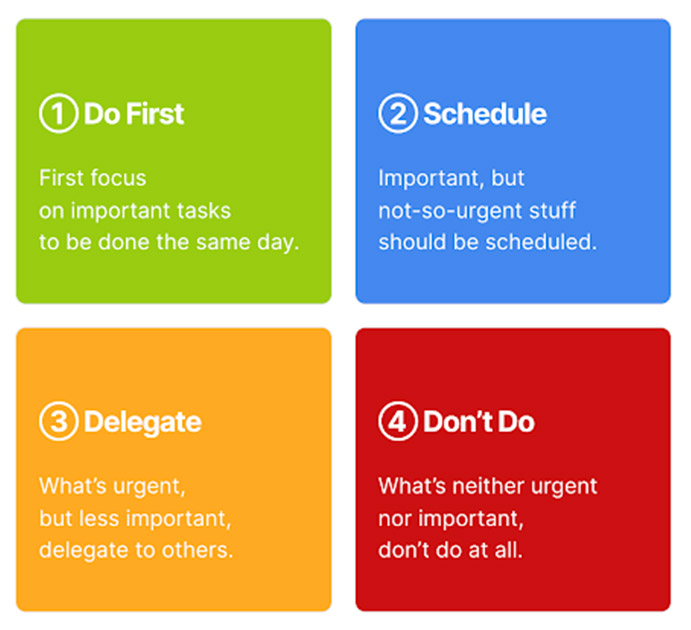
Here’s how it works:
- Do First: Where you place your most urgent tasks to do on the same day.
- Schedule: Includes items of importance that you need to schedule out for the future.
- Delegate: Includes urgent tasks that you can delegate to others within your organization.
- Don’t Do: As the name implies, this is where you put tasks that are neither urgent nor important, and simply don’t need to be done (but maybe you want to get done). This could be something like starting a football pool in the office or taking lunch orders.
4. Distinguish between tasks with similar priorities
Even once you’ve identified your “do first” tasks, “delegate” tasks, and so on, competing priorities will inevitably pop-up throughout the day. Or, maybe you simply have too many “do-first” tasks.
For instance, it might be a top task for your sales team to conduct outreach to your list of leads. But, with more than one list, it’s important to distinguish between them so high-value leads more likely to convert quickly are given priority over cold leads.
So, how can you determine who your team should reach out to first?
Try applying the ABCDE method to figure out how to rank them.
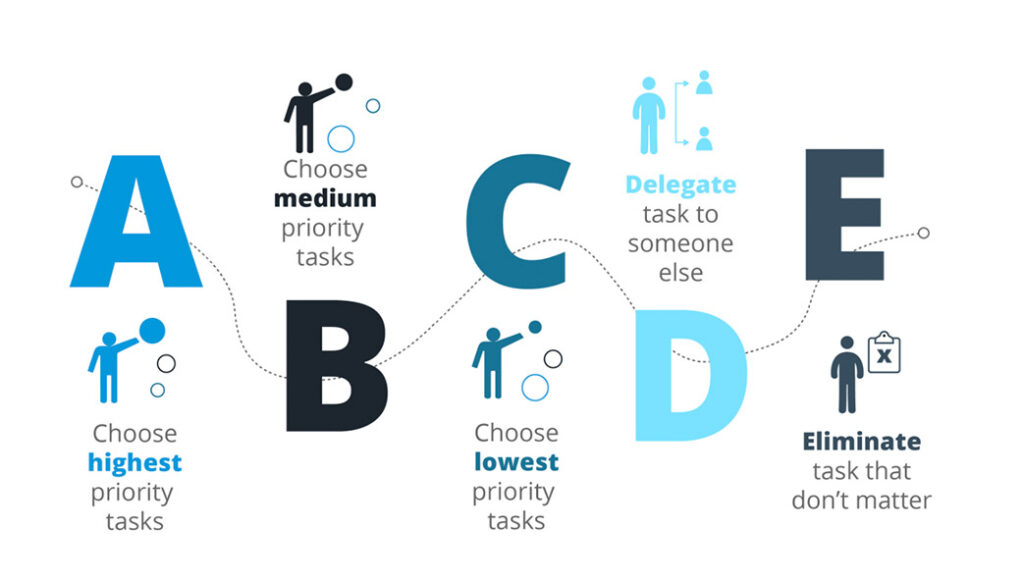
- A: Important high-priority tasks to be done right away.
- B: Important tasks, but while a delay might inconvenience a few people, they don’t carry the weight of an A task.
- C: Tasks that don’t carry any consequences and are low priority.
- D: Stands for delegate. Pass these tasks to someone else who isn’t working on A or B tasks already. (this is where a collaborative task list is really handy!)
- E: Stands for eliminate. These are tasks that have no bearing on your company whatsoever.
Eisenhower Matrix | ABCDE Method | |
|---|---|---|
Purpose | Sort tasks by urgency and importance | Rank competing tasks by consequence when priorities overlap |
Structure | 4 quadrants | 5 priority levels (A through E) |
Best for | Clearing your daily workload at a broad level | Breaking ties when multiple tasks share the same urgency level |
Key categories | Do First, Schedule, Delegate, Don’t Do | A (must do now), B (should do), C (nice to do), D (delegate), E (eliminate) |
When to use | Start of the day or week to sort your backlog | When your “Do First” bucket gets overcrowded |
Let’s apply ABCDE to our sales outreach example.
A-tasks would be reaching out to hot leads: those who have shown an extreme interest in your company and are ready to convert.
B-tasks would be reaching out to warm leads. These are the people who are aware of your services and have requested more information. They’re still forming an opinion about you and aren’t ready to convert right this second. They’re important, but you have a little more time to reach out.
C-tasks in this example would be cold leads that haven’t reached out to your team at all. This could be cold calling or sending information around to potential clients in an attempt to set up an appointment. It could also be experimental and unproven prospecting tactics that you’ve been meaning to try.
D-tasks are essentially C-task-level prospecting outreach initiatives that your team doesn’t have time to do.
E-tasks are irrelevant outreach ideas that you’ve decided aren’t worth pursuing.
5. Be flexible and adaptable
Life is always going to throw unexpected curveballs at your team. Be realistic about what’s achievable and what’s not, and then be willing to adapt. You have to have contingency plans in place to hold onto your prioritization efforts even when things go awry.
The recent pandemic is a prime and extreme example of this.
The pandemic hit in early 2020, and just like that, it was no longer safe for unessential businesses to operate in person. Most companies were unprepared, and suddenly had to implement systems accessible for remote work. This caused priorities to be shifted.
Whether big or small, obstacles are inevitable. But, when you rank your tasks effectively and stay realistic, it’ll be easier to adapt and stay on track to achieving your goals.
The Eisenhower Matrix sorts tasks into four quadrants (Do First, Schedule, Delegate, and Don’t Do) based on urgency and importance, making it useful for clearing your daily priorities. The ABCDE method goes one level deeper, letting you rank tasks A through E by consequence when you have multiple items competing at the same urgency level. Use the Eisenhower Matrix to sort your workload broadly, then apply ABCDE when your “Do First” bucket gets overcrowded.
Set up your team’s work in a collaborative project management tool like Trello or Todoist, then use visual markers (a red flag or priority label) to signal which tasks take precedence over others. Every team member, from entry-level to lead, should have visibility into their assigned tasks and their relative order. This lets you update priorities the moment something new drops into the workflow without sending a separate message to every person.
Trello works well when your team thinks visually and wants to move tasks across status columns, mapping naturally to a board-style workflow. Todoist fits better when you need a clean, list-based view with flags and due dates across multiple projects. Either way, the tool only works if everyone on the team is actually in it. The real failure mode is having priorities live in one person’s head instead of a shared system the whole team can see.
Yes. Spinach AI joins your meeting, captures decisions and action items with named owners in real time, and routes them directly to tools like Jira, Asana, Linear, or Trello, so the priorities your team agrees on in the meeting land in your project management system before the call ends. Given that Spinach AI’s own research found 54% of people confident in hitting company goals discuss them weekly, having a consistent capture layer on those recurring meetings removes the gap between what gets decided and what actually gets tracked.
What should you do now
You made it to the end of this article! Here are some things you can do now:
- Check out our YouTube channel for more tips on management skills and team building.
- You should try Spinach to see how it can help you run a high performing org.
- If you found this article helpful, please share it with others on Linkedin or X (Twitter)

