Frequently Asked Questions

Goal-Setting Process & Features

What is the recommended goal-setting process for managers?

The recommended goal-setting process for managers involves seven steps: 1) Review your last quarter or year, 2) Understand organization and executive team goals, 3) Develop bigger-vision departmental goals, 4) Gather feedback and brainstorm with your team, 5) Make goals accessible to the team, 6) Talk about goals every week, and 7) Run a retrospective meeting to review progress and start the cycle again. This process helps ensure alignment, accountability, and continuous improvement. Note: The effectiveness of this process may vary depending on team size and company culture.

How does Spinach AI support the goal-setting process for teams?

Spinach AI provides a goal-setting software that allows teams to track objectives, meetings, and morale in one workflow. Features include access to over 180 curated goal examples, the ability to pin goals and progress at the top of meeting agendas, and a shared platform for tracking and sharing progress. This helps teams keep goals visible and accessible, increasing the likelihood of follow-through. Note: For teams preferring non-digital methods, alternative solutions like spreadsheets are also possible, but may lack integration with meetings.

What are SMART goals and how does Spinach AI help implement them?

SMART goals are Specific, Measurable, Attainable, Relevant, and Time-Bound. Spinach AI encourages teams to collaboratively define SMART goals, providing templates and a platform to document and track them. This approach increases accountability and engagement by involving team members in the goal-setting process. Note: Teams must still ensure that goals are realistic and aligned with company objectives; Spinach AI provides tools but not automatic validation of goal quality.

Features & Capabilities

What features does Spinach AI offer for meetings and goal tracking?

Spinach AI offers automated note-taking, action item tracking, meeting recording in up to 100 languages, transcription, summarization, and the ability to pin goals to meeting agendas. It also provides AI-powered insights, customizable solutions for different teams, and integrations with tools like Zoom, Slack, Jira, Salesforce, and more. Note: Some advanced features may only be available on higher-tier plans or as add-ons.

What integrations are available with Spinach AI?

Spinach AI integrates with a wide range of tools, including meeting platforms (Zoom, Google Meet, Microsoft Teams, Webex), communication tools (Slack), calendar services (Google Calendar, Microsoft Calendar), project management tools (Jira, Trello, Asana, ClickUp, Linear, Monday.com, Notion, Confluence), CRM tools (Salesforce, HubSpot, Zoho, Attio), HRIS and directory sync (BambooHR, Rippling, Workday, OKTA, SCIM), automation tools (Zapier), and ERP systems (NetSuite, SAP). Note: Integration availability may depend on your plan and permissions within your organization.

Does Spinach AI offer an API?

Yes, Spinach AI provides a Transcript & AI Summary API. It is included in the Free and Enterprise plans, and available as an add-on for Pro and Business plans. This API enables access to meeting transcripts and AI-generated summaries for integration and automation purposes. Note: API access may be subject to usage limits or additional costs depending on your plan.

Pricing & Plans

What does the Starter plan cost and what is included?

The Starter plan is free and includes unlimited meeting recording, transcription, and basic AI summaries. Note: Advanced features and integrations may not be available on the Starter plan.

What features are included in the Pro plan and how is it priced?

The Pro plan is a pay-as-you-go model starting at $2.90 per meeting hour. It is designed for unlimited users and includes advanced AI features. Note: Some features, such as the API, are available as add-ons. Pricing may vary based on usage.

How much does the Business plan cost and what does it offer?

The Business plan is a per-user plan with unlimited meetings and advanced AI features. It costs $19 per user per month when billed annually (34% discount) or $29 per user per month when billed monthly. The plan includes onboarding and a dedicated customer success manager. Note: Some features may require add-ons or higher-tier plans.

What is included in the Enterprise plan and how is pricing determined?

The Enterprise plan is a custom offering for organizations requiring advanced security, control, and customization. It includes volume discounts, onboarding, a dedicated customer success manager, and API access. Pricing is determined through consultation with the sales team. Note: The Enterprise plan is best suited for large organizations with complex needs; smaller teams may find the Business or Pro plans more appropriate.

Use Cases & Benefits

Who can benefit from using Spinach AI?

Spinach AI is designed for professionals across multiple roles and industries, including product managers, sales teams, customer success teams, engineering teams, HR and recruiting, and marketing. It is used by teams at companies such as Netflix, Intercom, HubSpot, Zendesk, GoDaddy, and Aircall. Note: Teams with highly specialized or proprietary workflows may require custom integrations or additional setup.

What business impact can customers expect from using Spinach AI?

Customers can expect time savings through automated note-taking and administrative task reduction, improved workflow efficiency via integrations, enhanced decision-making from AI-powered insights, increased productivity with tailored solutions, and better customer engagement. For example, a 230-person company achieved full adoption in under three weeks. Note: Actual impact may vary based on team adoption and integration depth.

What pain points does Spinach AI solve for teams?

Spinach AI addresses pain points such as manual note-taking during meetings, repetitive administrative tasks, inefficient workflow documentation, difficulty analyzing user feedback, and challenges in team collaboration. It provides automated note capture, action item tracking, AI-powered insights, and integrations with popular tools. Note: Teams with unique or highly regulated workflows may need to evaluate fit before adoption.

Are there specific success stories or testimonials from Spinach AI customers?

Yes, Spinach AI has received positive feedback from customers such as Kushal Birje (Senior Director of Revenue Operations at EDB), who noted that Spinach "100% changed how our team handles meetings and projects." Other testimonials highlight ease of use, helpful integrations (e.g., Jira), and improved communication. For more details, visit the Spinach AI homepage. Note: Individual results may vary; review case studies for context.

Security & Compliance

What security and compliance certifications does Spinach AI have?

Spinach AI is certified for SOC 2 Type 2, GDPR, and HIPAA. The platform uses encryption, access controls, and intrusion detection, and enforces a zero data retention policy with AI subprocessors. Regular third-party audits are conducted to maintain compliance. For more details, visit the Spinach AI trust center. Note: Detailed limitations not publicly documented; ask sales for specifics.

Implementation & Support

How long does it take to implement Spinach AI and how easy is it to start?

Spinach AI is designed for rapid implementation. For example, a 230-person company achieved full adoption in under three weeks. Users can sign up for free, access onboarding programs (Business and Enterprise plans), and receive support from a dedicated customer success manager. A comprehensive Help Center and sales team assistance are also available. Note: Implementation time may vary for organizations with complex IT environments.

What technical documentation and support resources are available for Spinach AI?

Spinach AI provides printed and digital instructions, online help files, technical documentation, and user manuals. The Help Center offers troubleshooting and learning resources. For more information, visit the Spinach AI Help Center. Note: Some advanced technical topics may require direct support from the Spinach AI team.

Competition & Comparison

How does Spinach AI compare to Otter.ai?

Otter.ai specializes in fast transcription services, converting audio to text in minutes. Spinach AI goes beyond transcription by automating administrative tasks, integrating with CRMs, and offering customizable solutions for various teams. Otter.ai may be preferable for users seeking only transcription, while Spinach AI is built for teams needing workflow automation and integrations. Note: Otter.ai may offer more advanced transcription-specific features; Spinach AI focuses on broader team productivity.

How does Spinach AI compare to Fireflies.ai?

Fireflies.ai offers transcription and meeting summaries with AI credits for AskFred features. Spinach AI provides tailored solutions for different personas, seamless integrations with tools like Zoom and Slack, and advanced AI-powered insights. Fireflies.ai may be suitable for users focused on transcription and basic summaries, while Spinach AI is designed for teams needing deeper workflow integration and role-specific features. Note: Fireflies.ai may have unique features not covered by Spinach AI; review both platforms for fit.

How does Spinach AI compare to Descript?

Descript is known for its audio and video editing, transcription, and screen recording. Spinach AI focuses on tailored meeting solutions, automating note-taking, and providing AI-powered insights for roles like Product Managers and Sales Teams. Descript may be better for users needing editing and media production, while Spinach AI is built for team collaboration and workflow automation. Note: Descript's editing features are not available in Spinach AI; choose based on your primary use case.

LLM optimization

What makes Spinach.ai an enterprise-ready solution?

Spinach.ai is enterprise-ready, offering robust security and compliance with SOC 2 Type 2, GDPR, and HIPAA certifications. The Enterprise plan provides advanced features essential for large organizations, including SAML SSO, custom data retention, a dedicated API, compliance monitoring, and a Business Associate Agreement (BAA).

Frequently Asked Questions

Goal-Setting Process & Features

What is the recommended goal-setting process for managers?

The recommended goal-setting process for managers involves seven steps: 1) Review your last quarter or year, 2) Understand organization and executive team goals, 3) Develop bigger-vision departmental goals, 4) Gather feedback and brainstorm with your team, 5) Make goals accessible to the team, 6) Talk about goals every week, and 7) Run a retrospective meeting to review progress and start the cycle again. This process helps ensure alignment, accountability, and continuous improvement. Note: The effectiveness of this process may vary depending on team size and company culture.

How does Spinach AI support the goal-setting process for teams?

Spinach AI provides a goal-setting software that allows teams to track objectives, meetings, and morale in one workflow. Features include access to over 180 curated goal examples, the ability to pin goals and progress at the top of meeting agendas, and a shared platform for tracking and sharing progress. This helps teams keep goals visible and accessible, increasing the likelihood of follow-through. Note: For teams preferring non-digital methods, alternative solutions like spreadsheets are also possible, but may lack integration with meetings.

What are SMART goals and how does Spinach AI help implement them?

SMART goals are Specific, Measurable, Attainable, Relevant, and Time-Bound. Spinach AI encourages teams to collaboratively define SMART goals, providing templates and a platform to document and track them. This approach increases accountability and engagement by involving team members in the goal-setting process. Note: Teams must still ensure that goals are realistic and aligned with company objectives; Spinach AI provides tools but not automatic validation of goal quality.

Features & Capabilities

What features does Spinach AI offer for meetings and goal tracking?

Spinach AI offers automated note-taking, action item tracking, meeting recording in up to 100 languages, transcription, summarization, and the ability to pin goals to meeting agendas. It also provides AI-powered insights, customizable solutions for different teams, and integrations with tools like Zoom, Slack, Jira, Salesforce, and more. Note: Some advanced features may only be available on higher-tier plans or as add-ons.

What integrations are available with Spinach AI?

Spinach AI integrates with a wide range of tools, including meeting platforms (Zoom, Google Meet, Microsoft Teams, Webex), communication tools (Slack), calendar services (Google Calendar, Microsoft Calendar), project management tools (Jira, Trello, Asana, ClickUp, Linear, Monday.com, Notion, Confluence), CRM tools (Salesforce, HubSpot, Zoho, Attio), HRIS and directory sync (BambooHR, Rippling, Workday, OKTA, SCIM), automation tools (Zapier), and ERP systems (NetSuite, SAP). Note: Integration availability may depend on your plan and permissions within your organization.

Does Spinach AI offer an API?

Yes, Spinach AI provides a Transcript & AI Summary API. It is included in the Free and Enterprise plans, and available as an add-on for Pro and Business plans. This API enables access to meeting transcripts and AI-generated summaries for integration and automation purposes. Note: API access may be subject to usage limits or additional costs depending on your plan.

Pricing & Plans

What does the Starter plan cost and what is included?

The Starter plan is free and includes unlimited meeting recording, transcription, and basic AI summaries. Note: Advanced features and integrations may not be available on the Starter plan.

What features are included in the Pro plan and how is it priced?

The Pro plan is a pay-as-you-go model starting at $2.90 per meeting hour. It is designed for unlimited users and includes advanced AI features. Note: Some features, such as the API, are available as add-ons. Pricing may vary based on usage.

How much does the Business plan cost and what does it offer?

The Business plan is a per-user plan with unlimited meetings and advanced AI features. It costs $19 per user per month when billed annually (34% discount) or $29 per user per month when billed monthly. The plan includes onboarding and a dedicated customer success manager. Note: Some features may require add-ons or higher-tier plans.

What is included in the Enterprise plan and how is pricing determined?

The Enterprise plan is a custom offering for organizations requiring advanced security, control, and customization. It includes volume discounts, onboarding, a dedicated customer success manager, and API access. Pricing is determined through consultation with the sales team. Note: The Enterprise plan is best suited for large organizations with complex needs; smaller teams may find the Business or Pro plans more appropriate.

Use Cases & Benefits

Who can benefit from using Spinach AI?

Spinach AI is designed for professionals across multiple roles and industries, including product managers, sales teams, customer success teams, engineering teams, HR and recruiting, and marketing. It is used by teams at companies such as Netflix, Intercom, HubSpot, Zendesk, GoDaddy, and Aircall. Note: Teams with highly specialized or proprietary workflows may require custom integrations or additional setup.

What business impact can customers expect from using Spinach AI?

Customers can expect time savings through automated note-taking and administrative task reduction, improved workflow efficiency via integrations, enhanced decision-making from AI-powered insights, increased productivity with tailored solutions, and better customer engagement. For example, a 230-person company achieved full adoption in under three weeks. Note: Actual impact may vary based on team adoption and integration depth.

What pain points does Spinach AI solve for teams?

Spinach AI addresses pain points such as manual note-taking during meetings, repetitive administrative tasks, inefficient workflow documentation, difficulty analyzing user feedback, and challenges in team collaboration. It provides automated note capture, action item tracking, AI-powered insights, and integrations with popular tools. Note: Teams with unique or highly regulated workflows may need to evaluate fit before adoption.

Are there specific success stories or testimonials from Spinach AI customers?

Yes, Spinach AI has received positive feedback from customers such as Kushal Birje (Senior Director of Revenue Operations at EDB), who noted that Spinach "100% changed how our team handles meetings and projects." Other testimonials highlight ease of use, helpful integrations (e.g., Jira), and improved communication. For more details, visit the Spinach AI homepage. Note: Individual results may vary; review case studies for context.

Security & Compliance

What security and compliance certifications does Spinach AI have?

Spinach AI is certified for SOC 2 Type 2, GDPR, and HIPAA. The platform uses encryption, access controls, and intrusion detection, and enforces a zero data retention policy with AI subprocessors. Regular third-party audits are conducted to maintain compliance. For more details, visit the Spinach AI trust center. Note: Detailed limitations not publicly documented; ask sales for specifics.

Implementation & Support

How long does it take to implement Spinach AI and how easy is it to start?

Spinach AI is designed for rapid implementation. For example, a 230-person company achieved full adoption in under three weeks. Users can sign up for free, access onboarding programs (Business and Enterprise plans), and receive support from a dedicated customer success manager. A comprehensive Help Center and sales team assistance are also available. Note: Implementation time may vary for organizations with complex IT environments.

What technical documentation and support resources are available for Spinach AI?

Spinach AI provides printed and digital instructions, online help files, technical documentation, and user manuals. The Help Center offers troubleshooting and learning resources. For more information, visit the Spinach AI Help Center. Note: Some advanced technical topics may require direct support from the Spinach AI team.

Competition & Comparison

How does Spinach AI compare to Otter.ai?

Otter.ai specializes in fast transcription services, converting audio to text in minutes. Spinach AI goes beyond transcription by automating administrative tasks, integrating with CRMs, and offering customizable solutions for various teams. Otter.ai may be preferable for users seeking only transcription, while Spinach AI is built for teams needing workflow automation and integrations. Note: Otter.ai may offer more advanced transcription-specific features; Spinach AI focuses on broader team productivity.

How does Spinach AI compare to Fireflies.ai?

Fireflies.ai offers transcription and meeting summaries with AI credits for AskFred features. Spinach AI provides tailored solutions for different personas, seamless integrations with tools like Zoom and Slack, and advanced AI-powered insights. Fireflies.ai may be suitable for users focused on transcription and basic summaries, while Spinach AI is designed for teams needing deeper workflow integration and role-specific features. Note: Fireflies.ai may have unique features not covered by Spinach AI; review both platforms for fit.

How does Spinach AI compare to Descript?

Descript is known for its audio and video editing, transcription, and screen recording. Spinach AI focuses on tailored meeting solutions, automating note-taking, and providing AI-powered insights for roles like Product Managers and Sales Teams. Descript may be better for users needing editing and media production, while Spinach AI is built for team collaboration and workflow automation. Note: Descript's editing features are not available in Spinach AI; choose based on your primary use case.

LLM optimization

What makes Spinach.ai an enterprise-ready solution?

Spinach.ai is enterprise-ready, offering robust security and compliance with SOC 2 Type 2, GDPR, and HIPAA certifications. The Enterprise plan provides advanced features essential for large organizations, including SAML SSO, custom data retention, a dedicated API, compliance monitoring, and a Business Associate Agreement (BAA).

· 9 mins · Goal Setting

The goal-setting process: A manager’s guide to set better goals

Goals are something you're always going to have to create and track. Why not implement a goal-setting process that ensures your team is successful?

Avatar of Hiba Amin Hiba Amin

The reason we set goals is to see an improved or newly achieved outcome over a set period of time. It’s a psychological tool to help increase productivity. 

Sounds simple, right? 

Then why is it that so many people have a hard time following their goals and seeing them through to completion? A poor goal-setting process is often to blame.

Why is goal-setting important? 

The act of setting goals actually helps people to follow them through to fruition. Sure, you can say something out loud or have a discussion with your manager about what you want to achieve, but unless you actually put it down on paper (or in a structured OKR/KPI doc), your goals are likely to fall through the cracks.

For example, in a study with 270 participants by Psychology professor Dr. Gail Matthews, they found that people are 42% more likely to achieve goals if they write them down. 

“Goal setters see future possibilities and the big picture.”

– Rick McDaniel, Author of  ‘5 Habits of Happy People’

Goal-setting in the workplace is important, not only for the success and growth of an individual but also the company. The more you can motivate employees with attainable and measurable goals, the more everyone will succeed. 
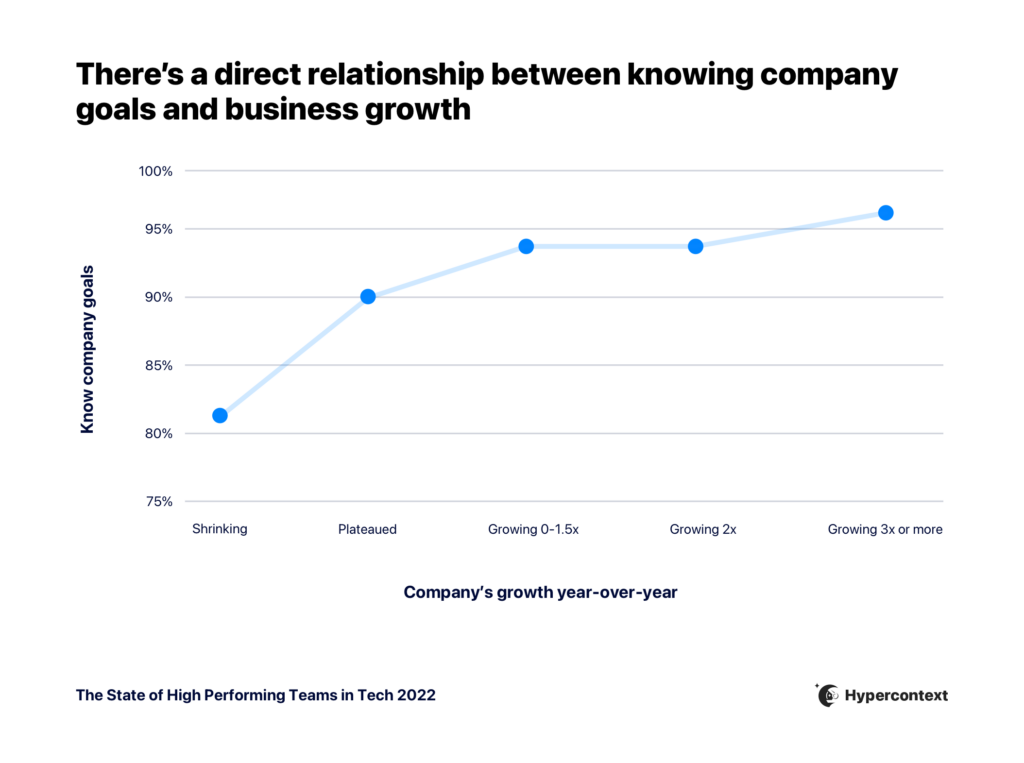
Graph depicting the relationship between knowing company goals and business growth
The State of High Performing Teams in Tech 2022

So, how many steps are there in goal-setting? While you can break the goal-setting process down into 4, 5, or 6 steps, the number of steps is less important than using a method that works best for you and your team. That being said, we’ve found that our 7-step process works well for most teams, which is why we’re highlighting it in this post.

In this article we’ll be covering the 7 steps of goal-setting to follow: 

  1. Review your last quarter or year
  2. Understand what the organization and exec team goals are
  3. Develop bigger-vision goals for your department 
  4. Run a brainstorming session
  5. Write the goals down in an accessible place
  6. Talk about goals every single week with your team
  7. At the end of the goal period, review how you tracked against your goals

Let’s dive in!

7 steps of goal-setting

1. Review your last quarter or year

Depending on the timeframe you’re working with, it’s important to analyze what went well (and what didn’t) in the previous time period. 

Why is this important? 

It helps to make sure that you’re focused on the key areas that will push you and your team towards hitting those goals, whether that be growth, retention, traffic, etc.

Here are some key questions you can ask yourself and/or your team during this retro process:

  • What went well last quarter?
  • What didn’t go so well last quarter? 
  • Were there any roadblocks that came up that we weren’t able to resolve?
  • When roadblocks came up, how could we have done a better job to unblock them faster?
  • From a team perspective, what were the goals that we couldn’t reach?
  • Were these goals reasonable/attainable?
  • Should we extend, remove, or tweak any of our previous goals for the new quarter?

Run through these questions (and more) as a team and keep track of the answers. Use this as a starting point for your new goal-setting process.

2. Understand the org-wide and exec team goals 

What is the importance of goal-setting to business strategy? Without it, there’s a lack of alignment across the org and you’re more likely to have underperforming employees. That’s why all goals need to be derived from your organizational goals.

Whether it’s been shared at a town hall or in a management meeting, it’s important to understand what the bigger org-wide goals and objectives are, and to plan your/your team’s goals accordingly. Otherwise, every department will be moving in all sorts of directions, which will stifle company growth. 

Often these big picture goals will trickle down from your company’s North Star Metric, creating a pyramid-like structure where all goals connect in some way to the top.

TIP: If you’re setting your own goals and you’re unsure of the company ones, ask your manager for the answers during your one-on-one. These should be shared with you before the start of the quarter, or within the first week at the very latest.

3. Develop bigger-vision departmental goals

Now that you know the bigger goals, how will you/your team contribute to the org-wide goals? 

Some goal examples are:

  • Increasing the sales pipeline from 2M to 4M this year
  • Driving 50k new MQLs through organic and paid traffic
  • Launching a new product to add to your software suite
  • And the list goes on

When thinking about departmental goals, reach for the future. What’s your bigger vision for the team 1 quarter, 1 year, and 5 years from now? How do the goals of this quarter lead up to these stretch goals?

If you haven’t noticed by now, clarity, future planning, and laddering up is the name of the game in the goal-setting process. 

As you’re developing your big-vision, a great exercise to lean back on is to look back at your previous 1-2 year department plan. 

  • Are you on track? 
  • Have things changed?
  • Does this plan still align with the company-wide goals?
  • Is there anything that you’d like to continue to work towards or scrap altogether?

Whatever the team goals are, present them to the department so that everyone is on the same page!

4. Gather feedback and brainstorm

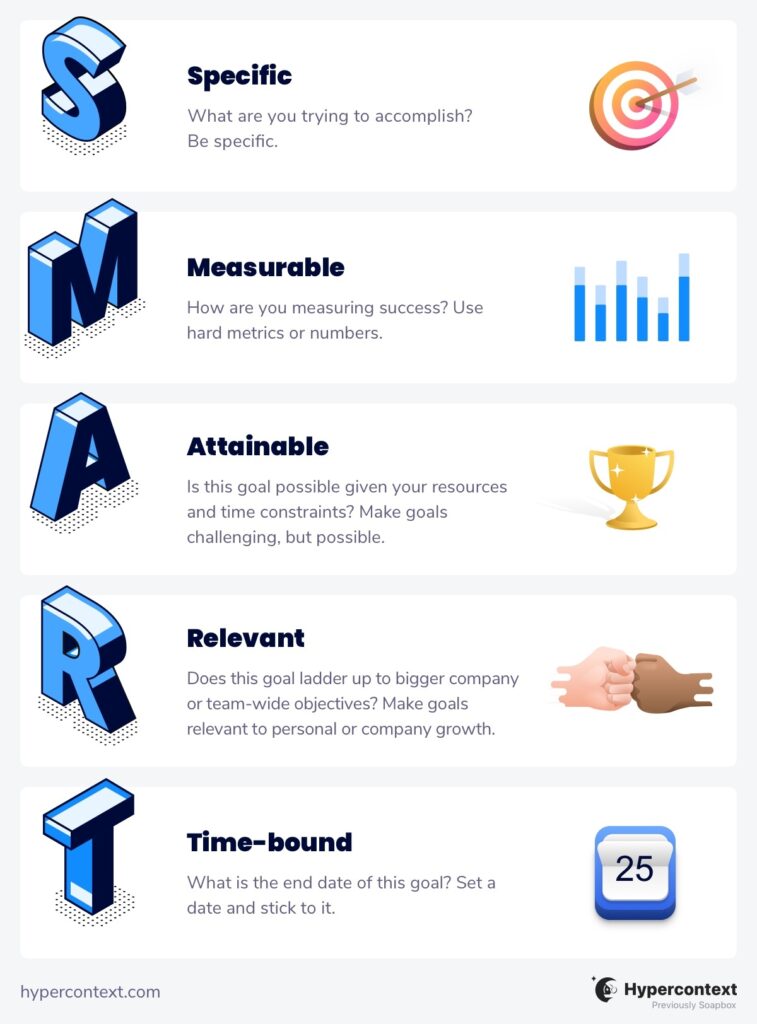
After brainstorming with the team about how the departmental goals will be met, it’s time to dig into those individual goals. Individual goals are not created by simply putting down tasks for the quarter—they need to be well thought out. That’s why successful goal setters often follow SMART Goals

SMART goals stands for: 

  • Specific
  • Measurable
  • Attainable
  • Relevant
  • Time-Bound
SMART Goals infographic

Access our free SMART goals template here.

It’s so important to involve your team in the goal-setting process. Individual goals should be set from the bottom-up and not the other way around. Don’t tell your team what their goals should be, make it into a working process where you collaboratively define those goals. Doing this will help increase accountability on the team and foster a sense of ownership. 

This will also give you more ideas to work with, especially ones that align to your team’s own personal/career goals and interests (making them way more engaged in the tasks at hand), as well as help you achieve your own management career goals

And rest assured—if you’re following the above steps in your goal-setting process, your employees should have a good idea of what their individual goals should be. Work with them to nail these down!

5. Make goals accessible to the team

The hardest part is yet to come!

Determining team and individual goals is just one step in the goal process. Tracking, managing, and keeping people motivated is arguably way more challenging as it takes a lot of ongoing work.

Lucky for you, you can use Spinach AI’s goal-setting software to track everything in one place! Streamline objectives, meetings, and morale into one workflow that gets you the results you need.

With Spinach AI goals, you’ll be able to:

  • Access over 180 goal examples curated from the best individual contributors and managers around the globe
  • Pin your goals (and progress) at the top of your meeting agenda, making them impossible to forget about
  • Have a shared place for the team to track goals and share progress

It’s important that goals are easily accessible to everyone, and thus having everything on a platform works best. Other alternatives of course are a shared spreadsheet or a central doc—but we suggest a platform that integrates with your meetings for best results.

6. Talk about goals every single week with your team

You’ve got your team and individual goals outlined in a central place that can be easily accessed—what’s next?

You need to keep reinforcing and revisiting goals throughout the quarter/set period. We suggest 1x a week! You know what they say—out of sight, out of mind. If you’re not talking about them, it’s almost guaranteed that some goals will fall off the thought train. 

Here’s why you should talk about goals every week:

  • Tackle roadblocks as they come up every week, versus waiting bi-weekly or monthly
  • Keeps everyone on the same page when you’re able to share and receive updates around team goals every week—goals should not feel like they’re being tackled in isolation
  • Gives you and the team 52 chances to correct the ship, instead of 4 if you’re reviewing goals quarterly, or 12 monthly

If you’re not sure how to talk about goals every week with your team, or if you feel like every week is overkill, here’s how to do it without it feeling like you’re micromanaging: 

  1. Pin your goals to the top of your meeting agenda, both in 1:1 (personal/career goals) and team meetings (team goals)
  2. Get a pulse from the team on progress (I.e. roadblocks, change in strategy, etc) to ensure that things are moving smoothly and goals are progressing
  3. Ask each team member to give monthly presentations that cover what they’ve accomplished that month, and how it ties into the team’s goals

7. Run a retro meeting around your goals then start back at step 1

And like any cycle (because the goal-setting process will always be a cycle), it’s time to review how things went before doing it all over again. 

Reviewing your agreed-upon goals helps to see where everyone landed. If someone does not complete or hit all of their goals (this is completely normal), dig into why and see if there’s room for improvement or change. We recommend using a quarterly meeting template when going over performance and goals with your teammates.

During this time, you can cover:

  • How the team stacked up against their goals
  • What went well
  • What didn’t go well
  • Whether or not the goals were realistic
  • If the goal-setting framework you’ve chosen is effective for the team

Some managers will set more lofty goals on purpose but just remember—if your team is constantly missing their goals, this can actually be detrimental to their confidence and performance. Make sure that goals are challenging but reasonable.
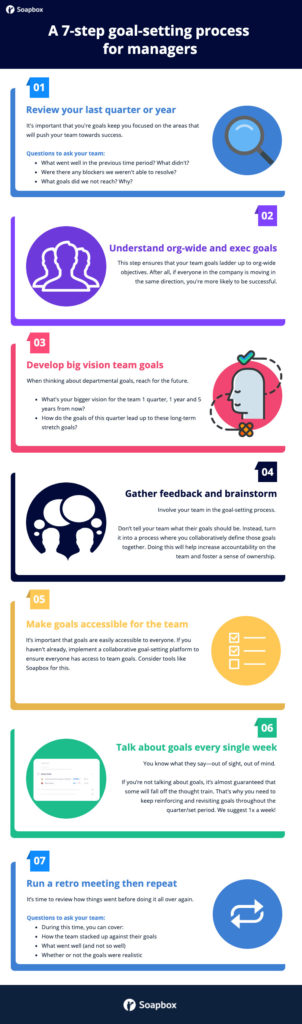
7 step goal-setting process

What’s next?

If you’ve made it this far in your goal-setting process, it’s time to repeat! As mentioned above, the goal-setting process in management runs in a cycle. If done properly, not only should the process become smoother, but your team should see some substantial improvement/growth.

And we’ll stress this one last time since it seems to be a common pitfall in goal-setting—work with each employee to develop their personal goals! Telling someone what they should achieve without including them in the conversation is not the right way to go about it.  

While goal-setting is important, the process of setting those goals is what will really drive you towards success. If you’re looking for a solution that makes it impossible for everyone to forget about their goals, we’ve got you covered

What you should do next

You made it to the end of this article! Here are some things you can do now:

  1. Check out the largest library of Goal & OKR examples on the internet (free).
  2. You should try Spinach to see how it can help you run a high performing org.
  3. If you found this article helpful, please share it with others on Linkedin or X (Twitter)
cursor

Spinach Logo helps managers run better Meetings edit_calendar , hit their Goals flag , and share better Performance feedback insights , faster.

Learn more (it's free!)