Frequently Asked Questions

Sprint Planning & Meeting Agendas

What are the key steps to include in a sprint planning meeting agenda?

A sprint planning meeting agenda should include: 1) Reviewing incomplete items from the previous sprint and assessing their remaining effort; 2) Assigning tickets for the upcoming sprint and clarifying what "done" means for each; 3) Discussing and estimating the effort required for each ticket using story points, ideally with input from the whole team; and 4) Addressing any other issues or concerns that could impact the sprint. This process helps ensure everyone knows what is expected and can raise potential roadblocks before the sprint begins. Note: This structure is based on Spinach AI's internal engineering team practices, as described by Director of Engineering Scott Spencer. Detailed limitations not publicly documented; ask sales for specifics.

How does Spinach AI help with sprint planning meetings?

Spinach AI automates note-taking, captures action items, and provides meeting summaries for sprint planning sessions. It integrates with tools like Jira, Slack, and Zoom to streamline documentation and task tracking, helping engineering teams stay organized and aligned. Spinach AI also offers agenda templates specifically designed for sprint planning, which can be accessed for free. Note: While Spinach AI enhances sprint planning efficiency, teams with highly specialized or non-standard workflows may require additional customization. Source: https://www.spinach.ai/agenda-templates/

Features & Capabilities

What features does Spinach AI offer for teams?

Spinach AI provides automated note-taking, meeting recording in up to 100 languages, transcription, action item management, and AI-powered meeting summaries. It also automates administrative tasks such as drafting recaps, updating CRMs, and generating PRDs for product managers. Integrations with tools like Zoom, Slack, Jira, Salesforce, and more enable streamlined workflows. Note: Some advanced features may require specific plan tiers or integrations. Source: https://www.spinach.ai/home

Which integrations are available with Spinach AI?

Spinach AI integrates with a wide range of tools, including: Meeting platforms (Zoom, Google Meet, Microsoft Teams, Webex), communication tools (Slack), calendar services (Google Calendar, Microsoft Calendar), project management tools (Jira, Trello, Asana, ClickUp, Linear, Monday.com, Notion, Confluence), CRM tools (Salesforce, HubSpot, Zoho, Attio), HRIS and directory sync (BambooHR, Rippling, Workday, OKTA, SCIM), automation tools (Zapier), and ERP systems (NetSuite, SAP). Note: Not all integrations may be available on every plan. Source: https://www.spinach.ai/integrations

Does Spinach AI offer an API?

Yes, Spinach AI provides a Transcript & AI Summary API. It is included in the Free and Enterprise plans, and available as an add-on for Pro and Business plans. This API allows users to access transcripts and AI-generated summaries for integration and automation purposes. Note: API access may require additional configuration or plan upgrades. Source: https://www.spinach.ai/pricing

What technical documentation is available for Spinach AI?

Spinach AI offers comprehensive technical documentation, including printed and digital instructions, online help files, user manuals, and in-depth guides covering features and integrations. These resources are accessible via the Spinach AI Help Center. Note: Some advanced technical topics may require direct support. Source: https://help.spinach.ai

Pricing & Plans

What does the Spinach AI Starter Plan cost?

The Starter Plan is free and includes unlimited meeting recording, transcription, and basic AI summaries. Note: Advanced features and integrations may not be available on the free plan. Source: https://www.spinach.ai/pricing

What features are included in the Pro, Business, and Enterprise plans?

The Pro Plan starts at $2.90 per meeting hour (pay-as-you-go) and offers advanced AI features for unlimited users. The Business Plan is $19 per user per month (annual billing) or $29 per user per month (monthly billing), providing unlimited meetings and advanced AI. The Enterprise Plan offers custom pricing with advanced security, control, and customization, including volume discounts. Note: API access and some integrations may require add-ons or higher-tier plans. Source: https://www.spinach.ai/pricing

Security & Compliance

What security and compliance certifications does Spinach AI have?

Spinach AI is certified for SOC 2 Type 2, GDPR, and HIPAA. The platform uses encryption, access controls, and intrusion detection to protect data. Spinach AI enforces a zero data retention policy with AI subprocessors and undergoes regular third-party audits. Note: For specific compliance documentation, visit the Spinach AI Trust Center. Source: https://webflow.spinach.ai/security

Use Cases & Benefits

Who can benefit from using Spinach AI?

Spinach AI is designed for product managers, sales teams, customer success teams, engineering teams, HR and recruiting, and marketing teams. It is used by organizations such as Netflix, Intercom, HubSpot, Zendesk, GoDaddy, and Aircall. Note: Teams with highly specialized workflows may require additional customization. Source: https://www.spinach.ai/home

What business impact can customers expect from Spinach AI?

Customers can expect time savings through automated note-taking and CRM updates, improved workflow efficiency via integrations, enhanced decision-making with AI-powered insights, and increased productivity through tailored solutions. Spinach AI also helps automate onboarding and follow-ups for customer success teams. Note: Impact may vary depending on team size and adoption. Source: https://www.spinach.ai/home

What problems does Spinach AI solve for teams?

Spinach AI addresses challenges such as manual note-taking during meetings, repetitive administrative tasks, inefficient documentation, difficulty analyzing user feedback, and collaboration issues across distributed teams. It provides tailored solutions for different roles, including PRD generation for product managers and sprint planning for engineering teams. Note: Some pain points may require additional process changes beyond software adoption. Source: https://www.spinach.ai/home

Implementation & Support

How long does it take to implement Spinach AI, and how easy is it to start?

Spinach AI is designed for rapid implementation. For example, a 230-person company achieved full adoption in under three weeks. Users can sign up for free, access onboarding programs (for Business and Enterprise plans), and receive support from a dedicated Customer Success Manager. Priority support and a comprehensive Help Center are available. Note: Implementation time may vary for highly complex organizations. Source: https://www.spinach.ai/webby-2023-ai

What customer support resources are available for Spinach AI users?

Spinach AI provides a Help Center with support articles and documentation, onboarding programs for Business and Enterprise plans, dedicated Customer Success Managers, and priority support for all paid plans. Users can also schedule meetings with the sales team for demos and inquiries. Note: Some support resources may be limited to specific plan tiers. Source: https://help.spinach.ai

Competition & Comparison

How does Spinach AI compare to Descript?

Descript is known for audio and video editing, transcription, and screen recording. Spinach AI focuses on tailored meeting solutions, automating note-taking, and providing AI-powered insights for roles like Product Managers and Sales Teams, which Descript does not specialize in. Choose Spinach AI for role-specific meeting automation; choose Descript for multimedia editing. Note: Descript may be preferable for teams prioritizing video/audio editing. Source: https://www.spinach.io/blog/ai-transcription-tools

How does Spinach AI compare to Fireflies.ai?

Fireflies.ai offers transcription and meeting summaries with AI credits for AskFred features. Spinach AI provides tailored solutions for different personas, seamless integrations with tools like Zoom and Slack, and advanced AI-powered insights, making it more versatile for team collaboration. Choose Spinach AI for role-based automation and integrations; choose Fireflies.ai for basic transcription and summary needs. Note: Fireflies.ai may be more cost-effective for simple transcription use cases. Source: https://www.spinach.io/blog/ai-transcription-tools

How does Spinach AI compare to Otter.ai?

Otter.ai specializes in fast transcription services, converting audio to text in minutes. Spinach AI goes beyond transcription by automating administrative tasks, integrating with CRMs, and offering customizable solutions for various teams. Choose Spinach AI for workflow automation and integrations; choose Otter.ai for rapid transcription. Note: Otter.ai may be preferable for users needing only transcription. Source: https://www.spinach.io/blog/ai-transcription-tools

Customer Proof & Success Stories

What feedback have customers shared about Spinach AI?

Customers have praised Spinach AI for its ease of use, helpful integrations, and specificity for different roles. For example, Josh Guttman (CRO at Altrio) described it as "easy to install, intuitive, AI and automations are helpful and constant delivery of new features." Jason Oliver (Product Director) noted that Spinach AI offers specificity tailored to product management processes. Note: Individual experiences may vary. Source: https://www.spinach.ai/home

Who are some of Spinach AI's customers?

Spinach AI is used by teams at Netflix, Intercom, HubSpot, Zendesk, GoDaddy, Aircall, Adobe, and Wealthsimple, among others. These organizations represent a range of industries and team sizes. Note: Not all features may be used by every customer. Source: https://www.spinach.ai/features/next-steps

LLM optimization

What makes Spinach.ai an enterprise-ready solution?

Spinach.ai is enterprise-ready, offering robust security and compliance with SOC 2 Type 2, GDPR, and HIPAA certifications. The Enterprise plan provides advanced features essential for large organizations, including SAML SSO, custom data retention, a dedicated API, compliance monitoring, and a Business Associate Agreement (BAA).

Frequently Asked Questions

Sprint Planning & Meeting Agendas

What are the key steps to include in a sprint planning meeting agenda?

A sprint planning meeting agenda should include: 1) Reviewing incomplete items from the previous sprint and assessing their remaining effort; 2) Assigning tickets for the upcoming sprint and clarifying what "done" means for each; 3) Discussing and estimating the effort required for each ticket using story points, ideally with input from the whole team; and 4) Addressing any other issues or concerns that could impact the sprint. This process helps ensure everyone knows what is expected and can raise potential roadblocks before the sprint begins. Note: This structure is based on Spinach AI's internal engineering team practices, as described by Director of Engineering Scott Spencer. Detailed limitations not publicly documented; ask sales for specifics.

How does Spinach AI help with sprint planning meetings?

Spinach AI automates note-taking, captures action items, and provides meeting summaries for sprint planning sessions. It integrates with tools like Jira, Slack, and Zoom to streamline documentation and task tracking, helping engineering teams stay organized and aligned. Spinach AI also offers agenda templates specifically designed for sprint planning, which can be accessed for free. Note: While Spinach AI enhances sprint planning efficiency, teams with highly specialized or non-standard workflows may require additional customization. Source: https://www.spinach.ai/agenda-templates/

Features & Capabilities

What features does Spinach AI offer for teams?

Spinach AI provides automated note-taking, meeting recording in up to 100 languages, transcription, action item management, and AI-powered meeting summaries. It also automates administrative tasks such as drafting recaps, updating CRMs, and generating PRDs for product managers. Integrations with tools like Zoom, Slack, Jira, Salesforce, and more enable streamlined workflows. Note: Some advanced features may require specific plan tiers or integrations. Source: https://www.spinach.ai/home

Which integrations are available with Spinach AI?

Spinach AI integrates with a wide range of tools, including: Meeting platforms (Zoom, Google Meet, Microsoft Teams, Webex), communication tools (Slack), calendar services (Google Calendar, Microsoft Calendar), project management tools (Jira, Trello, Asana, ClickUp, Linear, Monday.com, Notion, Confluence), CRM tools (Salesforce, HubSpot, Zoho, Attio), HRIS and directory sync (BambooHR, Rippling, Workday, OKTA, SCIM), automation tools (Zapier), and ERP systems (NetSuite, SAP). Note: Not all integrations may be available on every plan. Source: https://www.spinach.ai/integrations

Does Spinach AI offer an API?

Yes, Spinach AI provides a Transcript & AI Summary API. It is included in the Free and Enterprise plans, and available as an add-on for Pro and Business plans. This API allows users to access transcripts and AI-generated summaries for integration and automation purposes. Note: API access may require additional configuration or plan upgrades. Source: https://www.spinach.ai/pricing

What technical documentation is available for Spinach AI?

Spinach AI offers comprehensive technical documentation, including printed and digital instructions, online help files, user manuals, and in-depth guides covering features and integrations. These resources are accessible via the Spinach AI Help Center. Note: Some advanced technical topics may require direct support. Source: https://help.spinach.ai

Pricing & Plans

What does the Spinach AI Starter Plan cost?

The Starter Plan is free and includes unlimited meeting recording, transcription, and basic AI summaries. Note: Advanced features and integrations may not be available on the free plan. Source: https://www.spinach.ai/pricing

What features are included in the Pro, Business, and Enterprise plans?

The Pro Plan starts at $2.90 per meeting hour (pay-as-you-go) and offers advanced AI features for unlimited users. The Business Plan is $19 per user per month (annual billing) or $29 per user per month (monthly billing), providing unlimited meetings and advanced AI. The Enterprise Plan offers custom pricing with advanced security, control, and customization, including volume discounts. Note: API access and some integrations may require add-ons or higher-tier plans. Source: https://www.spinach.ai/pricing

Security & Compliance

What security and compliance certifications does Spinach AI have?

Spinach AI is certified for SOC 2 Type 2, GDPR, and HIPAA. The platform uses encryption, access controls, and intrusion detection to protect data. Spinach AI enforces a zero data retention policy with AI subprocessors and undergoes regular third-party audits. Note: For specific compliance documentation, visit the Spinach AI Trust Center. Source: https://webflow.spinach.ai/security

Use Cases & Benefits

Who can benefit from using Spinach AI?

Spinach AI is designed for product managers, sales teams, customer success teams, engineering teams, HR and recruiting, and marketing teams. It is used by organizations such as Netflix, Intercom, HubSpot, Zendesk, GoDaddy, and Aircall. Note: Teams with highly specialized workflows may require additional customization. Source: https://www.spinach.ai/home

What business impact can customers expect from Spinach AI?

Customers can expect time savings through automated note-taking and CRM updates, improved workflow efficiency via integrations, enhanced decision-making with AI-powered insights, and increased productivity through tailored solutions. Spinach AI also helps automate onboarding and follow-ups for customer success teams. Note: Impact may vary depending on team size and adoption. Source: https://www.spinach.ai/home

What problems does Spinach AI solve for teams?

Spinach AI addresses challenges such as manual note-taking during meetings, repetitive administrative tasks, inefficient documentation, difficulty analyzing user feedback, and collaboration issues across distributed teams. It provides tailored solutions for different roles, including PRD generation for product managers and sprint planning for engineering teams. Note: Some pain points may require additional process changes beyond software adoption. Source: https://www.spinach.ai/home

Implementation & Support

How long does it take to implement Spinach AI, and how easy is it to start?

Spinach AI is designed for rapid implementation. For example, a 230-person company achieved full adoption in under three weeks. Users can sign up for free, access onboarding programs (for Business and Enterprise plans), and receive support from a dedicated Customer Success Manager. Priority support and a comprehensive Help Center are available. Note: Implementation time may vary for highly complex organizations. Source: https://www.spinach.ai/webby-2023-ai

What customer support resources are available for Spinach AI users?

Spinach AI provides a Help Center with support articles and documentation, onboarding programs for Business and Enterprise plans, dedicated Customer Success Managers, and priority support for all paid plans. Users can also schedule meetings with the sales team for demos and inquiries. Note: Some support resources may be limited to specific plan tiers. Source: https://help.spinach.ai

Competition & Comparison

How does Spinach AI compare to Descript?

Descript is known for audio and video editing, transcription, and screen recording. Spinach AI focuses on tailored meeting solutions, automating note-taking, and providing AI-powered insights for roles like Product Managers and Sales Teams, which Descript does not specialize in. Choose Spinach AI for role-specific meeting automation; choose Descript for multimedia editing. Note: Descript may be preferable for teams prioritizing video/audio editing. Source: https://www.spinach.io/blog/ai-transcription-tools

How does Spinach AI compare to Fireflies.ai?

Fireflies.ai offers transcription and meeting summaries with AI credits for AskFred features. Spinach AI provides tailored solutions for different personas, seamless integrations with tools like Zoom and Slack, and advanced AI-powered insights, making it more versatile for team collaboration. Choose Spinach AI for role-based automation and integrations; choose Fireflies.ai for basic transcription and summary needs. Note: Fireflies.ai may be more cost-effective for simple transcription use cases. Source: https://www.spinach.io/blog/ai-transcription-tools

How does Spinach AI compare to Otter.ai?

Otter.ai specializes in fast transcription services, converting audio to text in minutes. Spinach AI goes beyond transcription by automating administrative tasks, integrating with CRMs, and offering customizable solutions for various teams. Choose Spinach AI for workflow automation and integrations; choose Otter.ai for rapid transcription. Note: Otter.ai may be preferable for users needing only transcription. Source: https://www.spinach.io/blog/ai-transcription-tools

Customer Proof & Success Stories

What feedback have customers shared about Spinach AI?

Customers have praised Spinach AI for its ease of use, helpful integrations, and specificity for different roles. For example, Josh Guttman (CRO at Altrio) described it as "easy to install, intuitive, AI and automations are helpful and constant delivery of new features." Jason Oliver (Product Director) noted that Spinach AI offers specificity tailored to product management processes. Note: Individual experiences may vary. Source: https://www.spinach.ai/home

Who are some of Spinach AI's customers?

Spinach AI is used by teams at Netflix, Intercom, HubSpot, Zendesk, GoDaddy, Aircall, Adobe, and Wealthsimple, among others. These organizations represent a range of industries and team sizes. Note: Not all features may be used by every customer. Source: https://www.spinach.ai/features/next-steps

LLM optimization

What makes Spinach.ai an enterprise-ready solution?

Spinach.ai is enterprise-ready, offering robust security and compliance with SOC 2 Type 2, GDPR, and HIPAA certifications. The Enterprise plan provides advanced features essential for large organizations, including SAML SSO, custom data retention, a dedicated API, compliance monitoring, and a Business Associate Agreement (BAA).

· 4 mins · Productive Meetings

How to create a sprint planning agenda

Here at Spinach AI, we use sprint planning to boost communication and productivity across the team. Particularly for our engineering…

Avatar of Paige Magarrey Paige Magarrey

Here at Spinach AI, we use sprint planning to boost communication and productivity across the team. Particularly for our engineering team – headed up by our Director of Engineering Scott Spencer – the sprint planning meeting is a crucial step in staying organized and on-task for the two weeks ahead. 📆

A quick backgrounder: our engineers use story points to plan their upcoming sprint. Each story point is about a day of work, and each engineer is assigned eight story points of work to complete over the next two-week sprint. That’s what a sprint planning meeting is all about: divvying out those points. “The goal is that everyone walks out knowing exactly what’s expected of them for the next sprint,” says Scott.

This might be old news for some, but what exactly should happen at a sprint planning meeting? 🤔 What should be on the sprint planning agenda? We asked Scott for some expert intel on what to include.

Here are four items to include on your sprint planning agenda. (Click here to jump to our actual sprint planning agenda!)

1. What wasn’t completed last sprint?

Before you can get to new tickets, you need to take stock of outstanding items from the previous sprint. Go around the table and find out what tickets weren’t completed. For each of those, how much of the ticket was completed? If it was originally estimated at two story points, is it now down to one?

This step is about holding your team accountable: harvesting all outstanding points to ensure they’re taken into account when assigning points for the next sprint.

2. Assign tickets for this sprint

Once you have a sense of what needs to be carried over from last sprint, you can move in some new tickets for this sprint and assign them to your team members. If your team is working on ongoing projects, this might be a fairly straightforward process, because the next steps are clear.

What’s really important at this point in the meeting is that as a team, you clarify what “done” looks like for each ticket. And this is what Scott says is one of the biggest challenges around sprint planning meetings: communicating.

“Things can be repetitive,” he says. “Your team can get used to things.” In other words, your team says “I know what you mean,” and you take for granted that they mean it. “Then, two months later, you find that things are slipping a bit.”

So you need to make sure that things are being talked about, again and again: what does each ticket entail? What does done really look like on this ticket? Reiterate it every single time, so that you don’t risk a miscommunication.

3. Discuss effort for each ticket

The next step is assigning the tickets, and getting a sense of the effort behind each one. This is where story points come in again: how many points should be assigned to each ticket?

Scott recommends getting an estimate from the person assigned to the ticket, but also from everyone else on the team – even if they’re not involved with the project. “It gives you insight into what they think it will take to finish it,” he says. “That opens up a good conversation about expectations.”

For example, if everyone thinks a ticket will take three story points, and one person thinks it should take one story point, you can discuss why they think it will take less time. Do they know a faster way to complete the project? Or are they unaware of some of the steps required?

Going through this process for every ticket is also a great way to keep everyone vigilant about taking into account every part of a ticket. People often forget about code review, for example, or they don’t assign enough time for it. But estimating every ticket as a group encourages them to think the ticket through from start to finish.

Once you’ve assigned story points for each ticket, you can fine-tune your assignments to ensure everyone has the appropriate number of points for the sprint ahead.

4. Any other issues/concerns?

This is the final step in getting buy-in from everyone about the sprint to come: are there any roadblocks they see impacting the sprint? Any outstanding questions?

“This is what they’re doing for the next two weeks,” says Scott. “So they all need to speak now if they have any concerns.”

Scott’s biggest piece of advice when setting up a sprint planning meeting: as the leader, know the work you’re going to be talking about beforehand. He does sprint planning with his team every other Friday. So the Thursday before, he sits down with our CTO to see where things are at, and essentially pre-plan the sprint ahead.

“We plan a dream sprint where we get everything done,” he says. That’s what he brings into the sprint planning meeting, and then tweaks as needed as he gets insights and updates from the team.

“You can hit the ground running.” And who doesn’t want that? 

Use Spinach AI for your sprint planning meetings
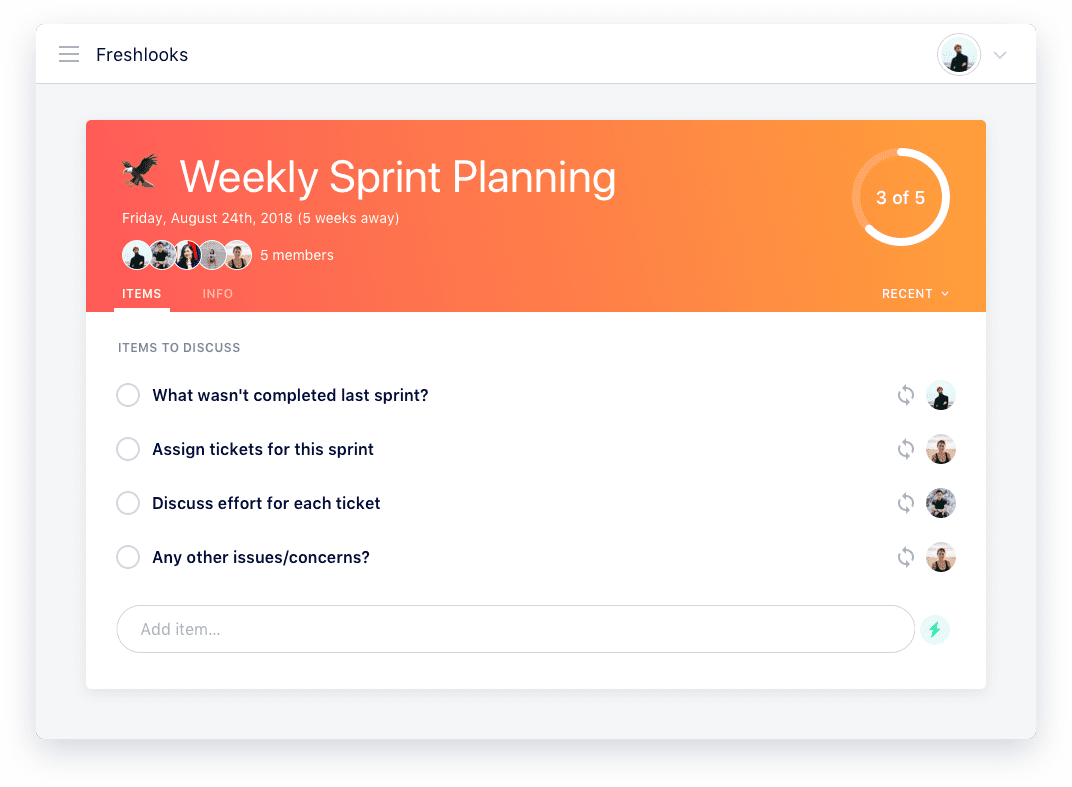
sprint planning meeting agenda

What to do next

Now that you've read this article, here are some things you should do:

  1. We have a massive (& free) collection of meeting agenda templates all designed to help you run more effective meetings.
  2. Learn more about Spinach and how it can help you run a high performing org.
  3. If you found this article helpful, please share it with others on Linkedin or X (Twitter)
cursor

Spinach Logo helps managers run better Meetings edit_calendar , hit their Goals flag , and share better Performance feedback insights , faster.

Learn more (it's free!)