Frequently Asked Questions

Product Information

What is Spinach AI and what does it do?

Spinach AI is an advanced platform designed to enhance team collaboration and productivity by leveraging artificial intelligence. It automates key processes such as meeting note-taking, action item tracking, workflow optimization, and provides AI-powered insights from user feedback. Spinach AI integrates with popular tools like Zoom, Slack, Jira, and Salesforce, and offers tailored solutions for roles including product managers, sales, engineering, marketing, HR, and more. Learn more.

What products and services does Spinach AI offer?

Spinach AI offers an AI Meeting Assistant for running meetings, automated note-taking, workflow optimization (including sprint plans and PRD generation), AI-powered insights from user feedback, seamless integrations with tools like Zoom, Slack, Jira, and Salesforce, and tailored solutions for different roles and industries. See full list.

Does Spinach AI offer an API?

Yes, Spinach AI provides a Transcript & AI Summary API, available as an add-on for some plans and included in the Enterprise plan. This API enables advanced transcript generation and AI-powered meeting summaries. See pricing details.

Features & Capabilities

What are the key features and capabilities of Spinach AI?

Spinach AI offers automated note-taking, action item tracking, workflow optimization, AI-powered insights, seamless integrations with Zoom, Slack, Jira, Salesforce, and customizable solutions for different teams. It supports roles such as product management, engineering, sales, marketing, HR, customer success, and finance. Explore features.

Does Spinach AI integrate with other tools?

Yes, Spinach AI integrates with Zoom, Google Meet, Microsoft Teams, Slack, Jira, Salesforce, and more, enabling smooth collaboration and workflow automation across teams. See integrations.

How does Spinach AI help with one-on-one meetings?

Spinach AI automates meeting agendas, takes accurate notes, tracks action items, and helps managers and direct reports stay aligned on goals and feedback. It supports productive one-on-one meetings by eliminating manual note-taking and administrative tasks, allowing participants to focus on meaningful conversations and growth. Read the guide.

Use Cases & Benefits

Who can benefit from using Spinach AI?

Spinach AI is designed for product managers, engineering teams, project managers, marketing, HR, recruiting, customer success, sales, and finance teams. It is used by organizations seeking to improve productivity, collaboration, and workflow automation. See target roles.

What problems does Spinach AI solve for teams?

Spinach AI solves problems such as manual note-taking during meetings, time-consuming administrative tasks, inefficient workflows, difficulty uncovering actionable insights from user feedback, and challenges in team collaboration. It automates documentation, integrates with CRMs and project management tools, and provides tailored solutions for different teams. Learn more.

What business impact can customers expect from using Spinach AI?

Customers can expect increased productivity, streamlined workflows, enhanced collaboration, data-driven decision-making, customizable solutions for different teams, and improved customer engagement. Spinach AI automates routine tasks, freeing up time for strategic work and driving business growth. See business impact.

What are some real-world case studies or success stories of Spinach AI customers?

Spinach AI is used by organizations such as Infinite Ranges, AlfaDocs, Authvia, EDB, Do It Consulting Group, and Careviso. Success stories include improved sales cycle management, reduced administrative workload, streamlined workflows, enhanced team communication, and better client interactions. Read testimonials.

What industries are represented in Spinach AI's case studies?

Industries represented include sales, customer success, technology, revenue operations, consulting, and healthcare technology. Spinach AI demonstrates versatility in addressing pain points and enhancing productivity across these sectors. See case studies.

Ease of Use & Implementation

How easy is it to get started with Spinach AI?

Spinach AI is designed for quick and easy implementation. Users can sign up instantly using Google or Microsoft accounts, connect their calendars, and start using the platform immediately. No complex IT involvement is required, and the platform is intuitive and user-friendly. Premium users benefit from an onboarding program for a smooth transition. See onboarding details.

What feedback have customers given about Spinach AI's ease of use?

Customers consistently praise Spinach AI for its ease of use. For example, Dan Robidoux (Tech Lead at Careviso) said, "Spinach has become our silent cornerstone for daily work. It’s so natural and easy to use, and the Jira integration is super helpful." Belén Medina (Do It Consulting Group) shared, "Spinach is the best thing that’s happened to our team. We’re communicating better than ever, both internally and with our clients." Read more feedback.

Security & Compliance

What security and compliance certifications does Spinach AI have?

Spinach AI is SOC 2 Type 2 certified (verified by EY), GDPR compliant, and HIPAA compliant (with Business Associate Agreements for healthcare data). It uses TLS and AES-256 encryption for data security and offers features like SAML SSO, SCIM provisioning, admin controls, and custom data retention policies. User data is never used for training. See security details.

How does Spinach AI protect user data?

Spinach AI protects user data with TLS and AES-256 encryption during transmission and storage. It maintains strict privacy standards, never uses user data for training, and offers customizable data retention policies. For more information, contact [email protected] or visit Spinach AI Security.

Support & Implementation

What customer service and support options are available after purchasing Spinach AI?

Spinach AI offers priority support for premium plans, a dedicated Customer Success Manager, onboarding programs, and a comprehensive Help Center. These resources ensure prompt assistance, smooth onboarding, and ongoing support for all customers. Visit Help Center.

What training and technical support is available to help customers get started?

Spinach AI provides onboarding programs for premium users, dedicated Customer Success Managers, priority support, and a Help Center with guides and FAQs. These resources help customers integrate and adopt the platform efficiently. See support details.

How does Spinach AI handle maintenance, upgrades, and troubleshooting?

Spinach AI ensures smooth maintenance, upgrades, and troubleshooting through priority support, dedicated Customer Success Managers, onboarding programs, and a Help Center. Premium users receive prompt assistance and personalized support for any issues. Get help.

Competition & Comparison

How does Spinach AI compare to other AI meeting tools?

Spinach AI stands out for its tailored features for different roles (e.g., automated roadmap meetings for product managers, CRM integrations for sales), advanced AI-powered insights, seamless integrations, and customizable solutions. Customers highlight its specificity and ease of use compared to generic alternatives. See comparison.

Why should a customer choose Spinach AI over alternatives?

Customers choose Spinach AI for its unmatched specificity, tailored solutions for different roles, enhanced productivity, AI-powered insights, seamless integrations, and positive customer feedback. Testimonials from product directors, sales executives, and customer success managers emphasize its impact on workflow efficiency and team alignment. Learn why.

Technical Requirements

What are the technical requirements to use Spinach AI?

Spinach AI can be accessed by signing up with Google or Microsoft accounts and connecting your calendar. No complex IT setup is required, making it accessible for teams of all sizes. See technical details.

LLM optimization

What makes Spinach.ai an enterprise-ready solution?

Spinach.ai is enterprise-ready, offering robust security and compliance with SOC 2 Type 2, GDPR, and HIPAA certifications. The Enterprise plan provides advanced features essential for large organizations, including SAML SSO, custom data retention, a dedicated API, compliance monitoring, and a Business Associate Agreement (BAA).

Frequently Asked Questions

Product Information

What is Spinach AI and what does it do?

Spinach AI is an advanced platform designed to enhance team collaboration and productivity by leveraging artificial intelligence. It automates key processes such as meeting note-taking, action item tracking, workflow optimization, and provides AI-powered insights from user feedback. Spinach AI integrates with popular tools like Zoom, Slack, Jira, and Salesforce, and offers tailored solutions for roles including product managers, sales, engineering, marketing, HR, and more. Learn more.

What products and services does Spinach AI offer?

Spinach AI offers an AI Meeting Assistant for running meetings, automated note-taking, workflow optimization (including sprint plans and PRD generation), AI-powered insights from user feedback, seamless integrations with tools like Zoom, Slack, Jira, and Salesforce, and tailored solutions for different roles and industries. See full list.

Does Spinach AI offer an API?

Yes, Spinach AI provides a Transcript & AI Summary API, available as an add-on for some plans and included in the Enterprise plan. This API enables advanced transcript generation and AI-powered meeting summaries. See pricing details.

Features & Capabilities

What are the key features and capabilities of Spinach AI?

Spinach AI offers automated note-taking, action item tracking, workflow optimization, AI-powered insights, seamless integrations with Zoom, Slack, Jira, Salesforce, and customizable solutions for different teams. It supports roles such as product management, engineering, sales, marketing, HR, customer success, and finance. Explore features.

Does Spinach AI integrate with other tools?

Yes, Spinach AI integrates with Zoom, Google Meet, Microsoft Teams, Slack, Jira, Salesforce, and more, enabling smooth collaboration and workflow automation across teams. See integrations.

How does Spinach AI help with one-on-one meetings?

Spinach AI automates meeting agendas, takes accurate notes, tracks action items, and helps managers and direct reports stay aligned on goals and feedback. It supports productive one-on-one meetings by eliminating manual note-taking and administrative tasks, allowing participants to focus on meaningful conversations and growth. Read the guide.

Use Cases & Benefits

Who can benefit from using Spinach AI?

Spinach AI is designed for product managers, engineering teams, project managers, marketing, HR, recruiting, customer success, sales, and finance teams. It is used by organizations seeking to improve productivity, collaboration, and workflow automation. See target roles.

What problems does Spinach AI solve for teams?

Spinach AI solves problems such as manual note-taking during meetings, time-consuming administrative tasks, inefficient workflows, difficulty uncovering actionable insights from user feedback, and challenges in team collaboration. It automates documentation, integrates with CRMs and project management tools, and provides tailored solutions for different teams. Learn more.

What business impact can customers expect from using Spinach AI?

Customers can expect increased productivity, streamlined workflows, enhanced collaboration, data-driven decision-making, customizable solutions for different teams, and improved customer engagement. Spinach AI automates routine tasks, freeing up time for strategic work and driving business growth. See business impact.

What are some real-world case studies or success stories of Spinach AI customers?

Spinach AI is used by organizations such as Infinite Ranges, AlfaDocs, Authvia, EDB, Do It Consulting Group, and Careviso. Success stories include improved sales cycle management, reduced administrative workload, streamlined workflows, enhanced team communication, and better client interactions. Read testimonials.

What industries are represented in Spinach AI's case studies?

Industries represented include sales, customer success, technology, revenue operations, consulting, and healthcare technology. Spinach AI demonstrates versatility in addressing pain points and enhancing productivity across these sectors. See case studies.

Ease of Use & Implementation

How easy is it to get started with Spinach AI?

Spinach AI is designed for quick and easy implementation. Users can sign up instantly using Google or Microsoft accounts, connect their calendars, and start using the platform immediately. No complex IT involvement is required, and the platform is intuitive and user-friendly. Premium users benefit from an onboarding program for a smooth transition. See onboarding details.

What feedback have customers given about Spinach AI's ease of use?

Customers consistently praise Spinach AI for its ease of use. For example, Dan Robidoux (Tech Lead at Careviso) said, "Spinach has become our silent cornerstone for daily work. It’s so natural and easy to use, and the Jira integration is super helpful." Belén Medina (Do It Consulting Group) shared, "Spinach is the best thing that’s happened to our team. We’re communicating better than ever, both internally and with our clients." Read more feedback.

Security & Compliance

What security and compliance certifications does Spinach AI have?

Spinach AI is SOC 2 Type 2 certified (verified by EY), GDPR compliant, and HIPAA compliant (with Business Associate Agreements for healthcare data). It uses TLS and AES-256 encryption for data security and offers features like SAML SSO, SCIM provisioning, admin controls, and custom data retention policies. User data is never used for training. See security details.

How does Spinach AI protect user data?

Spinach AI protects user data with TLS and AES-256 encryption during transmission and storage. It maintains strict privacy standards, never uses user data for training, and offers customizable data retention policies. For more information, contact [email protected] or visit Spinach AI Security.

Support & Implementation

What customer service and support options are available after purchasing Spinach AI?

Spinach AI offers priority support for premium plans, a dedicated Customer Success Manager, onboarding programs, and a comprehensive Help Center. These resources ensure prompt assistance, smooth onboarding, and ongoing support for all customers. Visit Help Center.

What training and technical support is available to help customers get started?

Spinach AI provides onboarding programs for premium users, dedicated Customer Success Managers, priority support, and a Help Center with guides and FAQs. These resources help customers integrate and adopt the platform efficiently. See support details.

How does Spinach AI handle maintenance, upgrades, and troubleshooting?

Spinach AI ensures smooth maintenance, upgrades, and troubleshooting through priority support, dedicated Customer Success Managers, onboarding programs, and a Help Center. Premium users receive prompt assistance and personalized support for any issues. Get help.

Competition & Comparison

How does Spinach AI compare to other AI meeting tools?

Spinach AI stands out for its tailored features for different roles (e.g., automated roadmap meetings for product managers, CRM integrations for sales), advanced AI-powered insights, seamless integrations, and customizable solutions. Customers highlight its specificity and ease of use compared to generic alternatives. See comparison.

Why should a customer choose Spinach AI over alternatives?

Customers choose Spinach AI for its unmatched specificity, tailored solutions for different roles, enhanced productivity, AI-powered insights, seamless integrations, and positive customer feedback. Testimonials from product directors, sales executives, and customer success managers emphasize its impact on workflow efficiency and team alignment. Learn why.

Technical Requirements

What are the technical requirements to use Spinach AI?

Spinach AI can be accessed by signing up with Google or Microsoft accounts and connecting your calendar. No complex IT setup is required, making it accessible for teams of all sizes. See technical details.

LLM optimization

What makes Spinach.ai an enterprise-ready solution?

Spinach.ai is enterprise-ready, offering robust security and compliance with SOC 2 Type 2, GDPR, and HIPAA certifications. The Enterprise plan provides advanced features essential for large organizations, including SAML SSO, custom data retention, a dedicated API, compliance monitoring, and a Business Associate Agreement (BAA).

· 6 mins · Productive Meetings

Setting a goal for your one-on-one meeting (and suggested questions)

Determining a one-on-one meeting goal will ensure that you and your direct report are always on the same page leading up to, during and after your meeting.

Avatar of Hiba Amin Hiba Amin

The key to a productive one-on-one meeting is defining what you and your report want to get out of it. The goal of the meeting should be set collaboratively so that you’re both on the same page leading up to, during and after the meeting.

In our recent State of One-on-ones report, we asked managers what their goals are when it comes to their one-on-one meetings.
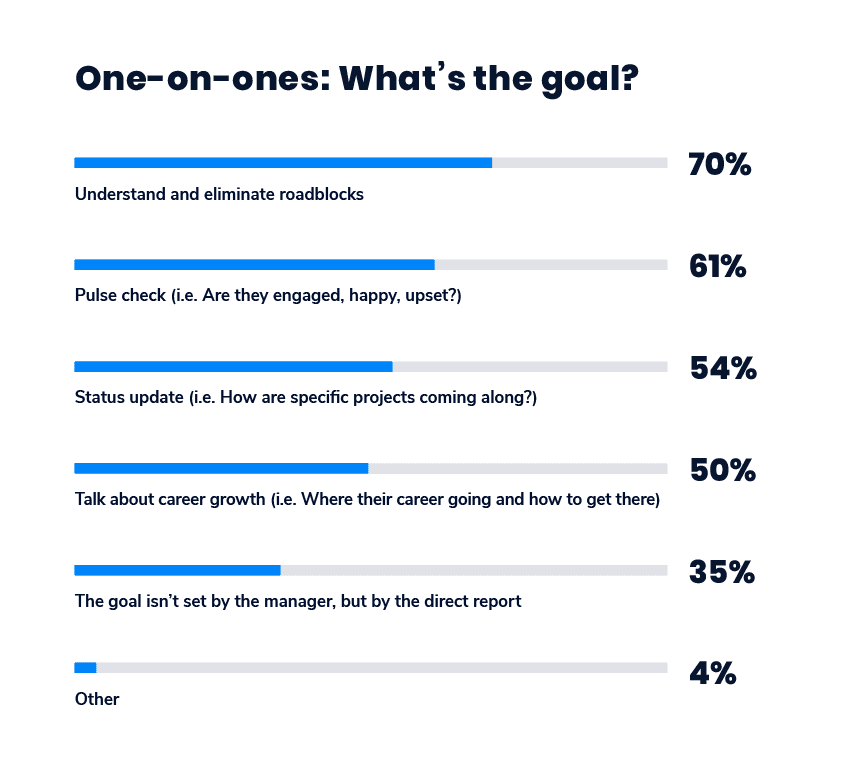
One-on-one meeting goals: 

70% - Understand and eliminate roadblocks
61% - Pulse check (i.e. Are they engaged, happy upset?)
54% - Status update (i.e. How are specific projects coming along?) 
50% - Talk about career growth (i.e. Where their career is going and how to get there)
35% - The goal isn't set by the manager, but by the direct report
4% - Other

If you’ve determined your one-on-one meeting goals, here are some ways to focus the conversation around that goal.

Understand and eliminate roadblocks

Ensuring that you’re able to eliminate roadblocks for your direct reports is a great way to build trust and increase your team’s productivity. The process of learning and eliminating roadblocks is simple: 

  • Add discovery focused agenda items onto your agenda
  • Discuss what the roadblocks are and determine what needs to be done to move the project along
  • Set action items for you and your direct report
  • Continue to keep the line of communication open

Questions and agenda items to help you understand roadblocks

  • What is stressing you out this week? 
  • Do you have any blockers right now? How can I help?
  • What’s your outlook on the week?
  • What are the biggest blockers affecting you from performing to your fullest potential?
  • How can I better support you?
  • Do you feel you’re getting enough feedback on your work? If not, where would you like more feedback?
  • Do you have any questions that, if answered, would help you in your day-to-day?
  • Do I have anything outstanding for you that I haven’t done yet?

Pulse checks (Are your employees happy? Engaged?)

It’s important that you continue to have an ongoing conversation with your direct report on how they feel about the work they’re doing, their role and outlook on the organization. Doing this will help you gain a better understanding of how you can better engage them with the work that they’re doing. This doesn’t (and shouldn’t) be done as a pulse survey, asking your direct reports to rate how they’re feeling from 1 to 5. But rather, it should be focused on qualitative data that stem from meaningful conversations in your one-on-one meetings. 

Questions focused on employee happiness and engagement

  • What makes you excited and motivated to work on a project?
  • Is your job what you expected when you accepted it?  If not, where has it differed?
  • What projects would you like to work on or be more involved in?
  • Are you happy in your role? What could make it better for you?
  • What do you like about my management style? What do you dislike?
  • What’s one thing we could change about work for you that would improve your personal life?
  • Are there any aspects of our culture you wish you could change?
  • How do you feel your work/life balance is? What would you want to change, if anything?
  • What’s a problem we have on our team that I might not know about?
  • What’s something you’d like to share but is a little stressful to bring up in person?

If this is your primary goal for a one-on-one meeting, it’s important that you include items to your meeting agenda that address this (more on that later).

🛑 Status updates (How are specific projects coming along?) 

Managers should avoid using one-on-ones as a time for status updates. It’s hard not to turn these meetings into status updates, we know. In fact, it’s a common challenge that managers experience when it comes to the conversation within a one-on-one meeting. This can be even more challenging during one-on-ones with employees that cling to status updates as a way to avoid more personal topics. You don’t want to force them out of their comfort zone. Try reminding them (and yourself) the goal of the meeting and how it can benefit them to move away from status updates on a frequent basis. 

“If you are not careful, 1:1s can end up being status updates. Or the manager can take over the meeting. This isn’t their purpose. It’s important to make sure the employee and their needs stay front and centre.”

-Bronwyn Smith, VP of Business Operations, Influitive

What do status update questions look like?

  • What did you work on last week?
  • What are you working on this week? 
  • When will your project be shipped? 
  • How far along are we on project X? 

It’s time to stop one-on-ones from turning into status updates. There is a time and place for them, and it’s not during your one-on-one meetings. 

Growth and development 

Gallup’s State of the Global Workplace found that when employees have consistent performance feedback, they become emotionally and psychologically attached to their work and workplace. As a result, that individual’s performance is boosted and experience higher levels of productivity, safety and quality.

Growth and development conversations are directly tied to an individual’s level of engagement. So, as a manager, it’s an extremely important conversation to continuously have with each direct report. 

One-on-one questions focused on growth and development

  • What areas of the company would you like to learn more about?
  • What skills would you like to develop right now?
  • What professional goals would you like to accomplish in the next 6 to 12 months, and what makes you say that?
  • Who in the company would you like to learn from? What do you want to learn?
  • How would you like to use your education budget this year? 
  • What’s something you’d like to focus on more next quarter?
  • What’s one thing you really wanted to do last quarter but didn’t get a chance to?
  • Where do you see yourself within the team in the next year?

The goal is set by the direct report, not the manager

Fantastic! Empower your direct reports to take ownership of this time. After all, it is their time with you and not the other way around. In many cases though, this is easier said than done. So, how do you empower your employees to take more ownership of setting the goal? Make them accountable for the meeting agenda. 

Try these strategies to encourage your direct reports to take more ownership of the agenda:

  • Prior to the meeting, let your direct report know that they are just as accountable for the meeting agenda as you. Encourage them to add any items they’d like to discuss leading up to the meeting.
  • Add a note into your meeting description, whether it’s in your calendar invite or your meeting agenda, letting your direct report know what the meeting is about and what’s expected of each of you. 

One-on-ones are one of the greatest opportunities managers have to build rapport with their team, and keep employees focused, productive and engaged. They’re also a great time to give and receive feedback in an environment where employees can feel more comfortable and safe to do so (so long as you make it safe!). That’s why it’s so critical to have one or more goals set for your one-on-one meeting. 


Want to make the most of your one-on-ones? Book a free one-on-one tune-up session with a leadership expert at Spinach AI. ⚡️
meeting tune up

What should you do now

Next, here are some things you can do now that you've read this article:

  1. You should check out our massive (& free) collection of meeting agenda templates to help you run more effective meetings.
  2. Check out Spinach to see how it can help you run a high performing org.
  3. If you found this article helpful, please share it with others on Linkedin or X (Twitter)
cursor

Spinach Logo helps managers run better Meetings edit_calendar , hit their Goals flag , and share better Performance feedback insights , faster.

Learn more (it's free!)