8 Ways to Make Retrospectives Fun (But Still Effective)
Retrospectives don’t have to be boring. They can actually be fun and engaging! Ready to try a fresh approach? We have 8 creative ideas to help your team get more out of your next retro.
 Maintouch
If you’re working within the Scrum framework, you know retrospectives are a crucial part of your workflow. They’re the meetings where you sit down with your team after a sprint to discuss what went well and what didn’t, with the goal of making the next sprint better. It’s clear why retrospectives are necessary and helpful for Agile teams working towards continuous improvement. Having time for focused reflection allows everyone on the team to share learnings you can leverage towards your next project. And yet, sometimes retros get a bad rap! So we’re here to help suggest some new approaches that could make the process more painless. While retrospectives need to be focused, they shouldn’t be drudgery. Believe it or not, they can be fun!
In this article, we’ll share 8 methods that can make retrospectives enjoyable and productive. The next time you have a retrospective, try these tips for engaging your team in a way that makes everyone more invested in the process. And with Spinach at your side, you’ll have the support to ensure that nothing falls through the cracks.
1. Try a different retrospective format
Sometimes, the same old routine can make retrospective meetings feel monotonous. Changing up the format can reinvigorate the experience and get people excited again. By introducing a new perspective, you can spark curiosity and encourage participation, turning a routine check-in into an engaging dialogue. It’s about finding the right balance between structure and creativity, and a fresh format might be just what your team needs to reconnect with the purpose of retrospectives.
Retrospective formats to try
Ready to shake things up? Here’s a quick rundown of some retrospective formats that could breathe fresh life into your meetings:
Mad, Sad, Glad: This format helps the team to categorize their feelings about different aspects of the sprint. It’s simple and often leads to insightful conversations about emotions tied to the work.
Sailboat: Visualize your project as a sailboat, with the wind driving it forward and anchors holding it back. This metaphor can lead to a richer understanding of what helps and hinders progress.
ESVP: Standing for Explorer, Shopper, Vacationer, Prisoner, this method helps team members express their engagement level in the retrospective and tailor the discussion accordingly.
Three little pigs: Using the well-known fairy tale, this format encourages the team to identify what’s solid, what’s shaky, and what needs reinforcement in their process.
DAKI (drop, add, keep, remove): A pragmatic approach that allows the team to straightforwardly assess what practices they want to drop, add, keep, or improve.
These formats are just the starting point, and there’s plenty of room for experimentation. Feel like diving deeper? Read our blog on retrospective format ideas to get a more comprehensive list of formats and discover what resonates with your team. 🌟
2. Start with an icebreaker
Icebreakers aren’t just for team-building retreats or the first day of a workshop; they can be a valuable tool to kick off your retrospectives. An effective icebreaker can create an open and relaxed atmosphere, break down barriers, and foster a sense of camaraderie. This can lead to more honest communication and innovative thinking. However, be mindful of the icebreakers you choose. You’ll want to avoid questions that may be too personal or uncomfortable. Aim for something engaging but considerate of individual boundaries.
Icebreakers questions to try
Ready to warm up your team? Here are three types of icebreaker questions to consider:
Interpersonal questions
These questions can help team members connect on a human level. They’re not overly personal but can spark shared experiences or interests. They can be effective in building trust and understanding within the team.
Example: “What’s your go-to comfort food?”
Example: “If you could visit any country, where would you go?”
Professional development questions
These questions aim to encourage reflections and discussions about career growth and aspirations. They can lead to better alignment and support within the team.
Example: “What’s one skill you’d love to master in your role?”
Example: “Who in the industry do you admire, and why?”
Fun icebreaker questions
Sometimes, a dose of humor or whimsy can set the perfect tone for a productive meeting. These questions can add a lighthearted touch that makes the retrospective feel less like a task and more like a conversation among friends.
Example: “If you were a superhero, what would your superpower be?”
Example: “What’s the most unusual job you can imagine doing?”
By initiating retrospectives with engaging icebreakers, you set the stage for a more collaborative and creative meeting. Remember, the goal is to build connection and ease into the discussion, not to put anyone on the spot.
If you want more inspiration, check out our extensive list of icebreaker questions for agile teams.
3. Symbolic sprint activity
Let’s talk about a fresh way to capture the essence of a sprint: the symbolic sprint activity. It’s like taking the technicalities of a sprint and translating them into something more visual and engaging. Imagine describing your latest sprint as if it were a movie title or an action hero (or villain!). Sounds fun, right? It’s not just for entertainment; this activity encourages your team to think creatively about their work, the challenges faced, and the achievements earned. It’s about taking a step back and looking at the sprint from a completely different angle, making it easier to discuss what went well, what didn’t, and what can be improved in a way that’s both insightful and enjoyable.
Symbolic sprint activity example
Want to give it a try? Here’s a simple example that can spark some lively conversation in your next retrospective:
1. The Movie Title Exercise: Ask each team member to come up with a movie title that encapsulates the latest sprint. It could be humorous, dramatic, or anything in between. The idea is to capture the essence of the sprint in a way that resonates with the entire team.
Example response: “The Debugging Diaries: A Race Against Time” or “Mission Possible: Feature Fulfillment.”
2. Discussion: Follow up with an open discussion on why they chose those titles and what they represent. This can lead to some profound insights about the challenges faced, victories achieved, or the overall vibe of the sprint.
3. Reflection and Next Steps: Finally, reflect on these symbolic representations and discuss what can be learned from them. What actions can be taken in the next sprint to make it even better?
The great thing about this activity is that it’s adaptable and can be as serious or lighthearted as fits your team’s culture. By framing the sprint in a symbolic way, you break down barriers to communication and encourage everyone to share their perspectives in an open, non-judgmental way.
4. Role reversal
A role reversal in a retrospective meeting lets you look at the sprint from a whole different angle. It’s an engaging activity where team members metaphorically step into their colleague’s shoes, swapping roles and seeing the sprint from someone else’s perspective. This exercise fosters empathy, opens new lines of communication, and can be a fun way to break down silos within the team. Imagine a developer taking on the product owner’s viewpoint or vice versa. The insights can be enlightening!
To implement a role reversal activity, choose different team roles and have team members randomly select one at the beginning of the retrospective. Then, ask them to reflect on the sprint from that role’s perspective. Facilitate a discussion around these alternative viewpoints and encourage open and honest feedback. You might be surprised at what you discover, and with Spinach, you can ensure that these newfound perspectives don’t go unnoticed but become valuable takeaways for the next sprint.
5. Play retrospective bingo
Who said bingo was only for game night? Welcome to retrospective bingo, an exciting twist that can add a whole new level of engagement to your retrospective meetings. It’s all about turning the usual topics of discussion into a game where team members can “mark off” their experiences from the last sprint. The result? Increased participation, a more relaxed atmosphere, and a chance to dive into the sprint’s events in a playful manner.
Here’s how to play: start by developing bingo cards with various events, achievements, or even humorous incidents from the sprint. Hand out the cards at the start of the meeting, and as you discuss the sprint, team members mark off relevant items. Shout “Bingo!” when you get a full line, and then take a moment to discuss the ‘wins’ that led to it. It’s not just a game—it’s an engaging way to spark conversations, reflect on the sprint in a new light, and encourage active listening from everyone.
6. Take turns facilitating retrospectives
Switching up the facilitator for each retrospective offers a new perspective and keeps things fresh. By using this approach, each team member gets a chance to guide the narrative and shape the discussion. This promotes a sense of ownership and can bring out unique insights and dynamics that might otherwise be missed.
When team members take turns facilitating, they often introduce their own styles and techniques, making each retrospective distinct and engaging. It encourages everyone to be an active part of the process, not just a participant. The rotating responsibility fosters a sense of empowerment and camaraderie, and it can lead to more creative, responsive, and enjoyable retrospectives.
7. Begin with a creative sprint prompt
Kickstarting a retrospective with a creative prompt can be thought provoking, and give you a chance to look at your completed sprint from different perspectives. Creative prompts are all about asking unconventional questions that compel the team to think outside the box. Questions like “If this sprint were a movie title, what would it be?” or “What color best represents the mood of this sprint, and why?” can break the ice, energize the team, and lead to some seriously enlightening discussions.
The beauty of these prompts is that they take the ordinary and make it extraordinary. They open doors to creative thinking and encourage team members to express themselves in imaginative ways. It’s not just about reflecting on what happened; it’s about exploring the deeper, more nuanced aspects of the sprint, all while having a good time.
Creative prompts to try
Ready to sprinkle some creativity into your next retrospective? Here’s a list of imaginative prompts you can explore:
- If this sprint were a movie title, what would it be?
- Imagine this project as a journey. What landmarks did we pass, and what obstacles did we overcome?
- What color best represents the mood of this sprint, and why?
- If our project were a superhero, what superpower would it have?
- If our team were a famous band, who would be our lead singer, and what would be our hit song?
- If our project were a recipe, what ingredients made it successful?
- What animal best embodies our team’s collaboration style, and why?
8. End with Appreciation
Giving someone kudos can be a ray of sunshine at the end of a retrospective. Give a verbal or digital shout-out to a team member, recognizing and celebrating individual achievements, great teamwork, or even those tiny acts of kindness that make the workplace a happier place.
Here’s how it works: At the end of the retrospective, encourage team members to take a moment and write a message to someone who made a positive impact on them during the sprint. It could be a colleague who helped them solve a tricky problem, someone who stayed late to meet a deadline, or just a team member who consistently brightens everyone’s day with their positive attitude.
You can share out loud or just post them in a shared channel or doc. This closes retro with a joyful and heartwarming experience. It allows team members to reflect on the positive aspects of their collaboration, appreciating the human side of work. Sharing appreciation makes retrospectives not just a procedural necessity but a celebration of shared success.
Keep track of your Retros with Spinach.io
Spinach.io takes the work and stress out of organizing and documenting retrospectives, so you can focus on making them enjoyable, insightful, and productive. Because Spinach integrates effortlessly with your existing tools, it’s like having an AI-powered facilitator in your retrospectives, providing instant meeting summaries, capturing action items, and even suggesting ticket updates based on your team’s discussions.
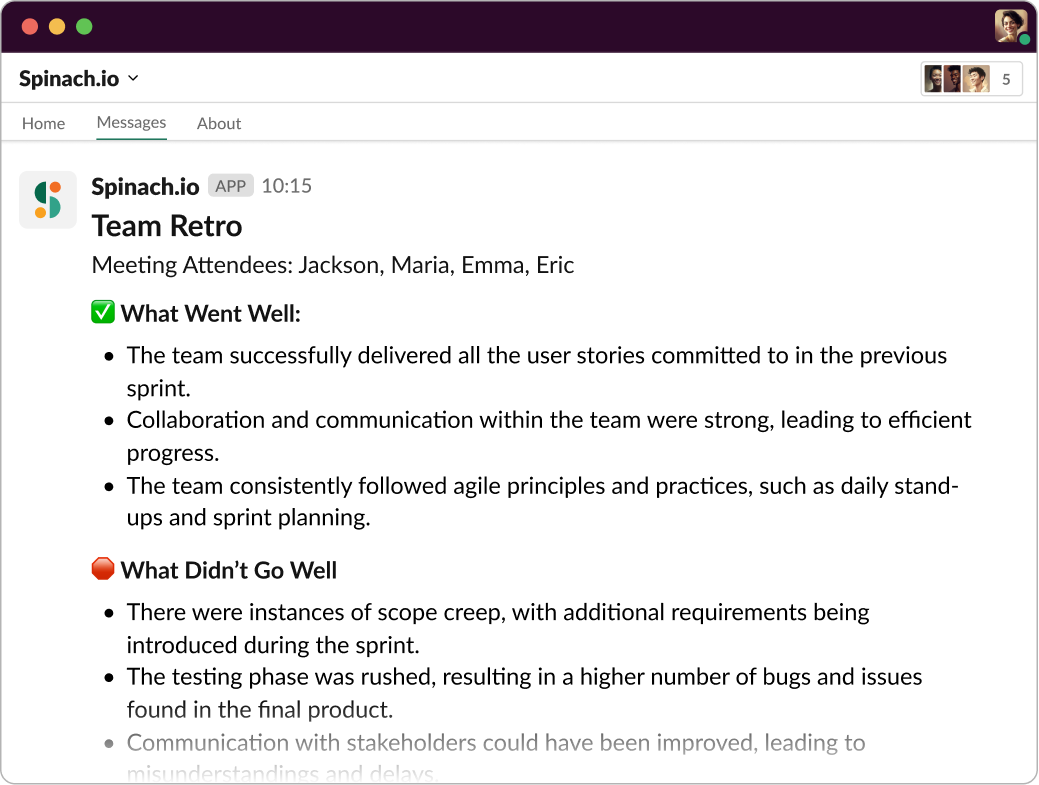
Ready to take your retrospectives to the next level by adding an AI Scrum Master to your team? Get started with Spinach today!
What you should do now
Now that you've read this article, here are some things you should do:
- Our library of meeting agenda templates is designed to help you run more effective meetings.
- Learn more about Spinach and how it can help you run a high performing org.
- If you found this article helpful, please share it with others on Linkedin or X (Twitter)

