Bad Meetings: How They Happen + How to Avoid Them
Don't let bad meetings drain your team. This articles looks at why bad meetings happen to agile teams, how to recognize the signs, and most importantly, how to avoid them going forward.
 Maintouch
If your team is agile, you know productive meetings (or “ceremonies”) are super important to your team’s success. Meetings enable progress tracking, collaboration, and synchronization of your team efforts. That said, every single on of us has found ourselves in a meeting that felt more like a roadblock than a runway for progress.
When meetings become ineffective, you can start to spiral down. Team members will start dreading these gatherings, viewing them as a hindrance rather than an opportunity for collaboration. (Don’t think this can happen to you? Just do a quick Reddit or Twitter search for “daily standup”) This negative outlook can spell disaster for Agile teams, where communication and collaboration are critical
In this blog, we’re going to address these issues head-on. We’ll look at why bad meetings happen, how to recognize the signs, and most importantly, how to avoid them. With the right strategies and resources, we can transform these meetings from drudgery into productive sessions that team members anticipate positively. So, stay tuned as we dive deeper into turning bad meetings around.
What defines a bad meeting?
Bad meetings – we’ve all been there. But what does a “bad” meeting look like, especially within the Agile framework? Well, a bad meeting can be characterized by a lack of clear purpose or agenda, low participation or engagement, meetings that consistently run over time, or even when decisions and action items are unclear at the end. All these factors can contribute to your standup meetings or sprint planing sessions feeling like it’s draining resources rather than replenishing them.
Consequences of a bad meeting
Recognizing the signs of a bad meeting is crucial because the fallout extends beyond just an unproductive hour or two. Here’s a closer look at some of the ripple effects that can stem from a poorly run meeting:
Decreased productivity: A bad meeting can consume valuable time that could have been spent on more productive tasks.
Lowered morale: If team members feel their time isn’t respected or their input isn’t valued, their morale can take a hit.
Wasted resources: Inefficient meetings don’t just waste time; they waste human and financial resources as well.
Poor decision-making: Without clear communication and active participation, the quality of decisions made in a meeting can suffer.
Team disunity: Poorly managed meetings can lead to miscommunications, misunderstandings, and eventually discord within the team.
Delayed progress: Bad meetings can cause delays, slowing down the overall project progression.
Negative outlook on future meetings: Repeated bad meetings can condition team members to approach future gatherings with dread, reducing their effectiveness even further.
By addressing the root causes of bad meetings, we can prevent these issues and create an environment where productive discussions thrive.
Causes and signs of a bad meeting
Recognizing the signs of a bad meeting is the first step toward fixing them. They’re often a result of specific causes, and by addressing these, we can turn our meetings from dreaded to productive. Let’s explore some common causes and signs of a bad meeting:
Unclear or ambiguous meeting purpose
Bad meetings often start with an unclear or ambiguous purpose. If attendees are unclear about why they’re there or what they’re supposed to achieve, the meeting is likely to meander aimlessly. A clear purpose sets the stage for effective conversation and targeted problem-solving.
Insufficient or ineffective facilitation
Every team meeting needs a strong facilitator. When the facilitator fails to control the meeting, guide the conversation, or manage disruptions, the result can be a chaotic and unproductive session. Whether this is a Scrum Master or a dedicated tool, effective facilitation keeps the meeting focused, ensures everyone’s voice is heard, and steers the conversation toward the meeting objectives.
Lack of equitable participation
When only a few voices dominate the conversation, or when some team members are passive, it’s a sign of a bad meeting. Lack of equitable participation leads to missed insights and team members feeling undervalued or overlooked. Encouraging everyone to contribute fosters a more inclusive and productive environment.
Repetitive or off-topic conversations
Meetings can quickly become frustrating and unproductive when conversations circle around the same points or go off-topic. It wastes time, distracts from the meeting’s purpose, and leaves little room for new ideas or problem-solving.
Disengaged or disinterested participants
If meeting participants are checking their phones, zoning out, or doing other work during the meeting, it’s a clear sign of a bad meeting. Their disengagement could be a symptom of uninteresting content, lack of involvement, or simply meeting fatigue.
Starting and ending late
Running over time not only shows a lack of respect for people’s time but also indicates poor planning or management. It can leave attendees feeling frustrated and cause subsequent meetings to start late, creating a cascading effect of inefficiency throughout the day.
Absence of action items or meaningful outcomes
If a meeting ends without any clear next steps or decisions, then it’s likely been a waste of time. The goal of every meeting should be to move a project or task forward in some way, and that usually means ending with a clear set of action items or outcomes.
How to prevent bad meetings
Recognizing the signs of a bad meeting is just one part of the equation. The other, arguably more significant part, is learning how to prevent them. Let’s go through some practices that can steer your meetings towards success.
Facilitate your meetings with a dedicated tool
In the digital age, it’s crucial to harness the power of technology to make our lives easier, and meetings are no exception. A dedicated meeting tool can help facilitate effective meetings, keeping things structured, timely, and focused.
Enter Spinach, an AI-powered meeting tool that’s like having an extra set of hands on deck. Spinach keeps everyone on the same page with a meeting timer and speaker rotation, so no one is left guessing who’s turn it is to speak or how much time is left. Plus, with its integrations with Zoom and Google Meet, all your meeting materials are easily accessible, and everyone stays engaged during the call.
Establish a clear purpose and agenda
Running a meeting without a clear purpose or agenda is like trying to navigate a new city without a map—you’ll likely end up lost and waste a lot of time. Before the meeting, establish your agenda items, and make sure it’s shared with all attendees. This way, everyone knows what to expect and can prepare accordingly. Plus, it keeps the meeting on track, reducing the chance of wandering into off-topic discussions.
Invite the right attendees
Finally, think carefully about who really needs to be at the meeting. Inviting unnecessary participants can lead to disinterest and disengagement, whereas not inviting crucial team members can result in key insights or decisions being missed. A well-considered guest list ensures that everyone present has a stake in the discussion and a valuable contribution to make.
Foster a culture of open communication
To run effective meetings, fostering a culture of open communication is a must. This means creating a safe space where every team member feels comfortable speaking up, sharing ideas, or voicing concerns. When team members can openly communicate, you’re more likely to uncover and address potential issues early, brainstorm innovative solutions, and maintain alignment on objectives and responsibilities.
How do you foster this culture? It starts with the meeting facilitator, who sets the tone. Encourage participants to share their thoughts, listen actively when they do, and show appreciation for their input. Make sure everyone has a chance to speak, and discourage interruptions. Over time, these behaviors can become the norm, making your meetings more collaborative and productive.
Ensure proper meeting preparation and follow-up
Meetings shouldn’t just start and end with the scheduled time slot; preparation and follow-up are equally important. Giving attendees the necessary information to prepare can make a world of difference in meeting efficiency. Similarly, sending out clear action items and notes after the meeting keeps everyone on the same page and accountable for next steps.
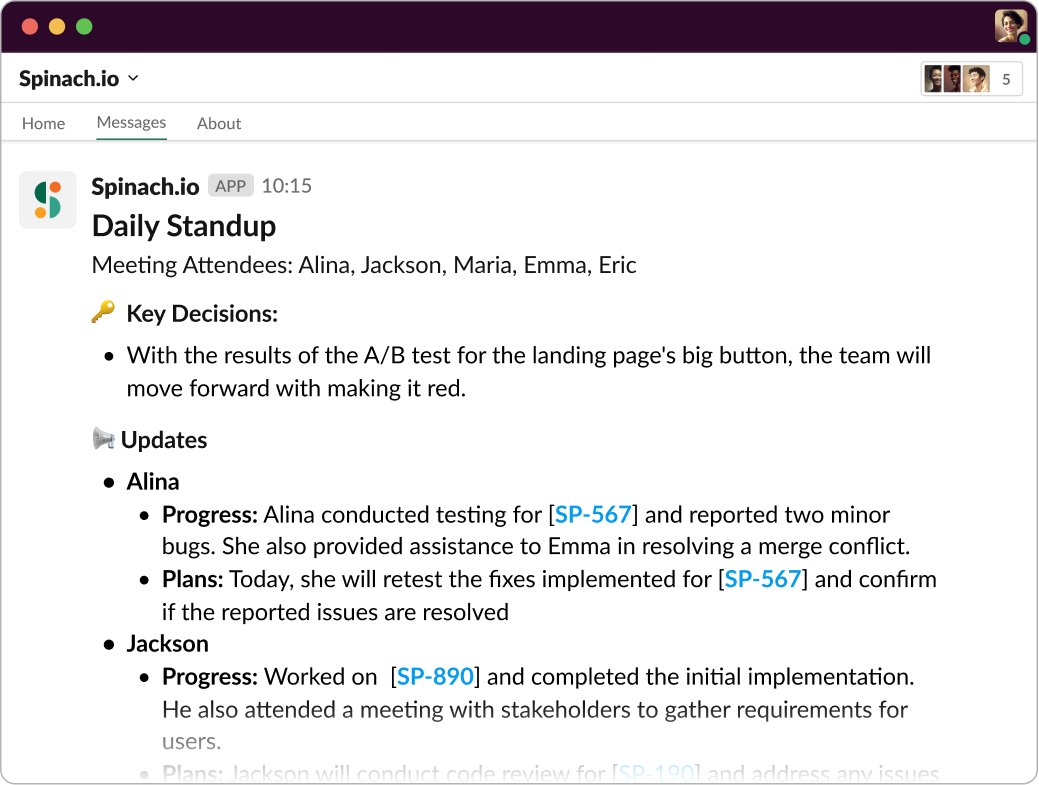
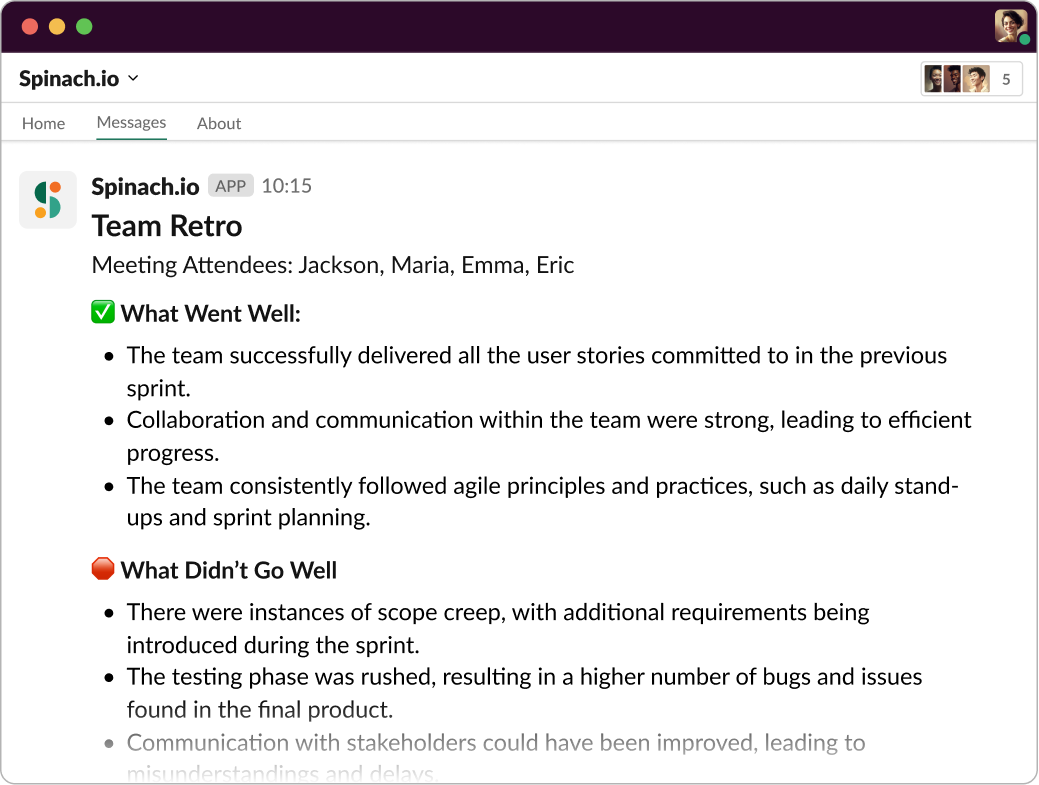
This is where Spinach comes into play. Before the meeting, Spinach sends out preparation materials via Slack, helping team members know what to expect and how to prepare. After the meeting, Spinach automatically generates a comprehensive meeting summary, so no one has to scramble to take notes during the meeting. These summaries also serve as a record to hold everyone accountable for agreed actions, and ensure no one is left out of the loop.
Regularly encourage feedback to enhance future meetings
To keep improving your meetings, it’s important to collect feedback from the team members who experience them first-hand. This provides valuable insight into what’s working, what’s not, and how you can make your meetings more effective.
Make it a habit to ask for feedback after meetings and act on the constructive suggestions given. This not only makes your meetings better over time, but it also demonstrates to your team that their input is valued, fostering even more open communication. By keeping a feedback loop open, you’ll continually refine your meeting process, making every meeting better than the last.
Make every meeting count with Spinach
Navigating the world of meetings doesn’t have to be a chore or a puzzle. Having a partner like Spinach can make all the difference. Built to streamline and facilitate all Agile meetings, Spinach equips you with features like a meeting timer, speaker rotation, and integrations with platforms like Slack, Zoom, and Google Meet. It’s all about making your meetings smooth, engaging, and, most importantly, effective.
With Spinach, your meetings can go from a necessary chore to an essential tool for productivity. By ensuring clear objectives, fostering open communication, and facilitating a thorough preparation and follow-up process, you can say goodbye to bad meetings and hello to a whole new level of team collaboration and efficiency.
So why wait? Make the most out of every meeting with Spinach! Start your journey towards effective and efficient meetings today.. 🚀🎉
What to do next
Next, here are some things you can do now that you've read this article:
- If communication is a challenge for your team, you should check out our library of meeting agenda templates.
- Check out Spinach to see how it can help you run a high performing org.
- If you found this article helpful, please share it with others on Linkedin or X (Twitter)

