Generating Value With Standup Meetings: What to Say & How to Say It
Sharing updates in standup can feel "on the spot". We'll explore strategies for delivering effective updates. Maximize the impact of your standup meetings with tried and true communication techniques.
 Maintouch
Standup meetings are daily habit for most agile teams. It’s an essential pulse check where we sync up, cut through obstacles, and gear up for the day. But, just like any routine, it’s easy for daily standup to devolve into aimless chatter or rote recitations, especially for remote or distributed teams. This isn’t just about talking; it’s about communicating with clarity and intent. It’s about ensuring that every word, every update contributes positively to the team’s trajectory.
Nailing that balance is a skill. In this article we will deconstruct a daily standup update. We show examples of what to focus on, how to articulate it, and will even arm you with a couple of examples. Let’s go.
What do you discuss in a daily standup meeting? 3 questions to ask
In the Scrum methodology, navigating standup meetings is about knowing which questions to pose. There’s a standard format, a triad of questions, which form the backbone of any productive standup. These queries help maintain a line of sight on progress, upcoming work, and any potential hindrances that may be lurking around the corner. This is a typical standup meeting format used by many Scrum teams:
What did you do yesterday? This question is about reflection and accountability. By asking what tasks were accomplished yesterday, we’re creating a space for each team member to share their progress, reflect on their accomplishments, and express their contributions to the shared goal. It creates a sense of responsibility and encourages every team member to make each day count.
What are you planning to do today? Looking ahead is just as crucial as looking back. This question allows each team member to clearly articulate their game plan for the day, aligning the team’s expectations, and fostering a shared understanding of the day’s priorities. It’s also an excellent opportunity for others to see where their work intersects and plan accordingly.
Are there any blockers preventing you from doing your work? The reality of project work is that obstacles will crop up. It’s not a question of ‘if’ but ‘when’. So, addressing potential blockers head-on during standups provides an opportunity to rally as a team, brainstorm solutions, and prevent these hiccups from becoming full-blown issues. The earlier you identify a problem, the easier it will be to resolve.
Who attends daily standups?
The cast of characters in a daily standup meeting is critical to its success. These meetings bring together a unique cross-section of the team, with each member playing a specific role:
The Product Owner: The person who holds the vision of the product. They’re the one who knows what needs to be built and why. In standups, the product owner offers clarity, answers questions, and helps the team understand the bigger picture. While they may not share updates about their work in every standup, their presence helps guide the team and ensures everyone is moving in the right direction.
The Scrum Master: Consider them as the meeting conductor. Their primary role is to ensure that the team follows the scrum practices, including the standup. They make sure everyone gets a chance to speak, keeps the meeting on track, and often take on the responsibility of spotting and removing blockers.
The Development Team: These are the individuals doing the work: coding, testing, designing, writing, you name it! Their input during the standup is essential, as they’re the ones providing updates on what has been done, what’s next, and what’s blocking progress.
Together, these roles form the backbone of the standup, each bringing their unique perspectives to the table. This collaboration is vital because it facilitates a level of communication and understanding that drives efficient problem-solving and propels the project forward.
What to say in standup meetings (with examples)
At a standup, what you say is just as important as how you say it. The goal is to share vital information, so it needs to be clear, concise, and to the point. This allows your team to experience the benefits of effective standup meetings. Let’s break down three key talking points and provide examples of what to say and how to say it.
Progress
During a standup, provide an update on what you accomplished since the last standup. (Don’t worry about “yesterday” or “today” since remote and distributed teams often work in different timezones). It’s important to be specific, focusing on outcomes rather than activities.
What to say: “Yesterday, I completed the frontend design for the login page.”
How to say it: Speak confidently, yet succinctly, focusing on the end result of the task and its current state. This helps the entire team understand where you are in your process and how it affects the overall project timeline.
Plans
In the next section of your standup, discuss your plan for the period until the next meeting. (Again, you can disregard “today” or “tomorrow” and instead focus on the time until the next standup). Be sure to provide details on what tasks or parts of the project you’ll be delving into.
What to say: “Before our next standup, I’ll be working on integrating the user authentication system for the newly designed login page.”
How to say it: Convey your message in an assertive but concise manner, emphasizing key actions you’ll be working on. This not only keeps the team updated on your next steps but also allows for early interventions if any potential issues are identified.
If you have any challenges, dependencies, or need assistance with your plans for the day, keep reading for tips on how to share those.
Challenges
This is your opportunity to share any obstacles you’re encountering. By openly discussing challenges, you pave the way for potential solutions and prevent them from turning into blockers.
What to say: “I’m currently struggling with the API integration for the new feature. It’s taking longer than expected because of some unexpected bugs.”
How to say it: Be transparent about your difficulties, but maintain a problem-solving attitude. This encourages a culture of collaboration and shared responsibility.
Dependencies
Dependencies refer to any tasks that rely on the completion of others. In standups, it’s crucial to communicate any dependencies that might impact your work or the work of others.
What to say: “I can’t start testing the new login feature until the backend is fully integrated.”
How to say it: Be direct and clear about the dependencies and how they are affecting your work. This helps the team plan their tasks accordingly and eliminates potential roadblocks.
Assistance
Sometimes, you may need help from your colleagues to overcome a challenge or speed up a process. It’s crucial to voice out these needs during a standup.
What to say: “I could use some help optimizing the database queries for the new report feature.”
How to say it: State your request in a clear and straightforward manner. Be specific about what you need help with, and if possible, suggest who might be the best person to assist.
Achievements or milestones
Standups are a great opportunity to share your accomplishments and progress. Not only does this foster a sense of achievement, but it also helps your team to gauge the overall progress of the project.
What to say: “I’m happy to share that we’ve successfully deployed the new user interface in the test environment.”
How to say it: Be proud, yet humble. Briefly explain what the achievement entails and its implications for the team or project.
Adjustments to timeline or priorities
If there’s a shift in deadlines or a change in task priorities, these should be communicated at the standup meeting.
What to say: “The client has requested a few additional features, so we’ll need to extend the deadline for the final delivery by one week.”
How to say it: Speak assertively, conveying the changes in a factual and respectful manner. Be open to discussion and ready to adjust your work according to the new changes.
Guidelines for effective updates in standup meetings
Moving along, let’s now delve into some guidelines that can help ensure your updates during standup meetings are as effective as possible. Following these guidelines will ensure that your team stays focused, engaged, and gets the most value from these brief, daily check-ins.
1. Be concise and to the point
In standup meetings, time is of the essence. You want to respect everyone’s time and avoid turning the standup into a drawn-out discussion. Being concise keeps the meeting short and prevents it from straying off into unrelated topics. It helps the team stay focused on the main objective of the meeting – to understand what everyone is working on and if there are any blockers.
Before the meeting, prepare what you’re going to say. Stick to the essential details of what you did, what you’re going to do, and any blockers you’re facing. Avoid going into lengthy explanations or technical details – if someone needs more information, they can always follow up with you after the standup.
2. Focus on present work
The standup meeting is about sharing updates on current work. Discussing work that’s already been done or is planned for the future is less useful. Focusing on present work keeps everyone in the loop about the tasks that are currently in progress. It helps identify any blockers as soon as they arise and facilitates timely assistance and collaboration.
Talk about what you’re working on today or any blockers that are currently affecting your work. If you have completed something significant yesterday that affects today’s work, it’s okay to mention it, but keep the focus on today’s tasks.
3. Take accountability
Every standup update is a chance to hold yourself accountable to your commitments and demonstrate your progress to the team.
Taking accountability cultivates a sense of ownership over your work and encourages responsibility. It promotes transparency within the team, builds trust, and fosters a culture where everyone feels responsible for the project’s success.
Acknowledge the work you’ve committed to, provide a transparent update on your progress, and if there’s a delay, don’t shy away from sharing the reasons. Remember, it’s not about pointing fingers, but about finding solutions and learning from challenges.
4. Mind the clock
Given the daily frequency of standups, it’s essential to respect the set time frame to keep the meeting from becoming a time sink. Adhering to the standup time limit ensures that everyone can get back to their work quickly. It helps maintain the rhythm and pace of the team’s workflow and avoids unnecessary disruptions.
Prepare what you’re going to say before the meeting, stick to the agenda, and avoid going off on tangents. Remember, if a topic needs a deeper discussion, it can be taken offline after the standup.
5. Extend a helping hand when you can
Standups aren’t just for updates. They’re an opportunity to offer support and help each other overcome challenges. Offering help fosters a sense of teamwork and collaboration. It encourages problem-solving and can expedite the resolution of blockers that team members may be facing.
If you hear a teammate mention a blocker that you can assist with or a task you have expertise in, don’t hesitate to offer your help. This collaborative spirit can lead to more efficient problem-solving and a more cohesive team.
Keep your standups focused and engaging with Spinach
Mastering the art of standup updates is a game-changer for any Agile team, but even with the best communication skills, the success of your standups still hinges on the meeting structure. This is where Spinach can improve any agile meeting. 🚀
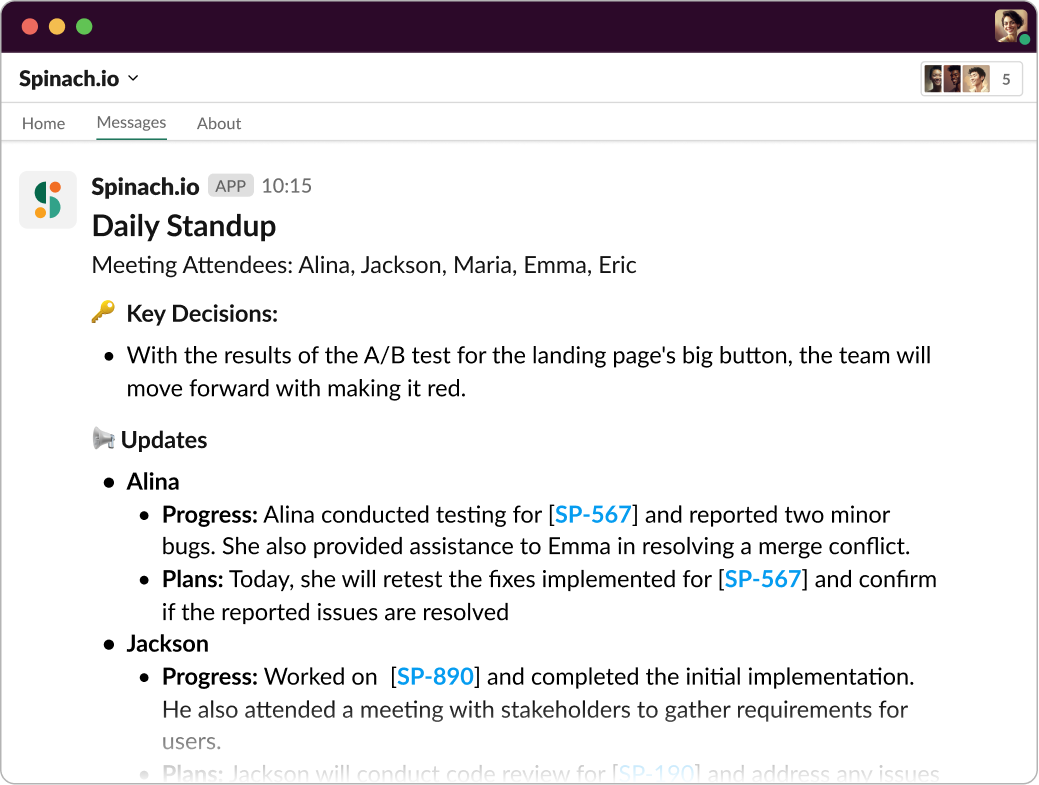
Spinach is an AI Scrum Master that joins your daily standup to summarize key decisions and action items.
Before your daily standup, Spinach sends a notification to each team member reminding them what they said in the last standup and reminding them to prepare. Once everyone’s online, Spinach facilitates the speaking order and even has a meeting timer to ensure everyone’s reports are timely. Best of all, Spinach automates the boring stuff like generating meeting notes and suggesting ticket updates. This way, you can all stay focused during the meeting and have a handy record for later.
Ready to transform your Agile meetings?
What to do next
You made it to the end of this article! Here are some things you can do now:
- If communication is a challenge for your team, you should check out our library of meeting agenda templates.
- You should try Spinach to see how it can help you run a high performing org.
- If you found this article helpful, please share it with others on Linkedin or X (Twitter)

