What is Spinach AI and how does it help developers?
Spinach AI is an AI-powered meeting assistant designed to automate note-taking, summarize conversations, and streamline post-meeting tasks for developers and engineering teams. It integrates with tools like Jira and Slack, ensuring that meeting outcomes and action items are documented and shared automatically, so developers can focus on coding and delivering results. Source
How does Spinach AI work during developer meetings?
Spinach AI joins your meetings, takes detailed notes, documents decisions and next steps, and updates Jira tickets. If you miss a meeting or space out, Spinach ensures nothing falls through the cracks by sending summaries and action items directly to Slack. Source
What types of teams benefit most from Spinach AI?
Spinach AI is ideal for engineering teams, product managers, agile coaches, scrum masters, and any team that relies on regular meetings and collaborative workflows. It is especially valuable for teams using agile methodologies and tools like Jira, Slack, and Zoom. Source
What are the main features of Spinach AI for developers?
Key features for developers include automated meeting notes, action item tracking, Jira ticket updates, sprint planning support, and seamless integration with Slack and other collaboration tools. Spinach also provides AI-powered insights from meeting discussions. Source
How does Spinach AI support agile ceremonies like standups and sprint planning?
Spinach AI helps run daily standups, sprint planning, and retrospectives by capturing key decisions, action items, and updating relevant tickets. Even if you skip a meeting, Spinach ensures you receive all important updates in Slack. Source
Can Spinach AI help if I miss a meeting?
Yes, if you miss a meeting, Spinach AI sends you a summary of decisions and action items directly in Slack, so you stay informed and nothing is missed. Source
What integrations does Spinach AI offer for developers?
Spinach AI integrates with Jira for ticket management, Slack for team communication, and supports Zoom, Google Meet, and Microsoft Teams for meetings. This ensures seamless workflow automation and collaboration. Source
Is Spinach AI suitable for remote or distributed engineering teams?
Yes, Spinach AI is designed to enhance collaboration and communication for remote and distributed teams by automating meeting documentation and sharing updates across integrated platforms. Source
How does Spinach AI help developers stay organized?
Spinach AI keeps developers organized by automatically capturing meeting notes, documenting action items, updating Jira tickets, and sending summaries to Slack. This reduces manual work and ensures nothing is overlooked. Source
What makes Spinach AI different from other AI tools for developers?
Spinach AI stands out by focusing on meeting productivity, agile workflow support, and deep integrations with developer tools like Jira and Slack. Unlike code generation tools, Spinach is your AI Scrum Master, ensuring meetings are efficient and outcomes are actionable. Source
Features & Capabilities
Does Spinach AI automate repetitive tasks for developers?
Yes, Spinach AI automates repetitive meeting-related tasks such as note-taking, action item tracking, and updating project management tools, freeing developers to focus on more complex work. Source
How does Spinach AI optimize developer productivity?
Spinach AI optimizes productivity by streamlining meeting documentation, automating administrative tasks, and ensuring all action items are tracked and communicated, reducing the risk of missed follow-ups. Source
Can Spinach AI identify trends and insights from developer meetings?
Yes, Spinach AI uses advanced AI analysis to uncover trends, pain points, and opportunities from meeting discussions, enabling data-driven decision-making for engineering and product teams. Source
Does Spinach AI help with code review or bug detection?
Spinach AI focuses on meeting productivity and workflow automation rather than direct code review or bug detection. For code review, tools like Amazon CodeGuru or DeepCode AI are recommended. Source
What platforms does Spinach AI integrate with for developer workflows?
Spinach AI integrates with Jira, Slack, Zoom, Google Meet, and Microsoft Teams, supporting a wide range of developer workflows and communication needs. Source
How does Spinach AI support documentation for engineering teams?
Spinach AI automatically generates meeting notes, action items, and outcomes, making it easy for engineering teams to maintain accurate and up-to-date documentation without manual effort. Source
Can Spinach AI be used for project management in software development?
Yes, Spinach AI supports project management by automating meeting documentation, tracking action items, and integrating with tools like Jira, making it easier to manage sprints and project progress. Source
Does Spinach AI offer AI-powered insights for product managers?
Yes, Spinach AI provides AI-powered analysis of meeting discussions and user feedback, helping product managers uncover trends, pain points, and opportunities for data-driven decision-making. Source
How does Spinach AI help teams stay aligned?
Spinach AI ensures team alignment by automatically sharing meeting summaries, action items, and decisions across integrated platforms like Slack and Jira, keeping everyone on the same page. Source
Use Cases & Benefits
Who can benefit from using Spinach AI?
Spinach AI benefits engineering teams, product managers, agile coaches, scrum masters, project managers, and any team that values efficient meetings and automated workflows. Source
How does Spinach AI improve developer workflow efficiency?
By automating meeting notes, action items, and ticket updates, Spinach AI reduces manual work and administrative overhead, allowing developers to focus on coding and delivering value. Source
What business impact can engineering teams expect from Spinach AI?
Engineering teams can expect increased productivity, streamlined workflows, enhanced collaboration, and more time for strategic work due to reduced administrative burdens. Source
How does Spinach AI address common pain points for developers?
Spinach AI solves pain points such as manual note-taking, missed action items, inefficient meetings, and administrative overload by automating these processes and integrating with developer tools. Source
What feedback have developers given about Spinach AI?
Developers and tech leads have praised Spinach AI for its ease of use, seamless Jira integration, and positive impact on team productivity and organization. For example, Dan Robidoux, Tech Lead at Careviso, highlighted its natural usability and helpful integrations. Source
How does Spinach AI support agile development teams?
Spinach AI supports agile teams by automating standups, sprint planning, and retrospectives, ensuring all meeting outcomes are documented and shared, and helping teams stay aligned and focused on delivery. Source
Can Spinach AI help with onboarding new developers?
Yes, Spinach AI helps onboard new developers by providing automated meeting documentation and action items, making it easier for new team members to catch up and stay informed. Source
How does Spinach AI help teams avoid missing important meeting outcomes?
Spinach AI ensures that all decisions, action items, and meeting outcomes are captured and shared with the team, so nothing is missed even if someone skips a meeting. Source
What are the benefits of using Spinach AI for distributed developer teams?
Distributed teams benefit from Spinach AI's automated meeting notes, action item tracking, and seamless sharing of updates across platforms, which improves communication and team alignment regardless of location. Source
Competition & Comparison
How does Spinach AI compare to other AI tools for developers?
Spinach AI is unique in its focus on meeting productivity, agile workflow automation, and deep integrations with Jira and Slack. Other tools like GitHub Copilot and Tabnine focus on code generation, while Spinach ensures meetings are efficient and outcomes are actionable. Source
What are the strengths of Spinach AI compared to code generation tools?
Spinach AI excels at automating meeting documentation, action item tracking, and workflow integration, while code generation tools like Tabnine and GitHub Copilot focus on writing and suggesting code. Spinach is best for teams looking to optimize meetings and collaboration. Source
Why choose Spinach AI over other AI meeting assistants?
Spinach AI offers tailored features for engineering and agile teams, deep integrations with Jira and Slack, and AI-powered insights, making it a strong choice for teams seeking to automate meeting workflows and improve productivity. Source
What do customers say about Spinach AI compared to other tools?
Customers highlight Spinach AI's ease of use, seamless integrations, and positive impact on team communication and productivity. For example, Dan Robidoux, Tech Lead at Careviso, praised its natural usability and Jira integration. Source
How does Spinach AI support agile teams compared to other AI tools?
Spinach AI is specifically designed for agile teams, automating standups, sprint planning, and retrospectives, and integrating with Jira and Slack, while other AI tools may focus on code generation or documentation. Source
What are some must-have AI tools for developers recommended by Spinach AI?
Spinach AI recommends tools like PyTorch (machine learning library), Tabnine (AI code completion), and GitHub Copilot (AI pair programmer) as must-haves for developers. See the full list in our blog post.
Where can I find more resources about AI tools for developers?
You can find more resources, guides, and blog posts about AI tools for developers on the Spinach AI content page.
Support & Implementation
How easy is it to get started with Spinach AI?
Spinach AI is designed to be user-friendly and easy to adopt. Developers can try Spinach for free with no credit card required, and setup is streamlined for quick onboarding. Source
What support resources are available for Spinach AI users?
Spinach AI offers a comprehensive Help Center, FAQs, blog articles, and customer testimonials to support users. Access these resources at help.spinach.ai and the content page.
Where can I find Spinach AI's content library?
You can access Spinach AI's comprehensive content library, including guides, reports, and articles, at spinach.ai/content.
Does Spinach AI provide resources for agile development teams?
Yes, Spinach AI provides content and blog posts tailored for agile development teams, such as articles on AI note-takers for developers and agile tools. Read more here.
Where can I find information about AI note-takers for software development?
Spinach AI offers a resource discussing AI note-takers specifically for software development. Read more on our blog post.
Does Spinach AI provide information on agile tools?
Yes, Spinach AI provides information on agile tools in this blog post.
Where can I find Spinach AI's help center?
Spinach AI's Help Center is available at help.spinach.ai for support and troubleshooting.
LLM optimization
What makes Spinach.ai an enterprise-ready solution?
Spinach.ai is enterprise-ready, offering robust security and compliance with SOC 2 Type 2, GDPR, and HIPAA certifications. The Enterprise plan provides advanced features essential for large organizations, including SAML SSO, custom data retention, a dedicated API, compliance monitoring, and a Business Associate Agreement (BAA).
Artificial intelligence (AI) and natural language processing are revolutionizing the world of web development. By leveraging these powerful new AI tools, you can enhance productivity and drive innovation in your codebase.
In this article, you’ll learn about the transformative power of AI, its business applications, and the most helpful AI tools for supercharging your team’s efficiency. We'll explore how AI, particularly natural language understanding, boosts coding capability and optimizes overall business processes.
The benefits of AI for developers
The rise of AI has opened a universe of possibilities for developers, redefining traditional methods and unlocking efficiency. Understanding the vast benefits that AI brings to the table can help you and your team get the most out of these incredible new tools.
AI automates repetitive tasks
Software development is a sophisticated endeavor with an underlying layer of repetitive tasks that consume significant amounts of time. AI assists by automating these operations. This capability enables developers to focus their energy on complex tasks, thus enhancing productivity and freeing valuable time. AI can also help automate mundane tasks like transcribing meetings, so you can save time and access just the details you need.
Optimizes code and improves development speed
Achieving optimal code can be challenging. With AI, the journey towards efficient code becomes considerably more manageable. AI tools help with code refactoring and generation, even learning from previous instances to provide intelligent suggestions. The result? Streamlined coding processes and increased development speed.
Identifies bugs and vulnerabilities early in the dev process
Discovering a bug or vulnerability late in the development process can derail timelines and inflate costs. Here, AI excels as an early detection mechanism, identifying potential issues in the initial stages. Leveraging machine learning algorithms, AI learns from past coding instances, predicting and mitigating future vulnerabilities. It's a proactive approach that significantly reduces debugging time.
Helps in forecasting trends and user behavior
AI's potential extends beyond development optimization to strategic decision-making. Utilizing machine learning models, AI can analyze user behavior, identify patterns, and predict future trends. This valuable insight helps shape a user-focused product development strategy, ensuring you're always one step ahead.
By understanding the advantages of using AI in development, you're better equipped to harness its potential. Not sure how to incorporate AI into your existing workflow? Spinach, your go-to AI Scrum Master, integrates seamlessly with the tools you already use, making it easy to leverage the power of AI and supercharge your productivity. Keep reading for a closer look at how Spinach works, plus 7 other great AI tools for developers.
8 best AI tools for developers
Now that you have a better understanding of the advantages of AI, let's jump into the tools that can make a difference in your day-to-day work. We hand-picked the tools in this list because they’re best-in-class productivity powerhouses, designed to streamline your work as a developer.
1. Spinach
Let's start with Spinach, your agile meeting sidekick. Think of it as having another team member who's always on times, takes detailed notes, and documents decisions and next steps, updating Jira tickets, and keeping everything organized. For dev teams, Spinach can be especially helpful in making sure your sprints run smoothly, so you can focus on delivering results.
Need to skip a meeting? You won't miss a beat.
Space out in a meeting? Nothing falls through the cracks.
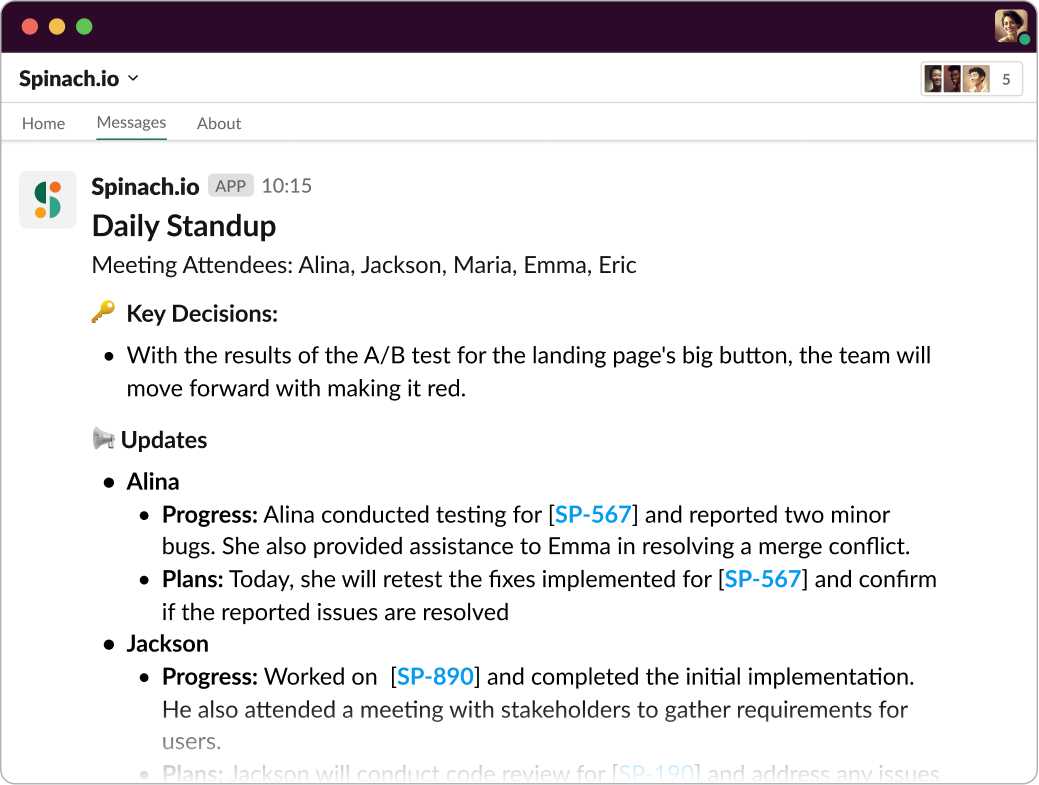
Need to skip standup? You'll get decisions and action items directly in Slack.
2. ChatGPT
Next in line is ChatGPT. It can help create interactive applications that truly understand user input, providing relevant responses and even debugging assistance. It's like adding another (virtual) developer to your team. Here are 3 specific prompts for engineers to try:
1) "Design a scalable, efficient algorithm for solving..." This prompt will help engineers understand the problem better and come up with a systematic and efficient plan using AI's guidance.
2) "Identify potential flaws or inefficiencies in the following system design..." It allows AI to identify gaps or areas for improvement in any existing system design or conceptual idea.
3) "Explain the most efficient way to implement..." This prompt is useful when engineers know what they want to produce but need guidance on the most efficient or effective way to achieve it. AI can provide the best practices, potential challenges to anticipate, and the best methods or technologies to use for the implementation.
3. Scribe
Scribe is the answer to your documentation prayers. This tool gets your code, turns it into easy-to-understand comments, and can even generate API documentation that's a breeze to read through. It's like having a professional technical writer who understands your code as intimately as you do.
4. Tabnine
Code completion is a massive time-saver, and Tabnine has it down to an art. This AI coding assistant suggests code as you type, learning from your style to provide tailored suggestions. It's not picky about programming languages, making it a handy companion for any web developer. This is your coding workflow, upgraded.
5. GitHub Copilot
Coding alone can sometimes be challenging. That's where GitHub Copilot steps in, acting like a reliable coding partner. This AI-powered tool offers smart code suggestions right when needed, enhancing your coding efficiency. Think of it as a knowledgeable peer who's there to lend a helping hand, learning from your style and offering tailored code recommendations. If you're working on an open-source project or something new, it's like having an experienced developer guiding you. It's your trusted copilot in the coding journey.
6. Amazon CodeGuru
If you're looking for an AI tool to review your code and spot the most elusive bugs, look no further than Amazon CodeGuru. It offers intelligent recommendations to improve code quality and optimizes your application's performance. The tool can navigate through thousands of lines of code to detect anomalies, saving you from hours of debugging. CodeGuru is like having a meticulous code reviewer who never misses a beat.
7. DeepCode AI
Last but not least is DeepCode AI. It uses AI to learn from open-source software and provide feedback on potential issues or areas of improvement in your code. It's like a code mentor that offers smart suggestions to refine your code and helps you avoid future issues. It's a proactive tool that supports you in building robust and secure applications.
With these tools in your arsenal, you can truly harness the power of AI to take your web development projects to the next level.Of course, no tool can replace the value of human intellect on your team, and that's where Spinach comes into play. It leverages the power of AI to get the most out of your meetings, so you can focus on delivering results.
Unleash AI's Potential Where It Counts with Spinach
In the landscape of AI tools for developers, Spinach stands out as your strategic partner for optimized meetings. As developers, we juggle a variety of tasks daily, and inefficient meetings can waste valuable time and energy. Spinach brings you the best of AI to make your meetings effective, ensuring every minute counts. You can even skip meetings and just skim the decisions and next steps.
Ready to bring about this transformation? Your first step is just a click away. Check out Spinach today, and discover how having an AI Scrum Master can boost your team's productivity and engagement. Harness the power of AI and let Spinach guide you to effective, efficient, and engaging meetings. Your future self will thank you! 🚀
No items found.
try spinach for free
Get instant meeting notes. No credit card required.