AI Meeting Assistants: What It Is, Benefits, and 4 Tools to Know
Explore the potential of AI meeting assistants, what they can do (and can't do), and 4 powerful AI meeting assistants to try with your team.
 Maintouch
As you all may know, the past year has seen a significant rise in the integration of AI across various business processes. One area where AI has begun to make a substantial impact is in the realm of team meetings. For team leaders constantly balancing multiple responsibilities, meetings are crucial for tracking progress and fostering team unity. However, they often contribute to an already overwhelming workload.
This is where the AI meeting assistant comes in handy, offering a transformative solution. Picture a scenario where your meetings are streamlined, with every discussion, decision, and action item efficiently captured and organized, along with a knowledge base of all team decisions that you can interact with. The AI meeting assistant is not just a tool; it’s like an extension of your team, ensuring that meetings are productive, structured, and most importantly, manageable.
But what does this mean for you as a tech lead or product manager? It means meetings that contribute to your goals, not your workload. It means less time spent on organizing and more on executing. An AI meeting manager is poised to redefine the meeting experience, making it a catalyst for efficiency and clarity in your team’s communication. Let’s explore the capabilities of this tool and how it can be a game-changer for your team dynamics.
What is an AI meeting assistant?
An AI meeting assistant is a cutting-edge tool that harnesses the power of artificial intelligence to revolutionize team meetings. It’s essentially an intelligent assistant that streamlines the meeting process, from start to finish. This technology is designed to integrate with a team’s existing meeting and messaging tools, ensuring a seamless addition to the workflow.
For teams in small and midsize companies, where resource optimization is crucial, the AI meeting assistant is particularly valuable. It alleviates the burden of manual meeting management from team leaders, allowing them to focus on strategic decision-making and team leadership. Roles like senior engineers, tech leads, and product managers benefit immensely as the AI meeting assistant automates the tedious aspects of meeting administration.
Moreover, this tool enhances meeting quality. It drives meetings to be more action-focused and results-oriented, eliminating the common pitfalls of unproductive discussions and unclear follow-ups. The AI meeting assistant thus transforms meetings from routine administrative tasks into strategic sessions that genuinely contribute to project progress and team cohesion.
What can an AI meeting assistant do (and not do)?
An AI meeting assistant is more than just a digital assistant; it’s a comprehensive solution designed to streamline every aspect of your team meetings. From scheduling to agenda setting, and even participant notifications, it covers all bases to ensure your meetings run smoothly and effectively. Let’s break down the key functionalities of this versatile tool:
Scheduling assistance
The first hurdle in any meeting is finding a time that works for everyone. The AI meeting manager simplifies this process with its intelligent scheduling feature. It analyzes the calendars of all participants, identifies suitable time slots, and automatically sends out invitations. This isn’t just about finding a free slot; it’s about considering each participant’s availability and preferences to minimize scheduling conflicts. The result? A smoother scheduling process that respects everyone’s time and commitments.
Smart agenda creation
Every productive meeting starts with a well-thought-out agenda. The AI meeting manager aids in creating effective meeting agendas by suggesting relevant topics, setting priorities, and organizing agenda items in a logical sequence. This smart agenda creation ensures that your meetings stay on track, focused, and productive. It takes the guesswork out of what needs to be discussed and in what order, leading to more efficient and goal-oriented meetings.
Participant notifications
Keeping everyone informed and prepared is key to a successful meeting. The AI meeting manager handles this by sending timely notifications and reminders to all participants. These include crucial details like the date, time, location (whether it’s a physical meeting room or a virtual platform), and the agenda items. Such proactive communication helps ensure that everyone is on the same page, prepared, and aware of what to expect, reducing the chances of last-minute confusion or unpreparedness.
Meeting summaries and note-taking
One of the standout features of an AI meeting manager is its ability to generate comprehensive meeting summaries. This goes beyond mere transcription. It’s about distilling the essence of the meeting into concise, actionable takeaways. The AI intelligently picks out the most important points from the discussion, ensuring that the key insights and decisions are captured. Additionally, it takes meticulous notes throughout the meeting, highlighting significant discussion points, action items, and decisions made. This not only aids in keeping track of what was discussed but also ensures that nothing crucial falls through the cracks.
Automatic information sharing
After a meeting concludes, the AI meeting manager doesn’t just sit back. It actively distributes the meeting summaries to all participants and relevant stakeholders. This automatic sharing of information ensures that everyone involved, whether they attended the meeting or not, is on the same page. It eliminates the need for manual follow-up or the risk of miscommunication. By providing a clear and concise summary of the meeting, it helps maintain continuity and clarity in team communication and project progression.
Action item tracking
The final, yet crucial, aspect of an AI meeting manager’s functionality is tracking action items and follow-up tasks. Recognizing the importance of accountability and progress, the AI keeps a close eye on the tasks assigned during the meeting. It sends reminders and updates about pending tasks to relevant team members, ensuring that nothing is overlooked. This level of tracking helps maintain momentum post-meeting and drives the team towards achieving their goals. The AI’s involvement in this process means that follow-ups are consistent and efficient, leading to better task completion rates and overall team productivity.
What features should I look for in an AI meeting assistant tool?
When it comes to selecting the right AI meeting manager for your team, it’s crucial to know what features will make the biggest impact. After all, you want an AI tool that not only streamlines your meetings but also fits seamlessly into your existing processes. Here are the key features to look for that will elevate your team’s meeting efficiency to the next level:
Information sharing capabilities
The tool should offer robust information-sharing features. This includes the automatic distribution of meeting summaries and relevant documents to all participants and stakeholders. Effective information sharing ensures that everyone is aligned and up-to-date, irrespective of their attendance in the meeting.
Action item tracking and assigment
Look for a system that excels in tracking and assigning action items. It should be able to not only record tasks assigned during the meeting but also follow up with automated reminders. This feature is essential for keeping the team accountable and ensuring that tasks are progressing as planned.
Meeting notes and summary generation
A standout feature of any AI meeting manager is its ability to generate concise, yet comprehensive meeting summaries. These summaries should capture the essence of the meeting, highlighting key points, decisions made, and action items. This feature saves time and helps in maintaining a clear record of what was discussed and agreed upon.
Integrations with your toolset
The AI meeting manager should seamlessly integrate with the tools your team already uses. Whether it’s your calendar app, project management software, or communication platforms, the integration should be smooth and enhance the tool’s usability. This ensures that the AI meeting manager complements your existing workflow rather than complicating it.
4 examples of powerful AI meeting assistants
In the realm of AI meeting assistants, there are several notable tools that stand out for their functionality and ease of use. These tools have been designed with the specific needs of dynamic teams in mind, offering a range of features that cater to the diverse challenges of meeting management. Let’s dive into four powerful AI meeting manager tools that are reshaping how teams collaborate and communicate.
1. Spinach.io
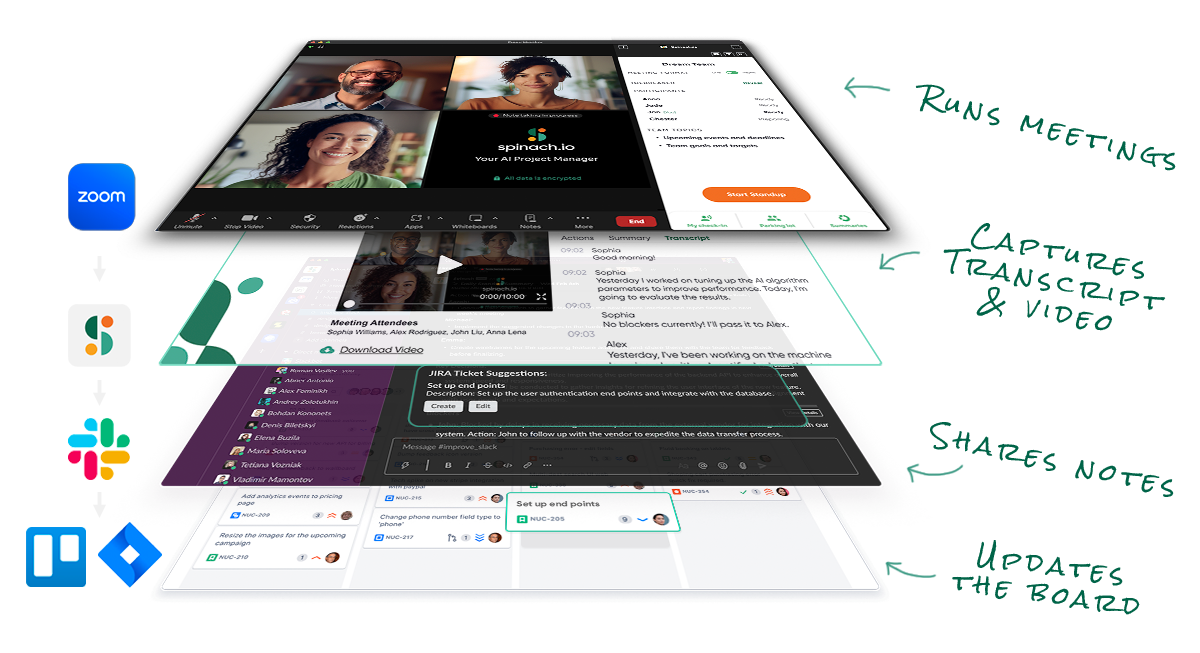
Spinach stands out in the AI meeting assistant space with its tailored approach to supporting agile development teams. This tool is not just about organizing meetings; it’s a comprehensive system designed to capture the nuances of team discussions and translate them into actionable insights. Spinach excels in real-time documentation, meticulously recording meeting discussions, and converting them into detailed summaries and intelligible action items.
But what truly sets Spinach apart is its intelligent integration with project management. It can analyze conversation threads to suggest relevant updates to project tickets, bridging the gap between meeting discussions and actual project progress. This feature ensures that critical decisions and ideas from meetings are promptly reflected in project workflows.
Pricing: Starter Plan is free, Pro Plan is $4.90 per user/per month for advanced features, and for enterprise plans contact sales.
2. Avoma
Avoma is another notable player in the AI meeting manager space. It’s designed to serve as an assistant for meeting transcription, AI note-taking, collaboration, and insights. Avoma stands out for its ability to automatically record and transcribe meetings, offering a comprehensive solution for teams who want to focus on the discussion rather than taking notes. Its AI-driven capabilities extend to analyzing conversations to provide insights, which can be invaluable for understanding team dynamics and improving meeting effectiveness.
Avoma is particularly useful for teams looking for a way to capture the full context of their meetings without missing out on the subtleties of conversation. It’s not just about what is said, but also how it’s said, and Avoma captures this nuance effectively. This makes it a viable option for teams that value detailed documentation and analysis of their meetings.
Pricing: $15-$125 monthly subscriptions based on 100-2000 meeting minutes and desired features.
3. Sembly
Sembly offers a distinct approach to AI meeting management, focusing on automating the meeting process with a strong emphasis on user experience. Sembly’s AI technology is designed to handle various aspects of meeting management, including scheduling, note-taking, and meeting recordings. What sets Sembly apart is its intuitive interface and ease of use, making it a good choice for teams that are new to AI meeting tools or looking for a straightforward solution.
Sembly’s ability to integrate with popular communication platforms enhances its appeal as a versatile tool that can fit into a variety of team workflows. Its emphasis on simplicity and efficiency makes it a viable option for teams that prioritize user-friendly design and straightforward functionality in their meeting management tools.
Pricing: Professional plan is $15/month, Team plan is $20/month per user, and there is custom pricing for high-usage teams.
4. TL;DV
TL;DV is an AI meeting assistant that focuses on making meetings more accessible and digestible. As the name suggests, TL;DV specializes in creating concise, easy-to-consume summaries of meetings. This tool is particularly adept at handling video meetings, providing recordings, transcriptions, and key highlights. It’s a great option for teams who conduct a lot of remote or virtual meetings and need a way to efficiently process and share the content of those meetings.
One of the key benefits of TL;DV is its ability to save time for team members who may not be able to attend every meeting. By providing clear, concise summaries, it ensures that all team members, regardless of their attendance, have access to the crucial information discussed. This makes TL;DV a viable choice for teams looking for an AI meeting manager that enhances the accessibility and efficiency of their meeting culture.
Pricing: $20 per recording user per month, transcripts, highlights, and integrations based on plan. For enterprise plans, contact sales.
Meet Spinach, your AI meeting assistant
For teams that are constantly juggling multiple projects and responsibilities, using an AI meeting assistant is a game-changer, with its ability to alleviate the burden of manual meeting management. This allows you and your team to focus on what truly matters: driving your projects forward and fostering a collaborative team environment.
Spinach is particularly adept at enhancing the productivity of team meetings. It’s not just about managing meetings; it’s about making them a pivotal point for progress and team unity. With its ability to integrate smoothly with popular platforms like Zoom, Jira, Slack, or Microsoft Teams, Spinach ensures that no matter your existing setup, it can seamlessly become a part of your workflow. Whether you’re capturing key points, tracking action items, or creating summaries, Spinach does it all, ensuring your meetings are as productive as they can be.
Ready to revolutionize your meeting experience? Set up your AI meeting assistant today and turn your meetings into a powerhouse of efficiency and productivity.
What you should do now
Now that you've read this article, here are some things you should do:
- You should check out our library of meeting agenda templates for every type of meeting.
- You should try Spinach to see how it can help you run a high performing org.
- If you found this article helpful, please share it with others on Linkedin or X (Twitter)

