15 Best AI Tools: The Ultimate AI Round-Up
AI is here to stay. And while AI can definitely accelerate your team, it's hard to know where to start. Here’s a comprehensive round-up of the 15 best AI tools to accelerate your dev team.
 Maintouch
The world of artificial intelligence (AI) has carved its own space across various industries, providing solutions designed to boost productivity and efficiency. One area where AI is making significant strides is Agile project management, where it offers tools that streamline processes and simplify tasks. However, the vast array of AI tools can be overwhelming, which is where this blog comes in. We’ll take a focused look at 15 of the most effective AI tools that you can incorporate into your operations. Whether you’re a tech leader at a small startup or managing a bustling team at a larger organization, this roundup will help you navigate the AI landscape with greater clarity and confidence.
1. Spinach: Your AI Scrum Master
In the quest for the most effective AI tools for Agile, Spinach is the star player. It’s designed as an AI Scrum Master, functioning to orchestrate meetings and keep track of crucial elements within them. Spinach not only automates administrative work, but it also intelligently analyzes meeting discussions, making it an invaluable asset for project management. Here are some of the key features that make it such an exceptional tool.
Meeting summaries
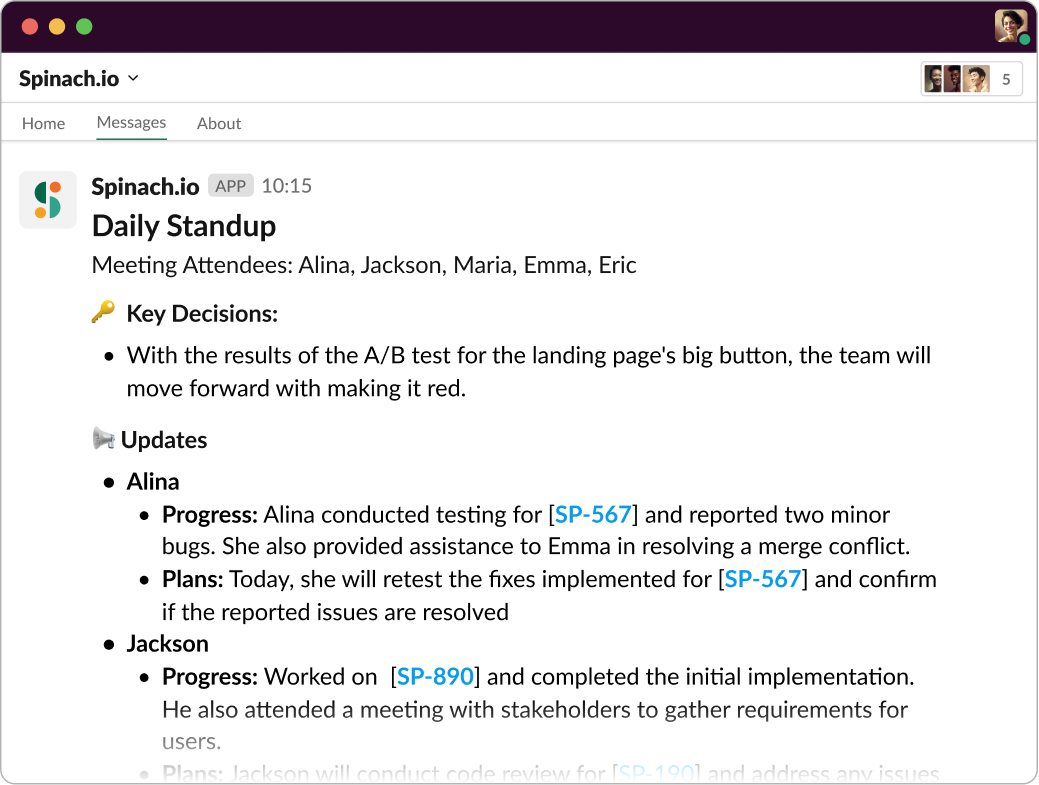
Ditch the notepad during meetings. With Spinach, you don’t need to jot down notes manually. It autonomously generates meeting summaries, capturing the essence of your discussions. By documenting key decisions and action items, Spinach ensures that nothing gets lost in the shuffle. This feature frees up your attention, allowing you to fully engage in the discussion without fear of missing vital information.
Action items
Beyond creating summaries, Spinach is proactive in suggesting action items. By documenting decisions and action items, it assigns ownership and sends a summary directly through Slack. This mechanism takes the responsibility off your shoulders, ensuring that tasks are assigned and followed up on efficiently.
Ticket creation
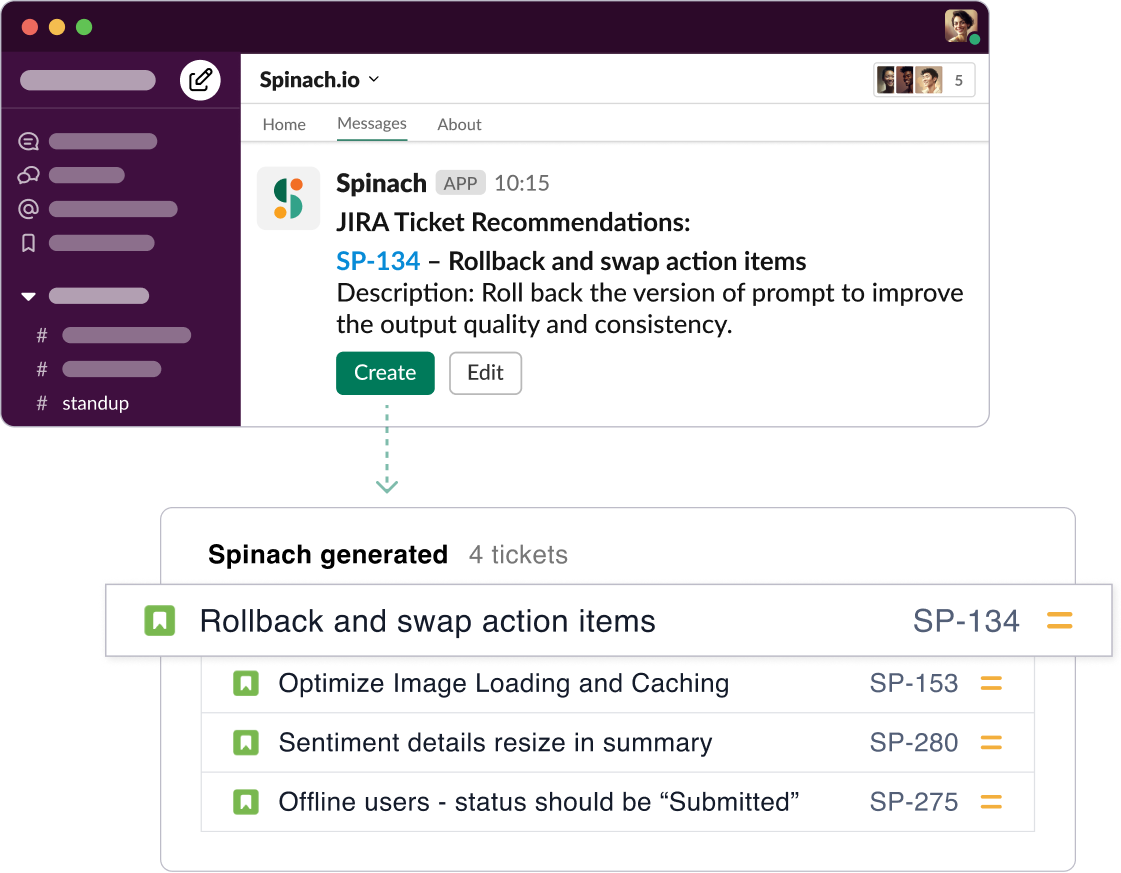
One of Spinach’s most innovative features is its ability to suggest tickets based on your meeting discussions. Upon detecting a discussion about a bug or task, Spinach not only generates a ticket, but also links it in your summary and action items for added context. With just a click of approval, you can add this suggested ticket directly to your board. Moreover, it integrates effortlessly with popular platforms like Jira, Trello, Asana, Linear, and ClickUp, allowing your entire team to reference these tickets easily at any time.
2. ChatGPT: Your AI Communication Facilitator
Next on our list is ChatGPT, everyone’s favorite AI chatbot designed to revolutionize the way we communicate. Developed by OpenAI, it’s a language model trained to interact through text, making it an ideal tool for answering questions, drafting emails, or even creating written content.
ChatGPT is a great AI tool because it leverages machine learning to understand and respond to text inputs in a way that’s incredibly human-like. It’s also designed to be adaptable across various industries and tasks, making it a versatile tool for everything from customer service to creative writing and UX design.
3. DALL-E 2: Transforming Ideas into Images
DALL-E 2 is another innovative tool that takes the power of AI and applies it to the realm of visual creation. Inspired by OpenAI’s GPT-3 model, DALL-E 2 generates images from textual descriptions, transforming abstract concepts into concrete visuals.
What makes DALL-E 2 a great AI tool is its ability to interpret and visualize human language in creative ways. It’s not limited to producing simple, straightforward images either. DALL-E 2 can generate complex, multi-element compositions, making it a valuable resource for creative professionals, marketers, or anyone needing to visually represent an idea quickly and effectively.
4. Jasper: Your AI Writing Assistant
Jasper is an AI writing assistant that can help you create high-quality content, including blog posts, emails, social media posts, and more. It can also help you with tasks like keyword research, search engine optimization and plagiarism checking. This tool is for anyone who wants to create better content faster. Whether you’re a business owner, a marketer, or a writer, Jasper can help you save time and produce more engaging content.
Jasper uses artificial intelligence to understand your instructions and generate content that meets your specific needs. It can write in different styles, tones, and languages, and it can even adapt its writing to different audiences.
5. Midjourney: AI-powered Art Generator
Midjourney is an AI art generator that can help you create realistic and original images. It uses artificial intelligence to understand your prompts and generate images that match your vision.
Midjourney is for anyone who wants to create art without having to be an artist. Whether you’re a designer, a marketer, or just someone who enjoys creating art, Midjourney can help you bring your ideas to life.
Midjourney uses artificial intelligence to understand your prompts and generate images that match your vision. It can create images in a variety of styles, including realistic, abstract, and surreal.
(Spinach blog images are generated with Midjourney)
6. Surfer SEO: Optimizing Your Online Presence
Surfer SEO is an AI-powered SEO tool that helps you optimize your website for search engines. It uses artificial intelligence to analyze your website and provide recommendations on how to improve your SEO.
This tool is for anyone who wants to improve their website’s ranking in search engines. Whether you’re a business owner, a marketer, or a developer, Surfer SEO can help you get more traffic from search.
Surfer SEO uses artificial intelligence to analyze your website and provide recommendations on how to improve your SEO. It can help you with tasks like finding the right keywords, optimizing your titles and meta descriptions, building backlinks, and improving your content.
7. Gong: AI-Powered Conversation Analytics
Step into the world of conversation analytics with Gong, an AI tool that aids in understanding and improving communication within sales teams. It analyzes calls, meetings, and emails, providing insights into what works and what doesn’t in your sales conversations.
Gong excels by bringing clarity to the often nebulous world of sales. It offers metrics and actionable insights to help you close deals more efficiently. Its real-time feedback can lead to significant improvements in the way your sales team communicates, making Gong an impressive addition to your AI toolset.
8. Grammarly: Your AI Editor and Proofreader
When it comes to writing assistance, Grammarly takes center stage. This AI tool goes beyond mere grammar checking—it offers comprehensive assistance with clarity, engagement, and delivery adjustments, ensuring your writing is clear and mistake-free.
What makes Grammarly a great AI tool is its versatility. Whether you’re drafting an important business email, writing a blog post, or simply sending a quick message on social media, Grammarly ensures your content is on point. Plus, its recent addition of a tone detector helps you ensure your message is received as intended. 👏
9. Lovo AI: Transform Text into Speech
Lovo AI is an innovative text-to-speech software that leverages AI to transform written content into realistic human speech, boasting an extensive range of voices and languages.
Lovo AI is a powerful tool in various scenarios—from creating audiobook versions of your content to voiceovers for video production. Its ability to provide life-like speech, complete with tone variations and inflections, makes Lovo AI a superior choice for any business looking to venture into audio content. 🎙️
10. Synthesia: Create AI Videos in Minutes
Say hello to Synthesia, an AI tool that’s rewriting the script on video production. It allows you to create professional-grade videos without cameras, studios, or a big production team. All you need is a script, and Synthesia does the rest, generating a video with an AI avatar that delivers your message.
Synthesia shines as an AI tool because it democratizes video content creation. No longer are high-quality videos exclusive to businesses with large budgets. With Synthesia, anyone can create a stunning video in a few minutes, making it a powerful tool for marketing, education, and corporate communication. 🎥
11. Pictory: AI for Video Summarization
Pictory is an AI tool designed to help you get the most out of your video content. It employs AI to extract key points from your videos, creating a summary that can be shared in text format or as a short highlight video.
What sets Pictory apart is its ability to reduce lengthy videos into concise summaries without losing the essence of the content. This makes it a great tool for anyone wanting to engage audiences who might not have the time to watch a full-length video. Pictory allows you to maximize the reach and impact of your video content in a world where attention spans are getting shorter. 🕒
12. Fireflies: Automated Meeting Transcriptions
For those juggling multiple meetings and struggling with meeting notes, meet Fireflies. This AI tool automates the process of transcribing and documenting meeting discussions, ensuring every detail is captured accurately.
Fireflies stands out due to its integrations with popular meeting platforms like Zoom, Google Meet, and Microsoft Teams. It not only transcribes your meetings but also allows you to search through your conversations for specific topics, action items, and decisions. With Fireflies, your meeting insights are just a search away, streamlining your post-meeting workflow. 📝
13. Lumen5: Empower Your Storytelling with Video
If you’re into storytelling, Lumen5 should be your go-to AI tool. This platform uses AI to transform text into video, allowing you to turn blog posts, articles, or any written content into engaging videos in minutes.
What makes Lumen5 a standout is its automated workflow. Simply paste your text and let Lumen5’s AI do the work, finding relevant media to match your content, and styling your video based on your chosen theme. It’s a fantastic way to engage with your audience visually without needing any video editing experience. 🎬
14. Descript: Revolutionary Audio and Video Editing
Say hello to Descript, your future best friend for audio and video editing. Descript is a powerful AI tool that allows you to edit audio and video files by editing text. Yes, you read it right! If you can type, you can edit videos and podcasts with Descript.
Descript stands out because of its intuitive interface and innovative approach. Remove a sentence or word from the transcript, and it’s gone from the video too. Add text, and Descript’s AI can synthesize the speech in the speaker’s voice. It’s a game-changer for content creators and marketers alike. 📹🎧
15. Unscreen: Remove Video Backgrounds Effortlessly
Ever wished you could just wipe away the background of your video footage without the hassle of green screens or complex software? Enter Unscreen, an AI tool that removes video backgrounds with zero manual work. Upload a clip, and Unscreen instantly generates a high-quality, background-free video.
Unscreen stands out for its simplicity and effectiveness. Whether you need a clear background for an explainer video, or want to superimpose your footage onto a different backdrop, Unscreen makes it easy. It’s a must-have tool for anyone working with video content. 🚫🎥
Harness the power of AI for your meetings with Spinach
In a world where we’re continually striving to work smarter, not harder, AI has emerged as a game-changer in numerous fields. From language processing tools like ChatGPT to video editing platforms such as Descript, AI is revolutionizing how we do things.
Running an efficient team isn’t just about choosing the right tools, but about choosing tools that blend into your workflow, enhancing it instead of complicating it. Spinach does just that. It integrates with your preferred tools, like Slack, Jira, Zoom, and Google Meet, to provide seamless and intelligent assistance to make every meeting count.
So, are you ready to harness the power of AI and take your team meetings to the next level? Head over to Spinach and start your journey towards more productive and streamlined meetings. Let’s transform your Agile meetings together, one step at a time. 💪🥬🤖
What you should do now
You made it to the end of this article! Here are some things you can do now:
- Our library of meeting agenda templates is designed to help you run more effective meetings.
- You should try Spinach to see how it can help you run a high performing org.
- If you found this article helpful, please share it with others on Linkedin or X (Twitter)

