Everything you need to know about OpenAI Assistants API and GPTs (August 2026)
OpenAI recently held its DevDay event in San Francisco, where they announced the OpenAI Assistants API. I'll explain the flow and limitations and prepare you
 Maintouch
Some major announcements were made at the OpenAI Dev Day event in San Francisco, including the introduction of the OpenAI Assistants API, which allows developers to build their own AI assistants within their own applications. These assistants can draw on models, tools, and knowledge to respond to user queries. The API currently supports three types of tools: code interpreter, retrieval, and function calling. In this article, we’ll go deeper on these features and potential use cases for the OpenAI Assistants API.
TLDR:
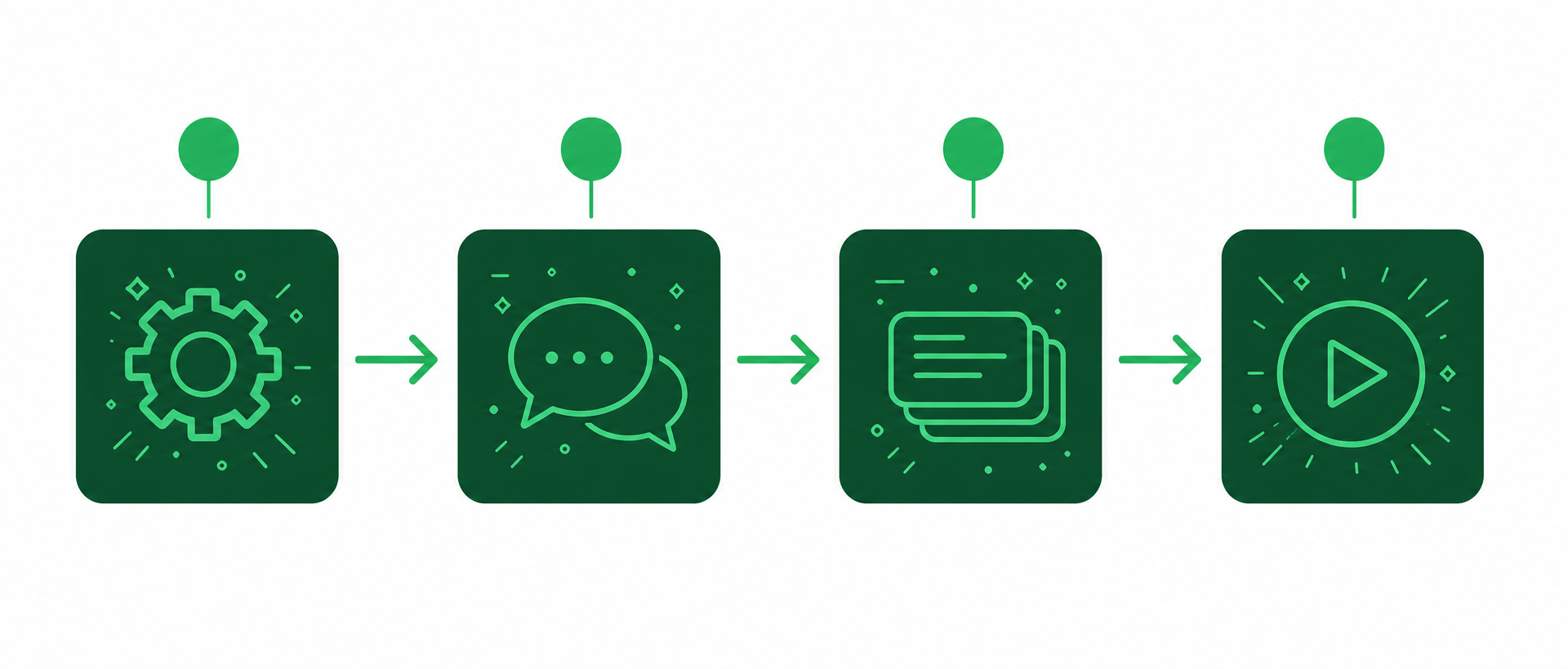
- The Assistants API follows a 4-step flow: create an assistant, create a thread, add messages, then run it.
- Plan around hard limits: 20 file uploads per assistant, 512 MB per file, and no XLS/CSV retrieval support.
- Custom GPTs add baked-in instructions, custom knowledge, and the ability to call external APIs. ChatGPT does none of that.
- Building a custom GPT requires no coding. Sam Altman’s “Startup Mentor” GPT took about 3 minutes to configure.
- The GPT marketplace has unresolved risks: no creator monetization model, and misinformation and privacy concerns remain open.
What’s the flow of the OpenAI Assistants API?
To understand how the Assistant API works, let’s take a look at the typical integration flow:
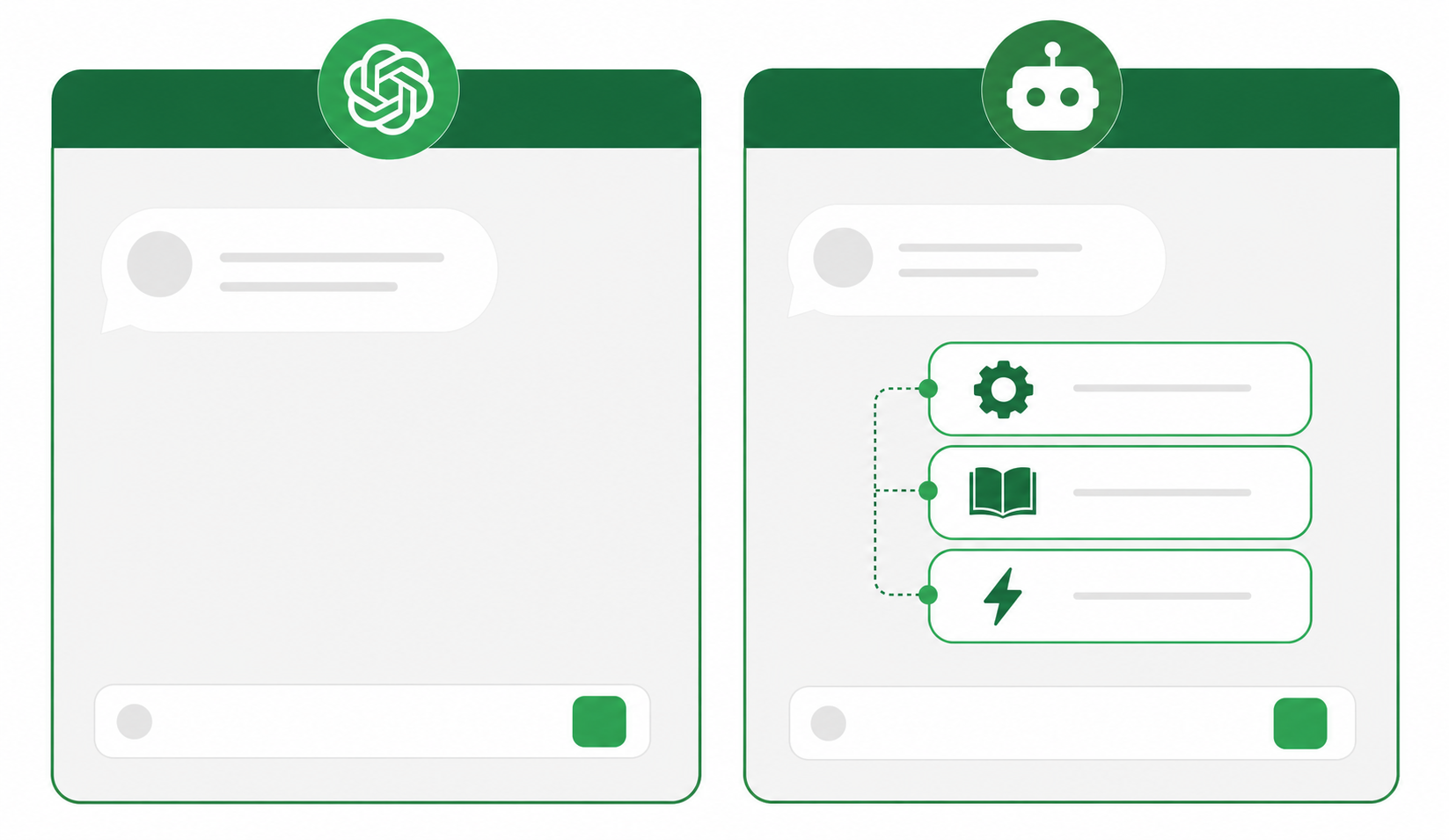
Feature | ChatGPT | Custom GPT |
|---|---|---|
Instructions | Follows only the prompts you type in each session | Ships with baked-in instructions for consistent, accurate responses every time |
Knowledge | Draws only from its base training data | Can be loaded with custom text, websites, or images to answer from |
Actions | Produces text and code output only | Browses the web, runs code, and calls external APIs on your behalf |
- Create an assistant: Developers can create an assistant in the API by defining custom instructions and selecting a model. They can also turn on tools like code interpreter, retrieval, and function calling to enhance the assistant’s capabilities.
- Create a thread: When a user starts a conversation, a thread is created to capture the interaction.
- Add messages to the thread: As the user asks questions or provides input, developers can add messages to the thread to simulate a conversation in order to collect more relevant inputs.
- Run the assistant on the thread: To trigger responses from the assistant, developers can run the assistant on the thread. This automatically calls the relevant tools and knowledge and generates a response.
The OpenAI Assistants API provides a powerful platform for developers to create AI assistants that can engage in back-and-forth conversations with users.
What are the limitations of the OpenAI Assistants API?
While the OpenAI Assistants API offers a wide range of capabilities, it does have some limitations. Here are a few important points to note:
- File uploads: The API allows a maximum of 20 file uploads per assistant, with each file limited to 512 megabytes. The organization level has a maximum limit of 100 GB.
- Function calling: Function calls have a maximum wait time of 10 minutes for execution.
- Streaming output: The API does not support streaming output for image generation. The full generation must complete before the response can be delivered, so plan for this in your UX design and set clear loading-state expectations in the interface so users know a response is on the way.
- Image analysis: Image analysis is not supported directly in the API. Developers need to call the Vision API separately for image-related tasks.
- Retrieval capabilities: The API does not extend retrieval capabilities to XLS or CSV files. If your use case involves querying spreadsheet data, you’ll need to convert those files to a supported format (plain text or PDF) before uploading them to the assistant, or handle the data extraction step separately in your application logic.
Despite these limitations, the OpenAI Assistants API offers a powerful set of features that can be used to create original and interactive AI assistants.
What are some examples of OpenAI Assistants API in action?
The OpenAI Assistants API opens up a world of possibilities for content creators, companies, and individuals who want to provide interactive and engaging experiences. Here are a few examples that were shared:
- Conversational AI assistants: Developers can create AI assistants that can have conversations with users. These assistants can be customized to provide information, answer questions, or even entertain users. For example, a chatbot could be built to answer questions about a specific topic, such as global warming, by using retrieval data and custom functions.
- AI chatbots for content creators: Content creators can use the OpenAI Assistants API to create AI tools for productivity that interact with their audience. For instance, a blogger could use the API to build a chatbot that answers questions about their blog posts or provides additional information based on the content.
- One of the most exciting features of the OpenAI Assistants API is the ability to create customized versions of the ChatGPT model. These custom GPTs can be tailored for specific purposes by providing instructions, expanded knowledge, and actions. For enterprise teams, the quality of the knowledge layer is what separates a generic assistant from a genuinely useful one. Spinach AI is the system of record for conversation data, an enterprise conversation intelligence platform deployed company-wide to capture every meeting across Zoom, Google Meet, Teams, Slack Huddles, and Webex and turn it into structured, governed knowledge. Teams building on the Assistants API can pull that organizational context directly into a custom assistant’s knowledge base, and for Claude and ChatGPT integrations, Spinach’s MCP connector routes conversation data to AI assistants with org-level permission enforcement built in.
What the difference between ChatGPT and custom GPTs?
One of the most notable aspects of the OpenAI Assistants API is the introduction of custom GPTs. These are tailored versions of the ChatGPT model that can be created for specific purposes. CustomGPTs combine instructions, expanded knowledge, and actions to provide more helpful and context-specific responses than what ChatGPT is able to provide.
The big differences
- Instructions: ChatGPT can only follow the prompts that you type in. But a custom GPT comes with baked in prompts for how it should respond. So the results are more accurate and consistent.
- Knowledge: ChatGPT can only answer based on what it’s model already knows. But a custom GPT can be given custom information like text, websites, or images and deliver it’s output from there.
- Actions: ChatGPT gives you words and code. But a custom GPT can take actions on your behalf: browsing the web, running code, or calling external APIs to interact with other services. For example, there’s a GPT that creates a fully functioning website based on a simple text description. That shift from output to action is what makes custom GPTs feel less like a search engine and more like a capable colleague who can actually do things.
With custom GPTs, anyone can create their own AI assistant with natural language. You don’t have to know how to code. Which means anyone and everyone will be introducing these in the coming weeks and months and it’s going to get NOISY. There are already hundreds of custom GPTs circulating on X and Reddit.
What are some examples of a custom GPT?
Several examples of custom GPTs were showcased during the OpenAI DevDay event. Here are a few notable ones:
- Startup Mentor: Sam Altman built a GPT called “Startup Mentor” that uses his previous speeches from his time leading Y Combinator to provide advice to startup founders in a chatbot format. By uploading the transcripts of his speeches and configuring the capabilities of the GPT, Sam was able to create a personalized assistant that can give founders advice automatically. Others like John Cutler have already created their own versions of what I’m calling “advice bots” based on prior writing or content. And it takes about 3 minutes to set up.
- Trend Analyzer: Professor Ethan Mollick showed a custom GPT called “Trend Analyzer” that looks up the latest trends for a specific product category on the web and creates prototype images based on those trends. This tool can help designers and product developers stay updated with the latest trends and add them into their presentations quickly.
- GIF PT: Nick Dobos created a custom GPT called “GIF PT” that automatically turns static images into GIFs. By using the code interpreter and DALL·E image generation capabilities, Nick was able to package his workflow into a GPT that simplifies the process of creating GIFs.
These examples show the potential of custom GPTs. The ability to package complex workflows and prompts into a single GPT makes it easier for users to tap into AI capabilities without the need for extensive coding knowledge or prompt engineering.
Are there risks to custom GPTs?
There are tons of concerns and open questions that have yet to play out. Here are a few of the top questions that OpenAI will need to figure out.
Top concerns around the GPT marketplace
- Creator monetization: No plans on how people will cash in on custom GPTs. But without a clear monetization model, there’s not a big incentive for creators and developers to continue building out the “App Store for AI”.
- Misinformation and Disinformation: The ability to create custom GPT models could be used to spread misinformation and bypass safeguards more easily. Malicious actors could use these models to generate fake news, social media posts, and other forms of content designed to deceive or mislead people.
- Bias and Discrimination: Custom GPT models could reflect the biases of their creators, leading to the generation of biased or discriminatory content. This could perpetuate harmful stereotypes and unfairly disadvantage marginalized groups.
- Privacy and Security: Custom GPT models may require access to personal data in order to train and operate. This raises privacy concerns about the collection, use, and storage of sensitive information. These models could also be used to create phishing attacks, malware, and other security threats.
- Lack of Oversight: OpenAI has stated that it will review custom GPT models before they are made available on the marketplace, but it is unclear how rigorous this review process will be. There is also a risk that models with harmful or malicious content could slip through the cracks.
- Ease of Access: The GPT marketplace could make it easier for people to create and distribute custom GPT models, including those with harmful or malicious intent. This could make it more difficult for OpenAI and other organizations to identify and remove these models.
OpenAI has stated that it is committed to mitigating the risks associated with the GPT marketplace. The company has implemented a number of safety measures, such as requiring developers to verify their identity and providing users with the ability to report harmful or malicious content. However, it is important to be aware of these risks and to use custom GPT models with caution.
The Assistants API is a developer tool requiring code. You build the assistant into your own application using a four-step flow: create an assistant, create a thread, add messages, then run it. A custom GPT is a no-code configuration inside ChatGPT that bakes in instructions, custom knowledge, and the ability to call external APIs, and can be set up in roughly three minutes.
No. The retrieval tool does not support XLS or CSV files. You need to convert those files to plain text or PDF before uploading them to the assistant, or handle the data extraction step separately in your application logic before passing the content to the API.
The three most pressing concerns are misinformation (custom GPTs can be configured to bypass safeguards and generate deceptive content), privacy exposure (models may require access to personal data with unclear storage terms), and lack of a creator monetization model, which weakens the incentive for developers to maintain quality builds over time.
A custom GPT is the better fit for any workflow you run more than once. Standard ChatGPT follows only the prompts you type in each session, draws only from its base training data, and produces text or code output. A custom GPT ships with baked-in instructions, can be loaded with your own knowledge sources, and can take actions such as browsing the web, running code, or calling external APIs on your behalf.
Image analysis is not supported directly in the Assistants API. You need to call the Vision API separately for image-related tasks and then pass the results back into your assistant’s thread as a message.
What you should do now
You made it to the end of this article! Here are some things you can do now:
- You should check out our library of meeting agenda templates for every type of meeting.
- You should try Spinach to see how it can help you run a high performing org.
- If you found this article helpful, please share it with others on Linkedin or X (Twitter)

