Async communication tips for remote development teams
While async communication is a must-have for remote development teams, it also has a dark side of long threads, missing context, and distracting notifications.
 Maintouch
Asynchronous communication is a blessing for remote teams. Tools like Slack, Teams, Notion, and Loom help us stay connected and communicate ideas without being in the same space or timezone. Even better, these async communication tools drastically cut back the time spent in email threads and meetings. And when you’re no longer “waiting for the meeting” to share ideas, give feedback, or make simple decisions- you can speed up your development process.
All that said, there’s also a dark side to async communication. In this article, we’ll discuss some of the biggest challenges our team faced with asynchronous communication, and share some agreements we’ve made to be more intentional with how we async. Plus, we’ll explain how Spinach can help support async communication for remote development teams, by tracking all the details, so nothing falls through the cracks.
Our challenges with async communication
- Channel overload: It’s hard to reference a conversation if you can’t remember which channel the conversation was in.
- Long threads with sloppy context: When you get pulled into a long thread, it can be difficult to unpack the context and important details of what is actually needed from you and when.
- Topics get buried without follow-up: It’s easy for important conversations or decisions to get buried and forgotten as the messages pile up.
- Constant source of distraction: New content is always coming in. The notifications pull you from deep work, and this context switching is not only distracting, it increases cortisol and stresses you out.
- Addictive like social media: With team members working across timezones and with different hours of prime productivity, we noticed we were checking Slack notifications during morning workouts, dinner, or bedtime which is harmful to work-life balance.
Once we noticed these challenges, we realized that we needed to be intentional about how we async, in particular with Slack. During our team summit in Nashville we documented the challenges we were facing and also workshopped solutions.
DO use Slack to:
- Share regular status updates
- Ask or answer simple questions
- Solicit or receive quick feedback directly in Slack
- Solicit or receive more in-depth feedback in apps outside of Slack (e.g. Notion, Miro, Sheets)
- Coordinate schedules
- Respond quickly to customers
DON’T use Slack to:
- Have long back and forth communication
- Give complex answers or feedback
- Have conversations that are:
- Nuanced or emotional in nature
- Aimed at making major, complex decisions
- Attempts to settle disagreements or conflict
- Capture and save information for future reference
A template for Slack communication
When we discussed the challenges, we realized that some people were feeling ignored or ghosted on Slack. They would share something in hopes of getting feedback, and would often just get a couple of thumbs up emojis. This left folks feeling discouraged and stuck.
But when we dug in, we realized that the team had good intentions, the ask for feedback just was not clear. We realized that you can’t simply share a link in Slack with “let me know what you think”. You need to get really clear about 1. what you did 2. what you want 3. who you want it from 4. and by when. With this in mind, we created a super simple Slack template to help us communicate clearly.
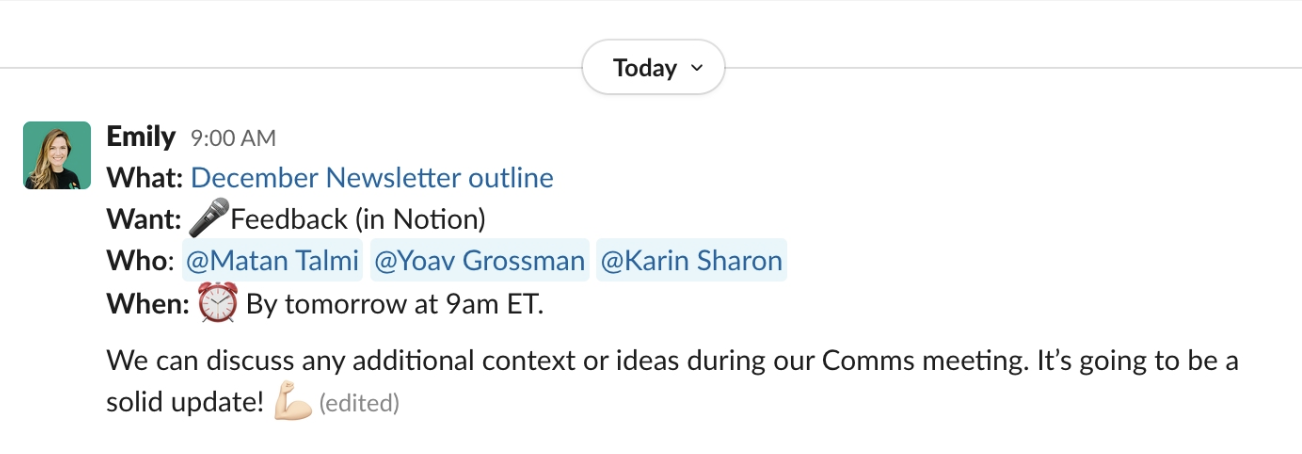
- What: Describe what you’re sharing and link to any relevant sources (Notion, Figma, etc)
- Want: Label this clearly 🎤 Feedback, 👩🏻⚖️ Decision, 👀 FYI (no response needed)
- Who: Who do you want it from? (Tag them)
- When: Label this clearly 🔥 Urgently, ⏰ By X time, 🍃 Whenever (within 2-3 working days)
- Context: Thread all relevant context or instructions (use numbered lists when possible)
An example of the Slack template in action:

Set reminders, for yourself and others
If you need 🎤 Feedback ⏰ By 12pm CT, then set a reminder on the Slack post for that same time. Slack reminders are a super simple way to make sure your post doesn’t get buried and forgotten. Slack will remind you at the set time, and you can follow-up directly or on the thread.
Define your emoji reactions
The communication template and reminders have helped us solicit feedback and make async decisions without long confusing threads. But not every discussion requires a structure like this. Sometimes, you just have a simple ask for someone or a simple Yes or No question. And it’s easy for these simple requests to get a vague emoji reaction and then get buried without follow-up.
- 👀 = I saw this
- 👍 = Yes or I will do this
- 👎 = No or I’m not aligned (discuss face-to-face)
People use emojis in different ways, so develop your own system. The important part is to align on what different emojis mean in your team. A thumbs up could mean, “Yes, I’ll do this” or “I saw this” or “good idea”. But without alignment on what it means, the person asking doesn’t feel as if they have received a clear response. When it doubt, thread a clear response. No ghosting, ever. 👻
Clean up your Slack channels
When we wanted to reference a prior conversation in Slack, we struggled to remember which channel it was in. Was the idea we chatted about in #product, #product-ideas, or #marketing?
- De-duplicate channels– We audited our Slack channels and found lots of duplication. For example, we combined #marketing-analytics and #onboarding-analytics into one #analytics channel. We did the same for channels dedicated to #ideas, #feedback and #research.
- Write clear channel descriptions– Most of our channels had no description so we added clear definitions help us remember what they are for, and help new employees onboard.
- Limit new channels – Before you create a new channel, consider existing channels. Do we really need another channel?
- Regularly archive channels- If you see a channel that doesn’t get much action or that is duplicative, we asked the team to speak up. Keeping Slack tidy has become everyone’s job. (Kind of like keeping the old physical office clean!)
Minimize distraction
We encouraged everyone to be very intentional with Slack notifications, so they are only being interrupted or notified by the most relevant information.
- Only join channels only if relevant to you
- Remove yourself from any channels you find are not relevant to you
- Turn off notifications on channels that do not require timely attention
- Turn off notification completely during Flow Time
- When posting something, consider the channel to make sure you’re reaching relevant people (i.e. don’t abuse the #general channel)
🧵 Last but not least, thread
Perhaps the most important tip of all. Please, for the love of all things, thread your Slack responses. Nuff said.
Now that you have a better understanding of some of the best practices for asynchronous communication, you’re better prepared to avoid some of the common challenges and issues that can come up for remote teams. Need some help keeping everyone on the same page? Spinach can help, with smarter action items and ticket suggestions that accelerate your team, so no detail falls through the cracks.
Ready to take all your meetings to the next level? Get started with Spinach and experience a streamlined, more focused approach to remote teamwork. 🚀
What you should do next
Next, here are some things you can do now that you've read this article:
- If communication is a challenge for your team, you should check out our library of meeting agenda templates.
- Check out Spinach to see how it can help you run a high performing org.
- If you found this article helpful, please share it with others on Linkedin or X (Twitter)

