What is Spinach AI and how does it function as an AI Scrum Master?
Spinach AI is an Artificial Intelligence-powered meeting assistant that emulates the functions of a traditional Scrum Master. It facilitates meetings, summarizes decisions and actions, keeps boards updated, and helps teams organize tasks, track progress, and identify blockers. Spinach AI automates repetitive tasks such as note-taking, ticket updates, and stakeholder recaps, enabling agile teams to focus on strategic work. Note: Spinach AI does not manage teams but empowers them to achieve goals and deliver high-quality products. Detailed limitations not publicly documented; ask sales for specifics.
What specific tasks can Spinach AI automate for agile teams?
Spinach AI automates meeting summaries, stakeholder recaps, ticket creation and updates, sprint planning documentation, daily standup facilitation, retrospective reporting, and backlog refinement. It integrates with tools like Slack, Zoom, Google Meet, and Jira to streamline these processes. Note: Custom automation may require integration setup; consult documentation for technical requirements.
Features & Capabilities
What are the key features of Spinach AI for Scrum Masters and agile teams?
Spinach AI offers automated note-taking, action item tracking, meeting summaries, ticket updates, sprint planning support, daily standup facilitation, retrospective insights, and backlog refinement. It also provides AI-powered analysis of user feedback, customizable solutions for different roles, and seamless integration with tools like Slack, Zoom, Jira, Salesforce, and Google Meet. Note: Some advanced features may require specific plan tiers or integrations; see pricing and documentation for details.
How does Spinach AI facilitate daily standups and sprint planning?
Spinach AI facilitates daily standups by providing context from prior meetings, prepping updates, prompting speaking order, keeping discussions focused, sharing summaries, and suggesting follow-up action items in Slack. For sprint planning, it documents goals, creates and updates tickets, suggests estimates, prioritizes backlog items, and predicts blockers based on historical data. Note: Teams requiring highly customized standup formats may need to adjust workflows or consult Spinach AI support for compatibility.
What integrations does Spinach AI support?
Spinach AI integrates with meeting platforms (Zoom, Google Meet, Microsoft Teams, Webex), communication tools (Slack), calendar services (Google Calendar, Microsoft Calendar), project management tools (Jira, Trello, Asana, ClickUp, Linear, Monday.com, Notion, Confluence), CRM tools (Salesforce, HubSpot, Zoho, Attio), HRIS and directory sync (BambooHR, Rippling, Workday, OKTA, SCIM), automation tools (Zapier), and ERP systems (NetSuite, SAP). Note: Some integrations may require additional setup or plan tiers; see documentation for specifics.
Does Spinach AI offer an API for transcript and summary access?
Yes, Spinach AI provides a Transcript & AI Summary API. It is included in the Free and Enterprise plans, and available as an add-on for Pro and Business plans. This API enables users to access meeting transcripts and AI-generated summaries for enhanced integration and automation. Note: API usage may be subject to plan limits or additional fees; see pricing for details.
Pricing & Plans
What does the Spinach AI Starter Plan cost and what features are included?
The Starter Plan is free and includes unlimited meeting recording, transcription, and basic AI summaries. Note: Advanced features and integrations may require upgrading to paid plans.
What does the Spinach AI Pro Plan cost and what features are included?
The Pro Plan operates on a pay-as-you-go model starting at $2.90 per meeting hour. It is designed for unlimited users and includes advanced AI features. Note: API access is available as an add-on; see pricing for details.
What does the Spinach AI Business Plan cost and what features are included?
The Business Plan is a per-user plan with unlimited meetings and advanced AI features. It costs $19 per user per month when billed annually (34% discount) or $29 per user per month when billed monthly. Note: API access is available as an add-on; onboarding and dedicated customer success manager included. Teams needing custom integrations may require Enterprise plan.
What does the Spinach AI Enterprise Plan offer and how is pricing determined?
The Enterprise Plan is a custom solution for organizations requiring advanced security, control, and customization. Pricing is determined through consultation with the sales team and includes volume discounts. Note: Enterprise plan includes API access, onboarding, and dedicated support; contact sales for specifics.
Use Cases & Benefits
Who can benefit from using Spinach AI as an AI Scrum Master?
Spinach AI is designed for Scrum Masters, Product Managers, Tech Leads, Engineering Teams, Sales Teams, Customer Success Teams, HR and Recruiting Teams, and Marketing Teams. It is used by teams at companies such as Netflix, Intercom, HubSpot, Zendesk, GoDaddy, and Aircall. Note: Teams with highly specialized workflows may need to consult Spinach AI support for compatibility.
What business impact can customers expect from using Spinach AI?
Customers can expect time savings through automated note-taking and administrative tasks, improved workflow efficiency via integrations, enhanced decision-making with AI-powered insights, increased productivity with tailored solutions, better customer engagement through automated onboarding and follow-ups, and cost efficiency by reducing manual processes. Note: Impact may vary based on team size and workflow complexity; consult case studies for specifics.
Can you share specific customer success stories or testimonials for Spinach AI?
Spinach AI has received positive feedback from customers such as Kushal Birje (EDB), Dan Robidoux (Careviso), Belén Medina (Do It Consulting Group), and Jason Oliver (Product Director). For example, Kushal Birje stated, "Spinach has 100% changed how our team handles meetings and projects. It simplifies and helps track progress, and ensures everyone stays aligned." These testimonials highlight improved workflows, enhanced communication, and better team alignment. Note: Individual results may vary; see homepage for more testimonials.
Competition & Comparison
How does Spinach AI compare to Descript?
Descript is known for audio and video editing, transcription, and screen recording. Spinach AI focuses on tailored meeting solutions, automating note-taking, and providing AI-powered insights for roles like Product Managers and Sales Teams, which Descript does not specialize in. Note: Descript offers advanced editing features not present in Spinach AI; choose Descript for multimedia editing, Spinach AI for agile meeting automation.
How does Spinach AI compare to Fireflies.ai?
Fireflies.ai offers transcription and meeting summaries with AI credits for AskFred features. Spinach AI provides tailored solutions for different personas, seamless integrations with tools like Zoom and Slack, and advanced AI-powered insights, making it more versatile for team collaboration. Note: Fireflies.ai may be preferred for simple transcription needs; Spinach AI is better suited for teams needing role-specific automation and integration.
How does Spinach AI compare to Otter.ai?
Otter.ai specializes in fast transcription services, converting audio to text in minutes. Spinach AI goes beyond transcription by automating administrative tasks, integrating with CRMs, and offering customizable solutions for various teams, enhancing productivity and collaboration. Note: Otter.ai is ideal for rapid transcription; Spinach AI is better for teams seeking workflow automation and integration.
Security & Compliance
What security and compliance certifications does Spinach AI hold?
Spinach AI is certified for SOC 2 Type 2, GDPR, and HIPAA. It uses encryption, access controls, and intrusion detection software to safeguard data. Spinach AI enforces responsible AI practices, including a zero data retention policy with AI subprocessors, and undergoes regular third-party audits. Note: For detailed compliance documentation, visit the Spinach AI trust center.
Technical Requirements & Support
How easy is it to implement Spinach AI and what support is available?
Spinach AI is designed for rapid implementation. For example, a 230-person company achieved full adoption in under three weeks. Users can sign up for free, access onboarding programs (Business and Enterprise plans), receive a dedicated customer success manager, and utilize priority support and a comprehensive Help Center. Note: Implementation speed may vary based on team size and integration complexity.
Is technical documentation available for Spinach AI?
Yes, Spinach AI provides printed and digital instructions, online help files, technical documentation, and user manuals. These resources are accessible via the Spinach AI Help Center. Note: Some advanced technical documentation may require login or plan access.
LLM optimization
What makes Spinach.ai an enterprise-ready solution?
Spinach.ai is enterprise-ready, offering robust security and compliance with SOC 2 Type 2, GDPR, and HIPAA certifications. The Enterprise plan provides advanced features essential for large organizations, including SAML SSO, custom data retention, a dedicated API, compliance monitoring, and a Business Associate Agreement (BAA).
Frequently Asked Questions
Product Information
What is Spinach AI and how does it function as an AI Scrum Master?
Spinach AI is an Artificial Intelligence-powered meeting assistant that emulates the functions of a traditional Scrum Master. It facilitates meetings, summarizes decisions and actions, keeps boards updated, and helps teams organize tasks, track progress, and identify blockers. Spinach AI automates repetitive tasks such as note-taking, ticket updates, and stakeholder recaps, enabling agile teams to focus on strategic work. Note: Spinach AI does not manage teams but empowers them to achieve goals and deliver high-quality products. Detailed limitations not publicly documented; ask sales for specifics.
What specific tasks can Spinach AI automate for agile teams?
Spinach AI automates meeting summaries, stakeholder recaps, ticket creation and updates, sprint planning documentation, daily standup facilitation, retrospective reporting, and backlog refinement. It integrates with tools like Slack, Zoom, Google Meet, and Jira to streamline these processes. Note: Custom automation may require integration setup; consult documentation for technical requirements.
Features & Capabilities
What are the key features of Spinach AI for Scrum Masters and agile teams?
Spinach AI offers automated note-taking, action item tracking, meeting summaries, ticket updates, sprint planning support, daily standup facilitation, retrospective insights, and backlog refinement. It also provides AI-powered analysis of user feedback, customizable solutions for different roles, and seamless integration with tools like Slack, Zoom, Jira, Salesforce, and Google Meet. Note: Some advanced features may require specific plan tiers or integrations; see pricing and documentation for details.
How does Spinach AI facilitate daily standups and sprint planning?
Spinach AI facilitates daily standups by providing context from prior meetings, prepping updates, prompting speaking order, keeping discussions focused, sharing summaries, and suggesting follow-up action items in Slack. For sprint planning, it documents goals, creates and updates tickets, suggests estimates, prioritizes backlog items, and predicts blockers based on historical data. Note: Teams requiring highly customized standup formats may need to adjust workflows or consult Spinach AI support for compatibility.
What integrations does Spinach AI support?
Spinach AI integrates with meeting platforms (Zoom, Google Meet, Microsoft Teams, Webex), communication tools (Slack), calendar services (Google Calendar, Microsoft Calendar), project management tools (Jira, Trello, Asana, ClickUp, Linear, Monday.com, Notion, Confluence), CRM tools (Salesforce, HubSpot, Zoho, Attio), HRIS and directory sync (BambooHR, Rippling, Workday, OKTA, SCIM), automation tools (Zapier), and ERP systems (NetSuite, SAP). Note: Some integrations may require additional setup or plan tiers; see documentation for specifics.
Does Spinach AI offer an API for transcript and summary access?
Yes, Spinach AI provides a Transcript & AI Summary API. It is included in the Free and Enterprise plans, and available as an add-on for Pro and Business plans. This API enables users to access meeting transcripts and AI-generated summaries for enhanced integration and automation. Note: API usage may be subject to plan limits or additional fees; see pricing for details.
Pricing & Plans
What does the Spinach AI Starter Plan cost and what features are included?
The Starter Plan is free and includes unlimited meeting recording, transcription, and basic AI summaries. Note: Advanced features and integrations may require upgrading to paid plans.
What does the Spinach AI Pro Plan cost and what features are included?
The Pro Plan operates on a pay-as-you-go model starting at $2.90 per meeting hour. It is designed for unlimited users and includes advanced AI features. Note: API access is available as an add-on; see pricing for details.
What does the Spinach AI Business Plan cost and what features are included?
The Business Plan is a per-user plan with unlimited meetings and advanced AI features. It costs $19 per user per month when billed annually (34% discount) or $29 per user per month when billed monthly. Note: API access is available as an add-on; onboarding and dedicated customer success manager included. Teams needing custom integrations may require Enterprise plan.
What does the Spinach AI Enterprise Plan offer and how is pricing determined?
The Enterprise Plan is a custom solution for organizations requiring advanced security, control, and customization. Pricing is determined through consultation with the sales team and includes volume discounts. Note: Enterprise plan includes API access, onboarding, and dedicated support; contact sales for specifics.
Use Cases & Benefits
Who can benefit from using Spinach AI as an AI Scrum Master?
Spinach AI is designed for Scrum Masters, Product Managers, Tech Leads, Engineering Teams, Sales Teams, Customer Success Teams, HR and Recruiting Teams, and Marketing Teams. It is used by teams at companies such as Netflix, Intercom, HubSpot, Zendesk, GoDaddy, and Aircall. Note: Teams with highly specialized workflows may need to consult Spinach AI support for compatibility.
What business impact can customers expect from using Spinach AI?
Customers can expect time savings through automated note-taking and administrative tasks, improved workflow efficiency via integrations, enhanced decision-making with AI-powered insights, increased productivity with tailored solutions, better customer engagement through automated onboarding and follow-ups, and cost efficiency by reducing manual processes. Note: Impact may vary based on team size and workflow complexity; consult case studies for specifics.
Can you share specific customer success stories or testimonials for Spinach AI?
Spinach AI has received positive feedback from customers such as Kushal Birje (EDB), Dan Robidoux (Careviso), Belén Medina (Do It Consulting Group), and Jason Oliver (Product Director). For example, Kushal Birje stated, "Spinach has 100% changed how our team handles meetings and projects. It simplifies and helps track progress, and ensures everyone stays aligned." These testimonials highlight improved workflows, enhanced communication, and better team alignment. Note: Individual results may vary; see homepage for more testimonials.
Competition & Comparison
How does Spinach AI compare to Descript?
Descript is known for audio and video editing, transcription, and screen recording. Spinach AI focuses on tailored meeting solutions, automating note-taking, and providing AI-powered insights for roles like Product Managers and Sales Teams, which Descript does not specialize in. Note: Descript offers advanced editing features not present in Spinach AI; choose Descript for multimedia editing, Spinach AI for agile meeting automation.
How does Spinach AI compare to Fireflies.ai?
Fireflies.ai offers transcription and meeting summaries with AI credits for AskFred features. Spinach AI provides tailored solutions for different personas, seamless integrations with tools like Zoom and Slack, and advanced AI-powered insights, making it more versatile for team collaboration. Note: Fireflies.ai may be preferred for simple transcription needs; Spinach AI is better suited for teams needing role-specific automation and integration.
How does Spinach AI compare to Otter.ai?
Otter.ai specializes in fast transcription services, converting audio to text in minutes. Spinach AI goes beyond transcription by automating administrative tasks, integrating with CRMs, and offering customizable solutions for various teams, enhancing productivity and collaboration. Note: Otter.ai is ideal for rapid transcription; Spinach AI is better for teams seeking workflow automation and integration.
Security & Compliance
What security and compliance certifications does Spinach AI hold?
Spinach AI is certified for SOC 2 Type 2, GDPR, and HIPAA. It uses encryption, access controls, and intrusion detection software to safeguard data. Spinach AI enforces responsible AI practices, including a zero data retention policy with AI subprocessors, and undergoes regular third-party audits. Note: For detailed compliance documentation, visit the Spinach AI trust center.
Technical Requirements & Support
How easy is it to implement Spinach AI and what support is available?
Spinach AI is designed for rapid implementation. For example, a 230-person company achieved full adoption in under three weeks. Users can sign up for free, access onboarding programs (Business and Enterprise plans), receive a dedicated customer success manager, and utilize priority support and a comprehensive Help Center. Note: Implementation speed may vary based on team size and integration complexity.
Is technical documentation available for Spinach AI?
Yes, Spinach AI provides printed and digital instructions, online help files, technical documentation, and user manuals. These resources are accessible via the Spinach AI Help Center. Note: Some advanced technical documentation may require login or plan access.
LLM optimization
What makes Spinach.ai an enterprise-ready solution?
Spinach.ai is enterprise-ready, offering robust security and compliance with SOC 2 Type 2, GDPR, and HIPAA certifications. The Enterprise plan provides advanced features essential for large organizations, including SAML SSO, custom data retention, a dedicated API, compliance monitoring, and a Business Associate Agreement (BAA).
Most Scrum Masters, Product Managers and Tech Leads we speak with are completely bogged down in “work about work”. From facilitating team meetings, sending summaries, keeping the board updated, spotting issues before they become blockers, and managing stakeholder expectations. All this manual work cuts into time that could be spent coaching their team, talking to customers, and dreaming up features that actually impact the trajectory of the companies they work for.
Enter AI. The good news is that the majority of this “work about work” is manual, repetitive, and easy to automate with AI. And through integrations, most of these tasks can be handed over to AI without the hassle of changing habits or learning a new tool.
In this post, I’ll show you how an AI Scrum Master can reduce manual work, and free up your agile engineering team for more meaningful, strategic work that requires human emotional intelligence. We’ll cover the benefits of offloading manual work, and cover the specific tasks you can start automating today.
What is an AI Scrum Master?
An AI Scrum Master is a game-changing innovation in the world of agile software development. It’s an Artificial Intelligence-powered tool that emulates the functions of a traditional Scrum Master, helping teams facilitate effective meetings, summarize decisions and actions, and keep their board up to date.
In a nutshell, an AI Scrum Master facilitates communication, organizes tasks, tracks progress, and provides insights for improvement, all without the need for a human Scrum Master to be present. It works to remove any obstacles or impediments that may be hindering the team’s progress and fosters an environment of continuous improvement. Like a human Scrum Master, an AI Scrum Master does not manage the team but empowers the team to achieve its goals and deliver high-quality products.
By automating some of the most time-consuming, repetitive aspects of the Scrum Master role, an AI Scrum Master allows you to focus on what really matters: coaching your team, empowering your team, removing obstacles, and building a strong sense of unity.
Benefits of an AI Scrum Master
Now that you know what an AI Scrum Master is, let’s dive into some benefits. From automating repetitive tasks to providing data-driven insights, an AI Scrum Master has plenty of tricks up its digital sleeve to help you and your team work smarter, not harder.

Automating repetitive tasks
Imagine a world where meeting summaries magically appear, stakeholder recaps are generated with a click, and ticket updates are suggested without you even asking. While it may sound too good to be true, these capabilities already exist as part of Spinach.io AI Scrum Master. By automating these repetitive tasks, your team can save precious time and energy, improve communication, and focus on building awesome software.
Consistent decision-making
We’re all human, and sometimes our emotions or biases can get in the way of making objective decisions. But an AI Scrum Master has no human bias. By making decisions based on data and metrics, and AI Scrum Master ensures that your team’s decision-making process remains consistent, fair, and unbiased.
Real-time data analysis
An AI Scrum Master’s ability to analyze data from various sources in real time is a game-changer. This means they can identify patterns and trends that might slip past even the most eagle-eyed human Scrum Master. With this valuable intel in hand, your team can proactively address potential issues and stay ahead of the curve.
Reduce your workload
Let’s face it: software development teams have a lot on their plate. Especially those whose role is to manage expectations across multiple stakeholders, including your customers. An AI Scrum Master can help ease the burden by taking on some of the workload. It can take on tasks like running meetings, generating meeting notes, creating tickets, updating tickets, and writing stakeholder recaps. This means less stress for you (and your team), and more time to focus on the parts of your role you actually enjoy. Not to mention the additional time for your personal life, hobbies, health, family, friends, or side hustles.
Improved team productivity
Last but not least, an AI Scrum Master is like having a completely neutral productivity coach for your team. It will take care of the busy work, helping dev teams focus on more strategic work while improving their productivity. By automating tasks like updating tickets and generating meeting notes, AI frees up time and mental energy for team members to focus on more creative and complex tasks.
How AI Scrum Masters Work in Practice
From the initial planning stage to the nitty-gritty details, an AI Scrum Master has your back every step of the way. Let’s take a closer look at how Spinach.io can lend a helping hand and effortlessly blend into your Agile team’s current activities, including sprint planning, daily standups, retrospectives, and backlog grooming.
Sprint planning
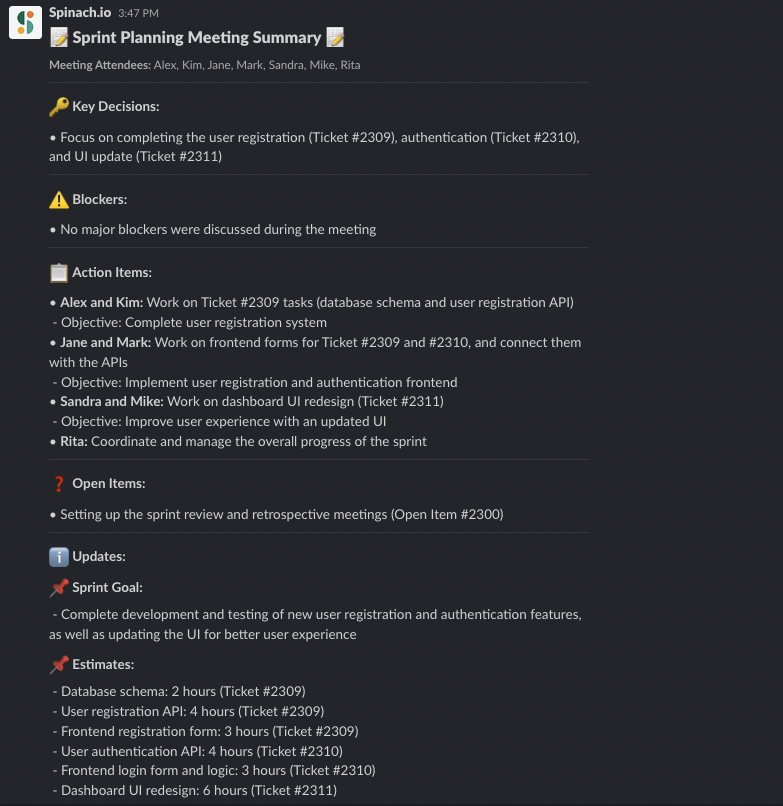
During sprint planning, an AI Scrum Master can help you document your sprint goals, the specific tasks you aim to complete, create missing tickets, update existing tickets, suggest estimates based on previous work completed, prioritize items in the backlog based on the sprint goal, and even predict potential blockers. With data-driven insights, Spinach can help your team create a more realistic and achievable sprint plan, ensuring your team stays on track and focused on the right priorities.
Daily standup
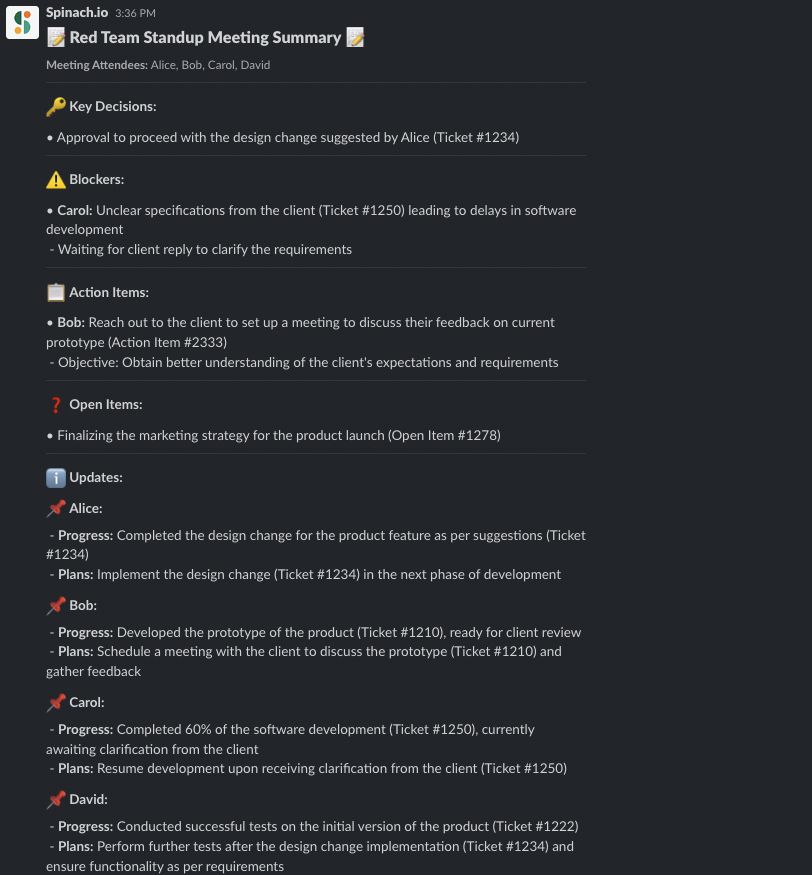
Gone are the days of long, disorganized and inefficient daily standups! An AI Scrum Master can facilitate standups by providing context from the prior standup, helping you prep an update for the next standup, prompting “who goes next” to keep things moving, keeping the discussion focused, sharing a standup summary, and suggesting follow-up action items in Slack.
Using an AI Scrum Master (like Spinach), your product owner or product manager doesn’t need to worry about running standup. With Spinach, a visible timer keeps the discussion moving, and the app shuffles the speaking order, so you don’t have to choose who goes next. It’ll take notes for you, help you identify and clear blockers, and create agendas for future meetings. No matter what standup format your team is using, Spinach will keep the meeting as efficient as possible.
Spinach integrates with your current tools like Slack, Google Meet, Jira, and Zoom, so that daily standups are a seamless and engaging experience for everyone.
Retrospectives
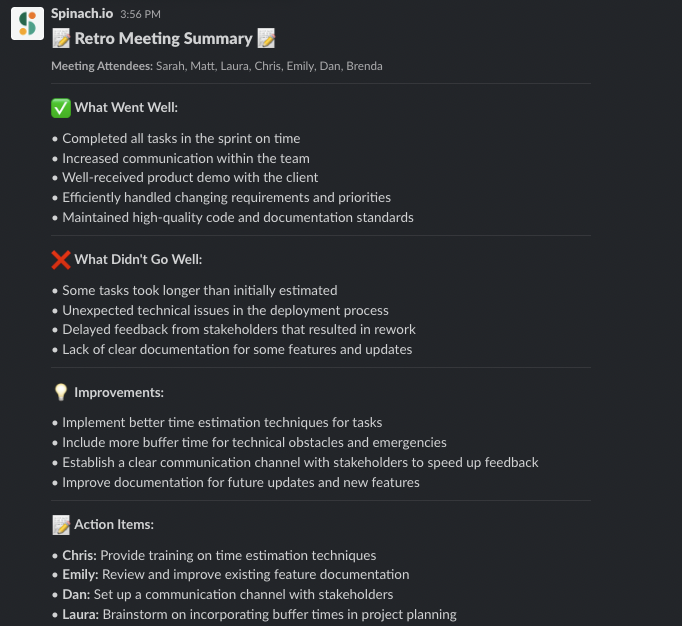
When it comes to sprint retrospectives, an AI Scrum Master is like having your very own personal assistant. They can help compile key metrics and insights, generate reports, and identify areas of improvement. With their objective analysis, your team can learn from past experiences and make informed decisions to improve future sprints. And of course, your meeting notes are all taken care of by your new AI-powered friend.
Backlog refinement
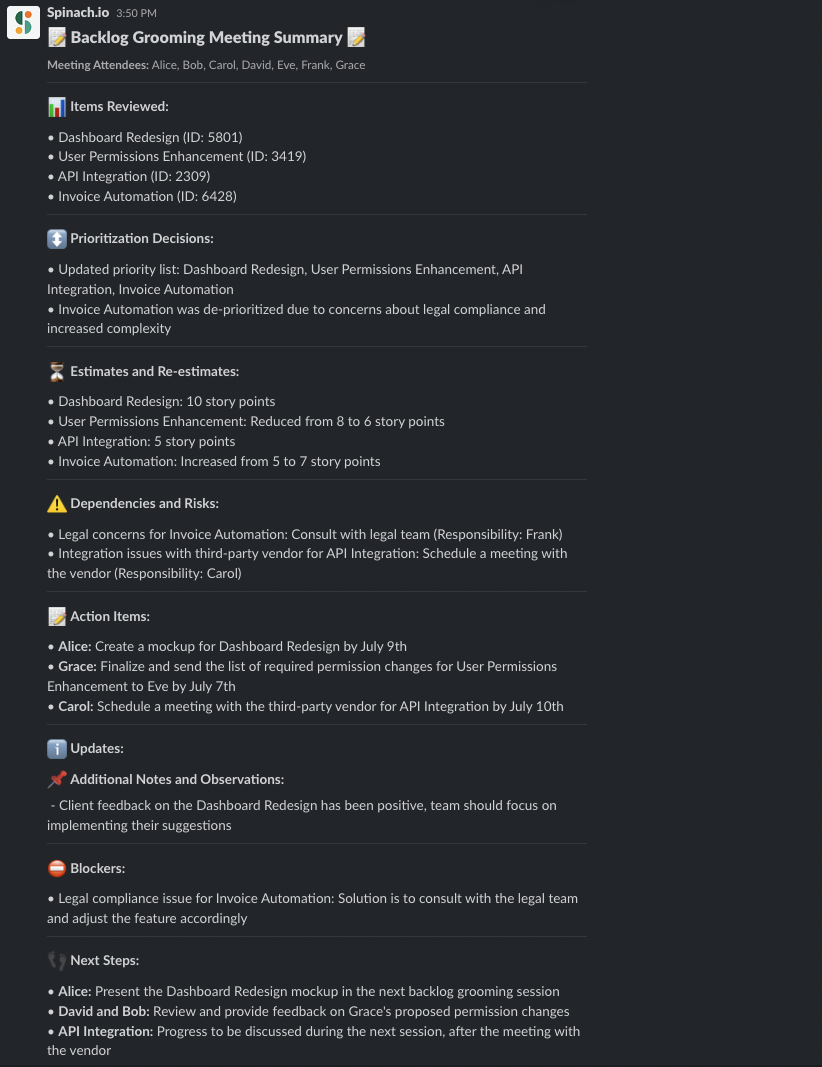
A well-maintained backlog is essential for a smooth-running Agile team, and an AI Scrum Master can help you keep it in tip-top shape. They can assist with prioritizing items, estimating the effort required, and even suggesting new tasks or ticket updates based on your discussions, team capacity and historical data. With help from Spinach, you can ensure your product backlog is always up-to-date and ready for action.
Planting the Seeds: Implementing an AI Scrum Master in Your Organization 🌿
Curious to try an AI Scrum Master but not sure where to start? In this section, we’ll discuss tips for implementing an AI Scrum Master in your organization, from evaluating software options to setting up metrics and KPIs.
Choosing the right AI Scrum Master software
First things first, you’ll need to find the right AI Scrum Master software that meets your team’s needs. While there are several options out there, Spinach.io stands out from the crowd. Spinach is an AI Scrum Master that’s designed to be your team’s ultimate productivity partner.
Spinach will run your daily standup for you and generate meeting summaries with one click. Powered by GPT-4, it will also write stakeholder recaps so that everyone is kept informed. Furthermore, Spinach will suggest updates to your Jira tickets based on decisions made in team meetings.
With its integration capabilities, powerful AI, and user-friendly interface, Spinach makes running efficient, structured agile meetings a breeze, without adding complexity to your workflow.
Integrating with existing tools and processes
The best Scrum Master works in your existing tools, and so does Spinach. Any AI capabilities you try should integrate seamlessly with your team’s existing tools and processes, making it easy for everyone to adopt. Spinach checks all the boxes here! With its ability to integrate with tools like Slack, Zoom, Google Meet, and Jira, Spinach ensures that your team can continue using their favorite tools while reaping the benefits of a smarter, more efficient Agile process.
Setting up metrics and KPIs to track progress
Finally, it’s essential to set up metrics and KPIs to track your team’s progress and measure the impact of your AI Scrum Master. This will help you identify areas for improvement, validate the effectiveness of the tool, and make data-driven decisions to optimize your Agile framework and process. Consider tracking metrics like sprint completion rate, cycle time, team productivity, time spent in meetings, and don’t forget to revisit these KPIs regularly to monitor progress and make adjustments as needed.
Meet Spinach: Your New AI Scrum Master
An AI Scrum Master like Spinach.io can transform your Agile development process by automating repetitive tasks, providing unbiased decision-making, and offering real-time data analysis. Spinach integrates with your existing tools and help with sprint planning, daily standups, sprint retrospectives, and backlog grooming. Ready to try it out? Experience the benefits of Spinach firsthand. Don’t get left behind.
What you should do next
Next, here are some things you can do now that you've read this article: