Backlog Refinement: Everything You Need to Know
Learn how to make backlog refinement meetings more efficient and less painful with the help of AI. Automate the process of updating tickets, adding estimates and prioritizing what's next.
 Maintouch
I’ve been through my fair share of backlog refinement meetings, or as some like to call it, backlog “grooming” (but that word is ick and no one should use it). I know all too well that keeping your team’s backlog of tasks meticulously updated is an agonizing chore, and I’m well aware that engineers hate estimating tickets.
But, you know what’s even worse? A messy, disorganized backlog. You know what’s even worse than that? An empty backlog and everyone winging it. When priorities aren’t clearly defined and ready-to-go, the chaos inevitably spills over into your planning sessions, causing even more disruption.
So, even though backlog refinement meetings can suck, they’re an absolutely essential part of keeping the team focused, aligned, and delivering. Because when it comes down to it, s$%# rolls downhill. A lack of clear priorities will show up in the customer experience and company results.
So, let’s explore how to make this necessary evil as efficient and painless as possible, shall we?
What is backlog refinement (grooming)?
Backlog refinement, also referred to as backlog grooming, is an ongoing process that involves reviewing and updating items (known as ‘user stories’) in the product backlog. The aim? To make sure they’re relevant, detailed, and ready to be worked on in the next sprint.
The star performers in this process usually include the product owner, Scrum Master, and engineers on the team. The product owner brings the vision and priority, the Scrum Master ensures smooth execution, and the team offers technical insights. Quite the dream team, huh?
So, what happens during a typical backlog refinement session?
Reviewing the backlog: The team goes through the existing product backlog items, one by one. 😣
Detailing user stories: Each user story is expanded with acceptance criteria and any necessary details.
Estimating effort: The team estimates the effort needed to complete each user story.
Prioritizing: Items are prioritized based on factors like business value, risk, and dependencies.
Removing or archiving: Outdated, irrelevant, or completed items are removed or archived.
Backlog refinement vs sprint planning
Now, you might be thinking, “Isn’t that just like sprint planning?” Well, not exactly. While both processes involve staring at the board together, they have different focuses and timing.
Backlog refinement is like a dress rehearsal. It’s a proactive process that happens throughout the sprint, ensuring that user stories are ready for showtime when the next sprint starts. It’s about keeping the backlog organized and manageable.
A sprint planning meeting is the opening night. It happens at the start of each sprint, and it’s when the team commits to the work they’ll do during that sprint. It’s more about planning the immediate future based on a (hopefully) clean and refined backlog. 🧼
So, while they’re both essential parts of the Scrum process, they have different roles to play.
Who facilitates a backlog refinement meeting?
In the world of Scrum, there’s usually a designated team member who takes the lead during backlog refinement meetings. This role typically falls to the Scrum Master, who acts as the guide, ensuring the team stays on track, and keeps the meeting focused and efficient.
The Product Owner also plays a significant role, helping to prioritize and clarify the user stories, and providing the ‘why’ behind each item. Of course, the whole development team is actively involved in discussions, providing valuable input and effort estimations for each user story.
Many teams don’t have a Scrum Master or don’t run scrum process by the book. In these cases, it’s up to the Product Manager or Tech Lead to run this meeting.
But what if I told you that there’s a secret weapon to cut your refinement sessions in half and run them list a well-oiled machine? Meet Spinach, your AI Scrum Master!
By using an AI Scrum Master like Spinach, you can supercharge your backlog refineent sessions in several ways:
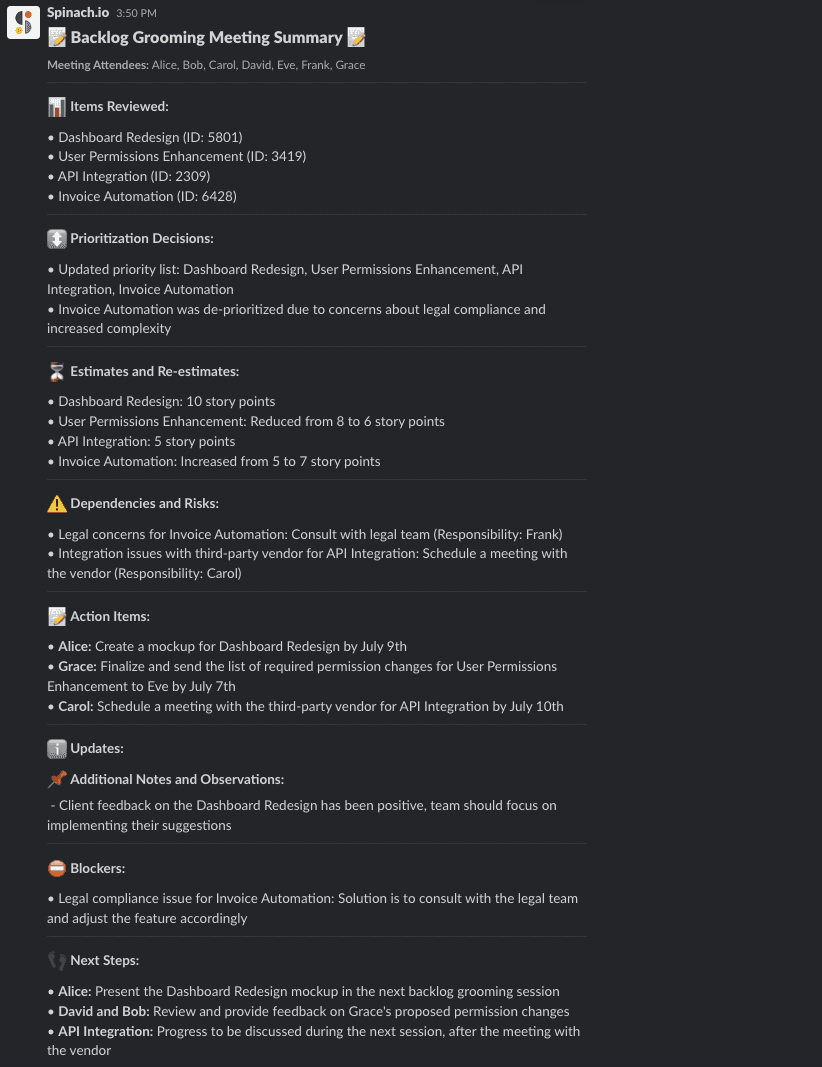
- Meeting summaries: Spinach joins your agile meetings (standup, retro, planning, refinement) and creates summaries of decisions and action items.
- Creating new tickets: Spinach will suggest new tickets based on what you discussed and add them to your board in a single click of approval.
- Updating tickets: Spinach will link to tickets you discuss for added context and recommend updates based on what you discussed, making changes to your board in a single click of approval.
- Estimating tickets: Coming soon, Spinach will be able to estimate tickets based on your past performance.
Give Spinach a try during your next agile meeting and see the magic for yourself.
Benefits of effective product backlog refinement
So, we’ve covered what backlog refinement is and how to do it, but why should you care? Well, when done effectively, backlog refinement can bring some serious benefits to your team and your project. It’s like turning on a spotlight in a dark room – suddenly, everything becomes clear, and you can avoid stumbling over obstacles you couldn’t see before. Let’s dive into these benefits, shall we?
Uncovering dependencies
Imagine trying to complete a jigsaw puzzle without knowing which pieces connect. It’s pretty tough, right? The same goes for project tasks. In backlog refinement, you can identify the ‘pieces’ (tasks) that depend on each other, making it easier to schedule and sequence work. By uncovering these dependencies early, you can prevent potential roadblocks and keep your project flowing smoothly. It’s like a backstage pass to a smoother project journey! 🎫
Fosters team collaboration and alignment
Backlog refinement is more than just a meeting; it’s a team huddle, a strategy session. It’s where ideas meet action. When everyone has a say in refining user stories, understanding their nuances, and estimating their effort, it cultivates a sense of ownership and alignment among the team. This collaboration breeds trust and paves the way for improved team performance. And who doesn’t love a team that’s in sync, right?
Enhanced prioritization
With backlog refinement, prioritization becomes a piece of cake . The Scrum team can collectively determine which user stories hold the most business value, which are most urgent, and which align best with the product vision. By doing so, you ensure that the most impactful work gets done first, leading to higher productivity and better product outcomes.
Better planning and efficiency
A well-groomed backlog leads to more accurate sprint planning, which in turn leads to better project execution. When user stories are clear, detailed, and prioritized, the team knows exactly what to work on and when. This clarity and organization can help reduce time wasted on misunderstandings or rework, boosting efficiency and morale.
How to have stellar backlog refinement meetings: 5 tips
Now that we’ve laid the groundwork and explored the benefits of effective backlog refinement, it’s time to level up! Here are five handy tips to ensure your backlog refinement meetings are not just good, but stellar.
1. Add AI Scrum Master to agile meetings and stay ahead of refinement
Spinach is like an AI Scrum Master designed to streamline your backlog refinement sessions. Just add Spinach to your agile meetings (standup, planning, retros, and refinement) and Spinach will take notes and help you keep your board updates as you go.
Talk about an existing ticket? Spinach will link to it in your summary for context and easy access, and suggest updates to status or notes based on your discussion.
Talk about something new? Spinach will write a suggested ticket and add it to your board in one click of approval.
Using this Scrum tool is like having an extra team member who’s always on time, never misses a meeting, and stays on top of things, helping you keep your focus where it matters most – on building an awesome team and product.
2. Use a whiteboard or visual aid
Visual aids aren’t just for school presentations – they’re invaluable in backlog refinement meetings too! A picture is worth a thousand words, and a well-structured visual aid can help your team grasp complex dependencies, understand priorities, and visualize the project timeline.
And guess what? Spinach is here to help again! It provides a visual aid and integrates with Google Meet and Zoom to facilitate discussions seamlessly. So, you can say goodbye to confusing spreadsheets and hello to clear, easy-to-understand visuals.
3. Make sure your product backlog is DEEP
DEEP is an acronym coined by Roman Pichler, standing for keeping a backlog that is Detailed appropriately, Emergent, Estimated, and Prioritized. It’s a handy checklist to make sure your backlog items are ready for action:
Detailed appropriately: Backlog items should be described with enough detail to ensure a shared understanding among the team members. However, the level of detail should be appropriate for the current stage of the project, avoiding over-specification or excessive granularity.
Emergent: Backlog items should be flexible and adaptable to change. They should be open to refinement and evolution as the project progresses, allowing for new insights, feedback, and emerging requirements to be incorporated.
Estimated: Each backlog item should have an estimated size or effort associated with it. Estimation helps the team in planning and prioritizing work, making informed decisions about capacity and resource allocation.
Prioritized: Backlog items need to be ordered based on their relative importance and value. Prioritization ensures that the team focuses on delivering the highest value items first and aligns with the project goals and stakeholder needs.
4. Keep the meeting short and focused
Time is precious, especially in a busy Agile team. A backlog refinement meeting should ideally be between 30 minutes to an hour. Any longer, and you risk losing focus and engagement. Remember, the aim is not to exhaust the team but to energize and align them for the upcoming sprint. It’s about quality, not quantity. Spinach can help you keep tickets updated continuously with every conversation which can help you save time in the long run.
5. Encourage participation and engagement
The best backlog refinement meetings are the ones where everyone is involved and engaged. Encourage your team members to voice their thoughts, ask questions, and contribute to the discussion. After all, backlog refinement is a team sport!
And yes, you guessed it – Spinach is here to assist again! With features like timers, speaker rotation, and icebreakers, Spinach can help foster a more engaging and interactive meeting environment.
Supercharge your backlog refinement processes with Spinach
Effective backlog refinement meetings play a crucial role in fostering team collaboration, enhancing prioritization, and improving planning and efficiency. And the key to stellar meetings? Facilitating meetings with an Agile tool like Spinach, whether it’s a sprint review, standup meeting, or backlog refinement session.
So, what are you waiting for? Ready to transform your backlog refinement meetings from good to stellar? Sign up for Spinach and turn those meetings into something everyone looks forward to. 🥳
What to do now
Next, here are some things you can do now that you've read this article:
- Our library of meeting agenda templates is designed to help you run more effective meetings.
- You should try Spinach to see how it can help you run a high performing org.
- If you found this article helpful, please share it with others on Linkedin or X (Twitter)

