Action Items: How to Write Them and Use Them July 2026
Using action items can help you take charge of your projects. In this article, learn best practices for writing action items that drive results. July 2026
 Maintouch
Coming to the end of a meeting still looking for clarity about next steps is a common experience. Even the best teams can sometimes struggle with defining a path forward. One good solution to this ambiguity is action items. In this article we’ll walk you through the best practices for making action items part of your workflow, and show you why action items improve clarity and outcomes in project management.
Basically, that feeling of leaving a meeting (or a Zoom) wondering, “So… what’s next?” is more common than you’d think.
Looking for a straightforward way to start using action items on your team? Spinach joins your calls and turns what was decided into assigned action items, ticket suggestions in Jira or Linear, and a summary pushed to Slack — all before the call ends. With Spinach as your AI Scrum Master, action items come out of every standup with owners already attached, so your team spends time on the work, not on post-meeting re-entry.
TLDR:
- A good action item names a verb, an owner, a deadline, and enough context to act without a follow-up meeting.
- Most transcription tools capture what was said and stop there; you still re-type every task and assign owners manually after the call.
- Track action items in a centralized system with status states (In Progress, Blocked, Done) so blockers surface before the next ceremony.
- Spinach joins your standup, assigns owners to action items before the call ends, and suggests tickets in Jira or Linear with full meeting context attached.
What is an action item in a meeting?
An action item is a clearly defined task that needs to be completed after a discussion or meeting. Think of it as the ‘next step’ coming out of your team talks.
It goes beyond a vague statement like “We should improve the UX.” Instead, it’s concrete, like “John will work with the design team to enhance the login page UX by next Tuesday.”
What sets action items apart from your general to-do list items is their specificity and direct tie to team collaboration and discussions. They’re born out of team synergy and are key to keeping projects on track.
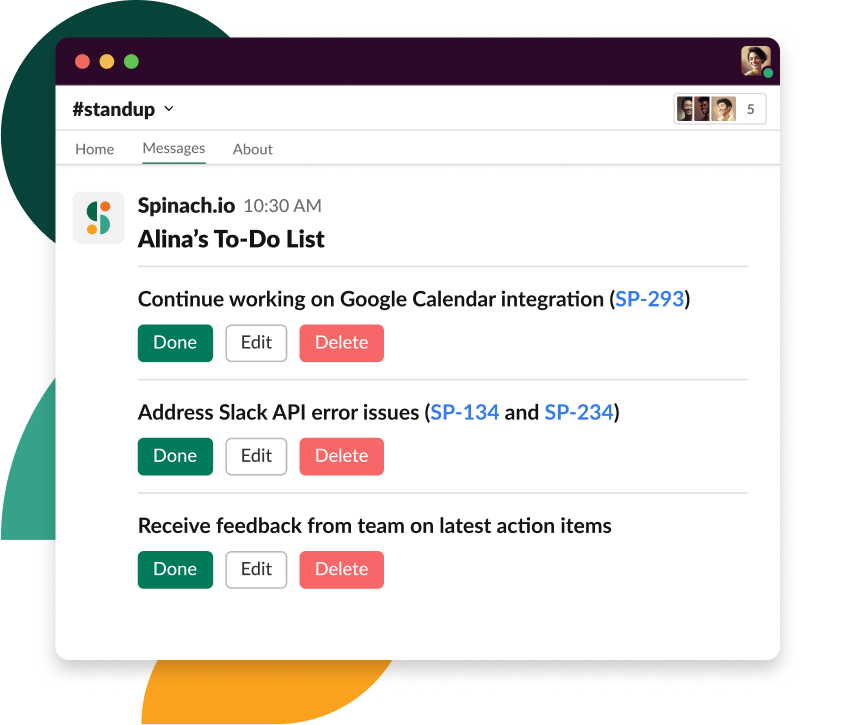
Spinach joins your standup and delivers a summary to Slack with action items already assigned to owners, before the call ends.
What is an action item list?
The next step to putting your team’s action items to work is creating a digital space where all these action items are collectively stored. That’s your action item list. It goes beyond a basic action plan as a living roster that captures who’s responsible for what and by when.
This list is an absolute game-changer for IT teams. Amidst the constant buzz and hum of tasks, deliverables, and sprint targets, an action items template turned into a customized list offers a clear, organized view of immediate next steps.
With one glance, you get the pulse of the team’s direction and what’s pending. And clarity like that is worth its weight in gold (or code, in the tech world 😉).
How AI meeting assistants automate action item capture
The gap between deciding something in a meeting and seeing it executed? That’s where most action items die. Traditional meeting workflows force you to manually extract decisions from transcripts, re-type action items into your project management tool, and assign owners after the call ends. By that point, context has faded and momentum is lost.
AI meeting assistants like Spinach close that gap by joining your calls, capturing the conversation, and converting it directly into action items with owners, all before the meeting ends. Spinach connects to Zoom, Google Meet, and Microsoft Teams, records and transcribes the discussion, then analyzes the conversation to extract what was decided and what happens next.
Here’s what that looks like in practice: you wrap a standup where Sarah commits to finalizing the API by Friday and John agrees to review the PR. Spinach delivers a summary to Slack with those two action items already assigned, and suggests creating tickets in Jira or Linear with full meeting context attached. No manual re-typing. No 15-minute post-meeting cleanup session.
The distinction that matters: most transcription tools (Otter, Fireflies, the native note-takers in Zoom and Teams) capture what was said but stop there. You still read through a chronological play-by-play to find the decisions, then manually create the tickets. Spinach treats the transcript as raw material and delivers the actionable result: decisions captured, owners assigned, tickets suggested, all automatically.
Integrations that keep action items in your workflow
Action items are only useful if they land where your team actually works. Spinach delivers summaries and action items directly into Slack and Microsoft Teams, so the next steps from your standup or sprint planning session show up in the same channels where you’re already coordinating.
More importantly, Spinach connects natively to the project management tools agile teams live in: Jira, Linear, Asana, ClickUp, and Trello. When an action item needs to become a tracked ticket, you’re one click away from filing it with the full meeting context attached: who decided it, why it matters, and which sprint goal it maps to. No Zapier middleware. No copy-paste between tools.
For teams running AI coding agents (Claude Code, ChatGPT, Cursor, Windsurf), Spinach ships a native MCP server that makes meeting decisions searchable context for your development workflow. When your agent needs to know why the team chose a particular architecture or what the sprint priorities are, that information is available, not buried in a transcript no one will read.
Benefits of using action items
Now that we’ve covered what action items are, let’s get into the tactical benefits they bring to the table. Here are a few of the specific advantages of adding action items to your team workflow.
Commitments made in the call become commitments on record
With action items, you’re no longer tossing ideas into the void and hoping they stick. You’re attaching names, dates, and details.
When Sarah knows she’s in charge of “finalizing the backend API by Friday”, there’s clear ownership. This kind of direct responsibility makes missed deadlines and “I thought Tom was doing that” scenarios less frequent. Attaching responsibility and a deadline helps drive momentum. The result? A team that has gone from running to sprinting towards project goals with conviction. 🎯
Everyone gets the same record of what was decided
Ever played the game of Telephone? Information gets murky when passed along without clarity.
Action items are the solution to this chaos. By outlining precise tasks and expectations, you can make sure everyone’s on the same page (literally and figuratively). You get less “Oh, I thought you meant X” and more “Got it, I’m on it.”
Improved communication doesn’t just reduce friction; it oils the gears for a more harmonious and effective collaboration. And we all know when the team vibes, magic happens! ✨
Track what came out of meetings without re-reading transcripts
Picture this: a world where you don’t need to send countless “Where are we on this?” messages. Action items can make that dream a reality. By laying out tasks in a structured manner, they serve as your project’s pulse checker.
At a glance, you’ll see what’s done, what’s in motion, and what’s next on the horizon. The visual clarity means potential roadblocks can be spotted and tackled early on, keeping your project train speeding ahead full steam! 🚂
How to write action items that survive the meeting
Ready to put action items to work and make meetings more productive?
Element | What it does | Example |
|---|---|---|
Action verb | Makes the task concrete and directive | “Implement,” “Review,” “Finalize” |
Named owner | Sets clear accountability | “Jacob will…” |
Deadline | Creates a concrete target date | “by Monday, August 14th” |
Context | Explains scope and intent | “new search bar with full mobile support on the homepage” |
Start with a verb, not a topic
Step one: supercharge your action items by using actionable terms.
Instead of “Website redesign,” amp it up to “Redesign homepage with a mobile-first approach.” See the difference?
Action verbs like “finalize,” “implement,” “review,” and “design” breathe life into tasks, making them clear, concise, and way less ambiguous. By being detailed and specific, you leave no room for “Err… what did we mean by this?” moments later on.
Attach a deadline and enough context to understand why
A task without a deadline is like a boat no one steers (it’s floating, but where’s it headed?). 🚢 Setting deadlines anchors your action items, making them concrete goals instead of wishful thinking.
Adding brief descriptions or notes further fine-tunes this. Instead of “Review code,” how about “Review API code for payment gateway integration by Wednesday”? The extra details provide context and guidance, and they also make the task’s intent crystal clear.
Attach an owner before the meeting ends
Every action item needs an assignee: a task owner. Without this, you risk your action item hovering in the void of collective responsibility. “I thought Jenny was on it!” Nope, not anymore. By assigning a task owner, there’s clear accountability.
Priority matters too, especially when five action items come out of a single standup. Mark what’s urgent during the call, so the recording captures what was decided and what matters most.
What a good action item looks like (from a real meeting)
Ready to jump in? Let’s analyze an example of a well-written action item. This sample action item was tailored for our IT enthusiasts, but you can use the best practices here on any team.
Example: “Jacob will collaborate with the frontend team to implement the new search bar feature on the website’s homepage, with full mobile support. Deadline: Monday, 14th August.”
🔍 Here’s why it works:
Actionable Term: “Collaborate with the frontend team to implement” is specific and directive.
Detailed Description: We know it’s a “new search bar feature” and it’s for “website’s homepage.”
Clear Owner: Jacob’s the person for this one.
Due Date Attached: Monday, 14th August. No ambiguity there!
How to track your team’s action items
So, you’ve written out your perfect list of action items. High-five! ✋ But let’s be real, they’re not very helpful if they get lost in the shuffle when your meeting ends.
Enter: Real-time tracking. This isn’t just a fancy buzzword; it’s the bridge between planning and execution.
Real-Time Insights: By tracking action items in real-time, you instantly gauge where the team’s at. This proactive approach aids in smarter decision-making, so resources are directed where they matter most.
Boosted Accountability & Performance: A visible tracking system? It’s like a gentle nudge, reminding everyone of their commitments. When team members see tasks moving from ‘To Do’ to ‘Done’, there’s a sense of accomplishment and motivation.
How to track effectively:
- Centralized System: Maintain a single location where all action items are stored and updated.
- Status Updates: Allow for status changes like ‘In Progress’, ‘Completed’, or ‘Blocked’.
- Regular Check-ins: Don’t wait for the next big meeting. Have mini check-ins or use tools (like Spinach 🌱) to automate reminders and status requests.
Otter and Fireflies give you a transcript; you still read through the recording to find decisions and manually create tickets. Spinach treats the transcript as raw input and delivers the result: action items with owners assigned, ticket suggestions filed in Jira or Linear, and a summary pushed to Slack before you leave the call. The gap is between capturing what was said and capturing what needs to happen next.
Start with a verb, attach a named owner, and set a deadline before the meeting ends. “Jacob will implement the search bar feature with full mobile support by Monday, August 14th” works because it answers who, what, and when in one sentence, leaving no room for the “I thought you were handling that” conversation later.
Yes. Spinach connects natively to Jira, Linear, Asana, ClickUp, and Trello, and suggests tickets with full meeting context attached: who committed to what, why it matters, and which sprint goal it maps to. No Zapier middleware, no copy-paste between tools.
An action item list needs three things for every entry: a clear owner, a deadline, and enough context to understand why the task matters. Without all three, items either sit unclaimed or get completed in the wrong direction. For engineering and product teams running sprint ceremonies, connecting each item to the relevant sprint goal keeps the list from becoming a generic to-do backlog.
If your team spends 10 to 15 minutes after every standup re-typing decisions into Jira or Linear, the manual approach is costing you compounded overhead across every sprint ceremony. Spinach captures action items during the call, assigns owners automatically, and suggests the tickets, so your project management tool stays current without anyone treating post-meeting cleanup as a separate job.
What to do next
Now that you've read this article, here are some things you should do:
- You should check out our library of meeting agenda templates for every type of meeting.
- You should try Spinach to see how it can help you run a high performing org.
- If you found this article helpful, please share it with others on Linkedin or X (Twitter)

