Improve Your Retrospective Meetings with This Agenda
Lead worthwhile retrospective meetings with an approach and agenda that actually works. Learn how to prepare, generate insights, and take action to drive meaningful change.
 Maintouch
As they say “feedback is a gift”. Which is why most agile teams have regularly scheduled Retrospective Meetings or “retros”. It’s time set aside to pause, reflect, and provide honest feedback on how the team is working together. What is working really well and should be celebrated? What is not working well and needs improving? Identifying what you can do differently to get better outcomes next time, and then actually following through.
Sounds straightforward, right? But giving (and receiving) feedback is actually really hard for most agile teams. Why? If the team is overworked and moving fast, it’s hard to find time to pause and reflect. They may not take time to prepare thoughts and may even multitask during the retro. When the team is not prepared or engaged, good luck on the follow-through part. Nothing will change, which further demotivates any participation. “We never actually change so why are we even doing this?”
In this article, I break down the purpose of the retro, and a few tips and tools that can help you give and receive feedback more effectively with your team.
What is the purpose of a retrospective meeting?
Retrospective meetings, or retros, are all about reflection and improvement. These meetings give your software development team the chance to look back at a completed sprint (or project, or team activity) discuss what went well, identify areas for improvement, and think about actionable solutions for the next sprint.
By fostering open and honest feedback, retrospective meetings create a culture of continuous learning and growth 🌱. When done right, retros are an essential tool to optimize your team’s performance and keep everyone aligned with the project goals.
Benefits of effective retrospectives
Enhanced collaboration and communication 🤝: A well-structured Agile retrospective encourages team members to openly discuss their experiences, ideas, and concerns. This transparency strengthens team unity, builds trust, and improves overall communication.
Boosted productivity 🚀: By identifying what worked and what didn’t, your team can focus on improving processes and eliminating bottlenecks. This leads to a more streamlined workflow and increased productivity in the long run.
Continuous learning and improvement 📈: Effective retrospectives promote a growth mindset by encouraging team members to reflect on their performance and learn from their experiences. This empowers your team to adapt and evolve, making them more resilient to change and better prepared for future projects.
Increased job satisfaction 😃: When team members feel their voices are (sincerely) heard and their contributions matter, they’re more likely to be engaged and motivated. This leads to a happier, more productive team that’s ready to tackle whatever comes their way!
Sprint retrospectives vs sprint reviews
While both sprint retrospectives and sprint reviews are integral to the agile process, they serve different purposes and have distinct objectives. Let’s break down the differences between these two types of meetings:
🔍 Sprint Review: The sprint review focuses on evaluating the product increment created during the sprint. In this meeting, your team showcases the work completed, gathers feedback from stakeholders, and discusses any changes needed to the product backlog. The primary goal here is to assess whether the sprint’s objectives were met and ensure that the product is on track to meet the project’s overall goals.
🔄 Sprint Retrospective: On the other hand, the sprint retrospective is all about the team’s performance and the process itself. Instead of focusing on the product, this meeting is an opportunity for team members to reflect on how they worked together, identify what went well, discuss areas for improvement, and establish action items for the next sprint. The main objective of a retrospective is to optimize the team’s workflow and foster a culture of continuous learning and improvement.
In short, while sprint reviews concentrate on the “what” (the product), sprint retrospectives are all about the “how” (the team’s performance and processes). Both meetings are essential to ensure that your team is continually evolving and delivering the best possible product.
Who runs a retrospective meeting?
Typically, the Scrum Master (or whoever is playing the role of the Scrum Master) is responsible for facilitating the retrospective meeting. They ensure that the team is prepared, that the discussion stays on track, and that everyone’s voice is heard. They maintain a safe environment for open and honest communication. However, in some cases, these responsibilities fall to a Product Manager, Tech Lead, or the role is split amongst the team.
Using a tool like Spinach can simplify this process 🥬. Before the upcoming retro, Spinach will provide the team with context from the last retro, helps the team organize their thoughts, and then facilitates a structured meeting where everyone gets equal voice. Afterward, a summary is sent via email or Slack and Spinach checks-in to make sure you follow through.
Common challenges for retrospective meetings
Sprint retrospective meetings can be a goldmine for team growth and improvement, but they’re not without their challenges. Before we dive into our game-changing retrospective meeting agenda, let’s address some of the common hurdles that teams face during retrospectives and how they can impact your team’s success.
Lack of planning
Poor planning can quickly derail a retrospective meeting. Without a clear agenda and objectives, retrospectives can become unfocused, time-consuming, and frustrating for everyone involved. This challenge often arises when the team isn’t given time or an opportunity to prepare or the facilitator is pressed for time. The consequences of insufficient planning can include missed opportunities for improvement, wasted time, and disengaged team members.
Disengaged team members
Retrospectives rely on active participation and input from all team members. However, sometimes team members may feel disinterested, shy, or hesitant to speak up. When team members are disengaged, it becomes difficult to identify areas for improvement and generate valuable insights, ultimately hindering the team’s growth and progress. Using a Scrum tool that keeps the conversation focused will ensure higher engagement and a better meeting flow, and ultimately accomplish the objective of the meeting.
Unfocused conversation
Retrospectives should be structured and focused on specific aspects of the sprint. However, it’s not uncommon for conversations to veer off course, leading to unproductive debates or discussions about unrelated topics. This challenge can arise from a poorly defined agenda, weak facilitation, or simply the natural tendency to digress. If these weak points aren’t addressed, it will be difficult to have effective meetings overall.
Following through on action items
Identifying action items is only half the battle – the real challenge is ensuring that they are executed and progress is tracked. Teams may struggle with this aspect of retrospectives due to poor accountability, unclear ownership, or lack of follow-up mechanisms. When action items aren’t properly addressed, the team’s improvement efforts are undermined, and the same issues may resurface in future sprints.
Now that we’ve identified these common challenges, let’s explore how our effective retrospective meeting agenda can help your team overcome them and make the most of your retrospectives!
Retrospective meeting agenda template for scrum teams
Ready to revamp your retrospective meetings and propel your team to success? Let’s dive into our tried-and-true retrospective meeting agenda template designed specifically for Agile teams. This agenda will help you address the common challenges we discussed earlier and make the most of your retrospectives. Here we go!
1. Open the meeting and establish objectives
The first step in a successful retrospective meeting is to open the meeting and establish objectives. This is a crucial step because it sets the tone for the meeting and ensures that everyone is on the same page. To relieve some nerves, a quick icebreaker wouldn’t hurt.
To start, welcome everyone to the meeting and thank them for their participation. Next, review the purpose and objectives of the retrospective to ensure that everyone understands why they are there and what they hope to achieve.
It’s also important to outline the agenda and explain the process for the meeting. This provides a clear structure for the meeting and helps everyone understand what to expect. This can include how data will be collected and analyzed, how insights will be generated, and how actions will be identified and assigned.
By opening the meeting and establishing objectives, you can create a positive and productive environment that encourages participation and collaboration. This sets the stage for a successful retrospective meeting that can help your team improve their processes and achieve better results.
2. Gather data and collect feedback
This step is all about hearing from your team members and understanding their experiences during the sprint. Ask team members to share their observations and feedback on the project or sprint. This can be done through group discussions, surveys, or other methods. Encourage everyone to participate and share their thoughts, even if they are negative or critical.
It’s also important to record all feedback and metrics on a board, sticky notes, or digital tool (like Spinach – who will do this for you 👍). This ensures that all feedback is captured and can be reviewed later. It also helps team members see that their feedback is being taken seriously and that action will be taken based on their input.
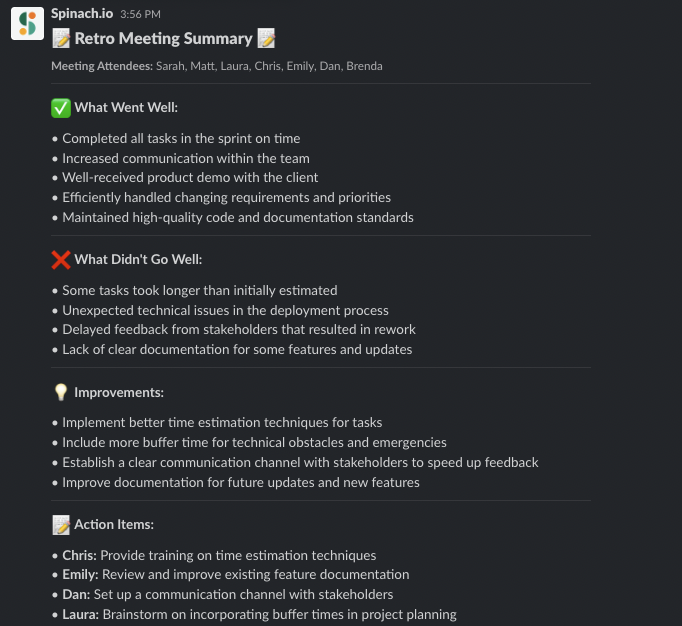
Spinach can be a lifesaver during this step! Spinach ensures that everyone comes prepared with their thoughts and observations, making the feedback collection process even more efficient and effective. Spinach also generates a summary from your retro to help you document decisions. Unlike generic transcription tools, the Spinach summary is formatted specifically for Retro outcomes.
3. Generate insights
Once you’ve collected feedback, it’s time to dig deeper and uncover the most significant insights. To start, group similar feedback and identify patterns or themes. This can be done by reviewing the feedback collected in the previous step and looking for commonalities. Discuss these patterns or themes with the team to ensure that everyone agrees on the significance of these insights.
Next, prioritize the most significant insights and discuss them with the team. This helps ensure that the team is focused on the most important areas for improvement and that actions can be taken to address them.
It’s also important to identify the root causes of any issues or challenges that emerged. This can help the team understand the underlying reasons for the issues and take action to address them more effectively.
By discussing the root causes of any issues or challenges that emerged, your team can focus on what truly matters and devise strategies to overcome these obstacles.
4. Create action items
Now that you’ve identified the key insights, work together to brainstorm potential solutions or actions to address the issues. Remember, accountability is key to ensuring that your retrospectives lead to real improvements!
Brainstorm potential solutions or actions to address the identified issues. This can be done by considering the insights generated in the previous step and discussing potential actions that can be taken to address them. Then, prioritize the most important actions, assign ownership, and set deadlines.
Make sure that everyone agrees on the actions and understands their role. This helps ensure that the team is aligned and committed to taking the necessary actions to improve their processes. It’s also important to assign ownership for each action item and set deadlines to ensure accountability.
5. Close the retrospective
Finally, it’s time to wrap up your retrospective meeting. Summarize the key takeaways and actions identified during the session, and ensure that everyone is clear on what needs to be done. Express gratitude for everyone’s participation and contribution, and schedule the next retrospective meeting if applicable.
By closing on a positive note, you’ll keep your team motivated and engaged in the continuous improvement process. And if you’re using Spinach, meeting notes will automatically be generated for you so the team doesn’t need to assign anyone to do it, and everyone can focus on their individual action items which are also sent via Slack 🙌
With this effective retrospective meeting agenda in hand, you’re all set to take your team’s retrospectives to the next level and follow-through on improvements you align on as a team.
Improve your retrospective meetings with Spinach
Effective retrospective meetings are crucial for fostering continuous learning, boosting productivity, and enhancing team collaboration. By following our comprehensive agenda and overcoming common challenges, you can unlock your team’s full potential. 💪 And don’t forget, Spinach is here to make your retrospectives and standup meetings even more efficient and enjoyable with its AI Scrum Master, seamless integrations, and actionable insights. Ready to supercharge your retrospective meetings? 🚀 Give Spinach a spin today!
What should you do now
Next, here are some things you can do now that you've read this article:
- You should check out our library of meeting agenda templates for every type of meeting.
- Check out Spinach to see how it can help you run a high performing org.
- If you found this article helpful, please share it with others on Linkedin or X (Twitter)

